Brand kit
Teach the AI your brand voice, audience, company facts, products and writing rules once per project, so every draft, rewrite and template sounds like you.
The brand kit tells the AI how your brand writes and what it may say about you. Fill it in once per project, and the AI follows it every time it writes there.
Where the brand kit is used
The AI follows the project's brand kit in:
- every AI action in the content editor: outlines, drafts, the article wizard, optimizing, improving and humanizing selected text, links and meta descriptions;
- bulk writing;
- templates, when you pick the project under Brand kit from project.
Tools that are not tied to a project, such as AI Chat, the essay writer or the humanizer page, do not use it.
Open the brand kit
- On the project page, click Brand kit.
- Or in the editor, open More (the three dots) and choose Brand kit.
Owners and editors can change it. Viewers do not see the button on the project page.
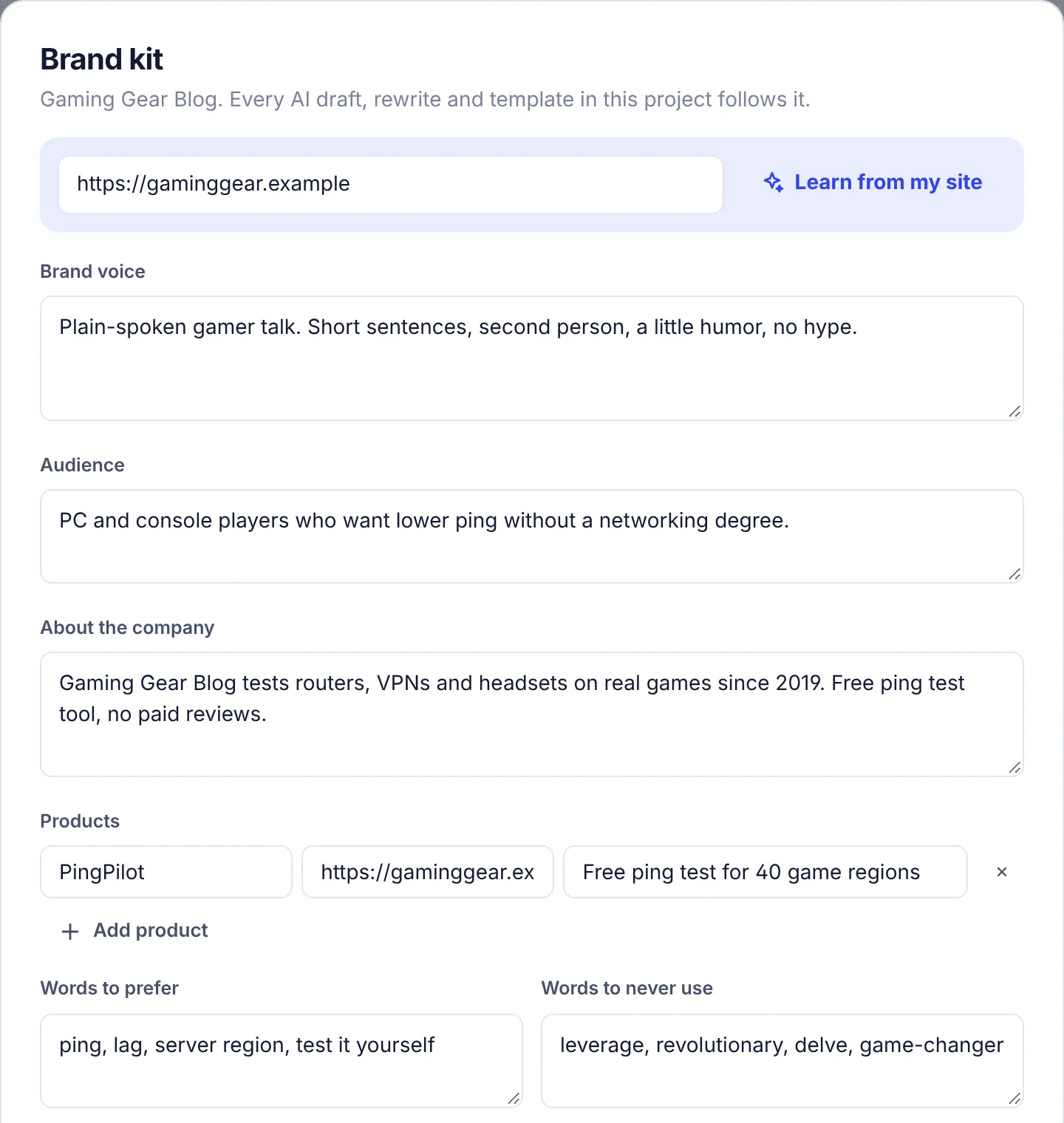
The fields
| Field | What to write | Limit |
|---|---|---|
| Brand voice | How you sound. Be concrete: sentence length, formality, humor, point of view. "Friendly expert. Short sentences, second person, a little humor, no jargon." | 800 characters |
| Audience | Who you write for. "Owners of small online stores who handle support themselves." | 500 characters |
| About the company | What you do and facts the AI may use: when you started, customers, pricing model, what makes you different. The AI uses these facts and is told not to invent others. | 2,000 characters |
| Products | Each product with a name, a link and one line on what it does. The AI mentions a product only where it really fits. | Up to 12 products |
| Words to prefer | Words and phrases you like to use. "customers, help desk, set up" | 500 characters |
| Words to never use | Words the AI must avoid. "leverage, revolutionary, delve, game-changer" | 500 characters |
| Style rules | House rules. "US spelling. No em dashes. Numbers as digits. Sentence case headings." | 800 characters |
Products
- Click Add product to add a row with Name, a link (
https://) and One line on what it does. - Click the × at the end of a row to remove it.
- Rows without a name are dropped when you save.
Let SerpPal draft it: Learn from my site
- In the box at the top, enter a page that shows how you write. Your About page or a typical blog post works best. The box starts with the project's website.
- Click Learn from my site. You see "Reading your site" while it works.
- When you see "Brand kit drafted from your site. Check it, then save.", read what it filled in and edit it.
- Click Save brand kit.
Learn from my site fills in Brand voice, Audience, About the company, Style rules and Products. It only fills fields that are empty, and only adds products you do not have yet, so nothing you typed is lost. Fill in the word lists yourself.
It uses 400 AI words from your plan.
Save
Click Save brand kit. You see "Brand kit saved". Cancel closes the dialog without saving, including anything Learn from my site drafted.
Tips for a good brand kit
- Show, do not praise. "Short sentences, no exclamation marks, explain every term" helps the AI more than "engaging and professional".
- Give real facts in About. Numbers, dates and specifics make articles more trustworthy, and the AI will not make them up.
- Use the banned list for AI clichés. Words like "delve", "seamless" or "unlock" make text sound machine-written.
- Keep products short. One clear line each, with the right link.
- Test and adjust. Write one article, read it, then tweak the voice or rules.
- One kit per site. Agencies: give each client its own project and brand kit.
Troubleshooting
"Enter your website address": the address box at the top was empty.
"Could not open that page (HTTP 403). Paste some text from the site instead.": the site blocked our visit. Try another page, such as a blog post, or fill in the fields yourself.
"Give a page address or paste at least a paragraph of your writing": the page had too little text. Use a page with more writing.
"The AI could not read a brand voice from that. Try another page.": try a page with more of your own writing.
"You have used all ... AI words on your plan this month": Learn from my site needs AI words. Fill the fields in by hand, or wait for your monthly reset.
"AI is not configured yet": AI is not turned on for this site. You can still fill in and save the brand kit by hand.
The AI ignores a rule. Make it shorter and more direct, and put the most important rules first. AI follows clear, specific rules best.