How the content score works
What the 0 to 100 content score measures, how each part is weighted, how term ranges, headings and word count are worked out, and how to raise it.
The content score tells you how well your article covers what the top Google results cover for your keyword. It runs from 0 to 100 and updates a moment after every change you make. It is worked out in your browser with the same scorer that scored the competitor pages, so your number and theirs are directly comparable.
A typical page on Google's first page lands around 60. The best pages usually score in the 80s. You do not need 100.
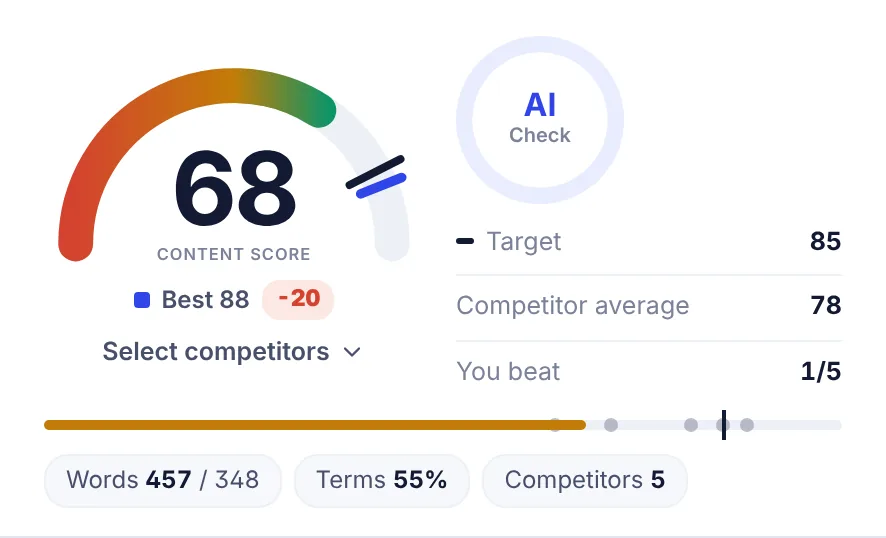
Reading the score area
- Gauge: your score. The dark tick is the target, the blue tick is the best competitor.
- Best: the highest-scoring competitor, with the gap to your score (for example
-20or+4). - Select competitors: choose which top pages set the terms and the target. See Choosing competitors.
- AI Check: a separate quality score from an AI editor. It is not part of the content score. See Insights and checks.
- Target: the score to aim for (see below).
- Competitor average: the average score of the competitor pages in use.
- You beat: how many of those competitors you score higher than.
- Race track: your score as a bar, each competitor as a dot and the target as a line.
- Words, Terms and Competitors: your word count against your target length, the share of basic terms you have used at least once, and how many pages the recommendations come from.
The gauge and score chip turn green when you are within 5 points of the target, amber when you have at least 60% of the target, and red below that.
How the target is set
The target is what the stronger competitor pages reach: the score of the page at the 75th percentile, kept between 60 and 85. So it is ambitious but reachable. When you change the competitor set, the target changes with it.
What the score is made of
The score combines six parts. Each part is a number from 0 to 100, and each has a weight:
| Part | Weight | What it checks |
|---|---|---|
| Terms in the text | 30% | How well you use the recommended terms, in the right amounts |
| Terms in headings and title | 25% | Whether your headings and title use the phrases top pages put there |
| Title and meta | 25% | Keyword in the title, H1 and opening, and title and description length |
| Names mentioned | 10% | Brands, products and places the top pages mention |
| Topics covered | 5% | Topics most top pages cover |
| Structure and length | 5% | Length, H2 sections, images, FAQ, tables and lists |
You can see each part on the Insights tab under Score breakdown. When a part cannot be measured for a keyword (for example when the top pages mention no names), it is left out and the other parts share its weight.
Reading ease is shown as guidance, but it is not part of the score.
Terms in the text
SerpPal finds the words and phrases that most top pages use. Each term gets a recommended range, shown as uses now / range, for example 3 / 2-4.
- The range comes from how often top pages use the term per 1,000 words. The low end is roughly what the lighter users of the term write (the 20th percentile) and the high end what the heavier users write (the 85th percentile). Both ends are then scaled to your target length. So if you raise your target length, the ranges grow too.
- Basic terms are used by at least 30% of the top pages and are up to 3 words long. They count fully.
- Extended terms are longer or less common phrases used by at least 15% of top pages. You only need them once, and each counts for about a third of a basic term.
- More important terms count for more. A term weighs more when more top pages use it, when the top 3 pages use it, and when it is specific to the topic rather than an everyday word.
How each term is credited:
- Not used: no credit.
- Used, but fewer times than the range: partial credit that grows with each use.
- In range: full credit.
- Above the range: still full credit unless the term is also much denser than on the top pages (more than 1.5 times their highest rate). Only then does it count as overused, lose some credit and show in red. Short drafts are never told they overuse a term.
Spelling variants count as the same term: "help desk", "helpdesk" and "help-desk" are one term, and simple plurals count too.
Terms in headings and title
Top pages tend to put certain phrases in their titles and H2 headings. SerpPal checks how many of the top 8 title phrases appear in your title (or your H1 when the title is empty), and how many of the top 12 heading phrases appear in your H1, H2 and H3 headings. Headings count for 60% of this part and the title for 40%.
Title and meta
This part checks:
- The keyword appears in your title (all its words, in any order).
- You have an H1 and it contains the keyword. With no H1, a filled title field gets partial credit.
- The keyword appears in the first 100 words.
- The title is 30 to 65 characters, and the meta description is 110 to 165 characters (when you have filled them in).
- The title uses the phrases that at least 30% of top titles use.
Names mentioned
The share of the top 30 names (brands, products, places) from top pages that your article mentions.
Topics covered
Topics are the headings that several top pages share. A topic counts as covered when your text uses most of its key words. When the analysis has an AI topic brief, the brief's topics count for half of this part, weighted by their importance.
Structure and length
Six checks, averaged:
- Length: full credit from 85% to 125% of your target length. Shorter loses credit step by step, and much longer loses a little.
- H2 sections: at least 70% of the number of H2s the top pages use.
- Images: at least half as many images as the top pages, when they use images.
- FAQ section: expected when 40% or more of top pages have one.
- Table: expected when 50% or more of top pages have one.
- List: expected when 60% or more of top pages have one.
Word count and target length
The word count includes every word in your article: headings, paragraphs, lists and tables. The title and meta fields are not counted.
Your target length starts at the median word count of the first-page results you compete against. Change it on the Insights tab under Target length, or in the Words row of the Optimization tab. The minimum is 300. The target changes your term ranges, your length check and the length the AI writes to. It is remembered per article in this browser.
Copied text lowers the score
If more than half of your article repeats the top 10 pages word for word, the score is cut by up to 30%. Copying is not optimization. The Originality number on the Insights tab shows how much of your text is your own.
How to raise your score
- Open the Optimization tab and filter terms by To add. Work the important ones into sentences where they fit.
- Use the phrases from Headings view in your H2 and H3 headings.
- Put the keyword in the title, the H1 and the first paragraph.
- Cover the topics on the Outline tab, and add an FAQ when most top pages have one.
- Mention the relevant names from Entities view.
- Read What to do next on the Insights tab. It lists the most useful fixes first.
Or let the AI do the first pass: AI Writing, then Optimize the whole article. See AI writing in the editor.
Aim for the target, not 100. Past the target, extra terms rarely help readers or rankings, and stuffing terms makes text worse.
Common questions
Why did my score drop when I changed the competitors? The terms, ranges and target come from the pages you pick. A different set means different recommendations.
Why is my score different from another tool's? Each tool reads different pages and weighs things differently. SerpPal's score is calibrated so pages land in a similar range to well-known tools, but the numbers will never match exactly.
Does the score update when I run the analysis again? Yes. More, then Run the analysis again fetches fresh results, and your article is scored against them. It counts as one analysis.
Why does the Optimization tab say 39% when the score area says Terms 55%? Terms in the score area counts basic terms only. Term coverage on the Optimization tab counts basic and extended terms together.