Content Planner
Find keyword ideas around a topic with monthly searches, difficulty, intent and CPC, grouped into clusters, then analyze or AI-write up to 20 of them at once.
The Content Planner helps you decide what to write. Give it a broad topic and it finds related keywords people search for, with how often they search and how hard each one is. The ideas come grouped into topics, so you can plan a whole cluster of articles at once.
Open it from Content Planner in the sidebar, or Find topics to write on the dashboard.
Find ideas
- Type a Topic or seed keyword, for example
vpn,keto dietorcrm software. Broad topics give more ideas. - Pick the Country and Language. Search volumes are for that country.
- Click Find ideas.
It takes a few seconds. Each search uses one keyword plan from your monthly limit. The line under the form shows how many you have left, for example "49 keyword plans left this month".
Your last 12 plans appear as chips under the form. Click one to open it again. Opening an old plan is free.
The results
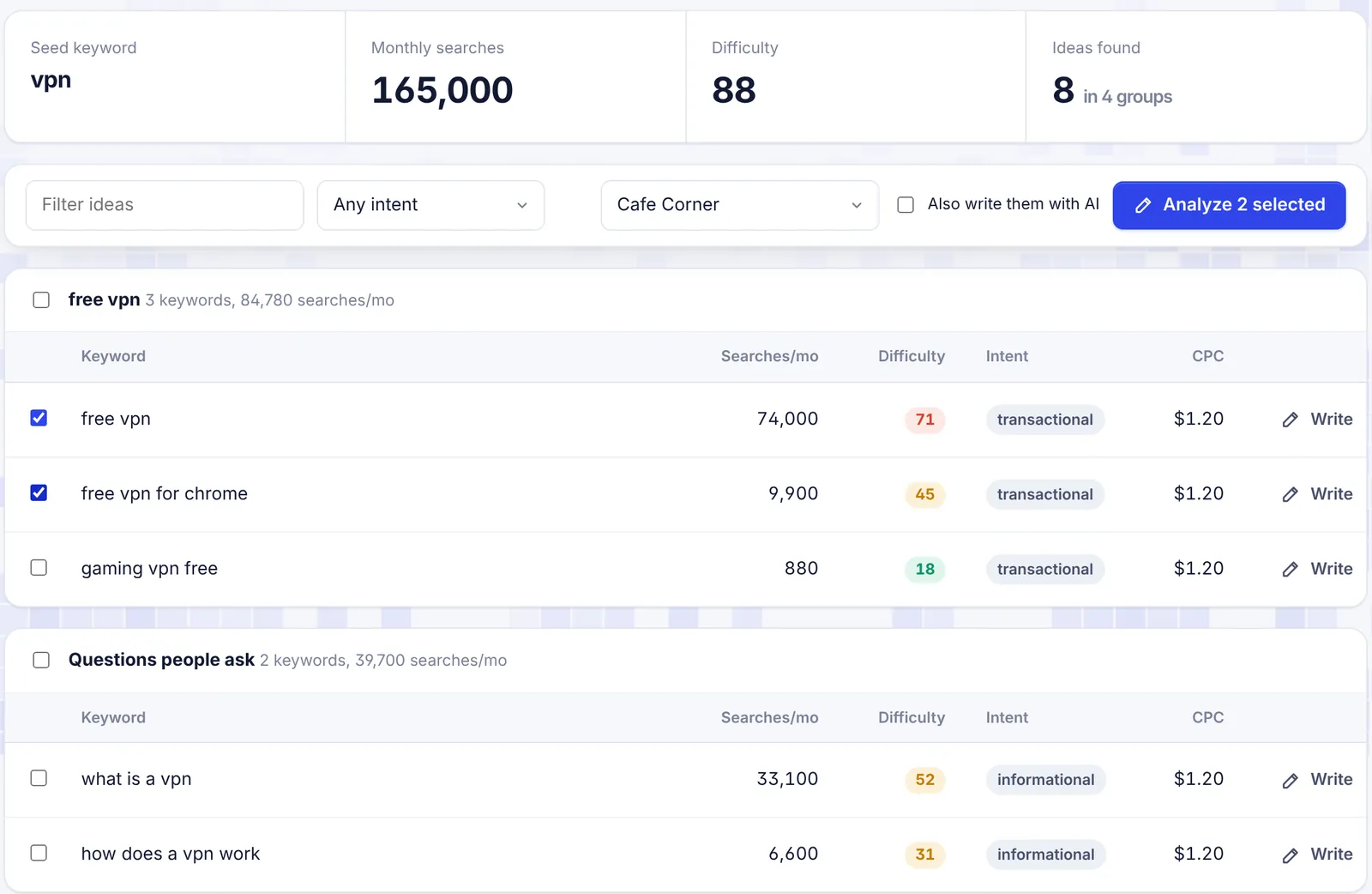
Summary
At the top you see the Seed keyword, its Monthly searches, its Difficulty and Ideas found with the number of groups.
Groups
Ideas are grouped by shared words. Each group is named after its biggest keyword and shows how many keywords it has and their total searches per month. Question searches (what, how, why and so on) get their own group, Questions people ask, and ideas that do not fit any group land in Other ideas.
Columns
| Column | Meaning |
|---|---|
| Keyword | The search phrase. |
| Searches/mo | Average monthly searches in the chosen country. "-" when unknown. |
| Difficulty | 0 to 100. Green below 30 (easier), amber 30 to 59, red 60 and up (hard). |
| Intent | Informational, commercial, transactional or navigational. See the Glossary. |
| CPC | What advertisers pay per click, in US dollars. |
| Write | Analyze this one keyword now. |
The ideas come from Google data: longer searches that contain your seed, plus searches Google relates to it.
Filter the ideas
- Filter ideas: type a word to show only ideas that contain it, for example
freeorhow. - Any intent: show only one intent, for example Informational for blog posts or Commercial for comparison articles.
Filters only change what you see. Your selection stays.
Analyze the ideas you pick
- Tick the keywords you want. The box next to a group name ticks the whole group.
- Pick the project in the selector on the right. If you have none, choose My articles (created for you).
- Optional: tick Also write them with AI to have the AI write every article after its analysis. See Bulk writing.
- Click Analyze N selected (or Analyze and write N selected).
- Confirm. The dialog reminds you that each keyword counts as one analysis on your plan, and with AI writing on, that each article uses about 2,000 to 3,000 AI words.
You can pick up to 20 keywords at a time. With more, you see "You can analyze up to 20 keywords at once".
With one keyword the editor opens. With several, you go to the project page, where the analyses run and appear as they finish.
Analyses use the planner's country and language, not the project's defaults.
The Write button on a row analyzes just that keyword, without a confirmation. If Also write them with AI is ticked, the AI writes it too.
Pick good keywords
- Quick wins: low difficulty (green) with decent searches. A new site should start here.
- Match intent to the article. Informational ideas suit guides and how-tos. Commercial ideas suit "best" lists and comparisons. Transactional ideas suit product and landing pages.
- Write a cluster. Pick several keywords from one group and link the articles to each other. It shows Google you cover the topic in depth.
- Avoid duplicates. Two keywords that mean the same thing (
vpn for gaming pcandgaming pc vpn) usually need one article, not two. - Check your chances. After the analysis, use Ranking chance in the editor to see if your site can compete. See Rank tracking.
Limits
- Each Find ideas uses one keyword plan, even when SerpPal reuses recent data for the same topic, country and language.
- Plans reset on the 1st of every month.
- Each keyword you analyze from the planner uses one analysis.
See Plans and limits.
Troubleshooting
"Enter a topic or keyword": the box was empty.
"Your Starter plan includes 15 keyword plans per month": you used all your keyword plans this month. Reopen old plans from the chips for free, wait for the 1st, or upgrade.
"Keyword data is not connected yet": the site's keyword data is not set up. Contact support.
"Keyword data failed: ...": the data provider had a problem. Wait a minute and try again.
Few or no ideas: very narrow topics have little data. Try a broader seed, or another country with more searches in your language.
Searches and difficulty show "-": there is not enough data for that keyword. It can still be worth writing, especially for very specific topics.