Insights and checks
The Insights tab explained: quick metrics, human tone, ranking chance, Google position, AI quality review, AI search readiness and the extra checks.
The Insights tab gives you the big picture: how your article compares with the top pages, what to fix next, and a few extra checks that go beyond the content score.
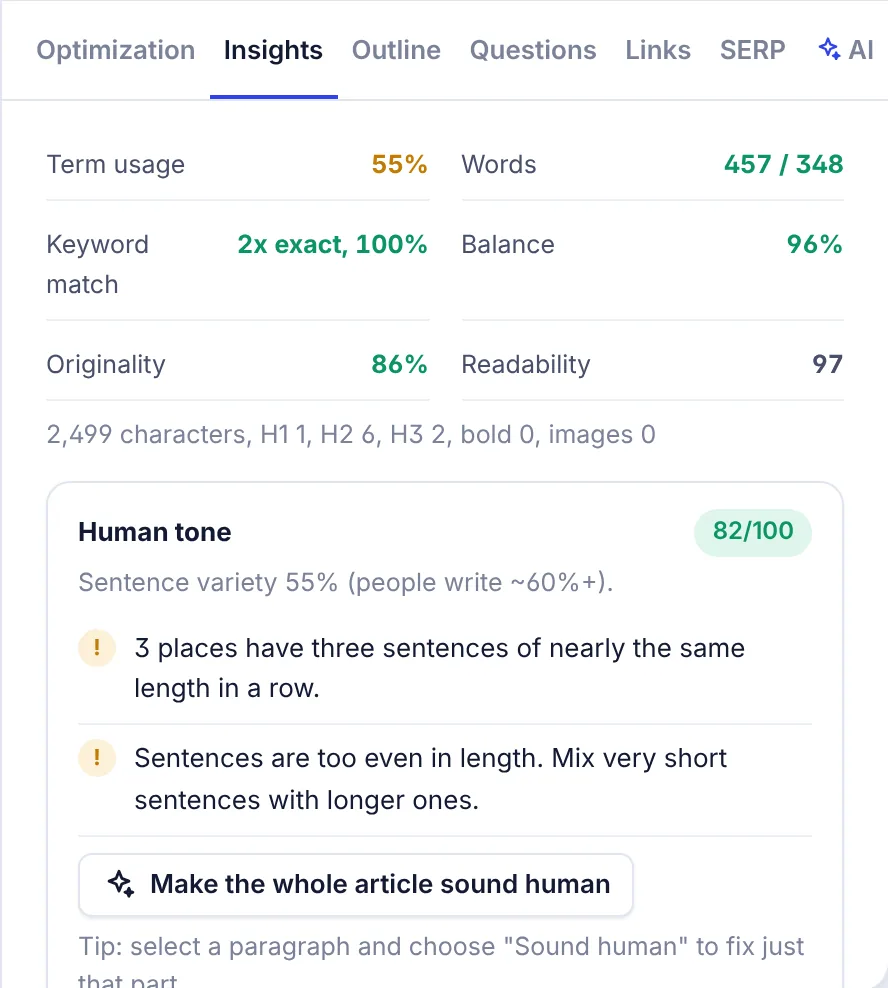
Quick metrics
Six numbers at the top. Hover one to see what it measures. Green means good, red means worth a look.
| Metric | What it shows | Good when |
|---|---|---|
| Term usage | Share of basic terms used at least once | 70% or more |
| Words | Your words against your target | 85% of the target or more |
| Keyword match | Exact uses of the keyword, and the share of its words you use | At least one exact use |
| Balance | Share of terms that are not overused | 95% or more |
| Originality | Share of your text not repeated word for word from the top 10 pages | 85% or more |
| Readability | Reading ease from 0 to 100, higher is easier | Guidance only |
Below them, a line counts your characters, H1, H2 and H3 headings, bold phrases and images. Originality appears once you have 150 words. Readability is only available for languages with a reading-ease formula (such as English, Spanish, French, German, Italian, Portuguese and Dutch).
Human tone
How natural your writing reads, from 0 to 100. It appears once you have 80 words. It looks at:
- Sentence variety: people mix short and long sentences. Most human writing scores about 60% or more.
- Stock AI phrases such as "delve", "seamless" or "in today's digital age". Each one shows as a chip with its count. Click a chip to find it in your text.
- Runs of three sentences of nearly the same length.
- Sentences that open with stiff transitions like "Furthermore" or "Moreover".
- Em dashes, and lists where most bullets start with a bold label and a colon.
Stock phrases and stiff transitions are only checked in English. Human tone is a writing aid, not an AI detector. To fix it, use Make the whole article sound human, or select a paragraph and choose Sound human. See Humanize in the editor.
Ranking chance
Compares your website with the sites on Google's first page and the keyword difficulty, and gives a chance in percent: high, medium or low. You also see the keyword difficulty and how many first-page sites get more search traffic than yours.
- Add your website to the project settings first. Without it the card says "Add your website in the project settings to see if it can rank for this keyword."
- Click Check ranking chance. Later, click Check again to refresh it.
Google position
Shows where your published article ranks for the keyword. It needs a target URL: open More, then Target URL, and enter the address of the live page.
- Check now checks the position right away. You can check once every 6 hours. If the page is not in the top 100 you see "not in top 100".
- Check every week keeps checking automatically. A small chart shows your recent positions.
See Rank tracking for all your tracked articles in one place.
AI quality review
An AI reads your article the way a strict editor and a Google quality rater would. It judges helpfulness, depth, first-hand experience or evidence, accuracy risks, originality and structure. You get a score out of 100, a one-sentence verdict and 3 to 6 fixes, most important first.
- Click Review my article here, Get the quality score on the Optimization tab, or the round AI Check button next to the score.
- You need at least 150 words, otherwise you see "Write more of the article first".
- Click Review again after you make changes.
The review uses AI words from your plan. It is separate from the content score: the content score measures coverage of terms and topics, the review measures quality.
Competitors used
Switch which top pages set your terms and target: First 10 (the first 10 pages we could read), All (every page we could read, up to 30) or Choose... to pick pages yourself. The recommendations are rebuilt and the page reloads. See Choosing competitors.
Score breakdown
The six parts of your content score, each from 0 to 100: Terms in the text, Terms in headings and title, Topics covered, Names mentioned, Structure and length, and Title and meta. Reading ease is shown under them but is not part of the score. How the content score works explains each part.
Compared with the top pages
- Length: your words against the typical range of top pages.
- H2 sections: your H2 count against the top pages' median.
- Images: your images against the top pages.
- FAQ section and Table: shown when most top pages have one.
- Reading ease of the top pages.
Target length and what to do next
Change your Target length here (minimum 300 words). Under What to do next you get the most useful fixes in plain words, for example "Add important terms: ...", "Use these in your headings: ..." or "Mention the main keyword in the first 100 words". When nothing important is missing, it says "Looking good."
AI search readiness
This row on the Optimization tab shows how easily AI search engines can quote your article. It scores seven factors:
| Factor | What helps |
|---|---|
| Answer-first opening | A first paragraph under 80 words that answers the main question and uses the keyword |
| Questions answered directly | Question headings followed right away by a 20 to 90 word answer |
| Lists, tables and headings | At least one list and one table, and a heading every 350 words or so |
| Fact density | 1.5 or more numbers or measurements per 100 words |
| Key takeaways near the top | A "Key takeaways" or summary block, or a list early in the article |
| FAQ section | A heading with "FAQ" or "Frequently asked questions" |
| Freshness and named entities | The current year or an "updated" date, and the names top pages mention |
For the answer-first opening, key takeaways and FAQ, an Add button appears when the factor scores low. The AI writes that block and puts it in the right place: the opening after your H1, the takeaways after the opening paragraph, and the FAQ at the end. You need at least 100 words first.
Extra checks
Once you have 80 words, the Insights tab also lists extra checks with a count of how many pass. Click Show to jump to the text.
- Snippet answers: each question heading (ending in "?") should be followed by a direct 40 to 60 word answer, which is what Google lifts into featured snippets.
- Needs a source: sentences with prices, percentages or "1,000 users" style claims that do not say where the number comes from.
- Freshness: years that make the article look out of date, and "best" or "top" lists without the current year.
- Copied from top pages: paragraphs that match a top 10 page word for word by 35% or more.
Common questions
Do these checks change my content score? Only the score breakdown is the score. Human tone, ranking chance, Google position, the AI review, AI search readiness and the extra checks are separate.
Which of these cost something? The AI quality review, the Add buttons and AI visibility use AI words from your plan. The other checks do not use your analyses or AI words. See Plans and limits.