Humanizer options
What Re-check and fix, Strict (aim for 0%) and Keep these words exactly do in the Humanizer, how many AI words they use, and when to turn them on.
The Options button in the Humanizer holds three settings. A small number on the button shows how many are on. Your choices are remembered in your browser for next time.
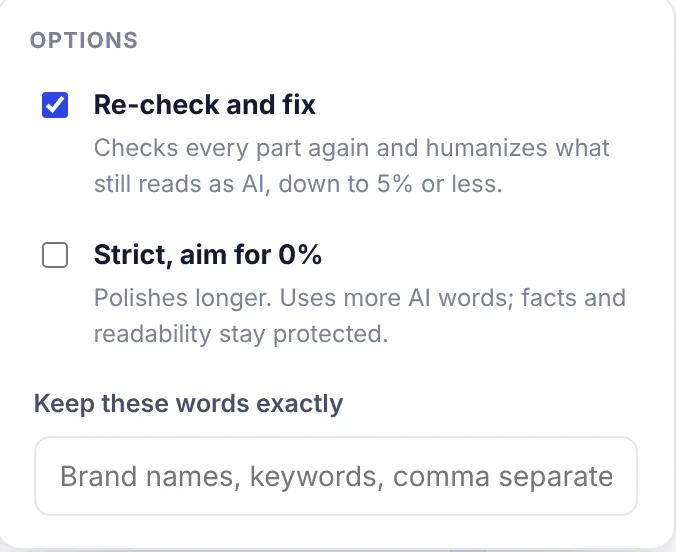
Re-check and fix
On by default. "Checks every part again and humanizes what still reads as AI, down to 5% or less."
With this on, humanizing runs in up to four passes:
- Humanizing: every part of your text is humanized in the style you picked.
- Check again: each part is checked with the AI checker. Parts that still score 25% or more are humanized again, more boldly, with notes on exactly what still reads as AI (for example "too many very short sentences" or a list of AI-typical words to replace). The new version is only kept if it reads less like AI and keeps every fact.
- Polish: in each part, the paragraphs or list items that push the score up the most (up to three at a time) are humanized again, one by one. Headings and tables are left alone. A change is only kept if it lowers the score and keeps every fact. This repeats for up to 4 rounds, or until the part is at 5% or less.
- Final polish: a long text can read differently as a whole than in parts, so the whole text gets one more polish. This only runs for texts with more than one part, and only if the whole text is still above the target.
During the extra passes, Strong is used for the bolder changes, except when you picked Academic or Simple: those styles are kept so the voice does not change.
With Re-check and fix off, only pass 1 runs. The other passes show "not needed". It is faster and uses fewer AI words, but the result may still read as partly AI.
Turn it off when you want a quick, light touch, or your text is already close to human and you only want a different voice.
Strict, aim for 0%
Off by default. "Polishes longer. Uses more AI words; facts and readability stay protected."
Strict changes three things:
- The target for the polish passes is 0% instead of 5%.
- More rounds: the polish runs up to 8 rounds instead of 4.
- A little more variety: sentences may run a bit longer (mostly 15 to 30 words, the odd one up to about 35), and a semicolon joining two close thoughts is allowed about once every 150 words. Normal mode keeps most sentences at 14 to 25 words and semicolons rare.
Strict works with Re-check and fix. If Re-check and fix is off, there are no polish passes, so Strict only changes the writing rules of the first pass.
Turn it on when a text is stubborn: the After score stays high with Natural or Strong.
0% is a target, not a promise. Your facts always come first: a change that loses a number, name or link is never kept, even if it would lower the score.
Keep these words exactly
Type words or phrases that must not change, separated by commas, for example SerpPal, cold brew, Section 4.2. Good things to keep:
- brand and product names;
- your SEO keywords;
- technical terms, course terms and quotes.
The Humanizer is told to keep each one exactly as written. They also count as facts in the facts kept badge, so you see if one went missing. You can keep up to 30 words or phrases.
Numbers, links and citation marks like [1] are always protected. You don't need to add them here.
How many AI words the options use
Each pass that changes a part counts the words it writes. The numbers below are a rough guide for a 1,000-word text, and real use varies with how stubborn the text is:
| Settings | Typical AI words |
|---|---|
| Re-check and fix off | about 1,000 |
| Re-check and fix on (default) | about 1,000 to 2,500 |
| Re-check and fix and Strict on | about 1,500 to 4,000 |
Text that already reads as human needs fewer extra passes, so it uses less. See Plans and limits.
Which settings to use
| Your goal | Style | Re-check and fix | Strict |
|---|---|---|---|
| Everyday blog post or email | Natural | On | Off |
| Very AI-sounding text | Strong | On | On |
| Essay or paper | Academic | On | Off, or on if it stays high |
| Easy reading for a wide audience | Simple | On | Off |
| Quick change of voice only | Casual or Professional | Off | Off |
Common questions
Why is my After score above 5% with Re-check and fix on? Parts that could not be changed without losing a fact keep your original wording. Very short parts (under about 60 words) are also not re-checked. Try Strict, or reword the sentences the AI checker highlights.
Do options apply to texts already humanizing? No. A text keeps the options it started with. While it runs, the pills show its settings. Change the options and click Humanize again to use new ones.