Essay writer
Write essays, research papers and reports in five steps, with real sources found on Google, an outline you control and correct citations.
The essay writer turns a topic into a finished essay, research paper or report. You choose the type, level, length and citation style, pick real sources, shape the outline, and SerpPal writes the essay section by section. References are built from each source's own author and date, never made up.
Open Essay writer in the sidebar. If you already have essays, you see your list first. Click New essay to start one.
The five steps
1. Topic
Type what the essay should be about, for example "How remote work changes team communication in small companies". You can click one of the example chips to try it out.
- Have notes, a brief or a paper to base it on? Use Upload PDF, Word or text or From a link to add your own material. The essay uses it as its main basis. Up to about 40,000 characters (roughly 6,000 to 7,000 words) are used. Click Remove to take it out again. See Importing files and links.
- Language: the language the essay is written in.
- Extra instructions (optional): anything else, like "focus on the UK" or "include a counterargument".
Click Next. The topic needs at least 4 characters.
2. Type and style
Pick what you are writing:
| Type | What it is |
|---|---|
| Essay | General essay with a clear structure |
| Argumentative | Takes a side and answers counterarguments |
| Persuasive | Convinces the reader |
| Expository | Explains a topic objectively |
| Analytical | Breaks a subject into parts |
| Compare and contrast | Similarities and differences |
| Cause and effect | Why it happens and what follows |
| Research paper | Evidence-based, with sources |
| Literature review | What existing research says, and the gaps |
| Report | Findings and recommendations |
| Personal statement | Your story, first person, no headings |
| Narrative | A story with reflection |
Then choose the Level (High school, College, University, Master's or PhD) and the Writing style:
- Standard: balanced, clear and readable.
- Academic: formal, no contractions, precise terms, careful claims.
- Simple English: short words and short paragraphs.
- Persuasive: confident, with a clear line of argument.
- Creative: vivid, with concrete images and a personal voice.
3. Length and sources
Pick a length: Short (500 words), Standard (1,000), Long (2,000), Detailed (5,000) or Extensive (10,000). You can also drag the slider or type any number from 200 to 10,000 words. The page shows about how many pages that is (about 275 words a page).
Under Sources and citations, choose:
- the citation style: APA 7, MLA 9, Chicago, Harvard or IEEE;
- how many citations go in the text: 2, 3, 5, 8, 10, 15 or 20, or No citations.
Then add sources:
- Find sources searches Google and reads the pages it finds. Research sites, universities, government sites, journals and well-known publications come first, and you get at most one source per website. Social media, video sites, shops, Q&A sites, essay sites and PDFs are skipped. Click Find more sources for more.
- Add a source link lets you paste the address of a page you want to cite and click Add.
Each source shows its title, authors, publication and year. Untick a source to leave it out. Only ticked sources are used.
Tick or untick Use section headings. It is on by default, except for personal statements and narratives.
Click Make the outline. If you picked citations but no sources, you see "No sources picked, so the essay will have no citations".
4. Outline
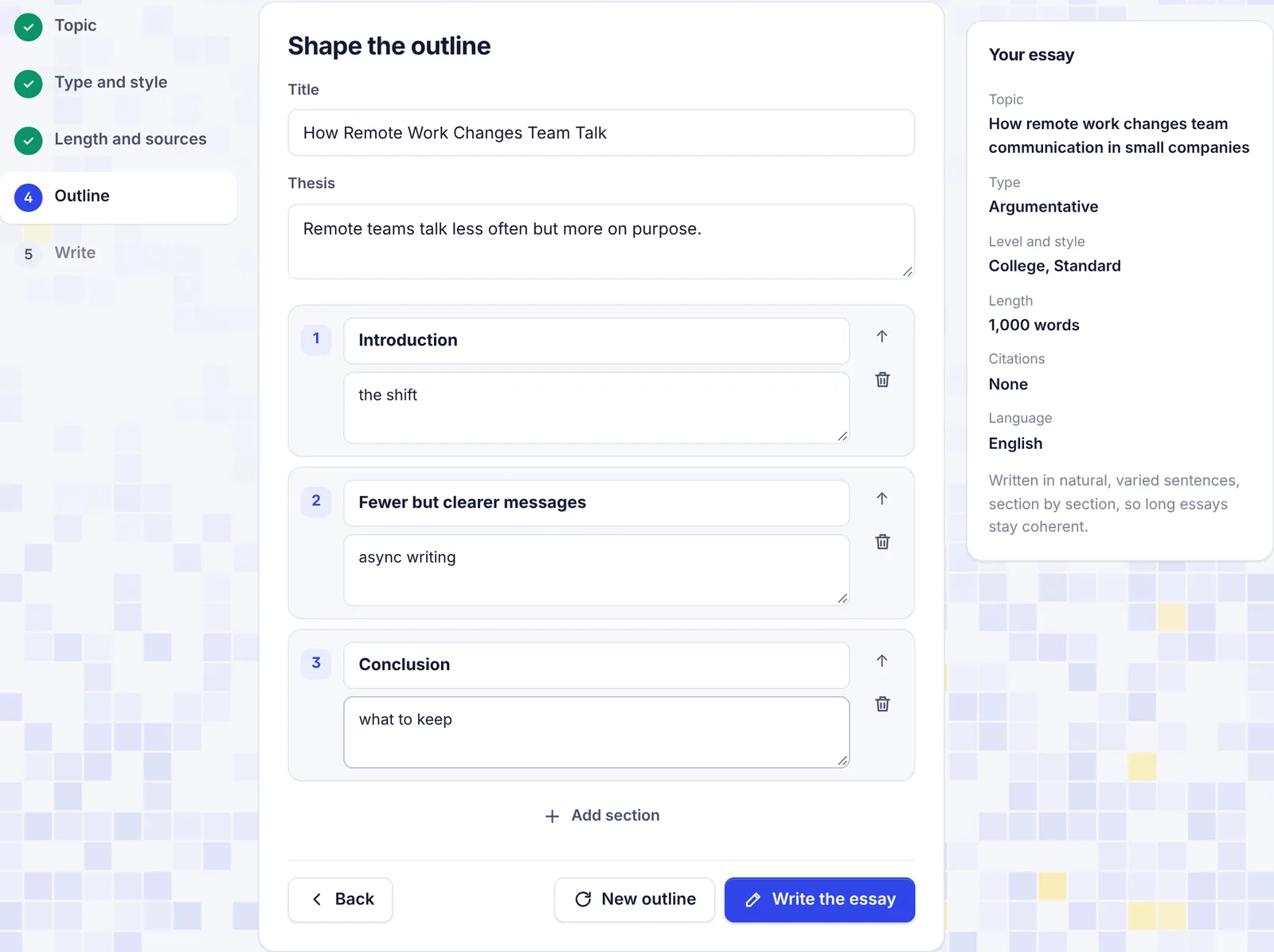
SerpPal plans the essay: a Title, a Thesis (the central claim in one sentence) and a list of sections, each with a few points to cover. Longer essays get more sections (from 3 up to 14).
Everything here is yours to change:
- edit the title, the thesis, any section heading or its points (one point per line);
- move a section up with the arrow, or remove it with the bin;
- click Add section to add one;
- click New outline to get a fresh plan.
When you are happy, click Write the essay.
5. Write
The essay is written one section at a time, so long essays stay coherent. You see "Writing section 2 of 6" and the text as it comes in. When it is done, the essay opens and is saved under Essays.
If you click Stop, or something goes wrong while writing, you go back to the outline. The partial essay is not saved, so click Write the essay again when you are ready.
How citations work
While writing, the AI marks where a claim comes from a source. When the essay is finished, SerpPal turns those marks into in-text citations in your style, like (Doe & Lee, 2023) in APA or [1] in IEEE. It then adds a reference list with only the sources the essay actually cites, under the heading your style uses: References (APA and IEEE), Works Cited (MLA), Bibliography (Chicago) or Reference list (Harvard).
Author, date and site come from each page's own metadata. If a page lists no author, the site name is used. If it has no date, you see "n.d." (no date).
Always open the sources and check that each one says what the essay claims. Your teacher will check too.
Your finished essay
The essay page has everything you need to polish and hand in:
- Edit in place. Click anywhere in the title or text and type. Changes save on their own. The top bar shows Unsaved changes, Saving... and then Saved.
- Word count. Under the title: words, about how many pages, and the reading time.
- AI score. On the right, a gauge shows the estimated share that reads as AI-written. It updates when you click outside the text. See How AI detection works.
- Humanize this essay. Humanizes the paragraphs into natural, varied sentences. Headings, citations and the reference list stay exactly as they are. Before it starts, a copy of the current text is saved in your essay list as "(before humanizing)", because Ctrl + Z cannot undo it. If you click Stop, paragraphs already humanized are kept.
- Detailed check. Opens the essay in the AI checker for a sentence-by-sentence view.
- Sources. The sources you used, with links, are listed on the right.
- Export: Word (.doc), PDF (print), Markdown or Plain text. PDF opens your browser's print window: choose "Save as PDF". If nothing happens, allow pop-ups for SerpPal.
- Copy copies the title and text as plain text.
- Delete (the bin) removes the essay for good.
Your essays are listed under Essay writer, newest first, with the word count, the last edit time and the AI share. Use Search essays to find one by title.
AI words and limits
The outline and the essay count toward your monthly AI words, and so does humanizing it. A 2,000-word essay uses a little over 2,000 AI words. Finding sources does not use AI words. See Plans and limits.
Troubleshooting
"Finding sources needs search data. Add your own source links instead." Search is not set up on this site. Paste source links with Add instead. The Find sources button is hidden in that case.
"No readable sources found. Add links yourself." or "Google returned no usable sources for this topic." Try a shorter, more general topic, or add links by hand.
"Could not read that page" The page may block automatic readers, need a login, or be a PDF. Pick another page about the same thing.
"The AI did not return an outline. Try again." Click Make the outline again (or New outline).
"The essay did not finish. Try again." or "The AI answer was cut off." Go back to the outline and click Write the essay again. For very long essays, try fewer sections.
The essay is shorter or longer than I asked Lengths are targets. Each section aims for its share of the words, and the total usually lands close. Add a section or ask for more words if you need it longer.
Common questions
Can it write in other languages? Yes. Pick the language in step 1. Sources are searched in that language too.
Is the essay plagiarism-free? It is written fresh from the sources, not copied. Still, quotes and close paraphrases are possible, so read it through and cite properly.
Can I add a source after the essay is written? Not to the existing essay. Add it in step 3 and write a new one, or add the citation by hand with the Citation generator.