
On this page
- Free keyword research template preview: the three tabs
- How to do SEO keyword research with the template: a six-step checklist
- Essential columns: search volumes, intent, competitor data and more
- Use cases for the template in an SEO strategy
- Why keyword grouping and mapping matter
- Read keyword metrics carefully
- Keep the keyword map current (and let AI do the boring part)
- Common mistakes with keyword spreadsheets
- Conclusion
- Frequently asked questions
A keyword research Excel template gives you one place to organize search terms, compare opportunities and decide which page should target each one. It's the backbone of an SEO strategy, because it connects keyword data to pages and pages to a calendar. You don't need to download anything: the free template below is a column layout you can rebuild in Excel or Google Sheets in five minutes, with the formulas to score and group keywords. This guide shows the template, then the six-step keyword research workflow that fills it: find keywords, clean the data, group them into clusters, score them, map them to URLs and turn the map into a content plan.
Key takeaways
- Three tabs are enough: Keyword List, Keyword Map and Content Plan.
- Record the source and date for every search volume and difficulty number. Tools disagree, and numbers go stale.
- Group keywords by intent and SERP overlap, not by shared words.
- Score with a transparent formula that weights relevance and business value above volume.
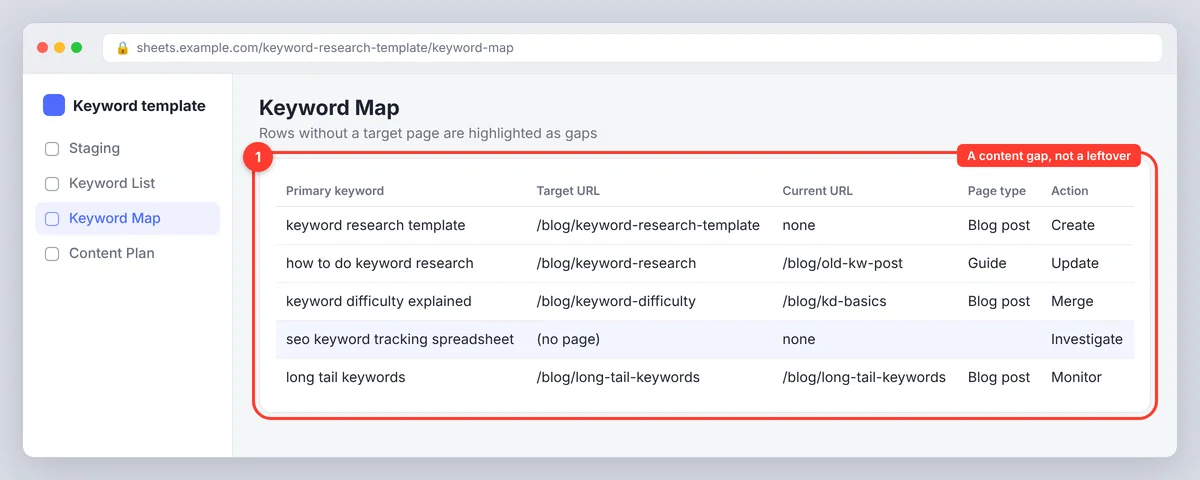
- One primary keyword per page. Anything without a target page is a content gap, not a leftover.
Free keyword research template preview: the three tabs
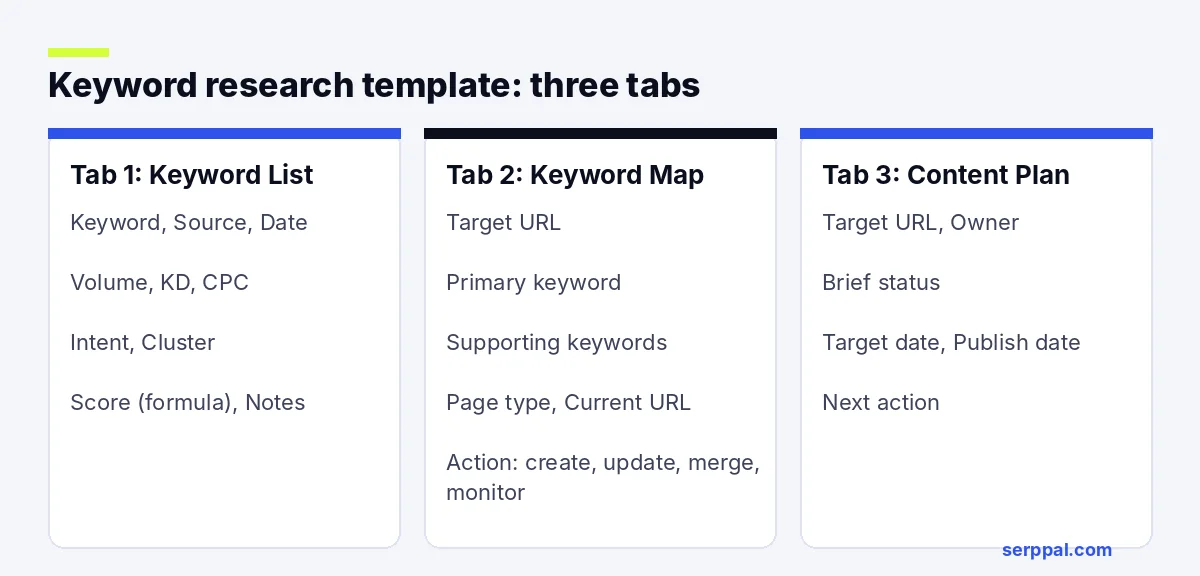
The template is organized into three tabs. The sample rows below use illustrative data, so replace them with figures from your own research.
Tab 1: Keyword List
| Keyword | Source | Volume | KD | CPC | Intent | Cluster | Score | Notes |
|---|---|---|---|---|---|---|---|---|
| keyword research template | Keyword Planner, Mar | 1,900 | 34 | $2.10 | Informational | Templates | 82 | Wants a download |
| keyword mapping template | Planner, Mar | 480 | 28 | $1.80 | Informational | Templates | 74 | Same page as above |
| how to do keyword research | GSC, Mar | 5,400 | 61 | $3.40 | Informational | Process | 58 | Separate guide |
Tab 2: Keyword Map
| Target URL | Primary keyword | Supporting keywords | Page type | Current URL | Action |
|---|---|---|---|---|---|
| /blog/keyword-research-template | keyword research template | keyword mapping template, keyword research spreadsheet | Blog post | none | Create |
| /blog/keyword-research | how to do keyword research | keyword research process, keyword research steps | Guide | /blog/old-kw-post | Update |
Tab 3: Content Plan
One row per target URL: owner, brief status, target date, publish date, next action. This is the tab that turns research into an editorial calendar.
Key features of the SEO keyword template
- An Excel Table on each tab, so filters and formulas extend as you add rows.
- Data validation lists for Intent and Action (create, update, merge, monitor), so you select from a menu instead of typing.
- A score column with a visible formula, so anyone can see why a keyword is prioritized.
- Source and date columns next to every metric.
- Conditional formatting that highlights rows with no target page: your gaps.
How to do SEO keyword research with the template: a six-step checklist
Step 1: Set your SEO goal and choose seed keywords
Decide what the research should support: more organic search traffic, product sales, qualified leads or stronger coverage of a theme. Then list seed keywords from product names, customer questions, support tickets, sales calls and site navigation. Use the words customers say, not internal product terms. Startups often skip this and end up with a sheet that describes the product rather than the problem.
Check competitor pages that rank in your niche and note the topics they cover. SerpPal's competitor analysis shows which pages rank for a keyword and how they're built. Add promising terms to the sheet, including modifiers such as "best", "near me", "cost" and "how to".
Step 2: Find keywords, export and clean the keyword data
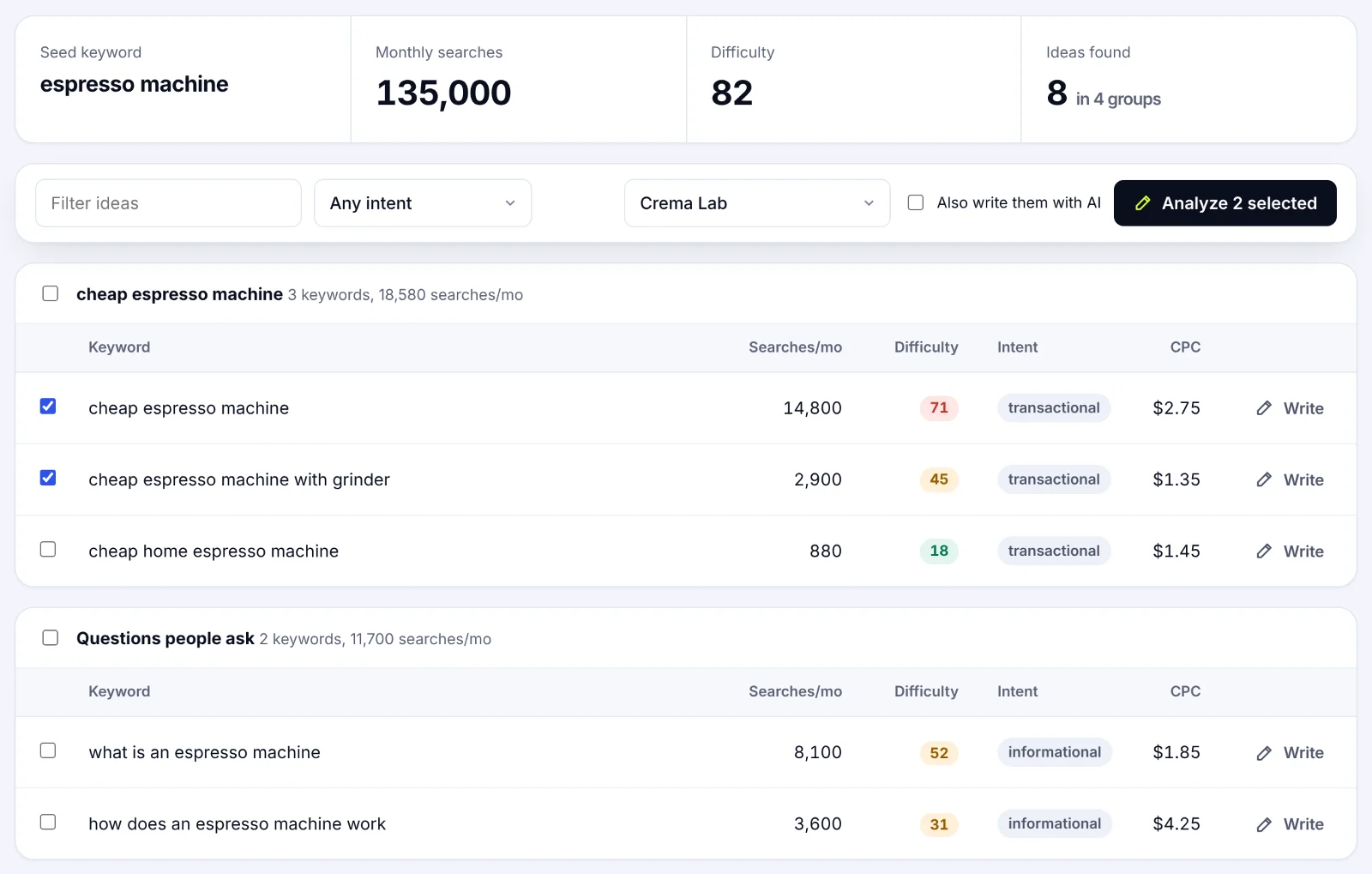
Expand the seeds with Google Keyword Planner (Google Ads data, useful for CPC and demand), the Search Console Performance report (queries that already bring impressions to your site) and a keyword tool such as Semrush, Ahrefs or Moz. Each exports different column names, so map them to the template's columns once and reuse that mapping. SerpPal's Content Planner takes a seed topic and returns related keywords with search volumes, difficulty, intent and CPC, already grouped into clusters, which you can copy straight into the first tab.
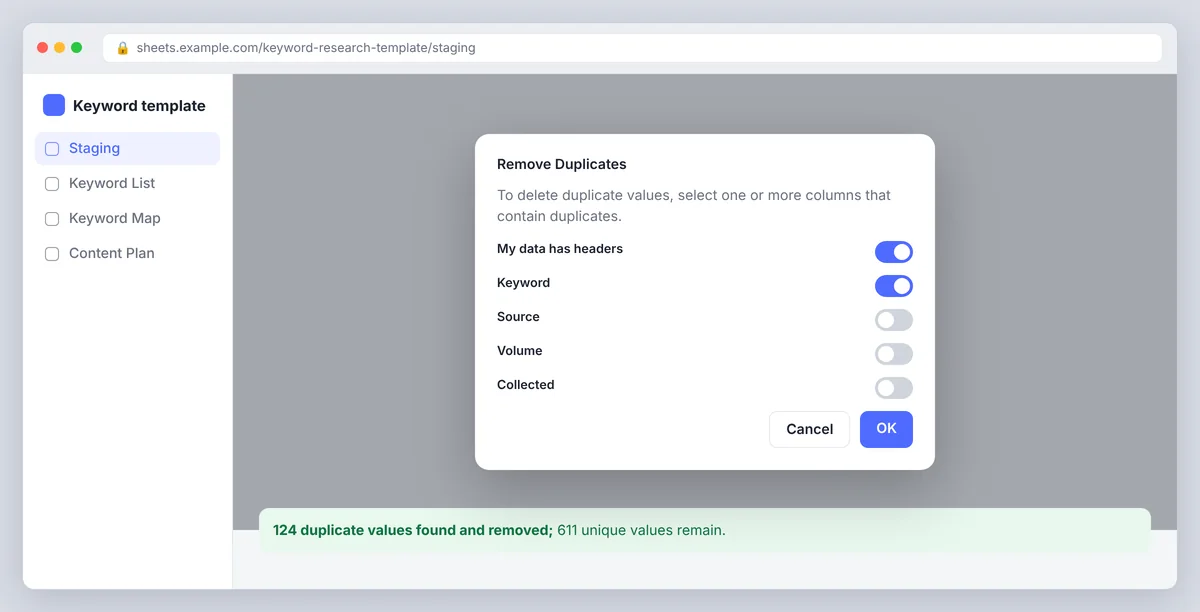
Export each tool's results as a CSV file and paste them into a staging tab before combining lists. Standardize capitalization and metric formats, remove blank rows and use Excel's Remove Duplicates on the keyword column. Keep the source and collection date, since search volume and KD estimates differ between tools and change over time.
Step 3: Group keywords into clusters by search intent and theme
Give each keyword a search intent. Question-style queries want an answer ("how to clean a coffee grinder"), commercial queries compare options, transactional queries show readiness to buy, navigational queries name a brand. Intent can be mixed, so check the search engine results rather than relying on the wording.
Then group close variants that one page could sensibly answer into a keyword cluster. Keep a term separate when its intent or expected page type differs. Implementing grouping rules (same intent, same page type, overlapping results) keeps the clusters consistent. Our guide to keyword clustering tools covers tools that automate this step. The quickest manual test is SERP overlap: if the same pages rank for two keywords, they belong together; if the results differ sharply, they need separate pages. Filters make it easy to review clusters by theme, modifier or intent before deciding what to publish.
Step 4: Score and prioritize target keywords with a formula
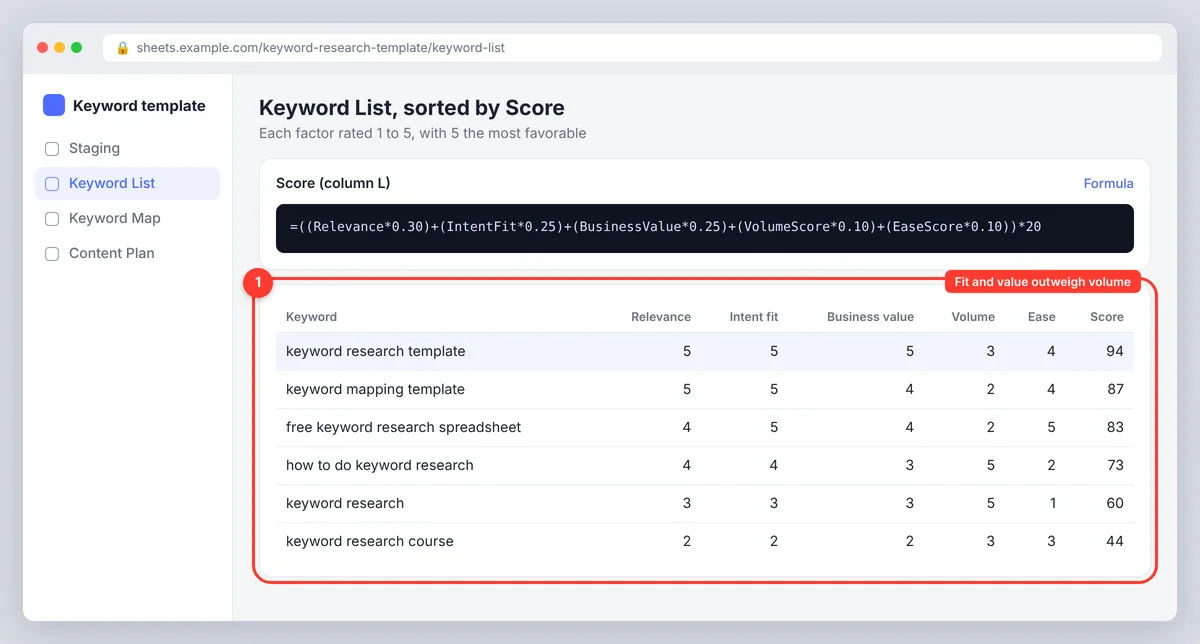
Use a transparent score as a sorting aid, not a promise of rankings. Rate fit, intent match, business value, search volume and keyword difficulty on a 1-to-5 scale, with 5 the most favorable (so rate a very hard KD as 1). Weight business value and fit most heavily, because a high-volume query is worthless if it attracts the wrong audience or never converts.
Score out of 100: =((Relevance*0.30)+(IntentFit*0.25)+(BusinessValue*0.25)+(VolumeScore*0.10)+(EaseScore*0.10))*20. Sort by the result, then sanity-check the top candidates by hand. Startups with little authority should weight ease higher until the site has some rankings; established sites can chase harder terms.
Step 5: Map keywords to existing and planned URLs, and find the gaps
Give each target page one primary keyword and list the closely related keywords as supporting terms. Add the current URL, page type and action: optimize an existing page with on-page SEO, create a page, merge overlapping pages, or investigate. If no suitable URL exists, mark the cluster as a gap rather than forcing it onto an unrelated page. Keyword mapping is what stops two of your pages competing for the same search.
Step 6: Turn the keyword map into a content plan
Move approved clusters into the Content Plan tab with an owner, brief status, deadline and next action. Link pillar pages and subpages where it helps readers move between subjects. When you're ready to write, analyze the primary keyword in SerpPal to get the brief: terms, headings, questions and target length from the pages that already rank. The spreadsheet decides what to write; the analysis decides what the page needs to contain.
Essential columns: search volumes, intent, competitor data and more
Start with columns that answer three questions: what does the searcher want, which page should serve them, and what should you do next?
| Column | What to record |
|---|---|
| Keyword and cluster | The search term, its cluster and any useful modifier |
| Search volume and KD | Tool estimates, source and date collected |
| Intent and cost per click | Likely search goal and the advertising price, where available |
| SERP features | Featured snippet, People Also Ask, video, shopping: what the results page shows |
| Current URL and target page | The page that ranks now and the page that should target the cluster |
| Priority and next action | Your score plus a clear task: update, create, merge or monitor |
Add ranking position or Search Console clicks if you'll use the file to track keyword rankings over time. Local SEO teams add a city column; agencies add the client's CMS and the page template. Avoid columns nobody will maintain; a short, accurate keyword map beats a sprawling workbook full of stale fields.
Excel formulas, tables and filters that save time
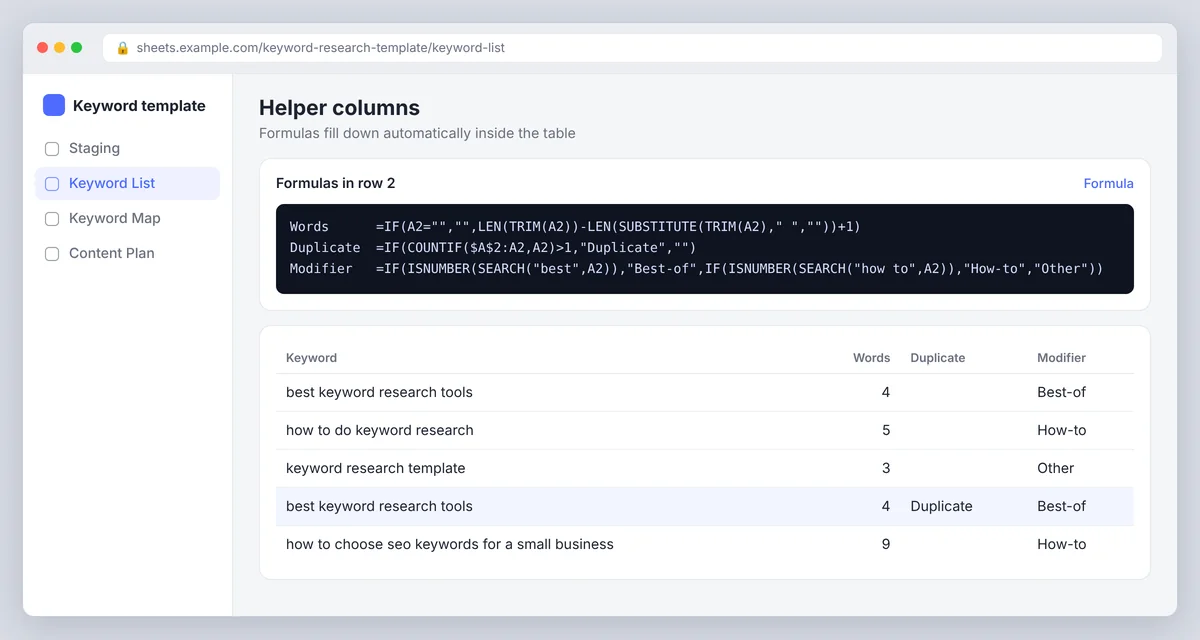
- Word count (long-tail check), keyword in A2:
=IF(A2="","",LEN(TRIM(A2))-LEN(SUBSTITUTE(TRIM(A2)," ",""))+1) - Duplicate check:
=IF(COUNTIF($A$2:A2,A2)>1,"Duplicate","") - Cluster by modifier:
=IF(ISNUMBER(SEARCH("best",A2)),"Best-of",IF(ISNUMBER(SEARCH("how to",A2)),"How-to","Other")) - Unmapped keywords: filter the Target URL column for blanks.
- Volume per cluster:
=SUMIF(ClusterColumn,"Templates",VolumeColumn)
For more advanced grouping, keep a lookup table of cluster labels and use XLOOKUP to fill consistent categories.
Use cases for the template in an SEO strategy
- New site or startup. Select the 20 easiest relevant keywords and map them before writing anything.
- Gap analysis. Paste competitor keywords, filter out the ones you already rank for, and the rest are gaps; this is often where a content strategy finds its next quarter.
- Site audit. Map every existing URL to a primary keyword; multiple pages that share one are cannibalizing each other.
- Agency reporting. One workbook per client, with the Content Plan tab doubling as the monthly deliverable.
- PPC and SEO campaigns together. Ad prices and volume in the same sheet show which keywords are worth paying for while the organic page climbs.
Why keyword grouping and mapping matter
Grouping prevents you creating several pages that compete for the same search. Mapping makes the intended page explicit, so writers and editors know which URL should answer which query. It also surfaces existing content that could be improved before you commission a new page, which is usually the cheaper win. Read more in our guide on what to do after keyword research.
Read keyword metrics carefully
Search volume is an estimate, not a forecast of visits. Keyword difficulty is tool-specific. The cost-per-click figure reflects advertising competition, not organic value. Compare terms within the same source where possible, then judge fit, intent and business value yourself. The insights that matter most, which searches your site already appears for and where it sits on page two, come from Google Search Console, which is free.
Keep the keyword map current (and let AI do the boring part)
A keyword map loses value when it stays static. Review priority pages every few months, or sooner after a major product, site or search change. Refresh Search Console data, check whether mapped URLs still match intent, add new keywords as they appear, and record ranking movement and content updates. If the sheet becomes a chore, an AI-assisted planner that keeps the clusters and the briefs in one project can generate the next batch of ideas and replace the manual export and paste.
Common mistakes with keyword spreadsheets
- Mixing data from different tools in one column. Volumes from two tools aren't comparable. Keep a source column, or one column per tool.
- No date on the numbers. A volume from last year looks just as confident as one from today. Record when you pulled it.
- Too many columns. Every column nobody updates turns stale and makes the rest less trusted. Start with the essentials and add only what you'll use.
- Keywords with no page. A long list with an empty Target URL column is a wish list, not a plan. Map every cluster or mark it as a gap.
- Two pages, one keyword. Sort the Keyword Map by primary keyword; any duplicate is a cannibalization problem to fix.
- Never closing the loop. Add a column for the result (clicks or position after three months) so the sheet teaches you which kinds of keywords work for your site.
Conclusion
A keyword research Excel template is only useful if it leads to pages. Keep it to three tabs: a clean keyword list with sources and dates, a keyword map with one primary keyword per URL, and a content plan with owners and deadlines. Score keywords with a formula you can explain, group them by intent and shared results, and review the sheet every few months. Build it once in Excel or Google Sheets, and it becomes the place where your SEO strategy turns into actionable work.
Frequently asked questions
What is a keyword research template?
A structured spreadsheet for collecting keyword ideas, comparing metrics, grouping related keywords and assigning them to pages. A good one also records decisions and next actions, not just a list of search terms.
Can I use the template in Google Sheets?
Yes. Every formula above works in Google Sheets; XLOOKUP is available in both. Sheets is easier to share with a team, Excel handles very large keyword exports faster. If you keep an FAQ tab for the questions you find, both work the same.
What is keyword mapping and why does it matter?
Keyword mapping assigns a primary keyword and supporting terms to a specific URL. It gives every page a clear search target, reduces overlap between pages and shows where existing content needs an update or a new page is justified.
How do I choose keywords?
Choose terms that match your offer, audience and likely intent. Check the search results, compare volume and difficulty from a consistent source, and favor queries where your site can give a genuinely useful answer.
Is there a free keyword research tool to fill the template?
Google Keyword Planner and Google Search Console are free. SerpPal's Content Planner, which every plan includes with a monthly number of keyword plans, groups ideas into clusters with volume, difficulty and intent so the sheet fills itself. The best keyword research tool is the one whose numbers you record consistently.