On this page
- SEO basics first: goals, audience and keyword relevance
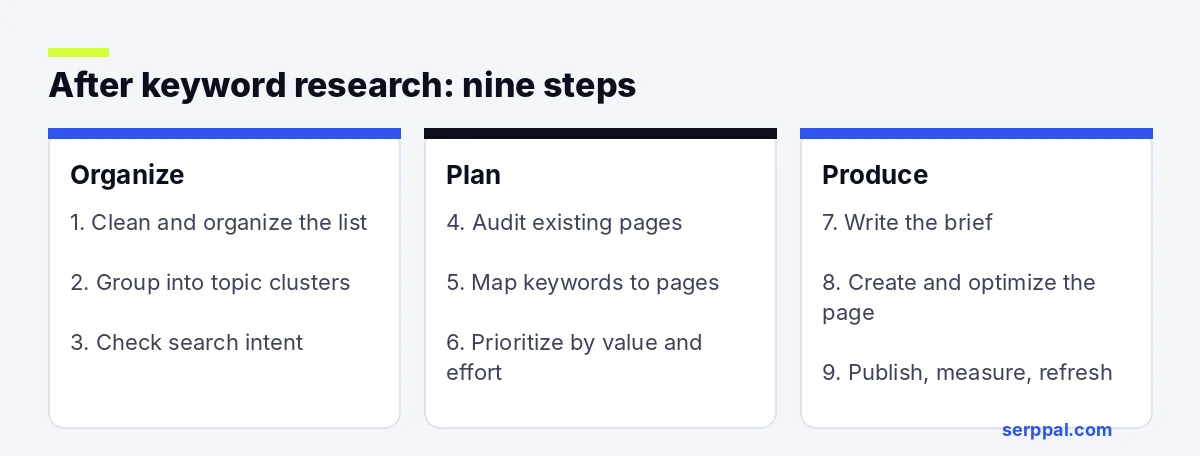
- Step 1: Clean and organize your keyword research
- Step 2: Group keyword ideas into topic clusters
- Step 3: Check search intent before choosing a page type
- Step 4: Audit existing pages before creating new ones
- Step 5: Assign keywords to pages and URLs
- Step 6: Prioritize keywords by value, effort and traffic
- Step 7: Turn each target page into a content brief
- Step 8: Create and optimize the page for search engines and readers
- Step 9: Publish, measure and refresh
- Common mistakes after keyword research
- Example: from keyword cluster to published page
- Conclusion
- Frequently asked questions
What to do after keyword research is the question that turns a spreadsheet of keyword ideas into an SEO plan. The short version: clean and organize the list, group related keywords, check search intent, audit what you already have, map each keyword to a page, prioritize by value and effort, write a brief, create and optimize the page, then publish and track it. This guide walks through those nine steps with a worked example at the end.
Key takeaways
- A list of keyword ideas isn't a content strategy. Decide which searches matter to your business before you decide what to write.
- Group keywords by what the SERP shows, not by shared words. One page per intent.
- Audit existing pages first. Updating a page that already gets impressions usually beats a new page.
- Every target page gets one primary keyword, a set of supporting terms and a brief.
- Track impressions, clicks and conversions after publishing, and refresh pages when the data says so.
SEO basics first: goals, audience and keyword relevance
Before sorting keywords, decide what the SEO work should support. A software company might want product trials, a local service business needs calls, a niche publisher cares about returning readers and organic traffic. That goal changes which topics deserve attention: a high-volume search can bring visitors nowhere near buying, while a smaller long-tail keyword attracts people comparing solutions.
The role of keyword relevance
Write down the audience, the problem they're solving and the next step you want them to take. This note is your relevance test later, when search volume and difficulty make a topic look tempting. Judge each keyword on business fit, search demand, likely outcome, your ability to compete and the production cost. Think about ROI as benefit against effort, not volume alone; CPC hints at commercial interest but reflects advertising conditions, not organic conversions.
Step 1: Clean and organize your keyword research
Your keyword research tools, from Google Keyword Planner to a content planner, will have handed you hundreds of seed keywords and expansions. Keyword research is messy by nature; the keyword list you keep should not be. Remove duplicates, misspellings that don't represent a distinct need, and terms your site can't address. Keep useful variants, but don't treat every wording difference as a separate page. Then add columns for topic, search volume, keyword difficulty (KD), current ranking URL, intent, business fit and planned action, plus the data source and date. If you don't have a sheet yet, our keyword research template has the layout and formulas.
Read search volume, difficulty, PPC data and other metrics together
Search volume is an estimate, and tools calculate it differently. A low number doesn't make a keyword a poor choice if it has clear transactional intent. Keyword difficulty estimates how hard ranking may be, usually from the authority and backlinks of the top-ranking pages; treat it as a comparison aid, not a verdict. A new site may find low-difficulty, narrow topics more practical than head terms; an established domain has room for competitive keywords. Keyword difficulty also affects PPC: the terms that are hard to rank for organically tend to be the expensive ones in Google Ads, which is one more reason to let long-tail keywords carry the early traffic while the head terms build.
Filter the list in Ahrefs, Semrush or a free tool
If your keyword research tools include Semrush or Ahrefs, use their filters before you export. Semrush's Keyword Magic Tool and Ahrefs' Keywords Explorer both let you filter by search volume, keyword difficulty, intent, CPC and words to include or exclude. A few filters save hours: exclude brand names you don't sell, cap keyword difficulty at a level your domain can compete for, and move question keywords to their own tab for FAQ sections. Export once, then do the rest in your sheet. With free SEO tools only, apply the same filters in the spreadsheet.
Free SEO tools cover more than people expect. Google Search Console shows searches that already bring impressions or clicks. Google Keyword Planner supplies ideas and advertising-oriented estimates. Google Trends shows whether interest is seasonal or changing, and Google Autocomplete shows the phrases people type next.
Step 2: Group keyword ideas into topic clusters
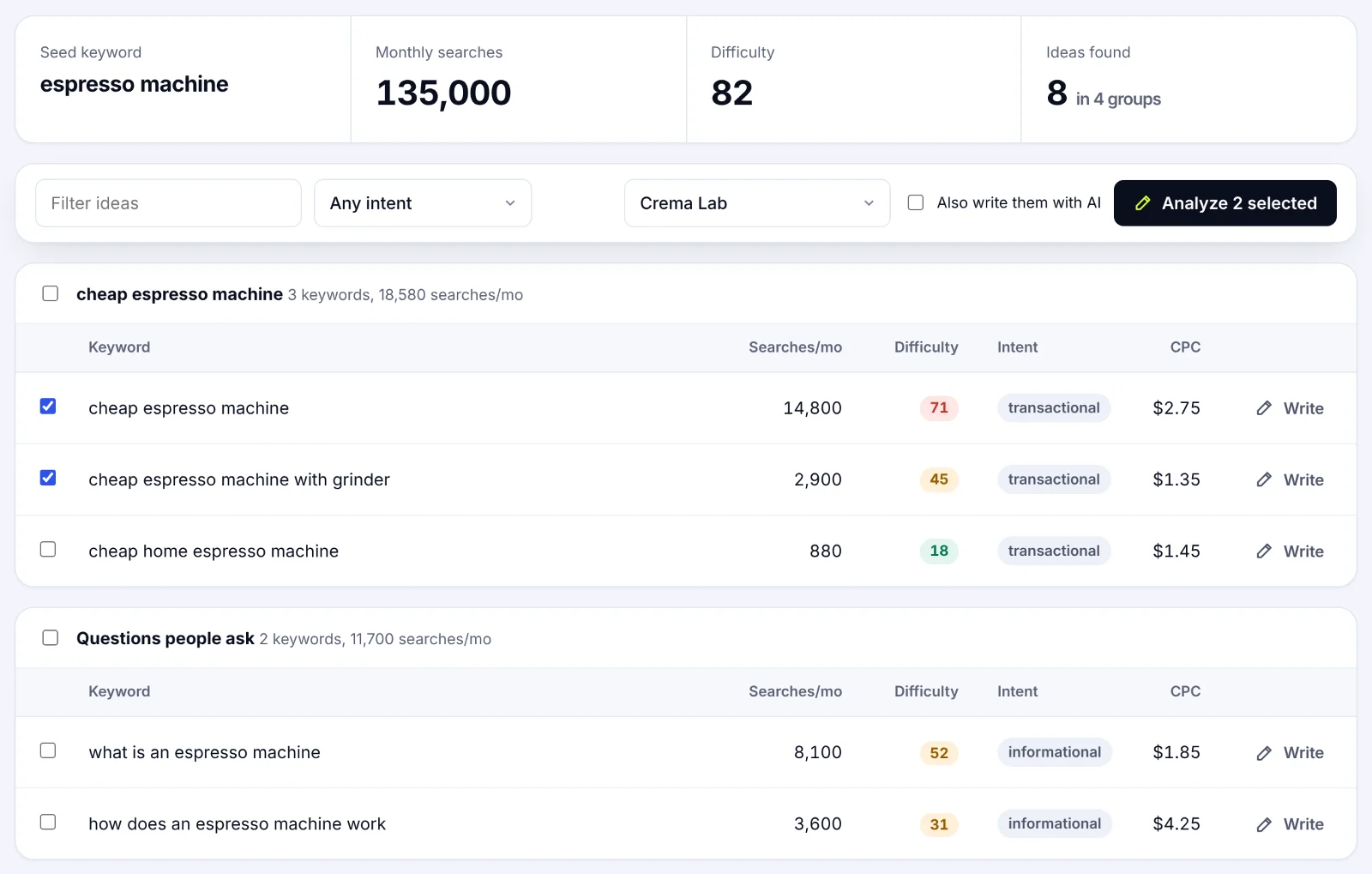
Most clusters grow from one of your seed keywords. Keyword clustering means grouping keyword ideas that one page, or a set of closely connected pages, can answer. Clusters are also how you build topical authority: Google learns that your site covers a subject in depth when the pages link to each other. A cluster about home espresso machines might include a buying guide, a comparison of machine types and a maintenance guide. Those belong together as a topic, but not on one page.
Add a cluster column and assign a tentative parent topic to each term. When a keyword could fit two groups, settle it by analyzing the Google results: if the same top-ranking pages appear for both searches and serve the same purpose, one page can target both. If the results show different formats or audiences, plan separate pages even when the words look alike. Record the date you checked, because search results shift.
Step 3: Check search intent before choosing a page type
Search intent is the purpose behind a search query, and a useful page in the wrong format struggles to rank in search engines. Four types cover most searches:
- Informational keywords: the searcher wants to learn or solve a problem. Guides, tutorials, explainers. Most long-tail keywords are informational.
- Navigational intent: they want a specific site or brand. Usually not a target unless it's your brand.
- Commercial investigation: they're comparing options. Comparisons, reviews, category pages.
- Transactional keywords: they're ready to buy or sign up. Product, service and landing pages.
A single keyword can carry mixed intent, so look at what Google rewards: lists, videos, maps, product listings, featured snippets, forums. Those SERP features tell you what searchers want and how they prefer to get it. If every leading result is a product comparison, an opinion essay on the topic won't match.
A short case study in intent mapping
A company selling home espresso machines researches "espresso machine for beginners", "best espresso machine for beginners" and "how to use an espresso machine". The first two show comparison pages in the results, so they share one page. The third shows tutorials and videos, so it gets its own. Mapping intent before writing saved them from a buying guide that tried to be a manual as well, and ranked as neither.
Step 4: Audit existing pages before creating new ones
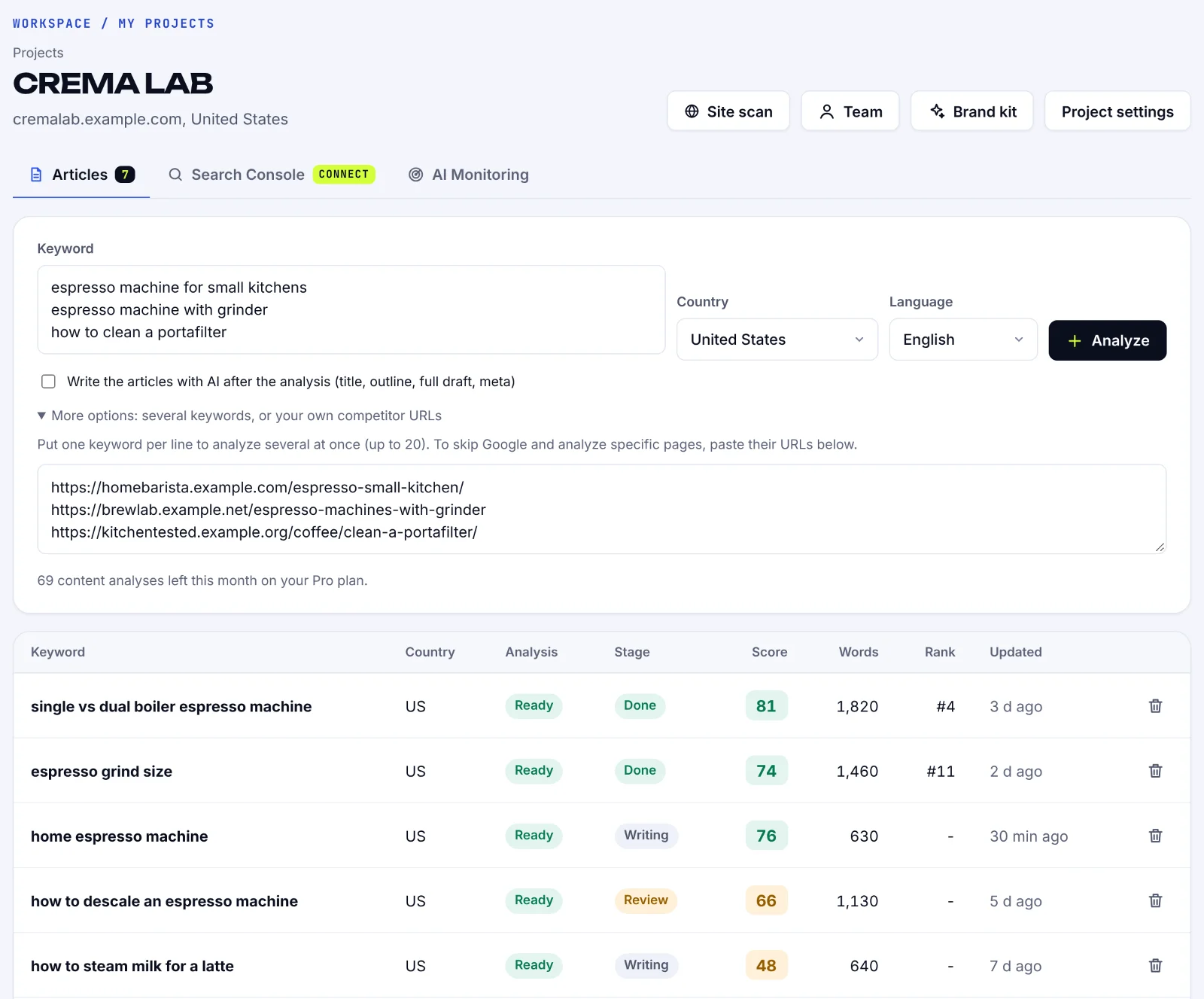
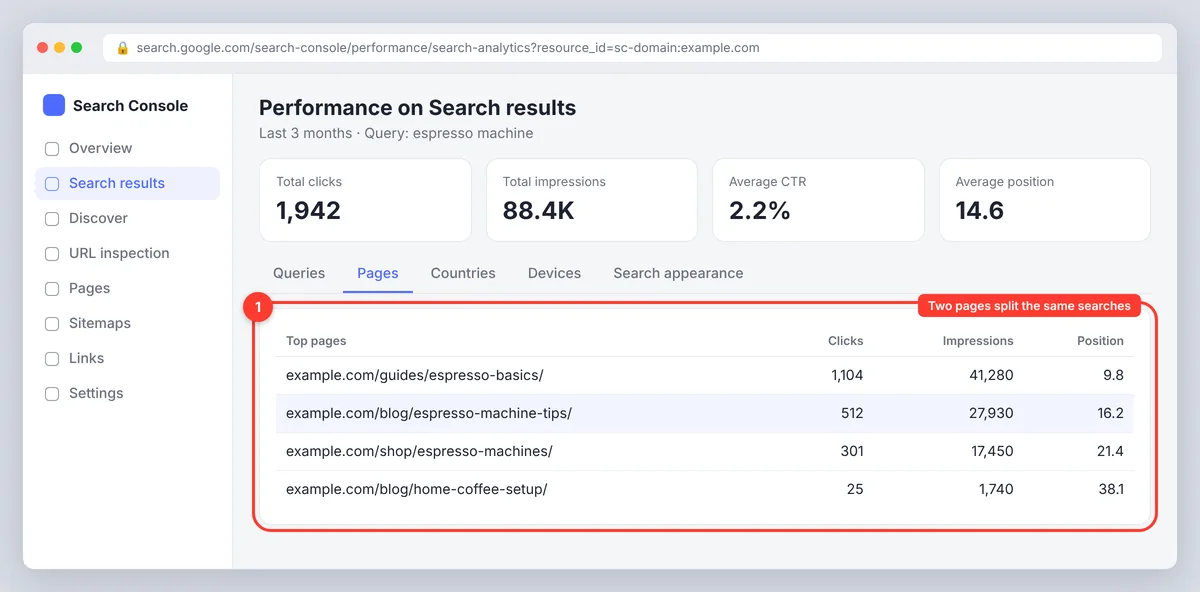
Before commissioning a page, check whether your site already has one that could answer the search. A page may rank for relevant phrases without using your preferred keyword in its title, or need one clearer section. Google's performance report shows which searches bring impressions and which pages appear for them; pair it with a site:yourdomain.com topic search. Check old blog posts, help articles and category pages, not just the blog archive.
Spot cannibalization and content gaps
Keyword cannibalization happens when multiple pages target the same need and split visibility. Check whether they serve the same intent and rank for overlapping searches. If so, update one, merge the useful material into the strongest URL and redirect the retired one. A content gap is a useful question your site doesn't answer well. A gap analysis against competitors' keywords, the ones they rank for and you don't, helps you find them, but their coverage isn't proof you should publish the same page.
Step 5: Assign keywords to pages and URLs
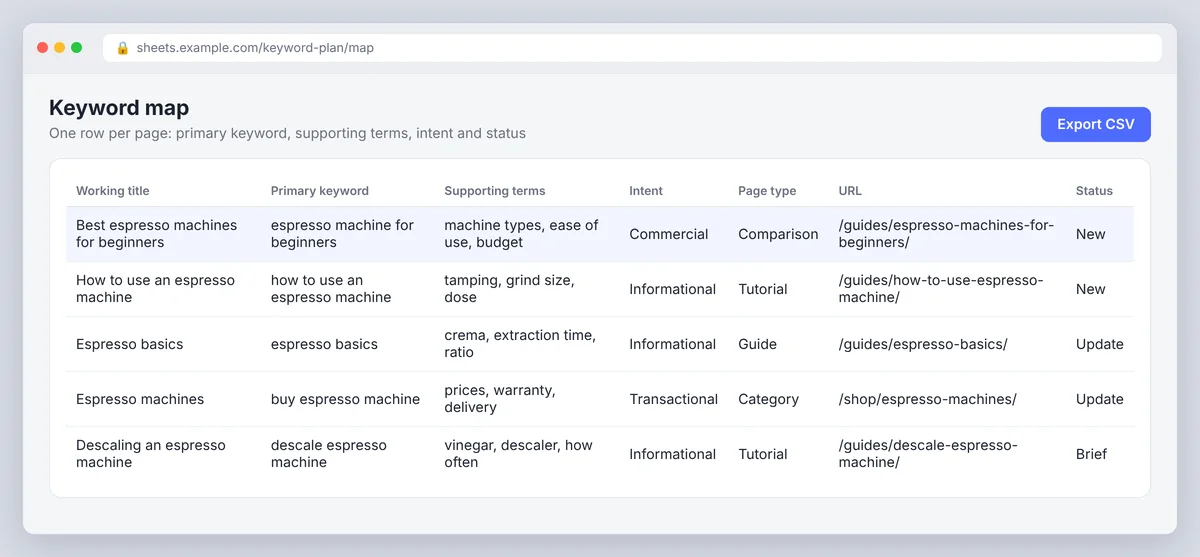
Give every planned page one primary keyword and a set of supporting terms, and keep the keyword list and the page list in the same workbook. One row per page: working title, primary keyword, supporting terms, intent, page type, URL and status. Writers and editors can then see which page owns which topic. Keep the address short and descriptive, using the words that identify the topic rather than every keyword variation.
Update or create?
Update an existing page when it already serves the same audience and intent but lacks detail, structure or current information. A page with impressions is a stronger starting point than a new one. Create a new page when the keyword is a distinct need, the existing page serves a different intent or the topic deserves a standalone resource in the content strategy. If two pages have nearly identical goals, consolidate or differentiate them.
Step 6: Prioritize keywords by value, effort and traffic
A keyword strategy usually holds more opportunities than a team can publish well. Prioritizing is the step most teams skip. Weigh business relevance, likely traffic, difficulty score, conversion value and the effort to make a strong page. A simple score helps as long as it supports judgment rather than replacing it; add a note explaining each score.
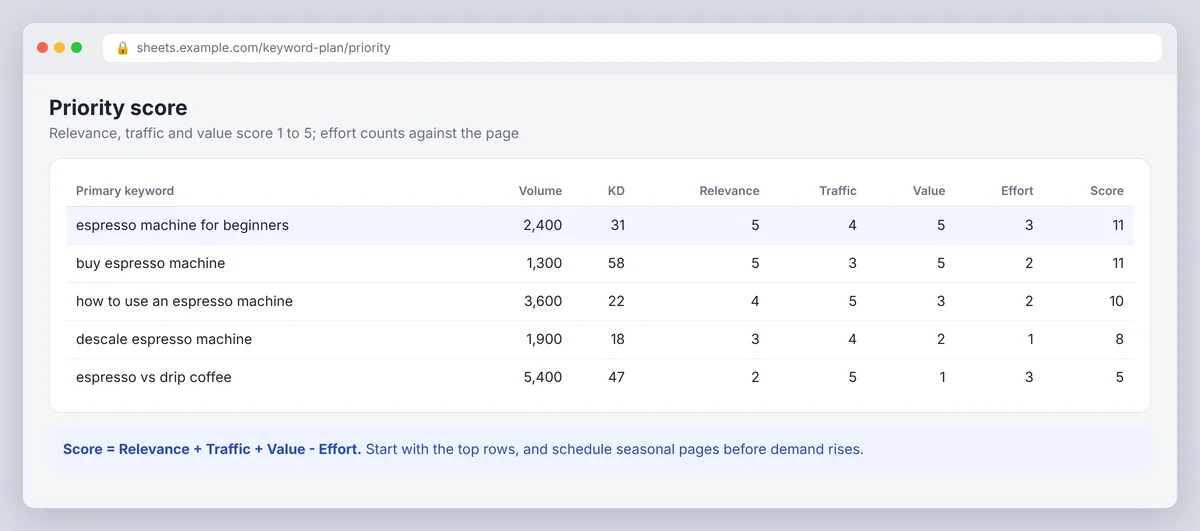
Consider timing: a seasonal page needs to go live before demand rises. And balance competitive keywords with achievable ones. Long-tail keywords describe narrower needs, face fewer strong competitors, and often convert better despite lower traffic. Marketers get the best results from a queue that mixes a refresh of a page already getting impressions, a focused guide filling a clear gap and one broader topic that builds authority over the long term. Clusters in a new language or country are how you enter new markets and increase exposure without a whole new content strategy.
Step 7: Turn each target page into a content brief
A brief turns the plan into instructions a writer can use: who the page is for, what they need, what it must cover and what it shouldn't claim. Include the primary keyword, supporting terms, intent, page type, audience, desired next action, likely questions, trusted sources, internal links and any details that need expert review.
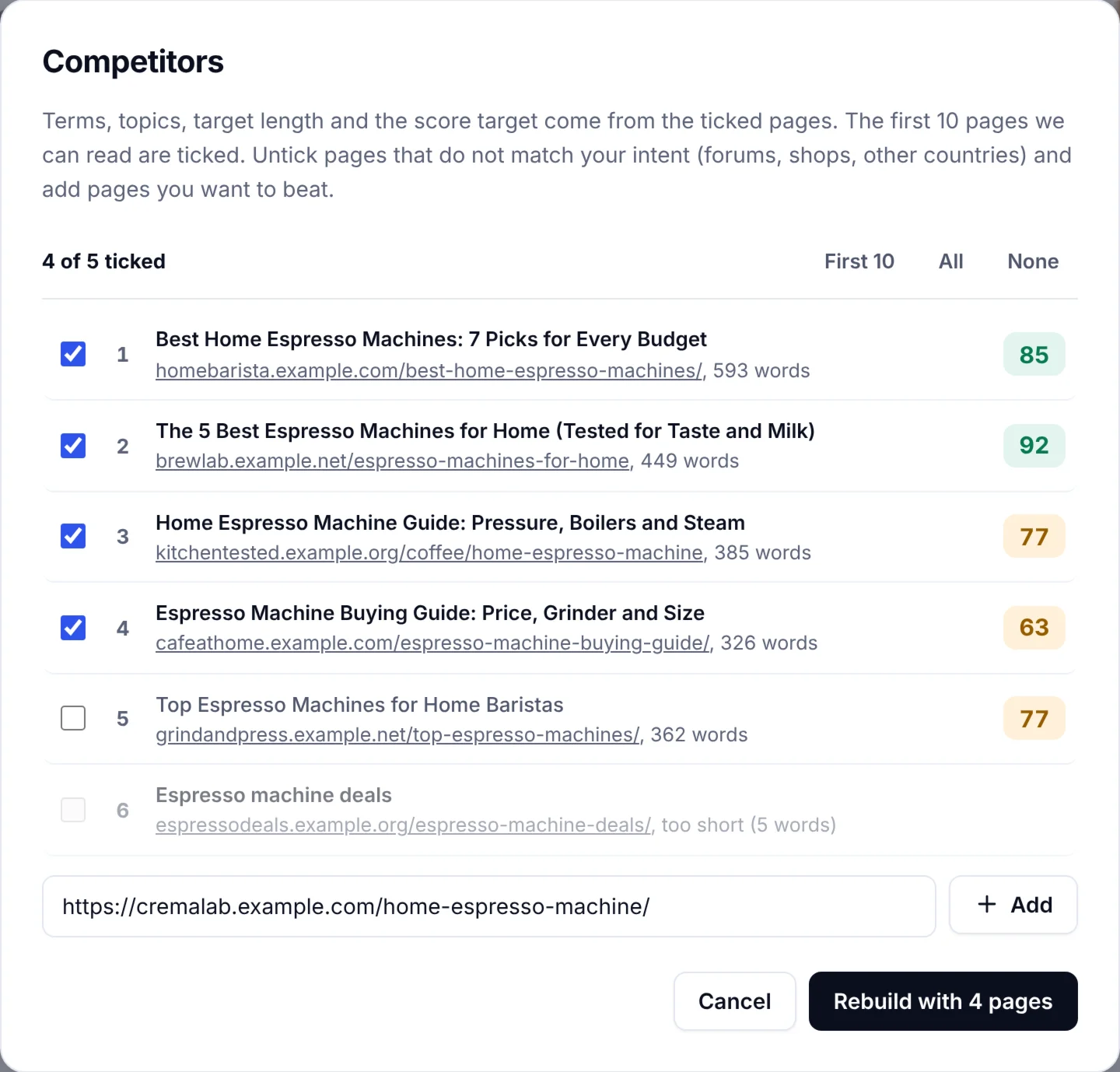
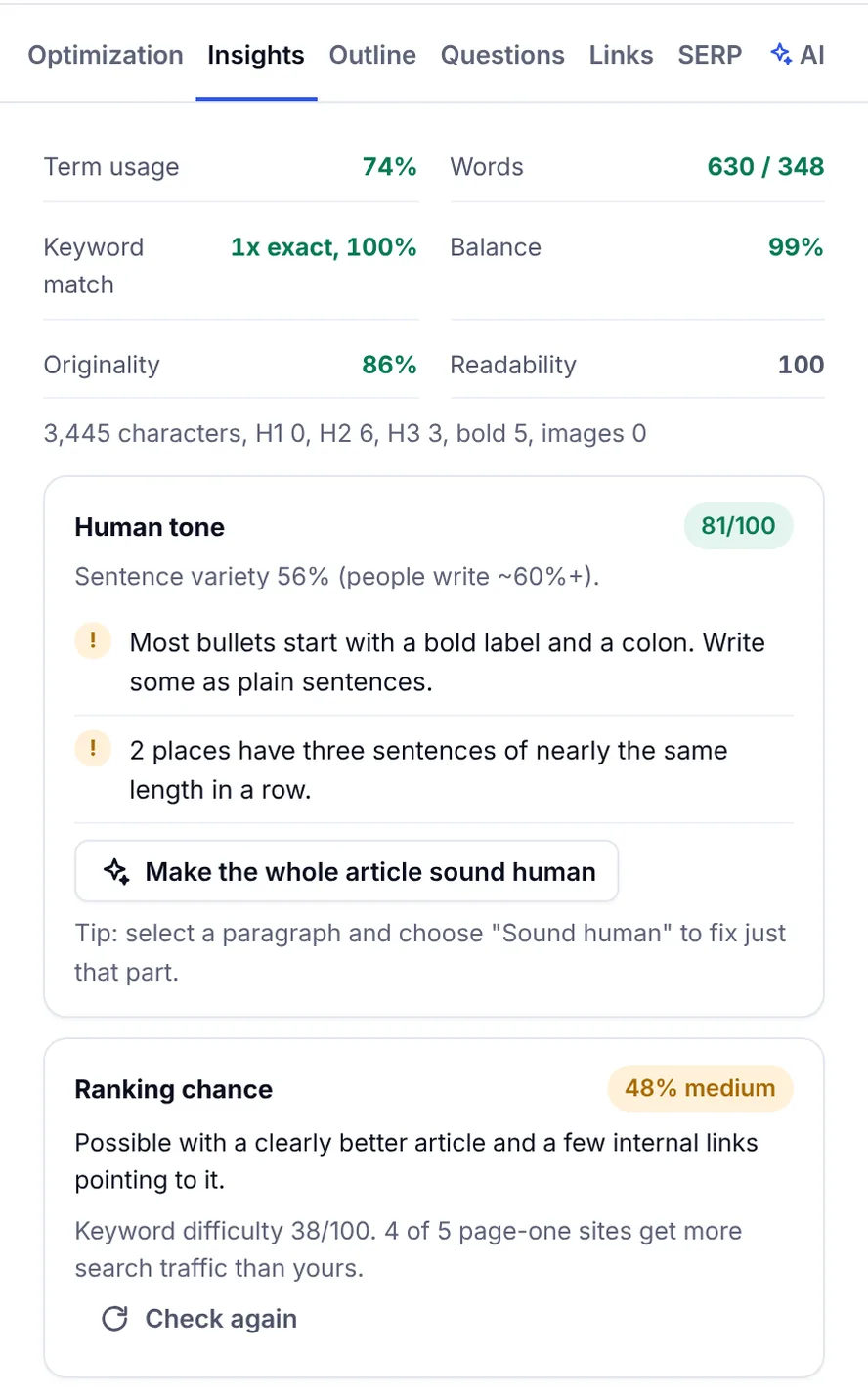
The fastest way to build the brief is to analyze the primary keyword against the pages that already rank. SerpPal's analysis gives you insights the keyword tools don't: the terms top pages share, their headings, the questions people ask and a target length, and the editor scores your draft against them as you write. That's the hand-off from research to writing, and it's where most of SerpPal's features live.
Use AI tools without letting them set the strategy
AI tools help here. An LLM such as ChatGPT, Claude or Gemini can sort notes into themes, generate questions for brainstorming or draft an outline from a prompt. It can't decide which topic matters most to your business (even with a careful project set-up and a framework prompt), confirm what Google rewards today or verify claims. Give it the brief, use what helps, and check everything against the results and your own knowledge. The editor makes the final calls on intent, evidence and structure.
Step 8: Create and optimize the page for search engines and readers
Write to satisfy the searcher's need, not to repeat an exact phrase a fixed number of times. Use the primary keyword where it reads naturally and explain related ideas in your audience's language. Give the page a descriptive title, a clear H1, section headings that help readers find answers, a concise meta description and images only where they clarify. Name sources for important facts and show why you're qualified to answer.
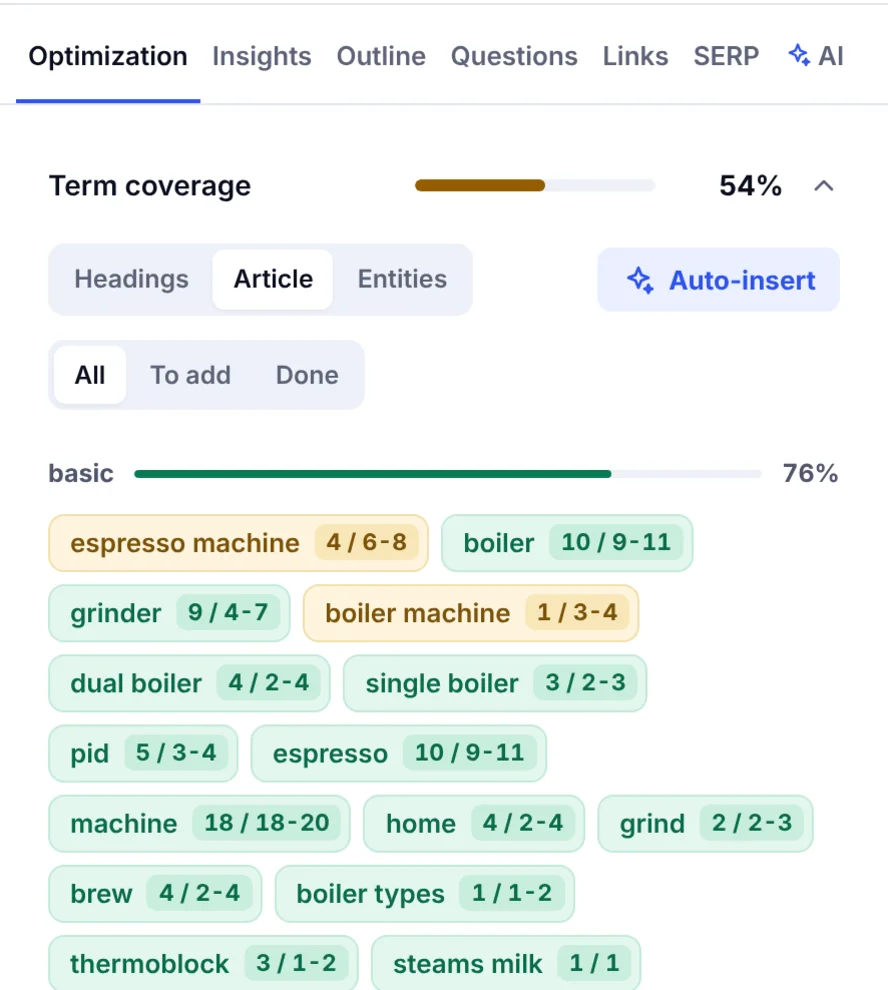
On-page SEO and term optimization is a check, not a goal: review the draft for thin sections, unsupported claims and missing questions, and use a terms list to notice concepts you haven't covered, without adding a term just to satisfy a tool. Our guide on how to write SEO content that ranks covers the writing itself.
Build internal links between related pages
Link pages that genuinely help a reader move to a related question or next step: a broad guide to a detailed comparison, the comparison to product pages. Write anchor text that describes the destination and vary it. Make sure important pages get links from relevant parts of the site, not only the sitemap; a page buried four clicks deep is hard for visitors and crawlers to find.
Step 9: Publish, measure and refresh
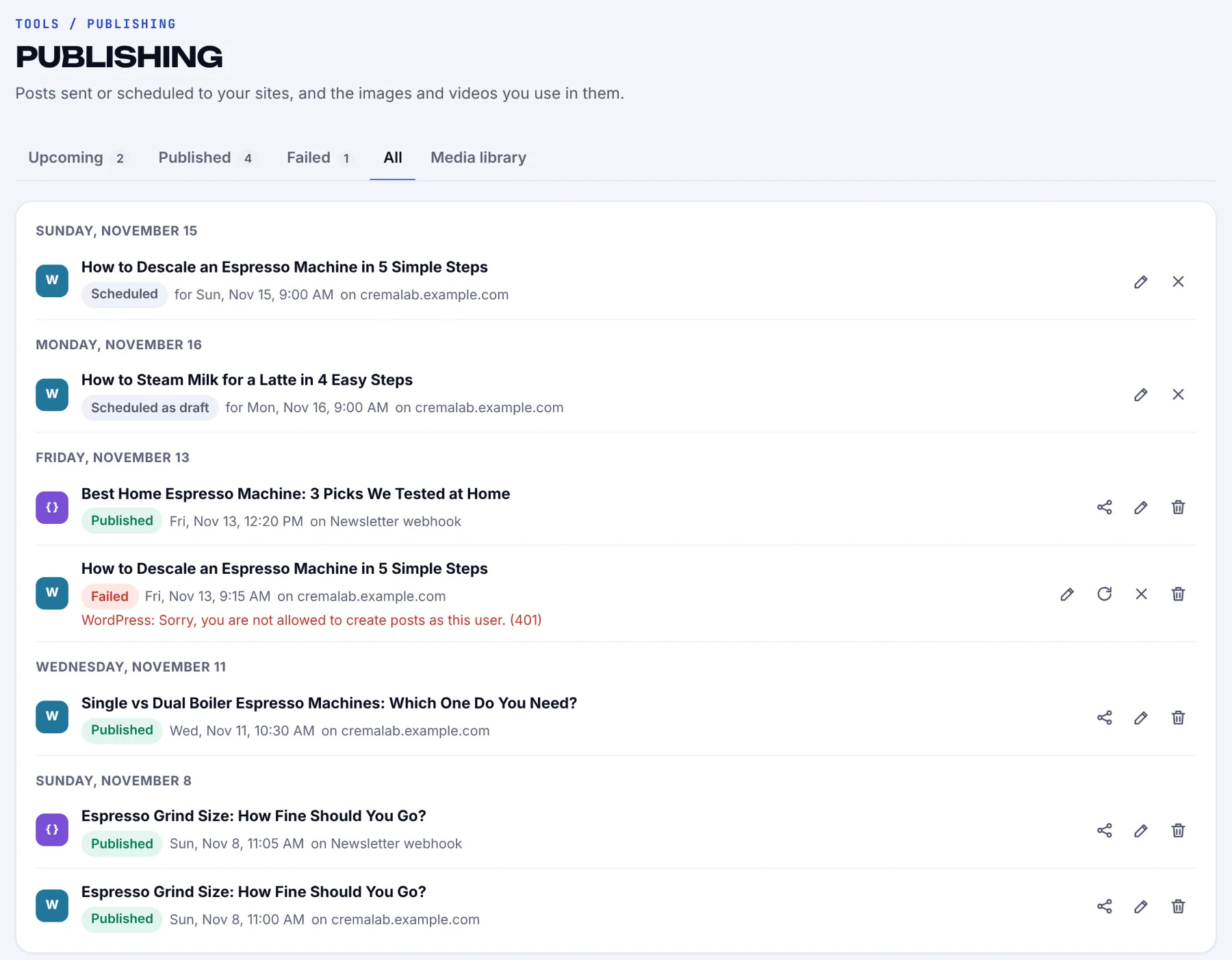
Before publishing, confirm the page is indexable, displays well on mobile, loads quickly and has the right canonical tag and sitemap entry. After launch, monitor impressions, clicks, searches and average position in Google Search Console, and engagement and conversions in Google Analytics. Rankings are noisy, so use a sensible time window and compare like periods.
Track the page's real goal alongside search metrics. A page can gain visibility without leads, or bring fewer visits but better inquiries. Refresh a page when its information dates, the results change or it earns impressions for relevant searches it only answers briefly. If a page stalls, diagnose before rewriting: is the intent right, the coverage complete, the title accurate, the internal linking in place? Set a review date when you publish.
Set realistic expectations
SEO results don't arrive on a schedule. Timing depends on competition, site history, content quality, technical health and links. Look for early signs (indexing, impressions, relevant queries) before expecting stable rankings, and don't rewrite a new page every few days because its position moved.
Common mistakes after keyword research
- Chasing search volume alone. A high-volume keyword with the wrong intent brings traffic that leaves. Check intent and business fit first.
- One page per keyword variation. Search engines understand close variants. Ten pages for ten wordings of the same informational query split your rankings.
- Ignoring keyword difficulty on a new domain. Start with long-tail, low-difficulty topics and build topical authority before going after head terms.
- Skipping the brief. Without one, writers guess what to cover, and the draft misses questions the top pages answer.
- Never measuring. Without Search Console metrics and organic traffic data, you can't tell which keyword research decisions worked.
Example: from keyword cluster to published page
Back to the espresso company. It assigns the comparison cluster to a new page, /guides/espresso-machines-for-beginners/, with "espresso machine for beginners" as the primary keyword and machine types, ease of use and features to compare as supporting terms. The brief says the audience is new to home espresso, the page should help them compare, and the next action is to view suitable machines.
The writer analyzes the keyword, follows the outline the top pages share, adds the company's own buying criteria and verifies product details. After publication the team links to the page from its coffee-making guide and the product category, records the launch date and watches the search data. When the page starts earning impressions for a maintenance question, they add a section, then plan the separate tutorial.
Conclusion
Keyword research for SEO ends with a list; the work that moves rankings starts after it. Organize, group, map, prioritize, brief, write, publish, track. Do those nine steps for ten keywords and you'll learn more than researching a thousand. When you're ready for the brief and optimization steps, analyze your first keyword in SerpPal and let the content score show what the ranking pages cover.
Frequently asked questions
What is keyword research, in one sentence?
Finding and evaluating the words people type into Google and other search engines so you can decide which topics to cover, in what format and in what order.
What are the best keyword research tools after the research is done?
The performance report in Search Console, for the searches your site already appears for, and a content analysis tool that turns a keyword into a brief from the ranking pages. The research tools got you the list; these two turn it into pages.
What should I do when I've already covered many topics?
Audit before you publish. Look for outdated information, thin answers, overlapping intent and impressions for searches a page doesn't address clearly. Improving or merging existing pages is often more useful than another broad post.
Which matters more, search intent or search volume?
Intent, as the first filter: it decides what kind of page can satisfy the search. Volume estimates demand. A relevant keyword with modest volume and clear intent beats a broad phrase that attracts the wrong visitors.
Why is keyword research important for an SEO strategy?
It tells you what your audience searches for and in which words. Without it, an SEO strategy guesses at topics. With it, every page has a target query, a reason to exist and a way to measure success in Search Console.
How often should I revisit keyword research?
When priorities, products or performance change, or at the start of each content cycle. Add new findings to the right cluster and decide whether they call for an update, a new page or nothing.