On this page
- What an AI watermark detector can and can't detect
- How to check content by format
- Choosing an AI watermark checker: SynthID, C2PA and other approaches
- Can AI watermarks be removed or bypassed?
- Legislation and policies
- Watermark detection results: limits and how to read them
- Conclusion
- Frequently asked questions
An AI watermark detector looks for a specific signal that an AI company placed inside an image, an audio clip, a video or a piece of text. It can confirm that a known signal is present, but it can't prove who made a file, and "no watermark found" never proves a human wrote it. This guide explains what these tools can detect, how to check each format, how hidden characters differ from a real watermark, and what you can and can't remove. It also covers how watermarking works in Google Gemini, ChatGPT and other tools.
Key takeaways
- Watermark detection looks for a known signal. A general AI detector looks for patterns AI text tends to have. They answer different questions.
- Google SynthID watermarks and C2PA Content Credentials are the two systems you'll meet most often, and they work in different ways.
- Hidden Unicode characters in text are not a watermark. You can strip them in seconds, and doing so changes nothing about a statistical text watermark.
- A negative result is inconclusive, and a high AI detection score is a probability, not proof. Edits, cropping, compression and screenshots all weaken signals.
- Check the privacy terms before you upload anything sensitive to a third-party service.
What an AI watermark detector can and can't detect
An AI watermark is information added to content when a model generates it. Image generators such as Imagen, DALL-E, Midjourney or Stable Diffusion can embed the signal in the pixels. Audio tools such as Suno can hide it in the waveform. Language models can carry it in their word choices, as a token-level pattern. Together these methods are called digital watermarking, and they're different from the metadata fingerprints a file may also carry.
A detector can only find signals it was built to recognize. It can't identify every piece of AI-generated content, and it usually can't name the person or the tool behind a file unless provenance data is attached as well.
This is the big difference from a general AI detector. A classifier like that reads the writing itself and estimates how likely it is that a model produced it. It never looks for a hidden mark, so its score is an estimate of AI detection, not a verification of a watermark. SerpPal's free checker works this way: it looks for patterns AI text tends to have and highlights the sentences that read most machine-made. You can read how that kind of check works in our guide to how AI detectors work.
Embedded signals, statistical patterns and hidden Unicode
There are three things people call "AI watermarks", and mixing them up leads to bad decisions.
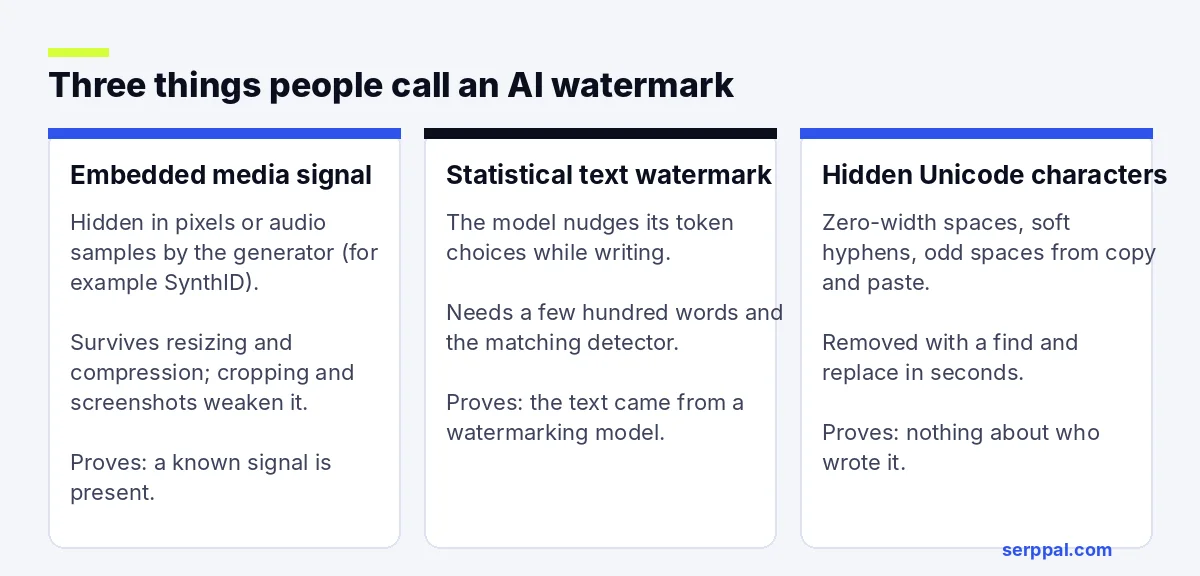
- Signals in media. A watermarking system changes pixels or audio samples in a way your eyes and ears can't notice. The signal is designed so it survives resizing or JPEG compression, but heavy cropping, filters or a screenshot can weaken or destroy it.
- Statistical text watermarks. The model nudges the probability of certain token choices while it writes. Over a few hundred words those token choices form a pattern that a matching detector, and only that detector, can detect. Research by Kirchenbauer and colleagues at the University of Maryland describes the approach, and Google's SynthID-Text is a shipped example. Not every provider uses one, and no public tool can verify text from every model.
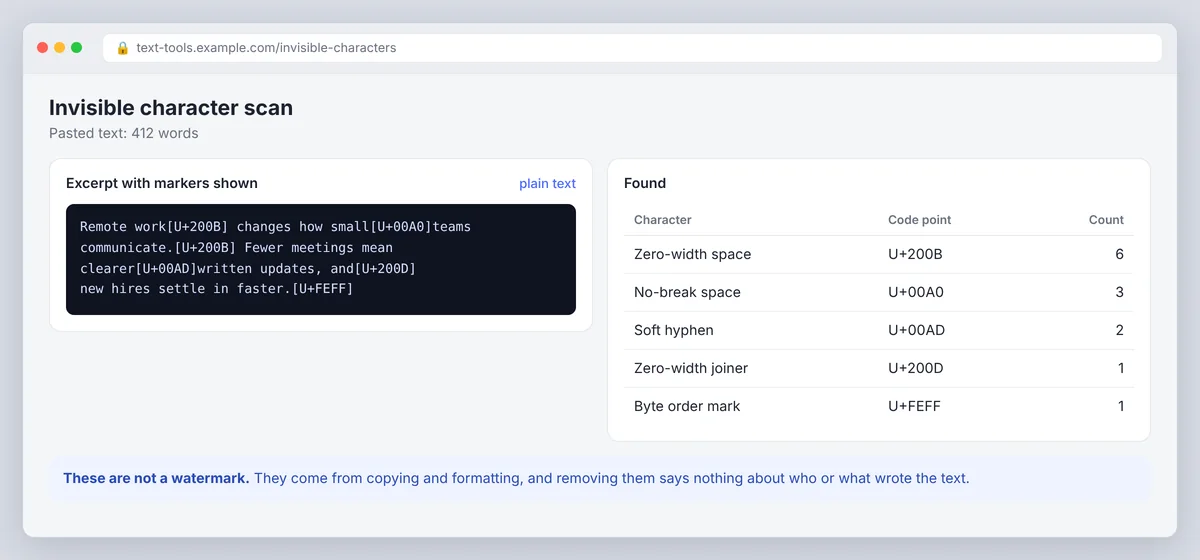
- Hidden characters. Zero-width spaces, zero-width joiners, soft hyphens and unusual spaces are invisible Unicode characters. They can land in text through formatting, copy and paste, or a deliberate trick. They are not a watermark in the cryptographic sense, and their presence doesn't establish that an AI wrote the text.
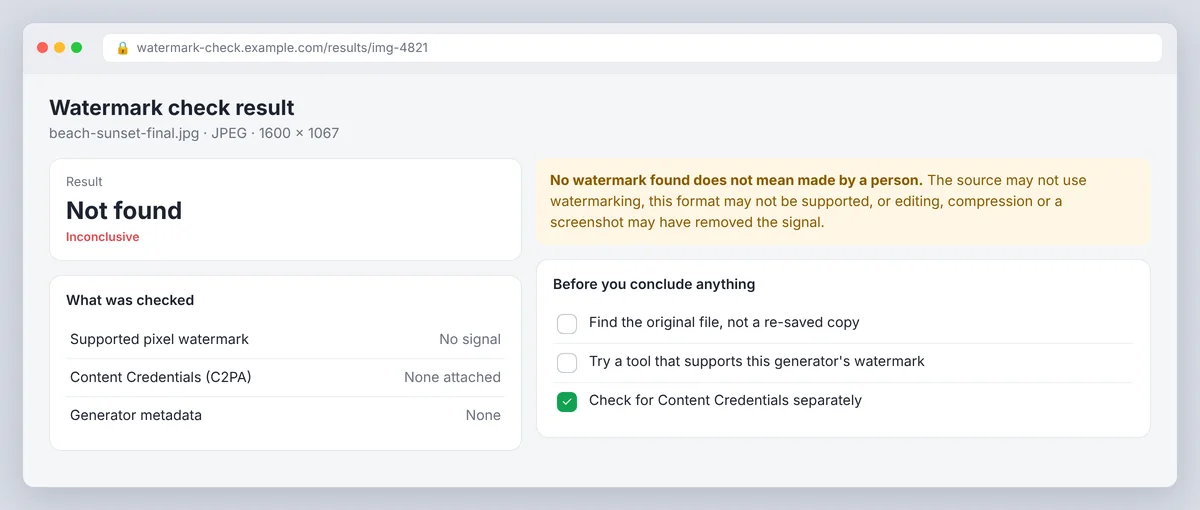
What "no watermark found" means
It means the tool didn't find a signal it could verify in what you submitted. The source may not use watermarking at all, the tool may not support that format, or editing and compression may have degraded the signal.
So a clean result is inconclusive, not a certificate of human authorship. False positives happen too. Every detector has a false-positive rate, and the evidence a tool shows matters more than a bare score or a one-word verdict.
How to check content by format
Start with the original file whenever you can. A screenshot, a pasted excerpt or a converted copy may have lost the signal or the metadata the detector needs.
The workflow is the same for every format: confirm the tool supports your file type, upload the original or paste the full text, read what the result actually says it checked, and save the report with the file name and date if you need to share your findings.
Images and photos
For AI-generated images, use a tool that explicitly supports the relevant watermarking system and the image format. Upload the original, review the evidence it reports, and note whether it checked embedded pixels, metadata, or both. EXIF and IPTC metadata can name a generator, but metadata is stripped by most social networks and is trivial to delete, so it's the weakest evidence you have.
Don't assume one tool can scan every image made with Gemini or another generator. A picture can be AI-generated without any supported watermark, and a JPEG conversion, crop or screenshot can break detection. If all you have is a screenshot, try to get the source image and test that too.
Text, ChatGPT text and Claude text
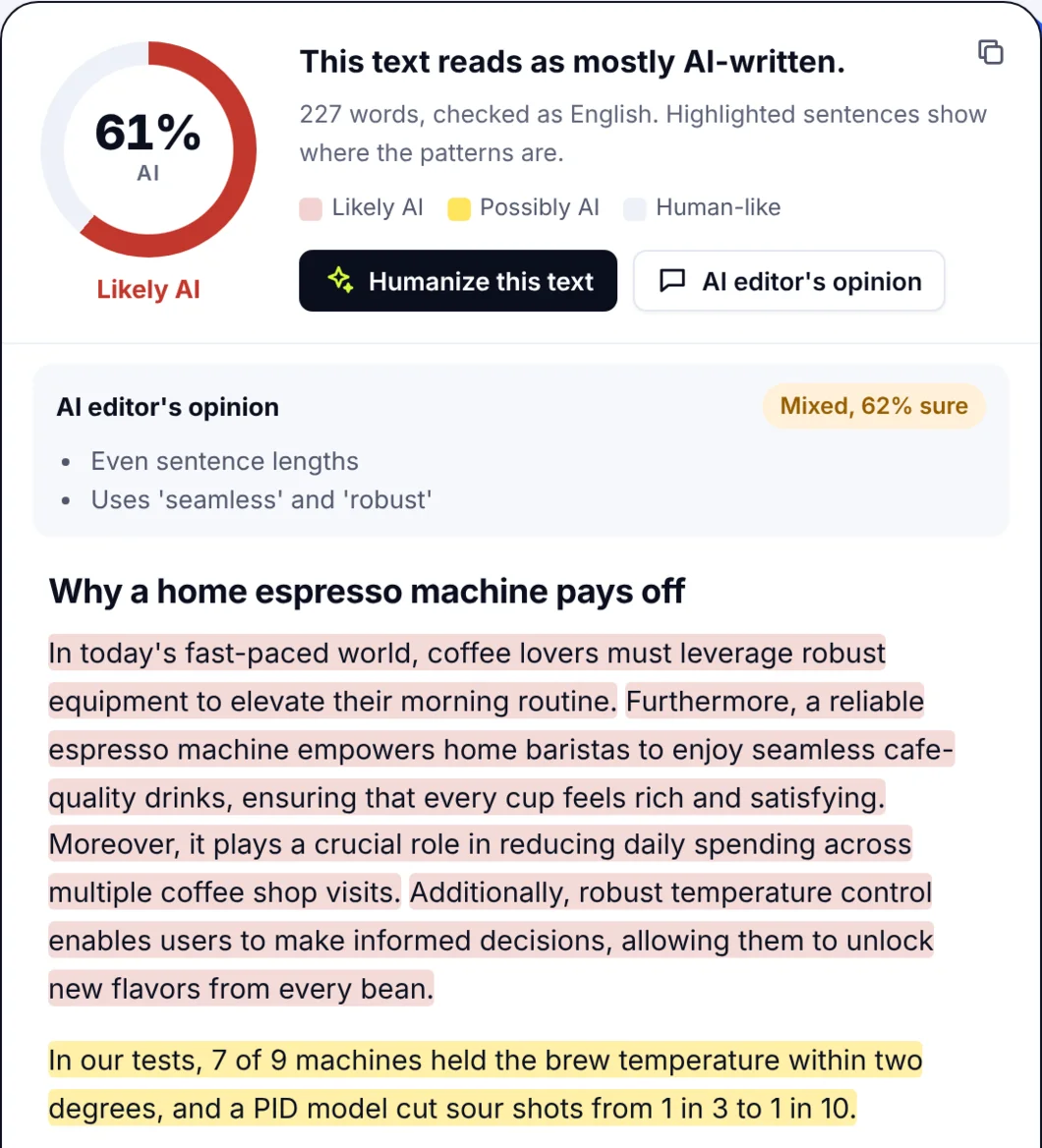
For text, first decide which question you're asking. Are you checking for a specific statistical watermark, or estimating whether a model wrote it? Public tools can't reliably confirm ChatGPT or Claude authorship through a watermark, because OpenAI and Anthropic haven't released public text watermark detectors. What you can do is run the text through a classifier and treat the result as a probability, not proof.
Paste enough original text for the tool to work with, at least a few paragraphs. A single sentence or a heavily edited passage tells you very little. SerpPal's AI checker needs at least 40 words and shows which sentences pushed the score up, which is far more useful than a bare percentage.
Hidden characters in text
Copying text between apps can add invisible characters. To find them, paste the text into a plain-text editor that shows non-printing characters, or search for the common ones: U+200B (zero-width space), U+200C and U+200D (zero-width non-joiner and joiner), U+2060 (word joiner), U+FEFF (byte order mark) and U+00AD (soft hyphen).
To remove them, run a find-and-replace on each code point, or paste the text through a plain-text field that drops them. Then check the cleaned text and compare the score with the original. Remember that this cleanup says nothing about whether a statistical watermark was ever there.
Audio and video
Use a tool that names audio or video as a supported format. An image detector won't automatically inspect a soundtrack. Submit the original MP3, WAV or video file when possible, because extracting audio, changing codecs or exporting a clip can alter the signal.
For video, check whether the service scans frames, audio, or both. A clip can carry different evidence in its picture and its sound, so one result may not cover the whole file.
Google Docs, Word files and PDFs
A document can be checked three ways: its text, its metadata and the images inside it. These are separate checks. To test the text, copy it into a plain-text field or export the document to a supported format. To test an image inside a document, extract the original image and check it on its own.
For a PDF, try selecting and copying the text first. If it's a scanned PDF, run optical character recognition to extract the text, but remember OCR creates a new copy and can't bring back an image watermark lost in scanning. Word files and Google Docs also carry metadata, and metadata alone never proves AI authorship.
Choosing an AI watermark checker: SynthID, C2PA and other approaches
Pick the method that answers your question. A browser-based tool is fine for public content; a local tool is better for private files. A watermark detector checks for a known signal. A C2PA reader checks signed provenance. A general AI detector estimates authorship from patterns. The table sums up the limits of each.
| Approach | What it checks | Works on | Main limits |
|---|---|---|---|
| Google SynthID detector | A SynthID watermark embedded by supported Google models | Images, audio, video and text from supported Google tools | Only Google-generated content; detector access varies |
| C2PA credentials | Signed record of how a file was created and edited | Images, video and audio from tools that sign them | Often stripped on upload; missing credentials prove nothing |
| Hidden character scan | Invisible Unicode characters in text | Any text | Says nothing about authorship |
| General AI detector | Patterns AI text tends to have | Any text, roughly 40+ words | A probability, not proof; false positives possible |
| Metadata (EXIF, IPTC) | Fields a generator may write into the file | Images, some documents | Trivial to remove or fake |
Google SynthID and supported content
SynthID is Google DeepMind's watermarking technology. Google uses SynthID watermarks in supported AI-generated images, audio, video and text from its own tools, and it has released SynthID-Text as open source so other providers can embed the same kind of statistical signal in language models.
That doesn't mean every Gemini output or every file type can be checked by every detector. Google Gemini can check whether an image was generated with Google tools, and Google offers a detection API for partners. Confirm current coverage before you rely on a result, and remember a detection API can report a signal without saying who created the file.
C2PA Content Credentials and provenance
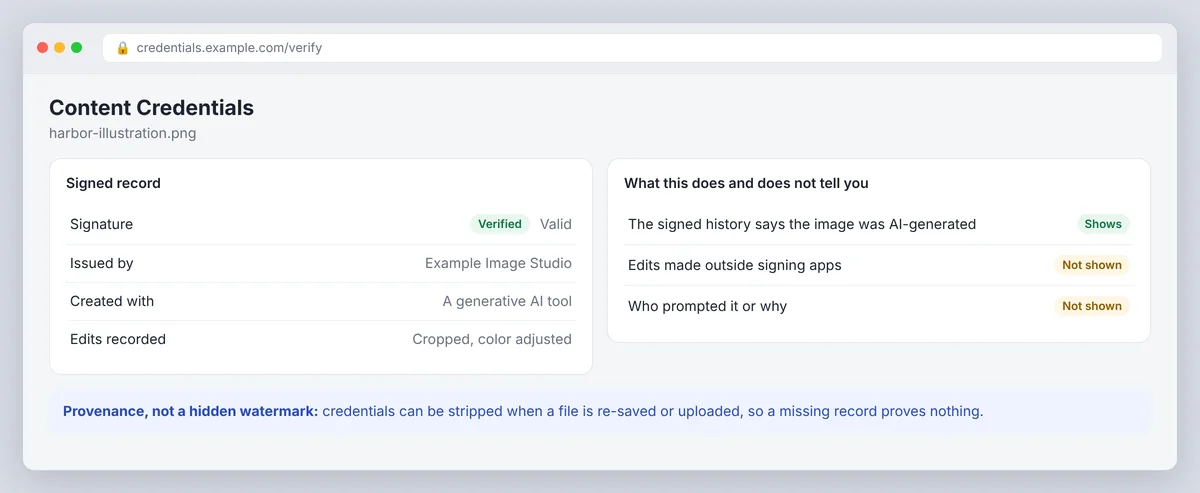
C2PA is an open standard backed by Adobe, Microsoft, Google, Meta, OpenAI and others. Content Credentials attach a cryptographic signature that records how a file was created and edited. A compatible reader checks whether the credentials are present and whether the signature verifies.
That's provenance, not a hidden watermark. Credentials can be absent, stripped or incomplete, and a valid record only tells you what the signed history contains. It's a strong complement to watermark detection, because it gives you a second, independent kind of evidence about authenticity. Many readers also use hashing to tie the credentials to the exact file, so any modification breaks the verification.
General AI detectors and command-line tools
Use a general AI detector when you want an estimate based on text patterns. Use a C2PA reader for Content Credentials. Use a watermark detector only when it supports the exact signal and format you have.
Open-source command-line tools suit technical users who need repeatable local checks. Confirm the supported formats and requirements, run the documented command on a copy of the original, and read the output carefully. A command that only dumps metadata isn't checking embedded pixels or token patterns.
For private material, prefer a local tool when one supports your format. Don't upload confidential documents to an unknown service for a one-word verdict.
Which AI-generated content is detectable?
It depends on what the generator does and what the detector covers. SynthID applies to supported Google content. Many image tools attach C2PA credentials (OpenAI's image tools do) or write metadata rather than a pixel watermark, and those can be removed by a simple re-save.
ChatGPT, Sora, Claude, Grok and open-source models shouldn't be treated as one category. Each may add a watermark, attach provenance data, do neither, or change approach over time. Check support for the exact model and media type rather than assuming a brand name guarantees detection.
Can AI watermarks be removed or bypassed?
Partly, and it depends on the type. Hidden Unicode characters are easy to remove with a find-and-replace. Metadata and C2PA credentials disappear when a file is re-saved without them, which is why their absence proves nothing. A pixel or audio watermark is built for robustness, but heavy edits, cropping, filters and re-encoding can degrade it until a detector no longer finds it.
Statistical text watermarks weaken when the text goes through paraphrasing or heavy edits. Their robustness depends on length: a watermarked essay is easier to confirm than a watermarked tweet, since the pattern lives in the word choices. There's a catch: a failed check never proves a watermark was removed, and editing a file to defeat a check can breach the terms of the tool that generated it, your school's policy or your employer's rules. If you want a clean copy of your own work, keep the original and be open about the changes.
Legislation and policies
Rules are moving toward labelling. The EU AI Act asks providers of generative systems to mark AI-generated content in a machine-readable way, and several platforms now label media that carries C2PA credentials or a SynthID watermark. Schools and publishers increasingly write their own policies on disclosure.
None of this makes detection universal. Policies cover providers that comply, formats that support marking, and files that haven't been altered. Proprietary implementations differ from provider to provider too. Treat any check as one piece of evidence inside a wider policy, not as the policy itself.
Watermark detection results: limits and how to read them
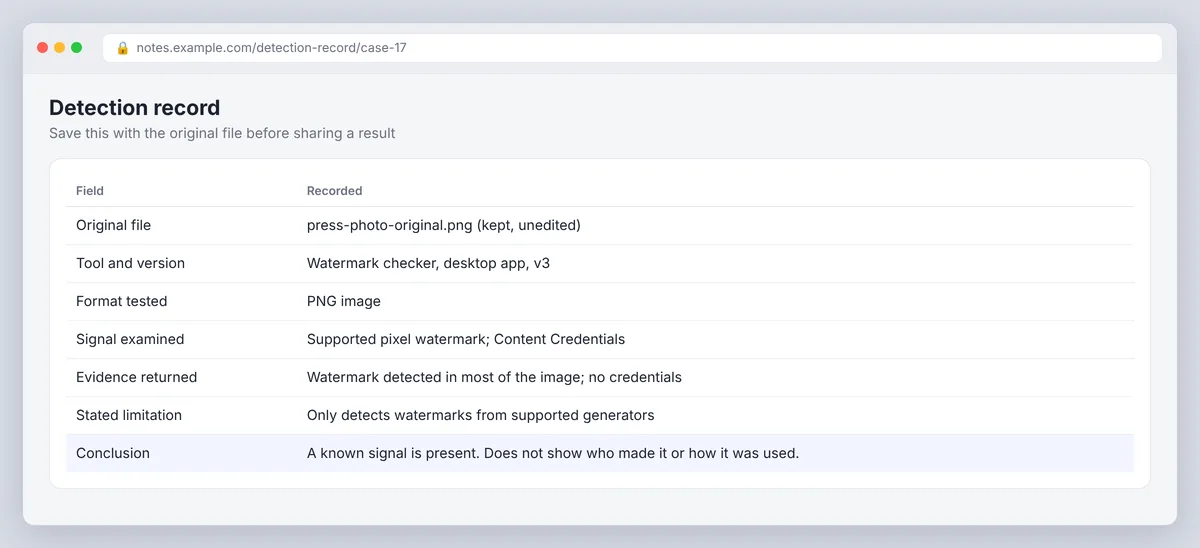
Before you share a result, save the original file, the tool's name, the date and the exact evidence it returned. That record makes it easy to explain what was checked and what wasn't.
Look for the format tested, the signal or credentials examined, and any stated limitation. A positive result supports the claim that a known signal is present. It doesn't identify the author or prove intent. A negative result can't rule out AI generation. If the decision has serious consequences, compare the file with drafts, source records or other reliable provenance instead of trusting one detector.
Read a service's privacy terms before you upload. Check whether it keeps submissions, uses them for training or shares them. For sensitive material, use a local tool or an approved service inside your organization.
Conclusion
An AI watermark detector answers one narrow question: is a known watermark signal present in this file? Use a SynthID check for supported Google content, a C2PA reader for Content Credentials, and a hidden character scan for invisible Unicode. To detect AI writing in general, use an AI detector and read its result as a probability. Invisible watermarks help, but no single check proves who made an AI image or a text, so keep the original file, record what each of your AI tools checked, and decide on the full evidence.
Frequently asked questions
Is an AI watermark always visible?
No. Most modern watermarks are designed to be invisible, so you can't confirm one by looking at an image or listening to a clip. Some tools add a small visible logo as well, but the visible mark is easy to crop away and isn't what detectors look for.
Does ChatGPT or Claude watermark its text?
Neither OpenAI nor Anthropic offers a public watermark detector for text, so there's no reliable public way to confirm ChatGPT or Claude authorship through a watermark. A general AI detector can estimate the likelihood from writing patterns, and that estimate is a probability, not proof. The same goes for code from tools like Codex: there is no public watermark check for it.
How do I check a Google Docs file or a PDF for an AI watermark?
Copy the text into a tool that accepts pasted text, or export the document to a supported format. For a PDF, extract the selectable text or run OCR on a scan. The result then concerns the extracted text, not the document's embedded images or metadata, which you'd check separately.
How do I remove hidden characters from text?
Paste the text into a plain-text editor and use find-and-replace on the common invisible code points (U+200B, U+200C, U+200D, U+2060, U+FEFF and U+00AD). Many word counters and text cleaners show the count of such characters so you can confirm they're gone. This does not affect any statistical watermark.
Can an AI watermark be removed from an image?
Metadata and credentials vanish when you re-save the image without them. A pixel watermark like SynthID is harder to remove and survives common edits, but aggressive cropping, filtering and re-encoding can weaken it. Either way, a detector that finds nothing can't tell you whether a mark was never there or was damaged.