On this page
- What is AI keyword research?
- Why marketers use AI-powered keyword research: what works
- What doesn't work: the limits of an AI keyword research tool
- How to use AI for keyword research in 7 steps
- AI tools for keyword research: picking a keyword research tool by job
- Prompts that produce usable keyword research
- Common AI keyword research mistakes (and smarter keyword habits)
- Keyword research in the age of AI search
- Conclusion: AI is the future of keyword research, with the decisions still yours
- Frequently asked questions
Why use AI for keyword research? Because it turns a broad topic into organized keyword ideas, questions, intent labels and topic clusters in minutes, which used to take an afternoon with a spreadsheet. What AI can't do is confirm that anyone searches for those ideas. Language models don't have search volume, keyword difficulty or rankings unless the tool connects them to real data. So the useful answer is a split: AI for discovery, sorting and briefs; search data and your own judgment for validation and decisions. This guide covers what works, what doesn't, a seven-step AI keyword research workflow, prompts that produce usable output, and the mistakes that leave you with a tidy list of weak targets.
Key takeaways
- AI is good at expanding seed keywords, labelling search intent, keyword clustering and drafting content briefs.
- AI is bad at search volume, difficulty and trends. A chatbot will invent metrics if you let it.
- The workflow that works: generate with AI, validate with Google Search Console and Keyword Planner, decide with the SERP.
- AI-powered keyword research tools that combine a model with live search data close most of the gap.
- Keyword research still matters in the age of AI search; what changes is how you cover a topic, not whether you research it.
What is AI keyword research?
AI keyword research uses large language models (artificial intelligence trained on text, the same NLP and machine learning that powers chatbots), and in some tools live search data, to discover, interpret and organize keyword opportunities. You give the model a topic, an audience or a seed keyword and ask it to generate related phrases, classify user intent or group searches into clusters. The model's strength is semantic understanding: it knows that "best running shoes for flat feet" and "supportive trainers for overpronation" describe the same need, which a plain word match misses.
The distinction that matters is data. A chatbot like ChatGPT or Gemini suggests what people might search. An AI keyword research tool with a connected database can also report search volume, CPC and difficulty, and an SEO platform that reads the search results can show what the ranking pages actually contain. Traditional keyword research started from the data; AI-driven research starts from the language and then goes looking for the data.
Why marketers use AI-powered keyword research: what works
- Seed expansion. Ask for 30 keyword ideas for a defined audience and you get head terms, long-tail keywords and questions in seconds, including conversational phrasings a tool's database may not hold.
- Intent classification. Models label searches as informational, commercial, transactional or local with reasonable accuracy, and explain why. Check the SERP, but it's a good first pass.
- Keyword clustering. Grouping 500 search queries into topics by meaning is exactly what natural language processing is for, and the patterns it finds are usually ones you'd have missed. It's the single biggest time saver.
- Content brief angles. Titles, H2 and H3 ideas, FAQs, and a summary of what the search results seem to want.
- Competitor gap analysis. Paste competitor headings and your own, and the model lists the subtopics you don't cover.
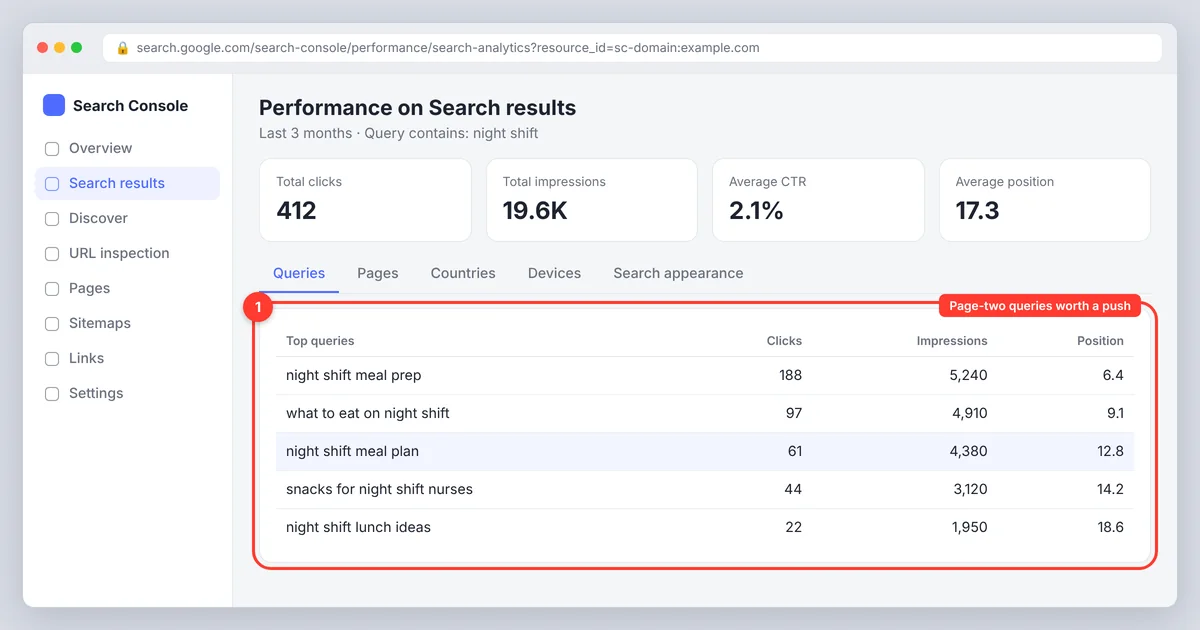
- Working with your data. Paste a Search Console export and ask which searches share an intent, which pages compete, and which page-two keywords are worth a push.
What doesn't work: the limits of an AI keyword research tool
- Search volume and metrics. A model has no idea how many people search a phrase. Ask for numbers and it will produce confident, invented ones.
- Trends and freshness. Models are trained up to a cutoff and have no real-time data. New products, seasonal shifts and this month's news aren't in there.
- Keyword competitiveness and rankings. Difficulty depends on who ranks today, with what authority. Only a tool that reads the results page can tell you.
- Your audience's actual words. AI suggests the phrasing it has seen most, which is often more formal than how your customers type.
- Business judgment. Whether a keyword is worth a page depends on margin, product fit, your niche and your keyword strategy. The model doesn't know your business or your target audience.
Lexical retrieval still matters too. Search engines interpret meaning, but the specific words on your page still decide which searches it can appear for, so "AI understands synonyms" is not a reason to skip the terms people use.
How to use AI for keyword research in 7 steps
Step 1: Define the audience, topic and seed keyword
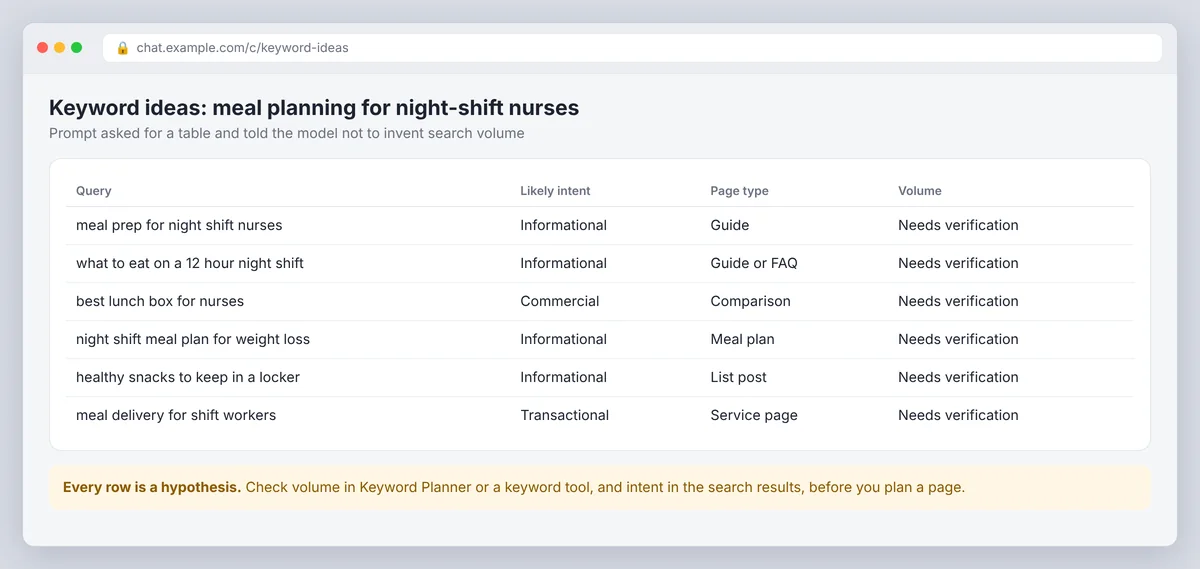
Give the model context: who your target audience is, the problem you solve, your location if it matters, and topics you don't want. "Meal planning for night-shift nurses" produces usable ideas; "meal planning" produces a generic list.
Step 2: Generate seed keywords, questions and long-tail queries
Ask for related keywords, questions people ask, comparisons and long-tail phrasings across the stages of a decision. Request a table with query, likely intent and page type, and tell the model to mark everything as unverified.
Step 3: Classify search intent before choosing a page type
Informational searches suit explainers and FAQs, commercial searches suit comparisons, transactional queries suit product and service pages, local searches suit location pages. Then analyze the search results: if the top results are product pages, a guide will struggle however well it's written. Search engines decide the format; you align with it.
Step 4: Keyword clustering by topic and intent
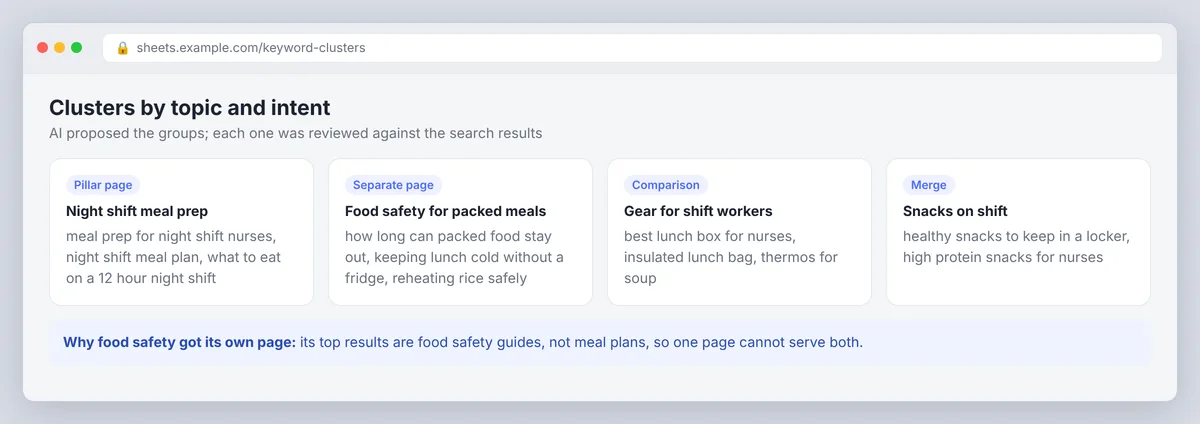
Let AI propose clusters, then review them for distinct needs. "Meal prep for night shifts" and "food safety for packed meals" may need separate pages if their results differ. Pick a pillar page for each cluster and add supporting pages only where they serve a clear purpose. This is how topical authority gets built.
Step 5: Validate with real search data
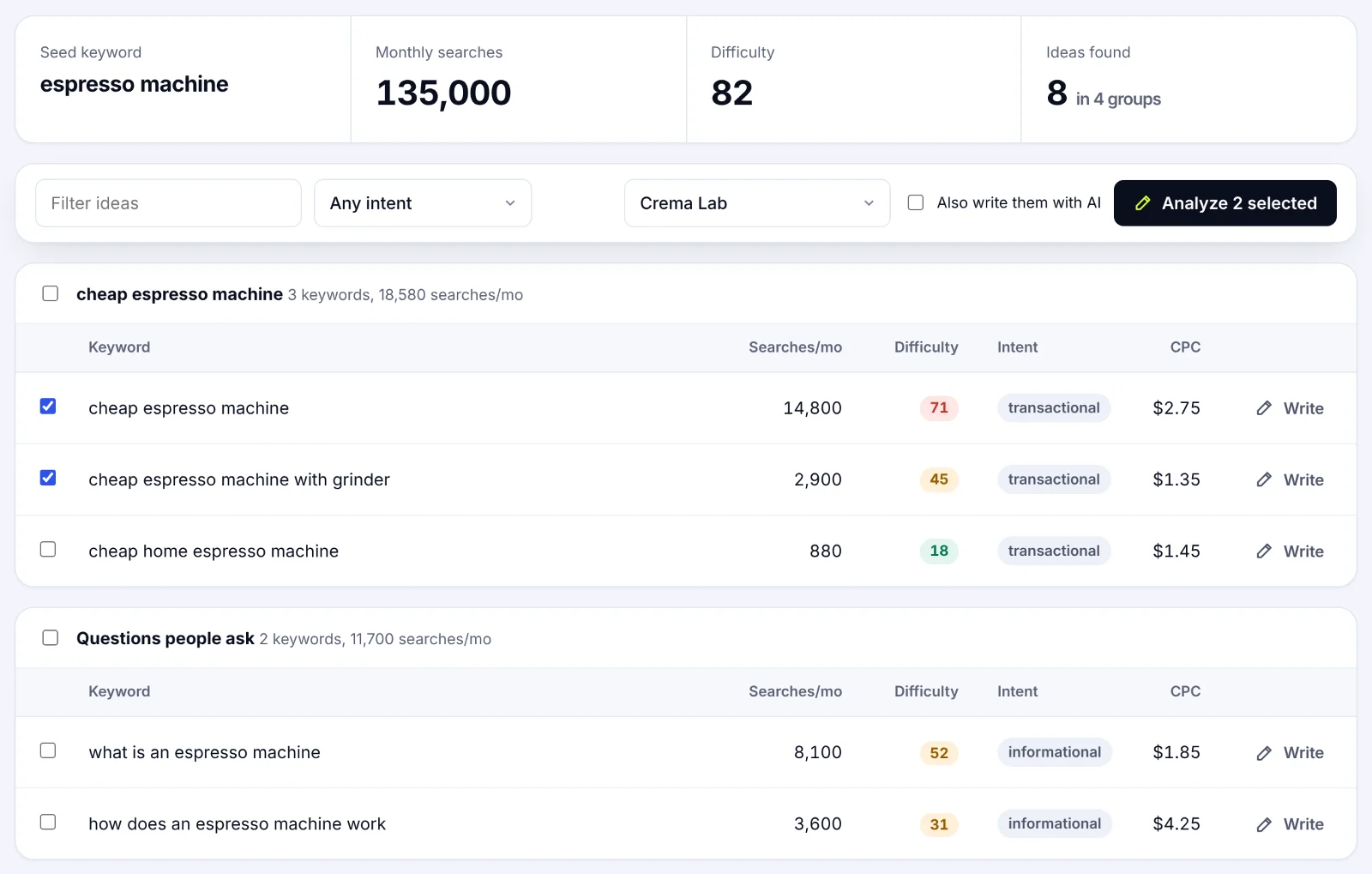
Check promising ideas in Google Search Console's performance report (searches your site already appears for), Google Keyword Planner (volume ranges and competition from Google Ads) and a keyword research tool with current data. SerpPal's Content Planner does the expansion and the data step together: it expands a seed into keyword ideas with monthly searches, competitiveness, intent and CPC, already grouped into topics, so nothing in the list is a guess. Treat all figures as estimates and compare, don't forecast. Analyzing the insights this way is what keeps an AI SEO workflow honest.
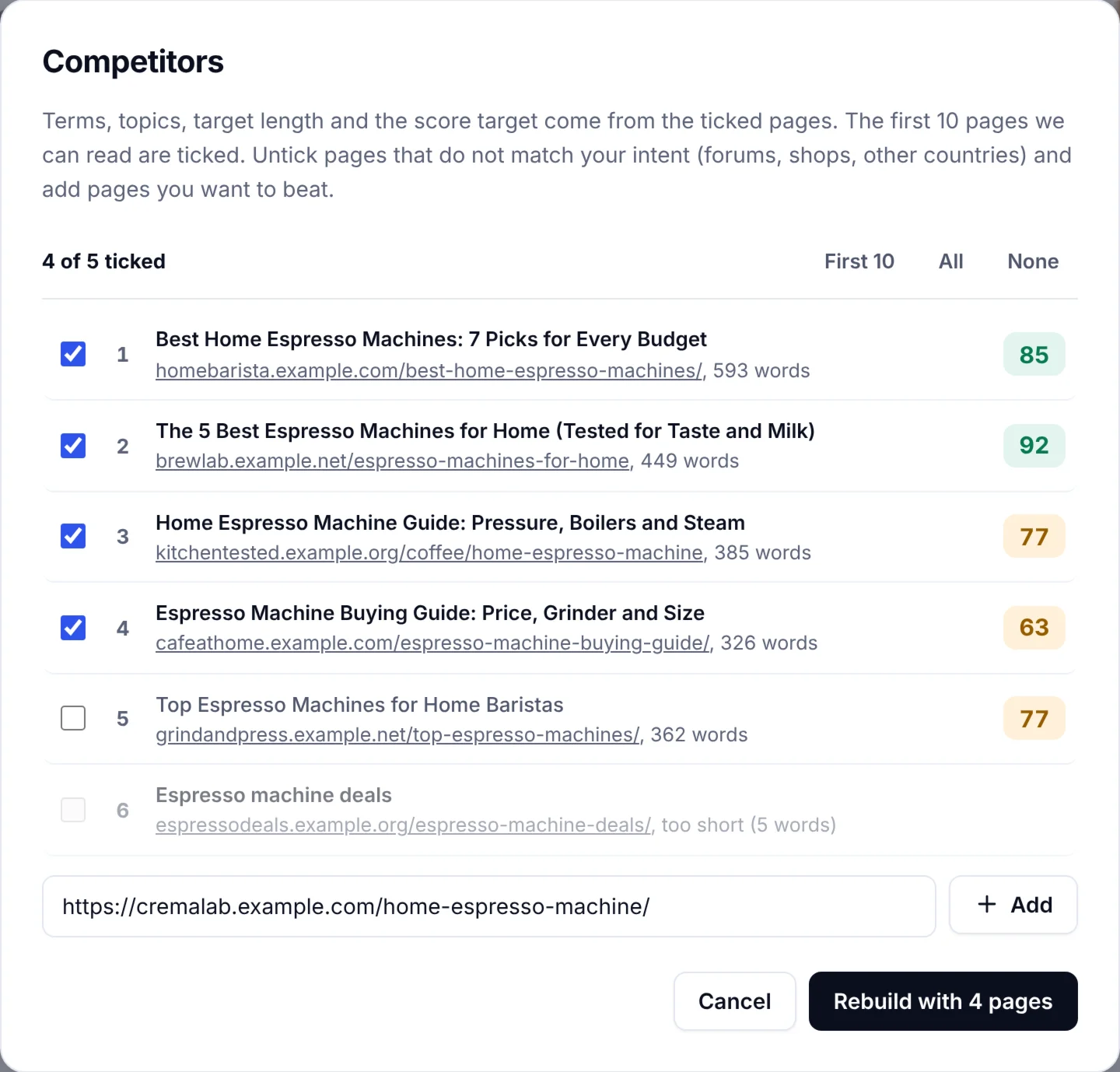
Step 6: Find competitors' gaps and check search results fit
Review the pages that rank. Note the page type, what they cover and the content gaps they leave. Incorporating competitor gap analysis at this stage, before writing, is what turns a keyword list into a plan you can align the whole site around. SerpPal's analysis reads the top results for a keyword and lists the terms, headings, questions and entities they share, which is competitor gap analysis without the copy-paste. Our guide to choosing competitors explains how to pick which pages to compare against.
Step 7: Prioritize and move from insight to action
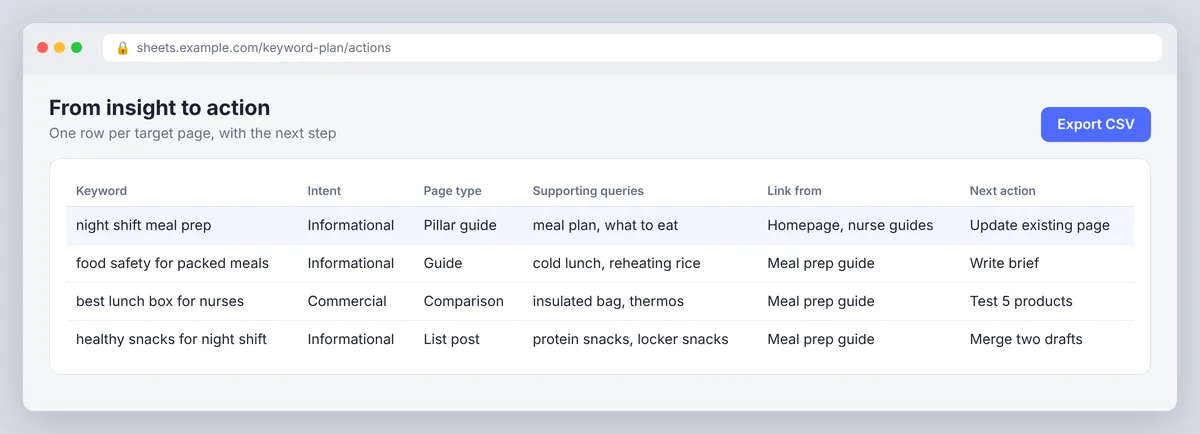
Choose targets by relevance to your readers, business value, effort and search results fit. Record the keyword, intent, page type, supporting queries, internal linking targets and next action, then write. In SerpPal the same keyword analysis becomes the brief and the content score, so the research you did is what the editor optimizes against during on-page optimization. You identify the target, the tool shows the gaps, you write the content. Our post on what to do after keyword research covers the mapping and planning in detail.
AI tools for keyword research: picking a keyword research tool by job
| Tool type | Good for | Not for |
|---|---|---|
| Chatbots (ChatGPT, Gemini, Claude, Perplexity) | Discovery, intent labels, clustering, briefs, prompts on your own exports | Volume, competitiveness, trends, rankings |
| Google's free tools (Keyword Planner, Search Console, Trends) | Validation, your own query data, seasonality | Clustering, intent, briefs |
| Keyword databases with AI features (Semrush, Ahrefs) | Search volume, keyword difficulty, competitor keywords, AI suggestions on real data | Deciding what fits your business |
| AI-powered SEO tools (keyword planner plus search results analysis) | Ideas with data attached, competitor gaps, content scoring | Replacing your judgment about what to publish |
Pick by job, not by the number of AI features advertised. A common setup is a chatbot for brainstorming, Google data for validation, and one SEO tool that reads the search results for competitiveness, gaps and the brief.
Prompts that produce usable keyword research
Specific instructions make AI output easier to use. Name the readers, the topic and the format you want back, and tell the model not to invent metrics. These prompts work the same in ChatGPT, Gemini or Claude.
- "For [readers], generate 25 keyword ideas about [topic]. Include questions and long-tail phrases. Return a table: query, likely intent, page type, why it might matter. Mark every row as needing volume validation."
- "Label these searches as informational, commercial, transactional or local. Explain the searcher's need and suggest a page type for each."
- "Group this keyword list into clusters by shared topic and intent. Flag phrases that may need separate pages because they answer different questions."
- "Here are the H2 headings from the five top-ranking pages and from my page. List subtopics I don't cover as hypotheses, not as verified demand."
- "Create a page outline for [query] using this audience, intent and search results summary. Suggest headings and FAQs. Don't invent statistics or sources."
Common AI keyword research mistakes (and smarter keyword habits)
- Treating suggestions as demand. Mark ideas unverified until Search Console or a keyword tool supports them.
- Letting the model invent metrics. If a volume number came from a chatbot, delete it.
- Clustering by words instead of intent. Review clusters against the search results; similar phrases can want different pages.
- Cannibalization. AI finds many similar phrases; don't give each one a page. One intent, one page.
- Skipping the search results. The results page is the only reliable source on what format a query wants.
- Pasting private data into public tools. Check the tool's terms before you upload customer or client data.
Keyword research in the age of AI search
AI Overviews, ChatGPT search and Perplexity answer many searches directly, and Google's own documentation on AI features and your website says the same fundamentals apply: helpful, well-structured pages get cited. People still type queries; the searches are longer and more conversational, and question keywords matter more because AI answers are built from them. Track visibility and conversions alongside rankings, cover topics in clusters rather than single pages, use question keywords to improve coverage, and answer them plainly near the top of each section. Keyword research isn't dead; it moved one step up, from "which words" to "which questions and which topics". The ranking algorithms changed; the need to know what people search didn't. Featured snippets and AI answers both reward the page that answers first and clearest.
Conclusion: AI is the future of keyword research, with the decisions still yours
Think of AI as the GPS and the search data as the map: one suggests routes, the other tells you which roads exist. Use AI to uncover ideas, speed up sorting, label intent, build clusters and draft briefs, then optimize the content yourself. Use search data to validate and the search results to decide. That split keeps the speed and loses the guesswork, and it's the same split the best AI-driven keyword research tools are built around. Make it part of your keyword strategy and your content will target what people actually search, not what a chatbot guessed.
Frequently asked questions
Can I use ChatGPT for keyword research?
Yes, for discovery and organization: ideas, intent labels, clusters and brief outlines. Verify volume, difficulty and search results fit with Google's tools or an SEO keyword tool before you plan a page.
Is AI keyword research accurate?
Accurate at interpreting language, unreliable at numbers. Treat generated keywords as hypotheses until a data source confirms demand and the search results confirm intent. Analyze the patterns, not the single numbers.
What is the best AI tool for keyword research?
One that combines a language model with live search data and search results analysis, so the ideas come with volume, competitiveness and a view of the ranking pages. A chatbot alone is a brainstorming tool; a keyword database alone can't cluster or classify.
Is SEO dead because of AI?
No. AI changes how results are displayed and how some people find answers, but relevant pages still have to match searcher needs. The research step is more important, not less, because AI answers are assembled from pages that cover questions clearly.