On this page
- How an AI email writer works
- AI email writing workflow
- Prompting techniques for better results
- Email types for common situations
- Best practices for writing effective emails with AI
- AI for customer support and sales
- Pitfalls of AI-written emails
- Choosing the best free AI email generator or email writing tool
- Beyond email: AI letter and message writing
- Frequently asked questions (FAQs)
AI email writing means using an AI email writer to draft emails from a few instructions: you say who the email is for, why you're writing, and what you want the reader to do, and the tool writes a subject line and a draft you can edit and send. Used well, it turns a ten-minute email into a one-minute job and helps you write better emails, faster. Used badly, it produces generic emails that people spot and ignore.
This guide covers how an AI email generator works, prompts and email types for the messages people write most, best practices for editing AI drafts, and the pitfalls that make AI-written emails fall flat.
Key takeaways
- Good AI emails start with clear instructions: the reader, the goal, the key facts, the tone and the length.
- AI handles creating first drafts of routine emails well: replies, requests, project updates, customer support emails, newsletters and outreach.
- Always edit before hitting send. Check facts, names and dates, cut generic lines, and add one detail only you would know.
- Keep emails short. Most professional emails need three to five sentences and one clear call to action.
- Don't paste confidential information into tools your company hasn't approved.
How an AI email writer works
An AI-powered email writer uses a large language model, the same kind of generative AI behind ChatGPT and Claude, to turn your instructions into an email draft. You describe the email ("a polite reminder to a client who hasn't replied to my proposal in a week") and it will generate a professional subject line, a greeting, the body and a sign-off in seconds. You can then select the best version, copy it into your email client and send.
Most email writing tools work in one of three ways, and all of them can generate a well-structured draft in seconds:
- Chat assistants. You describe the email in a chat and refine it with follow-up messages: "shorter," "more formal," "add the meeting link."
- Fill-in templates. You pick an email type (cold email, newsletter, promotional email) and fill in a few fields.
- Inbox add-ons. AI features inside Gmail, Outlook or your helpdesk suggest replies to the email you received, and some CRM tools draft prospecting emails from a contact's record.
A free AI email generator usually gives you a handful of drafts without signup; tools you sign in to can remember your tone, brand details and past emails, which helps with consistency.
AI email writing workflow
AI email writing works best as a short, repeatable workflow inside your normal communication habits:
- Specify the email in a few lines (see the prompt checklist below). A short prompt with the right details beats a long, vague one.
- Generate two or three versions and pick the closest. Generating more rarely helps.
- Edit the output for facts, tone and length.
- Copy it into your email client (Gmail, Outlook or your browser-based helpdesk) and send.
The main benefit is time efficiency. Used this way, AI writing tools help with writer's block and productivity without taking over: you still compose the parts that matter, and the AI handles the blank page. Most email tools and AI writing tools follow this pattern, whether they work in a browser tab or inside your inbox.
Prompting techniques for better results
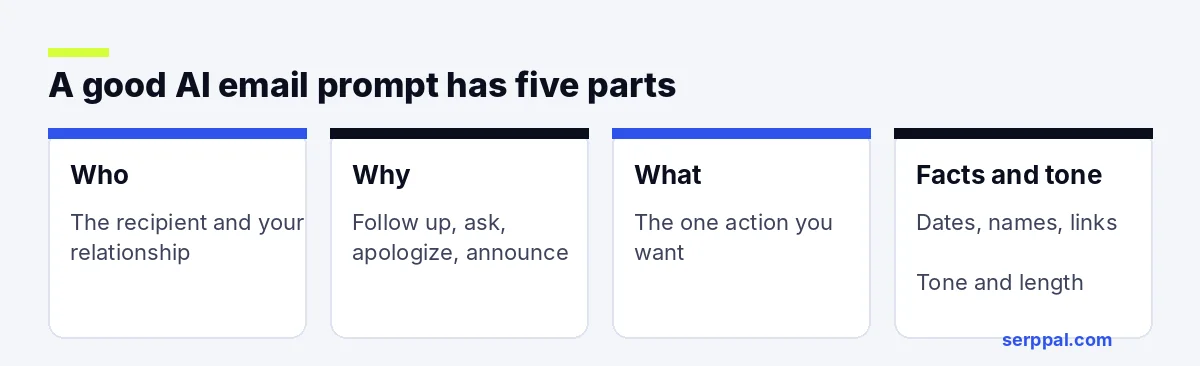
The instructions decide the quality of the email. Include five things:
- Who the email is for and your relationship (new lead, manager, customer, teammates).
- Why you're writing (follow up, ask, apologize, announce).
- What you want them to do (reply, book a call, approve, pay).
- Key facts the email must include (dates, numbers, names, links).
- Tone and length (friendly and brief, formal, under 120 words).
Example prompts
- Reminder: "Write a short, friendly email to Maria, a marketing manager who downloaded our pricing guide last week. Ask if she has questions and offer a 15-minute call on Thursday or Friday. Under 100 words."
- Business email request: "Write an email to my manager asking to move our project deadline from 12 May to 19 May because the client sent the files late. Professional, positive, under 120 words."
- Customer support reply: "Reply to a customer whose order arrived damaged. Apologize, offer a free replacement or a full refund, and ask which they prefer. Warm and direct."
- Cold email: "Write a cold email to the owner of a small bakery offering website photography. Mention their new seasonal menu. Two short paragraphs and a clear question at the end."
Email types for common situations
| Structure | Length | |
|---|---|---|
| Reminder | Context, one question, easy next step | 50 to 100 words |
| Cold email | Personal hook, value in one line, low-effort ask | 60 to 120 words |
| Meeting request | Purpose, two time options, agenda in one line | 50 to 80 words |
| Customer apology | Acknowledge, apologize, fix, next step | 80 to 150 words |
| Project update | What's done, what's next, any blockers | 80 to 150 words |
| Newsletter | Subject, preview line, one main story, CTA | 200 to 350 words |
| Invitation or announcement | What, when, where, how to reply | 60 to 120 words |
SerpPal's AI writer includes email templates for newsletters, promotional emails, cold emails and subject lines, and its AI chat can draft any other email from a description. It can follow your brand kit, so drafts use your tone and product names.
Best practices for writing effective emails with AI
Adjust the tone and style
Say the tone in your instructions, then check it in the draft. An AI may be too formal for a colleague or too casual for a client. Ask for a new version ("warmer," "more direct," "less salesy") rather than accepting the first one.
Personalize every email
Personalized emails get better replies than generic ones.
A personalized email to each recipient mentions something specific: the reader's recent post, the project you discussed, the question they asked. AI can't know those details unless you give them, so add one line yourself in every email that matters.
Ensure proper formatting, then proofread
AI-generated output is a draft, not a finished email. Treat the email draft like one from a new colleague: useful, but in need of review before it represents you professionally.
- Fix the opening line. Replace generic openers ("I hope this email finds you well") with something specific.
- Check every fact: names, dates, prices, links and promises.
- Cut by a third. AI drafts run long. Shorter emails get read.
- Proofread for typos, grammar and formatting once the content is right.
- Read it aloud. If it doesn't sound like you, change the words that don't.
Maintaining brand consistency
For teams, consistency matters as much as speed. Keep approved phrases, product names and signature styles in a shared document or your tool's brand settings, so every AI-generated email sounds like the same company. Save the best emails as your own starting points for next time.
AI for customer support and sales
Customer service and support teams use AI to generate replies to common questions, summarize long ticket threads and keep answers consistent. The person sending the reply still checks the facts and the tone, especially for refund requests and complaints.
Sales teams use AI to write first-touch emails, follow-up sequences and meeting recaps. The risk is sameness: when every prospect gets a generic AI email, response rates suffer. Strong sales messages use AI for the structure and a human for the personalization.
Pitfalls of AI-written emails
Generic language
AI drafts lean on familiar phrases and awkward phrasing: "I wanted to reach out," "Please don't hesitate to contact me." One is fine; three in a row make the email sound like automation, not communication. Polished isn't the same as personal, and generative AI makes polished easy.
Wrong or made-up details
AI can fill gaps with plausible but wrong information: a meeting time you never agreed, a feature your product doesn't have, a misspelled name. Never send without checking.
Privacy and policy
Pasting customer data, contracts or confidential plans into an AI tool can break company policy or privacy rules. Use approved tools and leave sensitive details out.
Sounding like AI
If an email will matter to the reader, such as an apology, a job application or a sensitive message, write the key lines yourself. To check whether a draft reads as machine-written, a free AI detector highlights the most generic sentences.
Choosing the best free AI email generator or email writing tool
There's no single best AI email tool for everyone. When you compare a free AI email generator or a paid email writing tool, check:
- Where it works. In your inbox, in a browser tab, or inside your helpdesk or CRM. The closer it sits to where you write emails, the more you'll use it.
- Control over tone and length. Good tools let you tweak tone, regenerate a version, or ask for shorter phrasing without starting a new email.
- Brand and personal settings. Saved preferences, signatures and approved product names keep generated emails consistent.
- Privacy. Read how the tool stores email content and attachments, and whether your data trains its AI models. Your email content belongs to you and your customers.
- Limits. A free AI email tier is fine for writing emails occasionally, and some tools work with no signup required; heavy users may need a paid plan for more drafts and features.
For email marketing (newsletters, promotions and follow-up emails), look for tools that also write subject lines, preview text and CTAs, so the entire email is consistent.
Beyond email: AI letter and message writing
The same approach works for letters (cover letters, complaint letters, recommendation requests) and short messages (Slack updates, LinkedIn messages, text replies). Give the AI the reader, purpose, facts, tone and length, then edit. For a cover letter, write the specific examples about yourself by hand.
Frequently asked questions (FAQs)
Can AI write emails for me?
Yes. AI email writers can draft most routine emails from a short description, including replies, requests, updates and newsletters. Review and edit every draft before sending, especially facts, names and tone.
Is there a free AI email writer without login?
Some AI email generators offer a few free drafts without signup. Tools you sign in to usually add saved history, preferences and brand or tone settings, which help if you write emails often.
How do I make AI emails sound less robotic?
Give specific instructions, cut generic openers and closers, shorten the draft, add one personal detail, and read it aloud before sending.
Is it okay to use AI for work emails?
Usually, if your company allows it. Check your organization's AI policy, avoid pasting confidential information, and take responsibility for every email you send.
What should an AI email prompt include?
The reader, your goal, what you want them to do, the key facts, and the tone and length. The more specific it is, the less editing the email needs.