On this page
- What competitive keyword research is
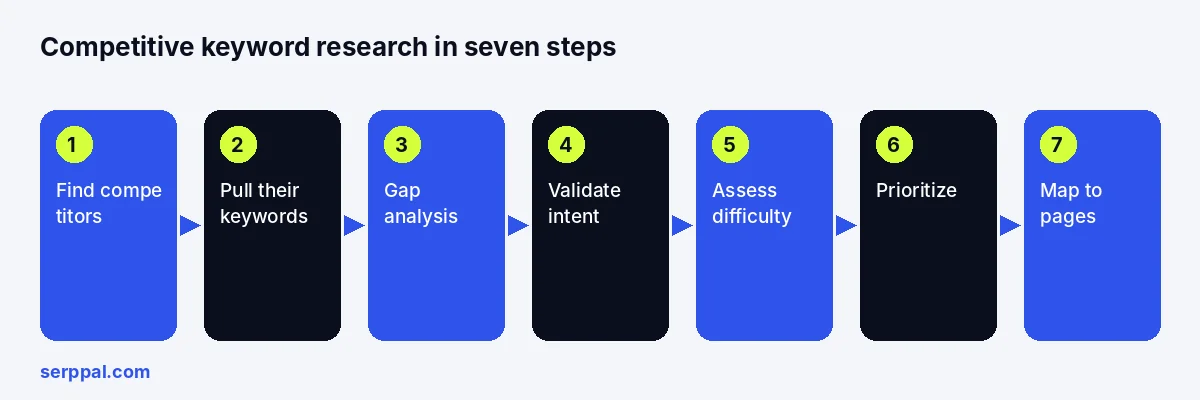
- Why analyze competitor keywords: discover new content ideas and market opportunities
- Step 1: Find your real search competitors
- Step 2: Finding competitor keywords with free and paid methods
- Step 3: Run a keyword gap analysis
- Step 4: Validate search intent and the SERP
- Step 5: Keyword analysis: metrics and ranking feasibility
- Step 6: Prioritize by traffic potential and business value
- Step 7: Map keywords to pages and build the content plan
- Track rankings and refresh the research
- Common competitive keyword research mistakes
- Conclusion
- Frequently asked questions
Competitive keyword research means finding the keywords your competitors already rank for, working out which of those your site could realistically win, and turning the result into a page plan. It is the fastest way to find the right keywords for an SEO strategy, because the demand is proven. It is faster than researching from scratch because the competitors have done the demand validation for you: if three rival sites rank for a phrase and earn traffic from it, people are searching it and it converts for someone.
This guide is a seven-step workflow you can run with free tools and a spreadsheet, or faster with a keyword tool. It covers finding your real search competitors (not your business rivals), pulling their organic keywords, comparing the lists, checking intent and difficulty, prioritizing by value, and mapping keywords to pages. It ends with the mistakes that waste most of the effort.
Key takeaways
- Your SEO competitors are whoever ranks for your target searches, which is often not who you compete with for customers.
- Competitor keywords come from three places: their ranking pages, your own Google data, and the domain reports in keyword research tools.
- A keyword gap analysis sorts terms into missing, weak, shared and irrelevant. Only the first two are work.
- Difficulty scores screen a list; the live results decide whether you can outrank the pages currently ranking.
- Map keywords to pages by intent, improve existing pages before creating new ones, and track the result.
What competitive keyword research is
Standard keyword research starts from your products and audience and expands outward: seed terms, related keyword ideas, questions, search volume. Competitive keyword research starts from the results page and works backward: which sites already win these searches, which keywords your competitors rank for that you do not, and why. The two overlap, and the best keyword research does both, but the competitor-led version has one advantage: every keyword on the list is already proven to attract organic traffic to a page like yours.
It uncovers three things you cannot see from your own keyword data. Topics your audience has searched for that you have never written about. Pages where a competitor ranks with a weak answer you could beat. And the shape of a niche: which content formats search engines favour, how deep the ranking pages go, and whether a smaller site has any room. Our keyword research guide covers the from-scratch method; this one is the competitor-led half.
Why analyze competitor keywords: discover new content ideas and market opportunities
Because it answers the questions a volume number cannot. A keyword research tool tells you "project management software" gets a lot of searches and is hard. Competitor analysis tells you that the pages ranking for it are comparison listicles from review sites with hundreds of referring domains, that a rival one-tenth your size ranks instead for "project management software for architects", and that its page is thin. One of those is a plan.
Competitor keyword analysis also finds the keyword opportunities a competitor website is leaving on the table: terms where it ranks on page two with an old page, questions its guide raises but never answers, and the long-tail variants that cluster around its winning pages. Marketers who only look at their own rankings never see these. Those are the cheapest rankings available to you, because the demand is proven and the competition is beatable.
Step 1: Find your real search competitors
Your business competitors and your search competitors are different lists. A local accountant's organic competitors are national directories and software vendors' blogs; a SaaS company shares its results with review sites, publishers, Reddit threads and forums. Analyze whoever actually ranks.
- List ten to twenty searches that matter to your business, mixing broad terms with specific keywords a buyer would type.
- Search each one in a private window set to your target country, and record the first page of organic results: domain, URL, page type.
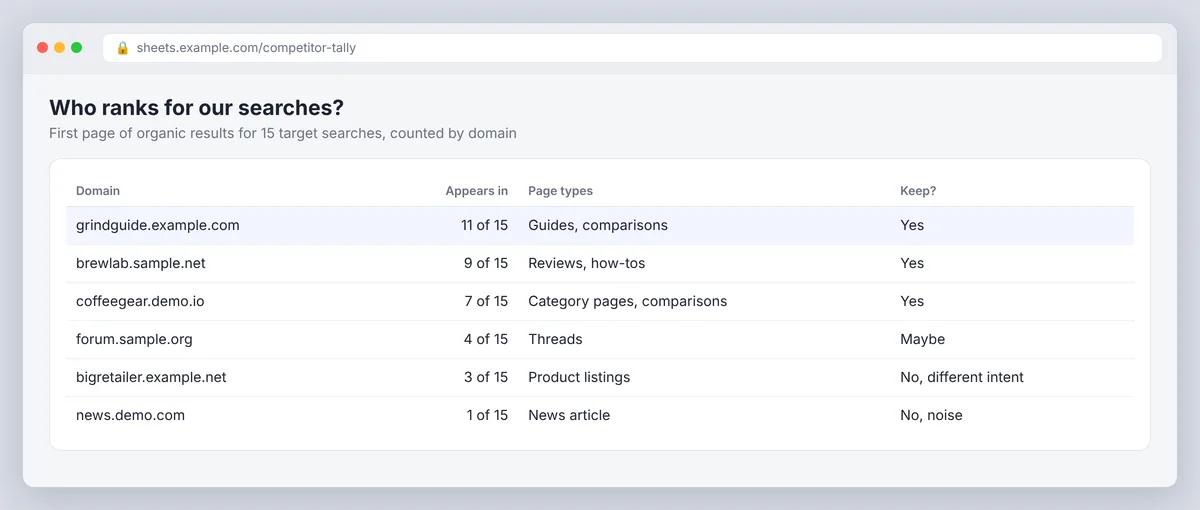
- Count how often each domain appears. The ones that show up for several searches are your SEO competitors; a site that ranks once is noise. A screenshot of each results page helps when you compare again in three months.
- Keep three to five domains for the analysis. More than that and the keyword lists become unmanageable.
Your own Google Search Console data helps here too: the Performance report shows which searches already bring you impressions, which tells you where you are competing now rather than where you think you are.
Step 2: Finding competitor keywords with free and paid methods
Use more than one source. No single tool sees every search query, and the free methods find keywords the SEO tools miss.
Free methods
- Read their ranking pages. Open the competitor pages from step 1 and note the headings, the questions they answer and the terms they repeat. Those are the keywords the page was built around.
- Use the results page. The "People also ask" box, related searches and autocomplete suggestions for each target search show the variants and questions people use.
- Mine your Google data. Searches where your site gets impressions but ranks on page two or three are keywords your competitors are winning and you are close on.
- Check Google Keyword Planner. It gives volume ranges and related ideas; the data is built for Google Ads, so treat volumes as directional for SEO. Google Trends adds seasonality.
- Ask an AI assistant for ideas. ChatGPT or Gemini can generate the terms a given buyer would use. Validate every suggestion against real data; a chatbot invents volumes and keyword rankings with complete confidence.
Paid methods
Keyword research tools with domain reports turn the manual version into an export: enter a competitor domain and get every keyword it ranks for with position, search volume, difficulty and the ranking page. Most also offer a gap report that compares several domains at once, which is step 3 automated. In Semrush that is Organic Research plus the Keyword Gap tool; in Ahrefs it is Site Explorer plus its competitive analysis report. The data between tools differs because each uses its own crawl and model, so compare direction rather than exact numbers.
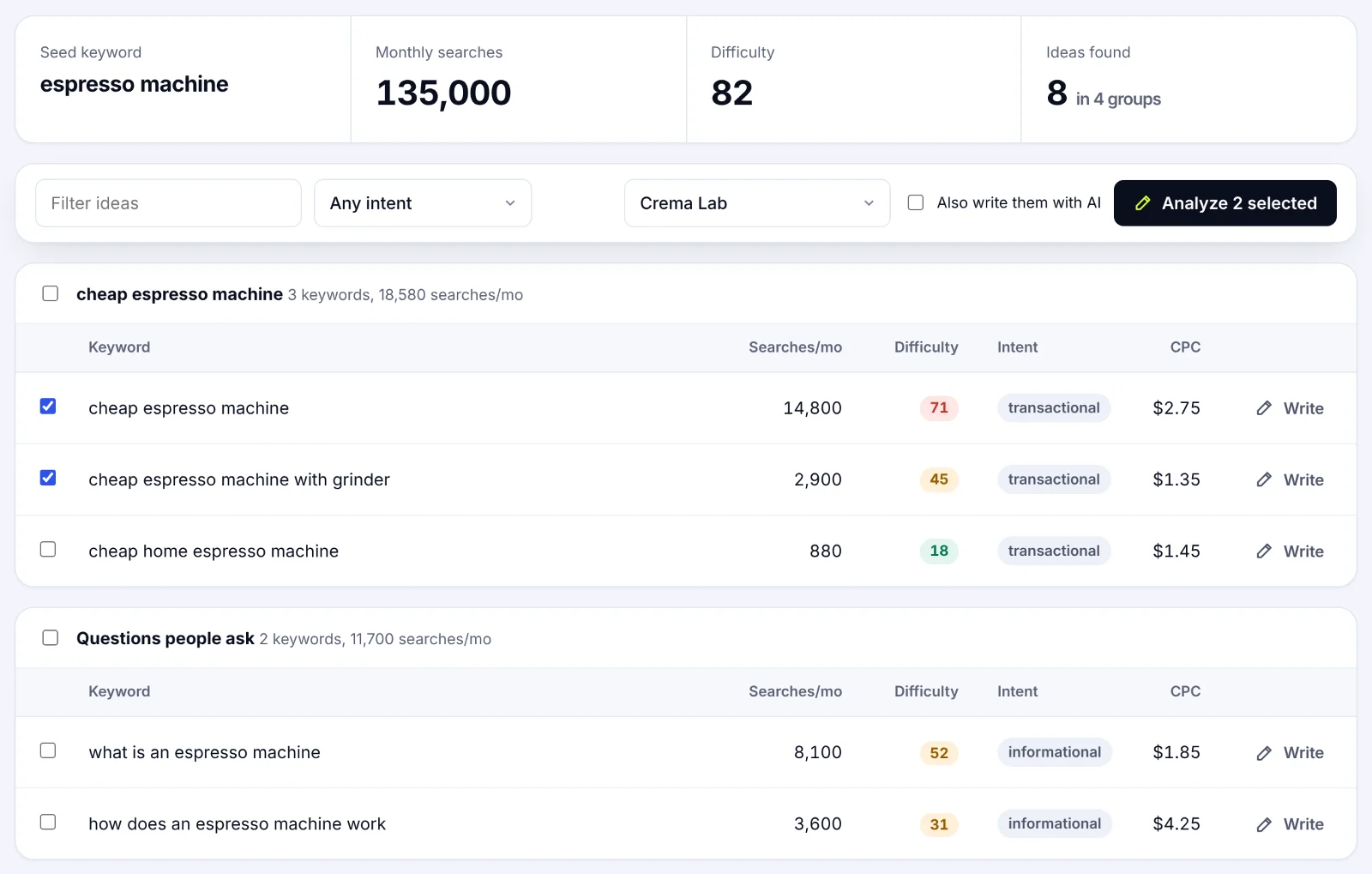
SerpPal's Content Planner approaches the same problem from the topic side: give it a seed keyword and it returns related keywords with monthly searches, difficulty, intent and CPC, grouped into clusters, which you can then analyze against the live results. The features page shows where that fits with the editor and rank tracking.
Step 3: Run a keyword gap analysis
A keyword gap analysis puts your keyword list next to each competitor's and sorts the difference. In a spreadsheet: one row per keyword, columns for your position, each competitor's position, volume, intent and the ranking page. A gap report in an SEO tool produces the same table in a minute; a simple spreadsheet template works for three domains.
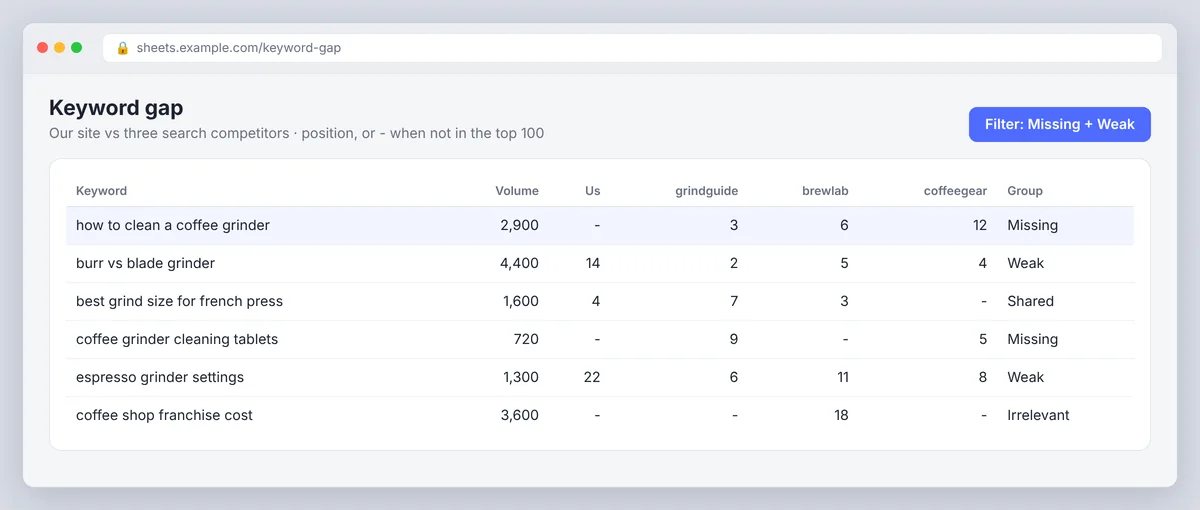
Then filter the sheet and sort every keyword into one of four groups (a tool does this automatically, but the groups are the same):
| Group | Definition | What to do |
|---|---|---|
| Missing | Competitors rank; you have no relevant page | Candidate for a new page, if intent and value check out |
| Weak | You rank, but below the competitors or with few clicks | Improve the existing page first |
| Shared | You and they both rank well | Defend; look for the long-tail variants around it |
| Irrelevant | Does not match your audience, offer or expertise | Drop it, however large the volume |
Most of a competitor's keyword list lands in the last group, and that is fine. The missing and weak groups are the work. Before you add a missing keyword to the plan, check whether it belongs on a new page or on one you already have: several keywords with the same intent share one page, and a separate page for every term splits your authority across pages that compete with each other.
Content gaps and link gaps
A competitor often ranks because its page covers a subtopic yours skips, answers a question yours raises, or has examples and data yours lacks. Compare the pages, not just the keyword lists. Link gaps are the same idea for backlinks: sites that link to two competitors and not to you are plausible targets, as long as the referring page makes sense for your audience. Copying a competitor's link profile is not a strategy.
Step 4: Validate search intent and the SERP
Before a keyword goes on the plan, look at the results page as a searcher would. A tool labels intent as informational, commercial, transactional or navigational; the live results show what Google's algorithms actually reward for the search query, and the two disagree more often than you would expect. Informational keywords usually want a guide; transactional keywords want a product or landing page.
- Page type. If the top results are comparison tables, a how-to guide will not rank, however good it is.
- Depth. Note how long the ranking pages are and how many subtopics they cover.
- SERP features. Ads, featured snippets, local packs, video, shopping and AI Overviews all take clicks from the organic listings in the search results. A high-volume keyword with an AI Overview and four ads may send very little traffic to position three.
- Quality. Open the top pages. If they are thin, outdated or generic, that keyword is an opening. If they are excellent, it is a long project.
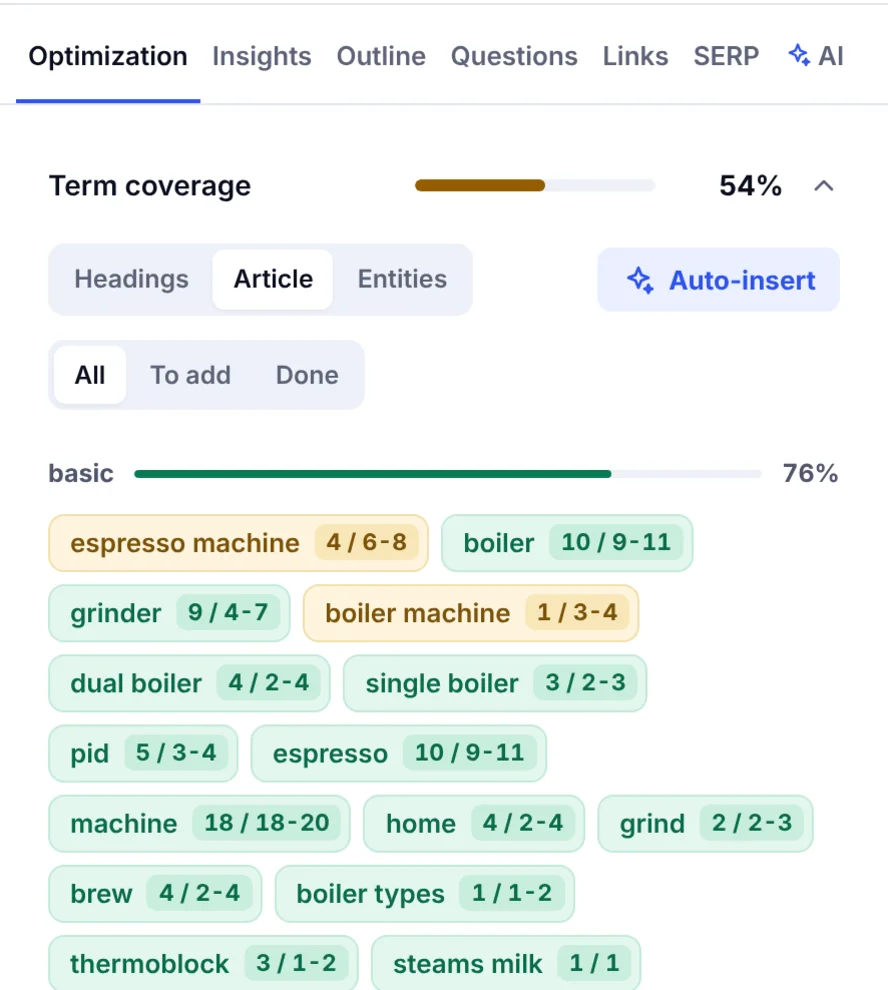
SerpPal's analysis does this reading for you per keyword: it pulls the top results, extracts the terms, headings and questions they share, and flags the content type and intent, so the validation and the brief happen in one step and you can start analyzing the pages currently ranking rather than guessing. See choosing competitors for how to pick which ranking pages the analysis learns from.
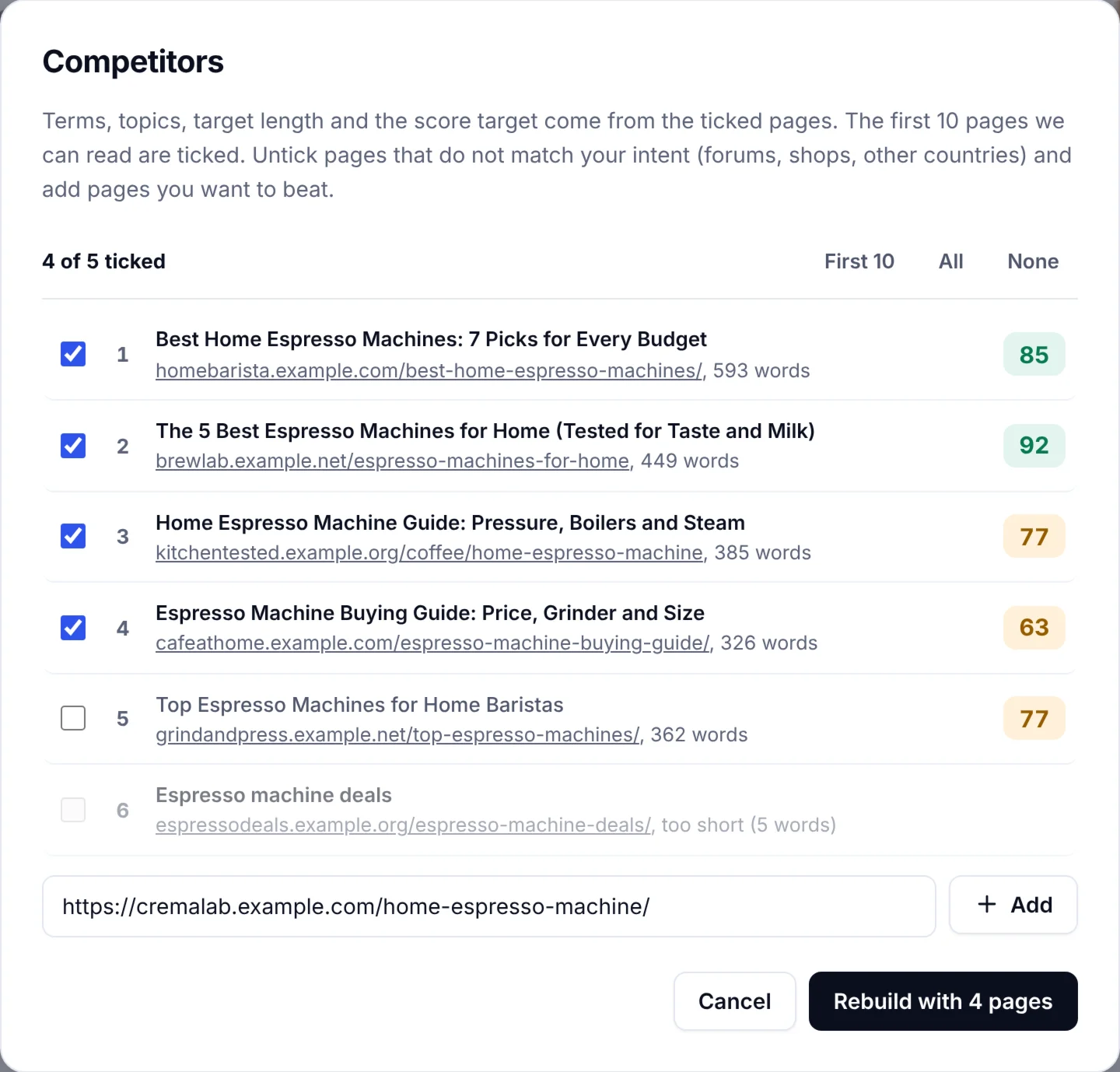
The terms those pages share become the checklist for your own page, which is the part of competitor analysis that most spreadsheets never reach.
Step 5: Keyword analysis: metrics and ranking feasibility
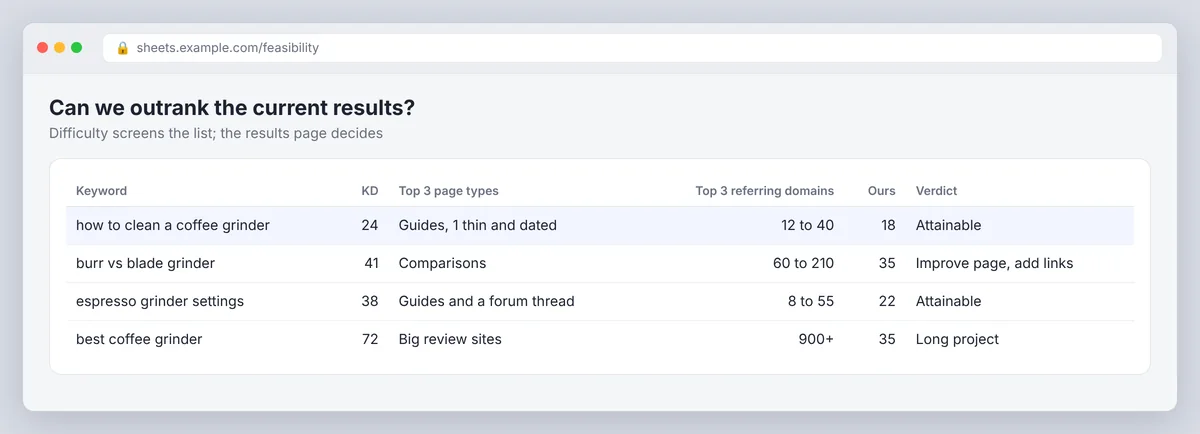
Keyword difficulty scores estimate how hard a term is from the strength of the pages ranking for it. They are useful for screening a list of five hundred terms down to fifty. They are not a verdict on whether your page can rank, because they know nothing about your site.
For the fifty, look at the SEO metrics that matter per keyword:
- Search volume and the volume trend, remembering that volume is searches, not clicks.
- The difficulty score, as a screen: under 30 is usually open to a focused page, 30 to 60 depends on your authority, above 60 needs a plan.
- CPC, as a hint at commercial value; PPC advertisers pay for clicks that convert.
- Backlinks and authority of the ranking pages, compared with yours. If every top page is a well-known domain with hundreds of referring domains, start with the long-tail keywords around the head term and build toward it.
- Relevance of the ranking pages. A strong domain ranking with a loosely related page can be beaten by a focused one.
The honest test is a comparison: your site against the current results on topical fit, depth and authority. Where you are close, the keyword is attainable. Where you are not, it goes in the "later" column, which is not the same as the bin.
Step 6: Prioritize by traffic potential and business value
A keyword list becomes a plan when it is ordered. Score each candidate on four things and weight them in this order: fit with what you sell, feasibility of ranking, likely clicks (volume adjusted for what else sits on the results page), and effort to produce a page that beats the current results. Refine the weights after the first few pages tell you what converts. Volume alone is the worst way to sort the list; it promotes broad terms you cannot win over specific ones you can.
A commercial keyword with a few hundred searches from people who need your product beats an informational term with ten thousand from people who do not. Where you have conversion data in Google Analytics, use it to estimate what a visit from each keyword is worth and the likely ROI of a page. To simplify, one visit value per page type is enough. Where you do not, say so in the spreadsheet rather than inventing a traffic forecast. Pick the low-hanging fruit first: weak keywords you already rank on page two for, and missing keywords with thin competition.
Step 7: Map keywords to pages and build the content plan
Keyword grouping comes next: group the chosen keywords by intent, not by shared words, into topic clusters. "How to clean a coffee grinder" and "coffee grinder cleaning steps" return the same results and belong on one page; "best coffee grinder for home" is a different intent and a different page. Then assign each cluster a page type that matches the SERP (guide, comparison, product page, landing page) and an address, checking your existing pages first. Improving a page that already ranks is almost always cheaper than publishing a near-duplicate. Our keyword clustering guide covers the grouping in detail.
For each page in the plan, record the audience, the primary SEO keyword, the supporting terms, the gap you are filling, the page type, the owner and the next action (new page, update, or optimize and merge). Keep it simple; a one-sheet plan gets used, a forty-column one does not. That record is the content strategy; everything downstream, from the brief to the draft to the optimization, reads from it.
Track rankings and refresh the research
Competitor keyword research goes stale. Rivals publish, Google changes the results page, and your own rankings move. Track the target keywords and the pages assigned to them, review monthly, and rerun the comparison each quarter or whenever a competitor launches something substantial.
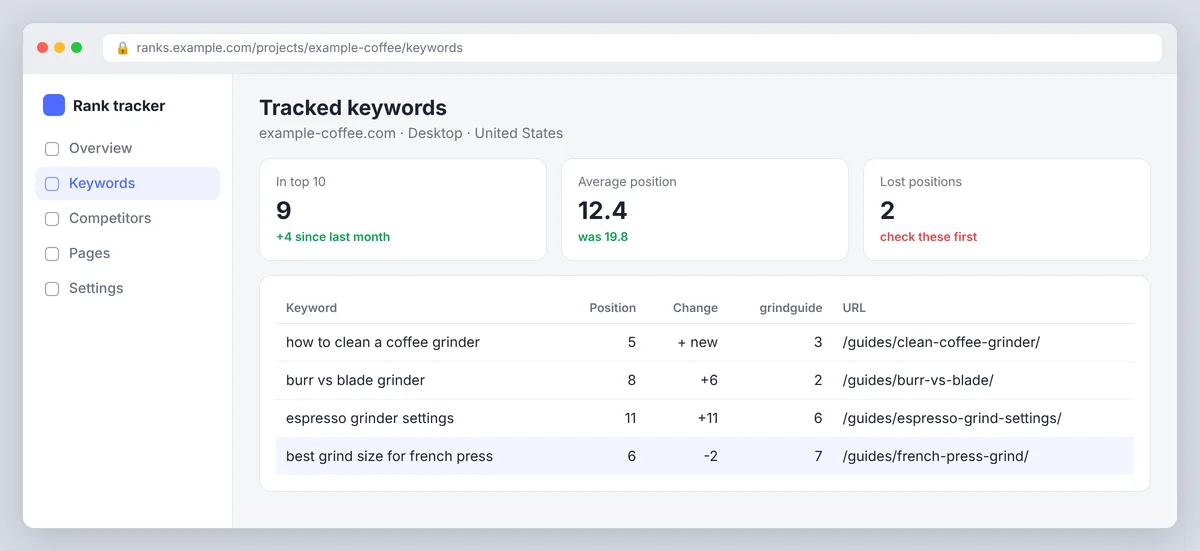
Google's own reports show impressions, clicks and average position for free; a rank tracker adds daily positions and competitor visibility for the keywords you chose, with insights into which pages moved. SerpPal's rank tracking checks the Google position of each article's keyword, weekly on paid plans, and shows the trend in the Insights tab, which is enough for most sites. Pages that earn impressions but few clicks need a better title; pages that get clicks but no conversions have an intent problem, not a ranking problem.
Common competitive keyword research mistakes
- Copying the whole list. Most of a competitor's keywords are irrelevant to you. Keep only relevant keywords you can serve.
- Trusting difficulty scores alone. They screen; the results page decides.
- Chasing volume. Broad terms you cannot rank for crowd out specific ones you can.
- Ignoring what else is on the page. Volume is not clicks when an AI Overview and four ads sit above the results.
- One page per keyword. Keywords with the same intent share a page; separate pages compete with each other.
- Forgetting your own pages. Check for an existing page before creating a new one.
- Treating CPC as organic value. Advertiser competition and SEO opportunity are loosely related at best.
- Doing it once. Rankings move; the research has to move with them.
Conclusion
Competitive keyword research turns other sites' rankings into your plan. Find the domains that actually rank for your searches, find keywords they win and you don't, check the search intent and the live results for each one, and keep the ones you can serve and realistically beat. Long-tail keywords around a competitor's best pages are usually the quickest wins. Then map each group to one page, brief it from the pages search engines already reward, and track it with a rank tracker so the next round of SEO research starts from real data.
Frequently asked questions
How do I find my competitors' keywords for free?
Search your target terms and read the pages that rank: their headings, questions and repeated wording are their keywords. Use Google Search Console for the searches where you already get impressions, Google Keyword Planner for related ideas and volume ranges, and the "People also ask" and related searches boxes for variants. A spreadsheet is enough for three to five competitors.
What is the difference between competitor keyword analysis and a keyword gap?
A keyword gap report is one part of competitor analysis: it compares the keywords you rank for with the keywords competitors rank for and sorts the difference. Competitor keyword analysis is broader and also looks at the ranking pages themselves, their formats, depth, backlinks and the intent they serve.
How do I check SEO competition for a keyword?
Search it and study the first page. Note the page types, how strong the domains are, how many backlinks the ranking pages have, how well they answer the search, and what sits above them. Compare that with your own site. Use a difficulty score to screen the long list, and the live results to make the call.
What keyword difficulty should I target?
It depends on your site's authority. New or small sites do best under 30, where a focused, better page can rank on relevance. Established sites can take on 30 to 60 with good content and some links. Above 60 usually needs a cluster of supporting pages and a link plan, so treat it as a quarter's project rather than a single article.
How often should I redo competitive keyword research?
Review keyword rankings monthly and rerun the comparison quarterly, or sooner when a competitor publishes a major resource, Google changes the results page for your core terms, or your own offer changes. The first pass is the big one; the refreshes are quick because the spreadsheet already exists.