On this page
- What is Google Search Console?
- What is Google Analytics?
- Google Search Console vs Google Analytics: key differences
- Comparing metrics: what each number means
- Why Search Console clicks don't match Google Analytics sessions
- Which tool should you use? Common tasks
- Comparing features: where GSC and Google Analytics align
- How to connect Google Search Console and Google Analytics
- A simple SEO workflow using both tools
- Pricing, access and whether you need both
- FAQ
Google Search Console vs Google Analytics comes down to one line: Search Console shows how your site performs in Google Search before anyone clicks, and Google Analytics shows what people do on your site after they arrive. You need Search Console for rankings, indexing and search queries, and Google Analytics for traffic sources, engagement and conversions.
Both tools are free, both come from Google, and both report "organic" numbers that never quite match. That is why so many site owners open the wrong one for the question they have. This guide explains what each tool measures, the key differences between them, why their numbers disagree, and a simple workflow that uses both.
Key takeaways
- Google Search Console reports search performance: impressions, clicks, click-through rate, average position, indexing and crawl problems.
- Google Analytics reports user behavior: sessions, traffic sources, audience demographics and conversions from every channel, not only search.
- Search Console clicks and Google Analytics sessions will not match. Different definitions, time zones, consent rules and tracking gaps all play a part.
- For SEO, start in Search Console to find the opportunity, then check the page in Google Analytics to see if people do what you want.
- Linking the two adds Search Console reports inside Google Analytics, but the data stays separate.
What is Google Search Console?
Google Search Console (GSC) is a free service that shows how the Google search engine sees your website. It used to be called Google Webmaster Tools, and it is built for site owners, SEOs and developers who care about organic search traffic and search visibility.
Google Search Console collects its data on Google's side. You don't install a tracking script. You verify that you own the site, either as a domain property (verified with a DNS record) or as a URL-prefix property, and Google starts showing you what it already knows about your pages. That makes GSC the main tool for monitoring how Google crawls and indexes your site.
The main reports cover:
- Performance: the searches your pages appeared for, with clicks, impressions, CTR and average position. Separate reports exist for Google Discover and Google News.
- Page indexing: which pages are indexed and why others are not (formerly the Coverage report). This is where crawl errors such as 404s and server errors show up.
- URL Inspection: the status of one URL, its last crawl and whether Google can render it.
- Sitemaps: submit a sitemap and see how many URLs Google read from it.
- Core Web Vitals: loading, responsiveness and layout stability measured on real users' visits.
- Links: your top linking sites and most linked pages, a basic view of your backlinks and internal links. It is not as comprehensive as a paid backlinks tool, but it comes straight from Google.
- Security and manual actions: hacked content, malware and penalties.
Search Console keeps 16 months of performance data and reports dates in Pacific Time. If you want those numbers next to the articles you write, SerpPal can connect Google Search Console to a project and show clicks, positions and pages losing clicks beside each article.
What is Google Analytics?
Google Analytics is a web analytics platform that measures what people do on your site or app. The current version, Google Analytics 4 (GA4), records everything as events: page views, scrolls, clicks, form submissions, purchases and anything else you set up.
Unlike Google Search Console, Google Analytics needs a tracking code on your pages. You add it in your site's HTML, through a plugin, or with Google Tag Manager. If the JavaScript tag doesn't load, or a visitor declines cookies, that visit may not be recorded.
Google Analytics answers questions such as:
- Where did users come from: organic search, paid ads, social, email, referral or direct? The Acquisition reports answer this.
- Which landing pages keep people engaged, and which lose them?
- Who is your audience? Demographics, country, device and new versus returning users.
- Which pages and channels lead to sign-ups, sales or other key events (GA4's name for conversions)?
It covers all your traffic, not just Google Search. It also connects to Google Ads, BigQuery and Looker Studio (formerly Google Data Studio) for deeper analysis and dashboards.
Google Search Console vs Google Analytics: key differences
The short version: Search Console measures what happens on Google's results page, and Google Analytics measures what happens on your site. The table below sums up the main differences between Google Search Console and Google Analytics.
| Aspect | Google Search Console | Google Analytics |
|---|---|---|
| Main question | How does Google see and show my site? | What do people do on my site? |
| Where data comes from | Google's own search and crawl data | A tracking tag that runs in the visitor's browser |
| Traffic covered | Google Search, Discover and News only | All channels: search, ads, social, email, referral, direct |
| Key metrics | Impressions, clicks, CTR, average position | Users, sessions, engagement rate, key events, revenue |
| Search queries | Yes, the words people typed | No, apart from linked Search Console reports |
| Technical SEO | Indexing, crawl errors, sitemaps, Core Web Vitals | None |
| Setup | Verify ownership (DNS record, HTML file or meta tag) | Install the tracking code on every page |
| Data history | 16 months | Up to 14 months in explorations on the free version |
| Cost | Free | Free (Google Analytics 360 is paid) |
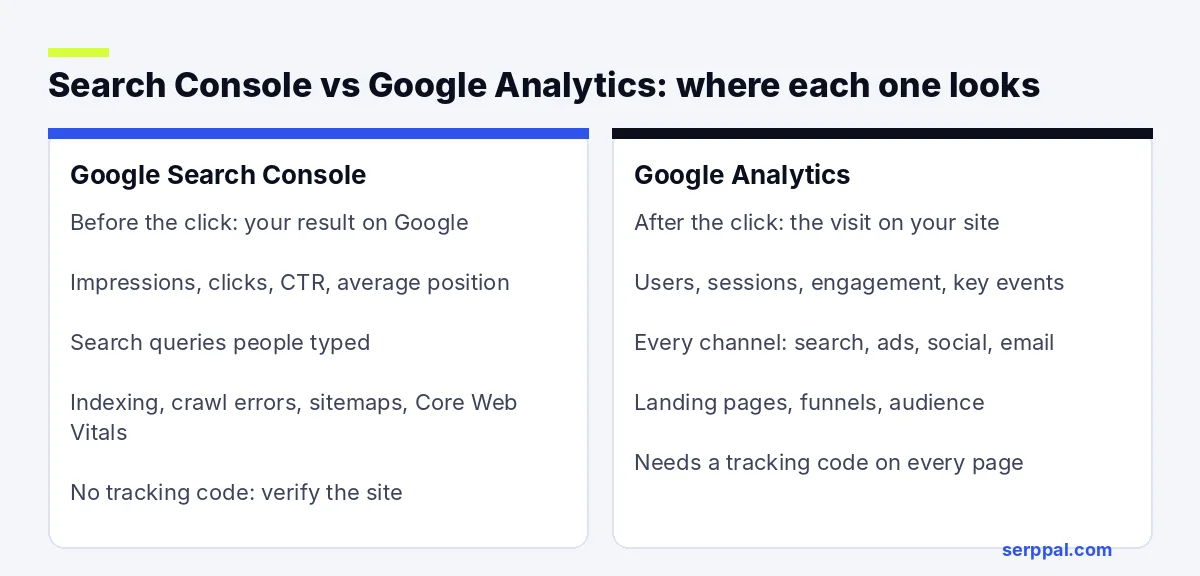
Search performance vs user behavior
Search Console stops at the click. It tells you a page showed up 4,000 times for a search and got 120 clicks, but not whether those 120 people read the page, signed up or left after five seconds.
Google Analytics starts at the visit. It can tell you the average time on page, the bounce rate and the conversion rate for organic visitors, but not which searches brought them there or how many people saw your result and scrolled past it.
Search data vs every traffic source
Google Search Console only knows about Google. It has nothing on Bing (use Bing Webmaster Tools for that), social media, newsletters or paid campaigns. Google Analytics groups all of those into channels, so it's the tool for comparing organic search against everything else and for judging ROI across your marketing.
Technical health monitoring vs on-site behavior
Google Search Console is the only one of the two that helps with crawling, indexing and technical monitoring. When a page drops out of Google, the answer is usually in Page indexing or URL Inspection, not in Google Analytics. Our guide to the URL Inspection tool walks through that check.
Google Analytics, on the other hand, shows what happens next: which pages hold attention, where people go after the landing page, and which steps of a funnel they abandon.
Comparing metrics: what each number means
Both tools use words like "clicks", "users" and "organic", but they measure different things. Understanding the definitions of the key metrics saves a lot of confused reporting.
Search Console metrics
- Impressions: how often a link to your site appeared in search results (the SERPs) the user could see.
- Clicks: how often someone clicked through to your site from Google.
- CTR: clicks divided by impressions.
- Average position: the average top position of your result across those searches. Lower is better.
Google Analytics metrics
- Users: the people (really, browsers or devices) who visited.
- Sessions: a group of interactions in one visit. One user can have many sessions.
- Engagement rate and bounce rate: GA4 counts a session as engaged if it lasts over 10 seconds, has a key event or has two or more page views. Bounce rate is the share of sessions that were not engaged.
- Average engagement time: the closest replacement for the old average session duration metric.
- Key events: the actions you mark as important, such as a purchase or a sign-up.
These insights fit together. GSC metrics tell you how much search visibility a page has; Google Analytics metrics tell you whether that visibility turns into business. Understanding both gives you a comprehensive picture that neither tool offers alone.
Why Search Console clicks don't match Google Analytics sessions
If you compare Search Console clicks with organic sessions from Google in Google Analytics, the numbers will be different. That is normal. The most common reasons:
- Tracking gaps. Analytics only records a visit when its tracking code loads. Ad blockers, declined cookie consent, slow pages and JavaScript errors all lose sessions. Search Console counts the click on Google's side, so it doesn't lose them.
- Different units. A click is one click. A session can include several pages, and one person can click your result twice in an hour and create one session.
- Time zones. Search Console uses Pacific Time. Google Analytics uses the time zone set in the property's Admin settings.
- Privacy filtering. Search Console leaves out rare searches to protect users, so totals by query are lower than totals by page.
- Attribution. Google Analytics may credit a session to another channel based on its attribution rules, while every Search Console click comes from Google Search.
- Bots and data lag. Analytics filters known bots, and both tools take a day or two to settle their numbers.
Look at trends, not exact totals. If clicks rise in Search Console while organic sessions fall sharply, check your tracking code, consent banner and redirects. A steady gap is not a problem.
Which tool should you use? Common tasks
Who each tool is for
Google Search Console is aimed at site owners, SEO specialists and developers whose job is search engine optimization and site health. Google Analytics is aimed at marketers, product teams and business owners who need to analyze traffic from every channel and measure results. Pick the tool that measures the question you are asking. This table covers the questions both groups ask most.
| Question | Open |
|---|---|
| What searches does this page show up for? | Search Console |
| Why isn't my new page in Google? | Search Console (URL Inspection, Page indexing) |
| Which pages have a high position but a low CTR? | Search Console |
| Who links to my site? | Search Console (Links report) |
| How much traffic does organic bring compared with ads? | Google Analytics |
| Which landing pages lead to sign-ups or sales? | Google Analytics |
| What do people do after they land? | Google Analytics |
| Did my SEO update work? | Both |
When is Search Console the better choice for SEO? Most of the time. It is the only free source of query-level search data from Google, which makes it the starting point for keyword research on your own site. Our guide to keyword research with Search Console shows how to mine it for new topics.
Comparing features: where GSC and Google Analytics align
The two tools overlap in a few places, which is why people mix them up. Both show landing pages that get organic traffic. Both break data down by country and device. Both export to BigQuery and Looker Studio for custom reports, and both have an API for teams that want to analyze data in their own dashboards or CRM.
Search Console used to have a Mobile Usability report, but Google retired it. For mobile usability checks today, use Lighthouse or PageSpeed Insights, and check device engagement in Google Analytics to see whether mobile visitors behave differently from desktop ones.
How to connect Google Search Console and Google Analytics
You can integrate the two so Google Search Console data shows up inside Google Analytics. Linking doesn't merge the data or make the numbers match. It just saves you from switching tabs for basic reports. Google explains the full process in its help article on Search Console integration.
- Make sure the site is verified in Search Console and that you are a verified owner of the property.
- Make sure you have the Editor role (or higher) in the Google Analytics property.
- In Google Analytics, open Admin, then Product links, then Search Console links.
- Click Link, choose the Search Console property, then pick the web data stream.
- Review and submit.
After the integration is set up (it can take a day or two for data to appear), look for the Search Console collection in Reports. If you don't see it, publish it from the Library. You get two reports: Queries, and Google organic search traffic by landing page, with engagement and key events next to Search Console clicks.
A simple SEO workflow using both tools
Here is a monthly routine that takes about half an hour and uses each tool for what it does best.
- Find opportunities in Search Console. Open Performance, compare the last 28 days with the period before, and sort pages by impressions. Note pages at positions 5 to 20 with lots of impressions, and pages with a low CTR for their position.
- Check behavior in Google Analytics. For those landing pages, look at engagement rate, time on page and key events from organic search. A page with good rankings and poor engagement has a content problem, not a ranking problem.
- Refine content using what you learned from both. A low click-through rate means the title and description need work. Short visits mean the page doesn't answer the search. Missing from the index means a technical issue to fix in Search Console.
- Optimize and keep monitoring. Update the page, request indexing in GSC, and note the date. Compare both tools four to eight weeks later, since search engine optimization takes time to show.
For pages that lose clicks, content optimization usually does more than any technical fix. A content editor can show which terms and topics the top-ranking pages cover that yours misses.
Pricing, access and whether you need both
If you run a website and care about search, yes. They answer different questions, both are free, and setting both up takes less than an hour. Search Console is the search engine's view of your site; Google Analytics is the visitor's view.
Access works differently too. In GSC you add users per property as owners, full users or restricted users. In Google Analytics you give roles such as Viewer, Analyst, Editor and Administrator. A small blog can get by with Google Search Console alone for a while, since it doesn't need tracking code or a cookie banner. Once you sell something or run campaigns, Google Analytics becomes necessary to see which traffic turns into customers. Larger teams sometimes use another platform such as Adobe Analytics instead of Google Analytics, but they still use Search Console, because nothing else shows Google's own search data.
FAQ
Is Google Search Console better than Google Analytics for SEO?
For SEO data, yes. Google Search Console shows the searches, positions, impressions and indexing issues that Google Analytics can't see. Google Analytics is better for judging what organic visitors do after they arrive, so most SEO teams use Search Console first and Analytics second.
Can I use Google Search Console without Google Analytics?
Yes. The two tools are independent. Search Console only needs you to verify ownership of the site, with no tracking code, so it works even if you never install Google Analytics.
What is the difference between Search Console clicks and Google Analytics sessions?
A Google Search Console click is counted when someone clicks your result on Google. A Google Analytics session is counted when the tracking code loads on your site. Ad blockers, consent choices, time zones and different counting rules mean the two numbers rarely match.
Does Google Analytics show search queries?
Not on its own. Google Analytics can show that a visit came from Google organic search, but not the query. To see search terms inside Analytics, link Google Search Console and use the Queries report.
Are Google Search Console and Google Analytics free?
Yes. Google Search Console is completely free. The standard version of Google Analytics is free too; Google Analytics 360 is a paid version for large companies with higher limits and support.