On this page
- Key takeaways
- Introduction: why keyword research matters for SEO
- Types of keywords and search intent
- Keyword research for SEO, step by step: finding the right keywords
- How to use free and paid keyword research tools effectively
- Where to use the target keyword on the page
- Common keyword research mistakes
- Conclusion
- Frequently asked questions
Keyword research for website SEO is the process of finding the search queries people type into search engines, judging which ones your site can realistically rank for, and mapping them to content. Done well, it tells you what to write, in what format, and in what order, before you spend a day on a draft nobody searches for. It's the foundation of any SEO strategy.
This guide walks through the whole keyword research process step by step: seed keywords, expanding the list, classifying search intent, reading the SERP, judging difficulty and search volume, grouping keywords into articles and prioritizing them into an SEO strategy. It covers free keyword research techniques and when paid keyword research tools earn their fee.
Key takeaways
- Start from your audience's questions and your own Search Console data, not from a keyword tool's biggest numbers.
- Every keyword has an intent: informational, navigational, commercial or transactional. The results page tells you which, and the intent decides the format, so the target keyword and the format are chosen together.
- Judge keywords on relevance, demand, difficulty and business value together. High-volume keywords with the wrong intent are worth less than a low-volume keyword that converts.
- Group supporting keywords into topic groups and give each group one article. Competing URLs for the same keyword hurt both.
- Free tools (Google Search, autocomplete, Keyword Planner, Search Console, Trends) cover most of the work; paid tools add scale, difficulty scores and competitor analysis.
Introduction: why keyword research matters for SEO
Search engines send traffic to content that answers a search, so your content has to match the queries people make. Keyword research connects the three: what your audience needs, what they type to find it, and what you publish. Skip it and you get articles that read well and rank for nothing, or several URLs that fight each other for the same keyword, and your visibility and traffic suffer.
It also sets the content strategy and the SEO strategy behind it. The list of keywords you end up with, sorted by intent and priority, is the publishing calendar: which blog posts, which product listings, which comparison guides, and which existing content to refresh. For a new website, keyword research is the difference between a site plan and a guess, and for marketing teams it decides where the budget goes for the long term.
Types of keywords and search intent
Search intent
Search intent (or user intent) is the reason behind a query. Google's results reveal it, because the ranking content is the format people clicked on and stayed with.
- Informational keywords: the searcher wants to learn something. "How to do keyword research", "what is keyword difficulty". Informational intent calls for a guide, an explainer, a how-to, and it's the top of the funnel.
- Navigational keywords: they want a specific site. "Google Search Console login". Only worth targeting if the brand is yours.
- Commercial keywords: they're comparing before buying. "Best keyword research tools", "X vs Y". The answer is a comparison, a review, a list.
- Transactional keywords: they're ready to act. "Buy", "pricing", "sign up", "near me". The answer is a product, service or sales landing.
Match the format to the intent, and align the content with where the searcher is in the funnel. A sales pitch for an informational keyword won't rank, and a blog post for a transactional keyword won't convert.
Short-tail and long-tail keywords
Short-tail keywords are broad, one or two words, high-volume and hard: "seo tools". Long-tail keywords are longer and more specific: "free keyword research tools for small business". They have lower search volume, but the intent is clearer, the competition is lighter and the visitors are closer to what you offer. Most sites earn most of their traffic from many long-tail keywords, not from one short-tail keyword.
Seed keywords, primary keywords and related keywords
A seed keyword is a broad starting phrase for a topic ("meal planning"). A primary keyword (or target keyword) is the main keyword one article targets ("meal planning for beginners"). Supporting keywords are the variants and sub-questions the same article should cover ("weekly meal plan template", "how to meal plan on a budget"). Keyword research moves from seeds to primary keywords to supporting keywords, and the page covers all three.
Keyword research for SEO, step by step: finding the right keywords
Step 1: Define the audience and the goals
Write down who you want to reach and what you want them to do. A B2B SaaS wants trials from people comparing software; a local service wants calls from people in one city; a publisher wants readers who come back. The goal decides which keyword types matter: commercial and transactional keywords for the first two, informational keywords for the third.
Step 2: Build a seed keyword list
Brainstorming comes first. List your products, services, features, problems you solve, locations and the words customers use on sales calls and in support tickets. Add the topics your competitors write about. Aim for 10 to 30 seed keywords per topic area; the tools generate more later. Keep a browser tab open for each seed as you go; a Chrome tab per topic is a handy way to compare.
Step 3: Expand the list with free keyword research techniques (Google Search, autocomplete, forums)
Typing a seed keyword into Google Search gives you more than you'd expect:
- Google autocomplete: the autocomplete suggestions in the search box as you type are real searches, ranked by popularity. Try the seed plus each letter of the alphabet to uncover new keyword ideas.
- People also ask: the question box shows the related questions searchers ask. Click a few and it keeps expanding.
- Related searches at the bottom of the results page.
- Google Trends for seasonal patterns and rising keywords.
- Google Search Console for the search terms your content already shows for, especially the ones with impressions but a low CTR, which are keyword opportunities you're already half-ranking for.
- Forums: Reddit and Quora threads show how people describe the problem in their own words, which is where long-tail keywords come from.
- Google Keyword Planner: free with a Google Ads account, it gives search volume ranges and keyword suggestions, with data designed for ads. Google Keyword Planner is the essentials tool most people start with.
Paste everything into one keyword list. Duplicates and junk get sorted in the next steps.
Step 4: Expand further with a keyword tool
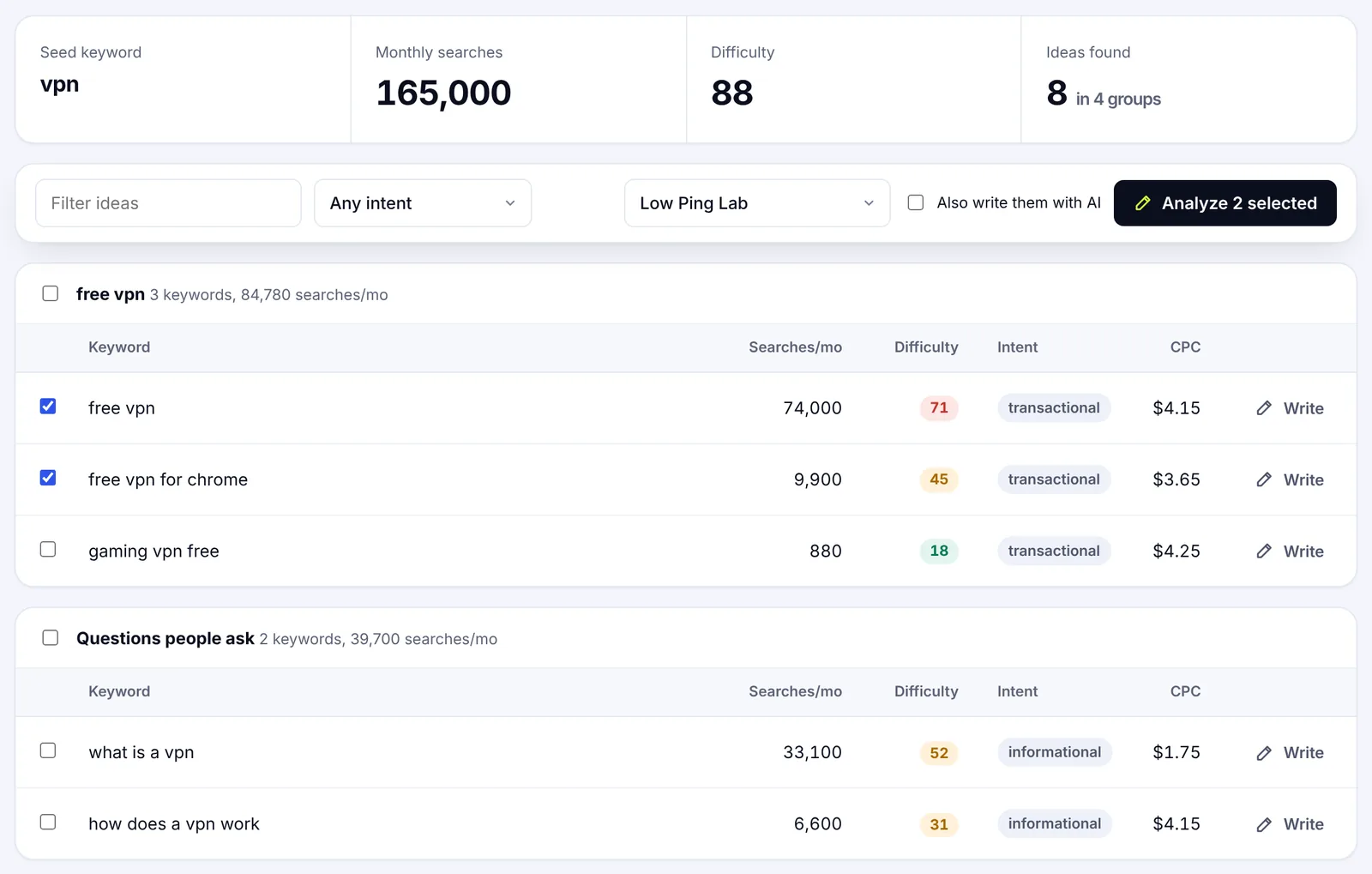
A keyword research tool, a keyword explorer, takes a seed and returns hundreds of keyword ideas with monthly search volume, keyword difficulty, intent and cost per click, then groups them into topic clusters. This is where paid SEO tools and all-in-one SEO toolsets earn their money: scale, metrics and competitor analysis in one place, discovering keywords you'd never find by hand. SerpPal's content planner does this for a topic and lets you send the keywords straight into analysis or AI writing; the features page shows how it fits with the editor.
Step 5: Classify intent and analyze SERP features
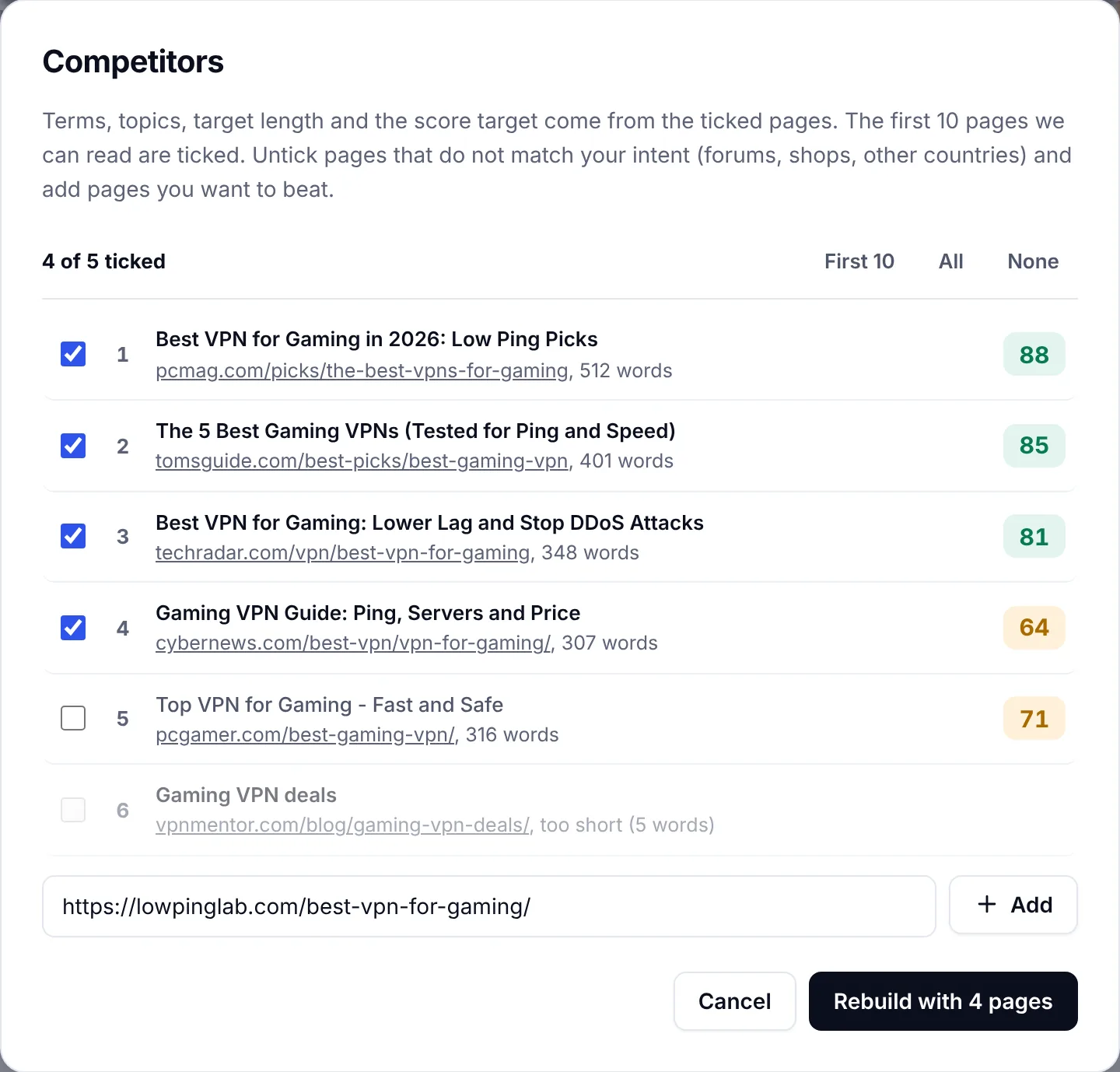
For each candidate keyword, search it and analyze the top 10 results. What format ranks: guides, lists, product listings, videos? Which SERP features appear: a featured snippet, People also ask, shopping results, a map pack? Those features take clicks away from organic results, so a keyword with a big featured snippet at the top is worth less than its volume suggests.
Reviewing the top ranking pages also shows you what competitive content looks like: length, subtopics, freshness, the questions they answer and the ones they miss. That's your angle. Analyzing competitors at this stage is cheap and prevents writing something the SERP doesn't want, and it's the easiest way to identify the right keywords for a new site.
Step 6: Keyword analysis: relevance, demand, difficulty assessment and value
Analyze keywords on four signals together:
| Signal | Question | How to check |
|---|---|---|
| Relevance | Does this search match what we offer and who we want? | Read the query and the ranking content |
| Demand | Do enough people search it? | Search volume from a keyword tool or Keyword Planner, as a direction, not a precise count |
| Difficulty | Can our site compete with the top 10? | Keyword difficulty plus a manual look at each ranking domain's authority and backlinks |
| Business value | Would a visitor from this keyword do something useful? | Intent, conversion path, CPC as a proxy for commercial value |
A good keyword scores well on all four. Relevance matters most: a keyword with 200 searches a month from your exact buyers beats one with 20,000 from students doing homework. Keyword difficulty is an estimate, and a focused niche site with real expertise often ranks for keywords a tool calls hard; a low number is a hint, not a promise.
Step 7: Group keywords into topics and map them to articles
Keyword clustering groups keywords that share an intent and can be answered in one article. "Keyword research for seo", "how to do keyword research" and "keyword research process" are one group and one article. "Keyword research tools" is a different intent (commercial) and a different article.
Map each group to a single web address with its format, audience and goal. Check existing content first: if something already ranks on page two for the group, improving it beats publishing a competitor to it. The post on keyword clustering goes deeper on grouping keywords based on intent.
Step 8: Keyword prioritization for content production
Score each group on relevance, attainable difficulty, business impact and effort, then order the list. This is where keyword strategies differ: a new domain and an established one shouldn't chase the same opportunities. A small team should take quick wins first: keywords where you already rank between 8 and 20, low-difficulty long-tail keywords with clear intent, and commercial keywords close to the sale. Broad, high-volume keywords come later, once the site has topical authority.
Prioritize, then write the plan down with the primary keyword, the supporting keywords, the format, the target audience and the goal for each item. That document is the content strategy for the next quarter, and the SEO strategy follows from it.
Step 9: Write, publish and measure
Write the page to match the intent and cover the group, then track impressions, clicks, click-through rate and position in Search Console, and conversions in analytics. If impressions rise but clicks don't, optimize the title. If the page stalls on page two, compare it with the top results and fill the gaps; that optimization step is where a content score helps. Keyword research isn't a one-time spreadsheet; revisit it as demand, search results and your products change. The guide to SEO content writing covers the writing step.
How to use free and paid keyword research tools effectively
| Free keyword research | Paid keyword research tools | |
|---|---|---|
| Sources | Google Search, autocomplete, People also ask, Trends, Search Console, Keyword Planner, forums | A keyword explorer with a database of billions of searches |
| Search volume | Ranges or none | Monthly estimates per keyword and country |
| Difficulty | Manual judgment of the top 10 | A difficulty rating, usually from backlinks |
| Competitor analysis | Manual | Keyword gap reports: what competitors rank for that you don't |
| Scale | Fine for a few topics | Thousands of keywords, tracked over time |
| Cost | Time | Monthly subscription |
You can do useful keyword research for free, and for a small site you should start there. Paid tools pay off when you handle many topics, need competitor keyword gap analysis, or want difficulty and volume in one list instead of twenty tabs. Whichever you use, confirm the opportunity by reading the actual results; the numbers are estimates from different data sources, and they disagree. Used well, the tools generate the long list and you make the short one.
Where to use the target keyword on the page
Once you have the primary keyword, use it where it helps readers and search engines understand the article: the title tag, the web address, the first paragraph, one or two headings and the meta description. Use the supporting SEO keywords in the body where they fit. Keyword density isn't a target; covering the topic is. A content score that compares your draft with the top-ranking pages tells you which related terms you're missing and which you've overused, which is more useful than counting.
Common keyword research mistakes
- Chasing search volume. High-volume keywords with the wrong intent bring traffic that leaves.
- Ignoring intent. The format the SERP shows is the format that ranks. Don't fight it.
- Trusting a difficulty score blindly. It's an estimate from backlinks; it doesn't know your expertise or your niche.
- One keyword per article, forever. An article should cover a group of supporting keywords, not repeat one phrase, and discovering new keyword ideas for it is part of the refresh.
- Forgetting existing content. Check Search Console before creating an article that competes with one you already have; identify what already ranks first.
- Doing it once. Searches change with seasons, products and news. Review the keyword list quarterly.
Conclusion
Keyword research for website SEO is a repeatable process: audience and goals, seed keywords, expansion with free techniques and a keyword tool, intent and SERP analysis, evaluation on relevance, demand, difficulty and value, grouping, prioritizing and measuring. The free methods get you most of the way; the paid tools add scale and competitor insights. Whatever you use, let the results page, not the numbers, make the final call, and keep the SEO strategy ahead of the tool, and turn the list into articles one cluster at a time. That's how you find keywords that pay off.
Frequently asked questions
What is keyword research in SEO?
Keyword research is finding the search queries people use, judging which ones your website can rank for and which are worth ranking for, and mapping them to content. It combines audience knowledge, search data from tools like Google Search Console and Keyword Planner, and a manual look at the search results.
Can you do keyword research for free?
Yes. Google autocomplete, People also ask, related searches, Google Trends, Search Console and Keyword Planner are free, and forums show how people phrase their problems. Free research lacks precise search volume and difficulty scores, which is what paid tools add.
What makes a good keyword for SEO?
A good keyword is relevant to what you offer, has real demand, is attainable for your site's authority, and brings visitors who are likely to do something useful. Long-tail keywords with clear intent usually score better on all four than broad, high-volume terms.
How many keywords should a page target?
One primary keyword and a group of related keywords that share the same intent. If two keywords have different intents, they need different articles. If they share an intent, one article should cover both, and splitting them creates competing URLs.
How often should you update keyword research?
Review the plan when you publish new content, enter a new market or change an offer, and check Search Console monthly for new search terms your pages show for. A full refresh once or twice a year catches seasonal shifts and new competitors.