On this page
- Key takeaways
- What on-page SEO is and why it matters
- Before you start: pick the page and set a baseline
- The on-page SEO checklist
- Content optimization and on-page optimization: cover the topic, don't stuff the keyword
- Local SEO and special cases
- Tools for the on-page and technical SEO checklist
- Reusable on-page SEO checklist template (reference)
- On-page SEO audit: how often and what to check
- Common on-page SEO mistakes
- Frequently asked questions
This on-page SEO checklist covers everything on a page you control before it goes live: the search intent and keyword, the content itself, the title tag and meta description, the heading tags, the web address, internal and outbound links, images, schema markup, mobile usability and indexing. Work through it top to bottom and you'll catch the mistakes that keep well-written pages off page one.
It's written for people who publish regularly, blog posts, product pages, landing pages, on WordPress or any other CMS. Each item says what to do, why it matters and how to verify it in under a minute. A reusable template is at the end.
Key takeaways
- On-page SEO is the content and HTML of a single page: keywords, title tag, meta description, headings, links, images, structured data. Off-page SEO is links and mentions elsewhere; technical SEO is how the site is crawled and delivered.
- Intent first: the format that ranks for the keyword is the format you should publish. Everything else on the list is wasted on the wrong format.
- Title tags and meta descriptions decide clicks; content quality decides whether people stay; headings, links and images decide whether search engines and readers can follow the page.
- Technical checks (URL slug, duplicates, schema, page speed, indexing) are quick to verify and expensive to skip.
- Record a baseline in Google Search Console before you optimize, so you can see what the changes did to your search visibility.
What on-page SEO is and why it matters
On-page SEO (or on-page optimization) is the work you do on the page itself so that people and search engines understand what it's about, trust it, and can use it. It covers the visible content and the HTML behind it. It's the part of SEO you control completely, which is why it's the first thing to get right, and why it's the cheapest part of an SEO strategy to improve. Search engines read the same page your visitors do; the checklist makes sure both get what they need.
| Area | What you work on | Examples |
|---|---|---|
| On-page SEO | Content and elements on the page | Keywords, title tag, meta description, headings, internal links, images, schema |
| Off-page SEO | Signals from other sites | Backlinks, brand mentions, reviews |
| Technical SEO | How the site is crawled and delivered | Indexing, site structure, HTTP status codes, speed, JavaScript rendering |
The areas overlap at the edges (a duplicate-handling tag is on the page but set by site rules), but the checklist below stays on what you can fix in the page editor today.
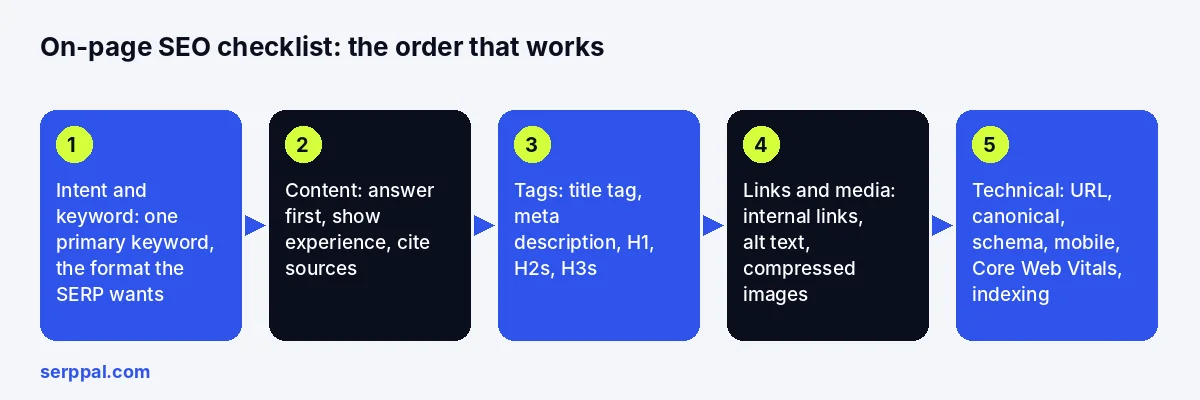
Before you start: pick the page and set a baseline
Don't optimize every page at once. Prioritize: use Google Search Console to find pages with impressions but few clicks, pages sitting between positions 8 and 20, and pages losing clicks month over month. Those are the ones where on-page work pays off fastest, and where SEO efforts show in organic traffic soonest. Then record the baseline: clicks, impressions, average position, click-through rate and conversions for the page, with the date. Without it you won't know what worked.
Analytics and Search Console setup
If the site isn't verified there yet, do that first; it takes ten minutes and it's the only place to see the search query data for your own pages. Connect analytics so conversions can be tied to the same pages. Both are free, and every later step in this checklist is measured through them.
Impact vs effort: an overview of which factors to fix first
Not every item on the list moves rankings equally. Intent, content and the title tag have the biggest impact; a wrong duplicate tag or a noindex tag can affect rankings completely but takes a minute to fix; images, schema and readability are steady gains with low effort. Analyze the gaps on your page and start with the high-impact, low-effort ones.
The on-page SEO checklist
1. Match the search intent
Search your primary keyword and look at what ranks: guides, lists, product pages, videos. That's the format the SERP wants. A sales page for an informational query won't rank, and a 3,000-word guide for a transactional query won't convert.
Verify: compare your page's format and depth with the top five results.
2. Choose one primary keyword and the secondary terms
Give the page one primary keyword (the main keyword it targets) and a set of related, long-tail and semantic phrases it should cover naturally. Keyword research tools and Google Keyword Planner help find them; the top-ranking pages show which ones matter and which have the most relevance. Don't give two pages the same target keyword, and use keywords naturally in the text rather than forcing them.
Verify: search your site for the keyword and confirm one URL is the best answer.
3. Write content that answers the query
Put the answer in the first two sentences, then the detail. Add what the top results don't have: your own examples, numbers, a process, an opinion. High-quality, well-optimized content is specific; thin content is generic. Avoid duplicate content across your own pages, and avoid padding to hit a word count. Organize the page around the search, not around the keyword list, and distribute the target terms where they belong.
Verify: read it as a new visitor. Is the answer within the first screen? Is every claim current and supported?
4. Show experience and trust
Name the author, show relevant experience, cite credible sources for claims that need them, and keep contact and company details easy to find. These are the E-E-A-T signals (experience, expertise, authoritativeness, trustworthiness) Google's quality guidelines describe. They don't rank a page by themselves; they stop a good page from being doubted.
Verify: author, date, sources and business details visible on the page.
5. Write a distinct title tag
The title tag is the headline in the search results and the strongest on-page signal. Put the primary keyword near the front, say exactly what the page offers, and keep it around 60 characters so it isn't cut off. Every page gets a unique one.
Verify: check the title in the page source or your SEO plugin, and preview it with a free SERP preview tool to see where it truncates.
6. Write a compelling meta description
The meta description is the snippet under the title. 120 to 160 characters, the keyword once, a reason to click. Google rewrites it sometimes, but a good one still lifts click-through rate on the queries where it shows.
Verify: no missing, duplicated or misleading meta descriptions across the site.
7. Use heading tags in a clear structure
One H1 that matches the title. An H2 for each main section, H3s for the points inside them, each one descriptive and concise. Headings make the page scannable for readers and tell search engines the topic hierarchy. Use the primary keyword in one or two subheadings where it fits, not in all of them.
Verify: read only the headings. Do they form a sensible outline?
8. Make the page readable
Short paragraphs (two to four sentences), a new subheading every 200 to 350 words, bullet lists for options, numbered lists for steps, a table for comparisons, a FAQ section for the questions people also ask. Readability keeps bounce rates down and time on page up, which is what the content was for. A readability checker gives you a reading ease score in seconds.
Verify: scan the page on a phone. Can you find the main points without reading every line?
9. Keep the URL short and readable
A clean URL structure: lowercase, words separated by hyphens, the primary keyword in the slug, no dates or parameters. SEO-friendly web addresses are easier to read, share and remember. Don't change an established address without a redirect.
Verify: read it aloud. It should describe the page.
10. Check the canonical tag and duplicates
If similar addresses exist (filters, tracking parameters, print versions), the canonical tag should point to the version you want indexed. Don't point it at pages that serve different purposes just because they overlap.
Verify: view the page source or run a crawler and compare the canonical with the intended page.
11. Add internal links
Link to related pages with descriptive anchor text, and link from older relevant pages back to this one. Internal links help readers find the next answer and help search engines discover and weight the page. Orphan pages, with no links pointing in, rarely rank. An editor that reads your sitemap and suggests internal links while you write makes this step hard to forget; SerpPal's features include that, along with the content score and the publishing step.
Verify: open every link; each should work and lead somewhere relevant.
12. Cite trustworthy outside sources
Link out when a claim needs evidence or a reader needs a primary source: documentation, studies, standards. Not competitors, not decoration. One or two good external links beat ten weak ones.
Verify: each outbound link supports the sentence it sits in and still resolves.
13. Optimize images and media
Compress images before uploading, use WebP or AVIF, give files descriptive names, and write descriptive alt text for images that carry information (decorative images get an empty alt attribute). Add a caption or nearby text for charts and videos. Images are among the biggest reasons pages load slowly.
Verify: every image has alt text, loads fast, and looks right at phone width.
14. Check mobile usability and page experience
Open the page on a phone. Text readable without zooming, buttons tappable, no content wider than the screen, no banner covering the answer. Then check Core Web Vitals in Google's speed tool: loading, interactivity and visual stability. Reserve space for images and embeds so the layout doesn't shift as it loads. Google's Core Web Vitals documentation explains each metric, and every browser's developer tools show the same numbers.
Verify: PageSpeed Insights on the live page, mobile tab first.
15. Add accurate schema markup
Structured data (schema markup) tells search engines what the page is: an article, a product, a FAQ, a how-to, a local business. Only use types that describe visible content. Schema can earn rich results; it doesn't guarantee them.
Verify: test the markup with Google's Rich Results Test and watch for errors in the search reports.
16. Confirm the page can be crawled and indexed
The page returns a 200 status, isn't blocked in robots.txt, carries no stray noindex tag, and is in the sitemap. Heavy JavaScript or CSS that hides content from search engines is a technical SEO issue, but you'll notice it here first.
Verify: inspect the address in Google Search Console; it should be indexed or indexable.
17. Add calls to action and the next step
Every page has a job: a signup, a purchase, the next article. Put one clear CTA where it follows from the content, with plain wording. Pages without a next step leak the traffic they earn.
Verify: a visitor who finishes the page knows what to do next.
18. Review the live page, then measure
Check the published page, not the preview: title, meta description, headings, links, images, schema. Then wait a few weeks and compare the search reports with the baseline: impressions, clicks, CTR, position, conversions. Visibility rises before clicks do, so watch impressions first. Impressions up and clicks flat means the snippet needs work; clicks up and conversions flat means the page or the CTA does.
Verify: a dated note of what you changed, so results can be tied to edits.
Content optimization and on-page optimization: cover the topic, don't stuff the keyword
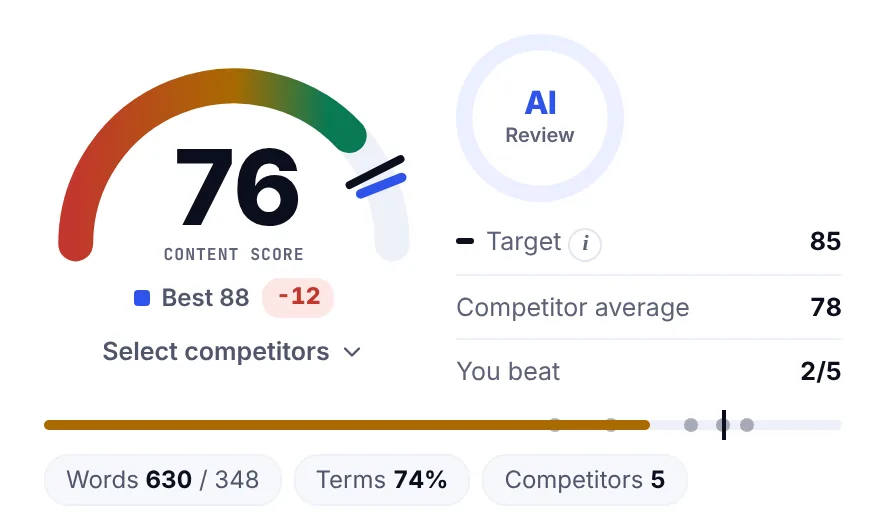
Keyword density isn't a ranking factor and keyword stuffing hurts readability. What matters to the ranking algorithms is coverage: the related terms, subtopics and questions the top-ranking pages share, distributed through the page where they belong. The practical way to check is a content score that compares your draft with the pages that already rank and shows which terms are missing, low or overused. SerpPal's editor does that live while you write, which turns steps 2, 3 and 7 of this checklist into a single pass. The content optimization guide goes through the full workflow.
Local SEO and special cases
For local businesses, add the city and service to the title and H1, embed the address and opening hours as LocalBusiness schema, and make the phone number tappable. For e-commerce, product schema with price and availability, unique descriptions per product, and category pages with real content above the product grid. For blog posts, the FAQ section and author details matter more than anywhere else. The checklist is the same; the weight of each item shifts.
Tools for the on-page and technical SEO checklist
- Google Search Console: search terms, impressions, clicks, indexing status, page experience report. Free and essential.
- Google's speed tool: performance for one page, with the highlighting of what to fix.
- A site crawler: finds missing tags, broken links, duplicate titles and canonical problems across the site.
- Rich Results Test: validates schema markup.
- A content editor with a live score: shows term coverage, headings and readability against the ranking pages while you write.
- Your CMS: where the title tag, meta description, duplicate settings and URL slug actually live. WordPress users set them in their SEO plugin.
Tools find problems; they don't decide whether the page is useful. Keep the reader ahead of the report.
Reusable on-page SEO checklist template (reference)
| Item | Done? | How to verify |
|---|---|---|
| Intent matched to SERP format | Compare with top 5 results | |
| One primary keyword, secondary terms covered | Content score or manual list | |
| Answer in the first two sentences | Read the opening | |
| Author, sources, trust signals | Visible on the page | |
| Unique title tag, keyword near front, about 60 chars | SERP preview | |
| Meta description 120 to 160 chars with the keyword | SERP preview | |
| One H1, descriptive H2s and H3s | Read headers only | |
| Readable: short paragraphs, lists, table, FAQ | Readability check, phone view | |
| Short, descriptive slug | Read it aloud | |
| Canonical correct | Page source or crawler | |
| Internal links in and out, descriptive anchors | Click them | |
| Outbound links to sources only | Click them | |
| Images compressed, alt text written | Inspect images | |
| Mobile usable, speed checks pass | Google's speed tool | |
| Schema markup valid | Rich Results Test | |
| Indexable: 200, no noindex, in sitemap | URL inspection | |
| Clear CTA | Finish the page as a visitor | |
| Baseline recorded, review date set | Search reports |
On-page SEO audit: how often and what to check
Run the checklist on every new page before it goes live. For existing pages, audit when the search reports show a drop, when the facts on the page change, and at least twice a year for the pages that bring the most traffic. A full on-page SEO audit of a site means running the same list across the top 50 pages and logging the fixes; the template below makes that repeatable.
Common on-page SEO mistakes
- Optimizing before checking intent. Perfect tags on the wrong format still don't rank.
- Keyword stuffing. Repeating the keyword in every header and paragraph. Cover the topic instead.
- Duplicate title tags and meta descriptions across pages, usually from templates.
- Two pages for one keyword. They split the signals; merge or differentiate them.
- Ignoring images. Huge files and missing alt text hurt speed, accessibility and image search.
- No internal links. New pages published and never linked from anywhere.
- Never measuring. Without a baseline, you can't tell what the optimization did to visibility or traffic.
Frequently asked questions
What is on-page SEO?
On-page SEO is everything you optimize on a web page itself so it ranks and converts: the content and keywords, the title tag and meta description, header tags, URL, internal and external links, images and alt text, schema markup and page experience. It's distinct from off-page SEO (links from other sites) and technical SEO (crawling and site speed).
What are the most important on-page SEO factors?
Matching search intent, content that fully answers the search query, a clear title tag with the target keyword, descriptive headings, internal links and a fast mobile-friendly page. Meta descriptions and schema help clicks and rich results rather than rankings directly, but they're quick wins.
How often should I run an on-page SEO audit?
Run the full checklist before every new page goes live, and audit existing pages when the search reports show a drop in clicks or position, when facts change, or at least twice a year for the pages that bring the most traffic.
How long does on-page SEO take to show results?
Google usually recrawls an updated page within days, and position changes settle over two to six weeks. Give an optimized page a month before judging it, and compare against the baseline you recorded rather than against a single day's numbers.
Does on-page SEO still matter with AI search?
Yes. AI Overviews and AI assistants pull from pages that are clear, well-structured and trustworthy, which is exactly what this checklist produces. Descriptive headings, direct answers and structured data make a page easier for AI systems to quote as well as for search engines to rank in the search results.