On this page
- Quick answer and best-fit recommendations
- What an AI humanizer does
- How we tested: methodology and limitations
- Results: a review of each mode we tested
- Is any AI humanizer undetectable? Detector reliability and limitations
- Comparison table: what the leading humanizer tools should offer
- Best choices by use case
- How to revise AI-assisted writing effectively: humanize AI text in seven steps
- What to avoid when choosing a tool
- Conclusion
- Frequently asked questions
The best AI humanizer is the one that makes AI-generated text read like a person wrote it while keeping every fact, number and link in place, and that shows you an AI score before and after so you can see what changed. A tool that only swaps synonyms, or that promises a 100% bypass rate against every AI detection tool, fails both tests.
Instead of ranking brands by their marketing claims, this guide explains what a humanizer actually does, then tests the main humanizing approaches on three real AI drafts (a blog section, a business policy and a technical explainer) and reports what happened to the AI score, the facts and the readability. The results, with the pros and cons of each approach, tell you more about choosing a tool than any list of key features.
Quick answer and best-fit recommendations
- A humanizer changes sentence rhythm, word choice and sentence structures, the patterns AI text tends to have. It can't add experience or opinions; that's still your job.
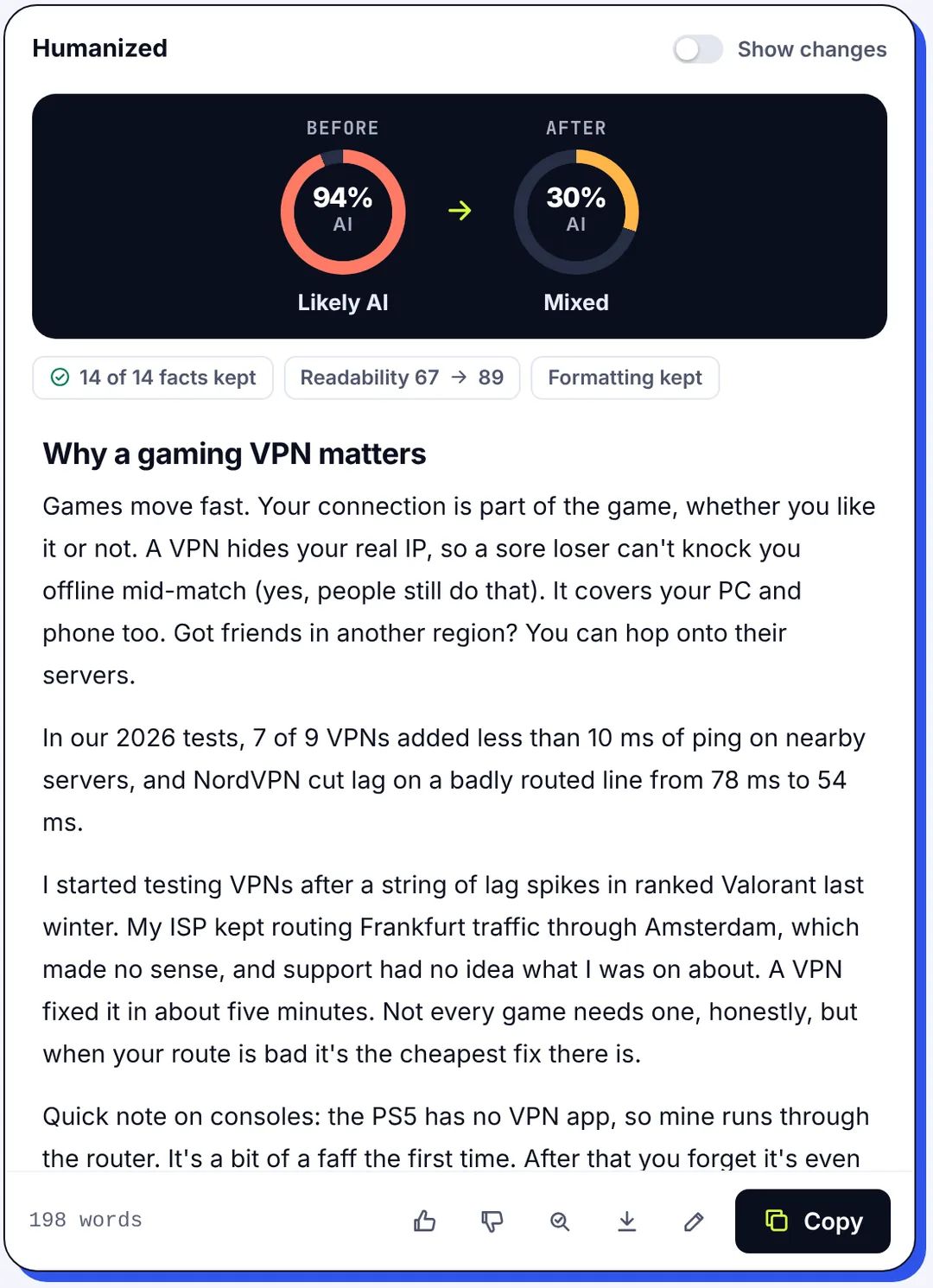
- A light pass barely moved the AI score on a generic blog passage (100% to 100%). A stronger pass with re-checking took it to 17%.
- Facts survived every pass in our test (4 of 4 and 7 of 7 protected numbers kept intact), and readability went up, not down.
- Technical text is the hardest to humanize: 94% to 48% at best. Expect manual edits afterwards.
- "Undetectable" is a marketing word. Detectors disagree with each other and change monthly; judge a humanizer by output quality and meaning preservation, not a bypass promise.
- Best fit: bloggers and SEO teams want the strong style inside their editor; professionals want the natural style; students should check their rules first; technical writers should plan on manual edits.
What an AI humanizer does
An AI humanizer takes AI-generated text and changes the things that make it read machine-made: sentences of the same length in a row, stock phrases ("in today's fast-paced world"), stiff transitions ("Furthermore"), tidy three-part lists, repetitive phrasing and predictable vocabulary. A good one changes syntax and sentence lengths, swaps generic phrasing for plain words, and keeps the original meaning, the facts and the formatting intact. The humanization runs in passes, and the algorithms behind it are the same kind of language models that wrote the text in the first place.
That's different from three things it's often confused with:
- A paraphraser or rewriter restates text in other words. Rewriting changes wording without caring whether the result reads human, and a plain rewrite has no idea which sentences a detector would flag. Paraphrasing is a fine way to avoid quoting; it is a different job.
- A grammar checker fixes errors. Clean grammar doesn't make text human; most AI text already has perfect grammar.
- A "bypass" tool optimizes against a specific AI detector. It may show a good raw bypass rate on one detector while making the prose worse and robotic in a new way, and the next detector update undoes it.
The best AI humanizer tools combine a humanizing model with a built-in AI checker, so they can re-check their own output, work again on the lines that still read as AI, and show you the AI score before and after. SerpPal's AI humanizer works this way, and it's what we used to run the tests below. Popular alternatives range from free web tools to features inside writing suites for users who already paraphrase there, and the same checks apply to all of them.
How we tested: methodology and limitations
We wanted a repeatable test anyone can rerun with their own text, so we kept it simple.
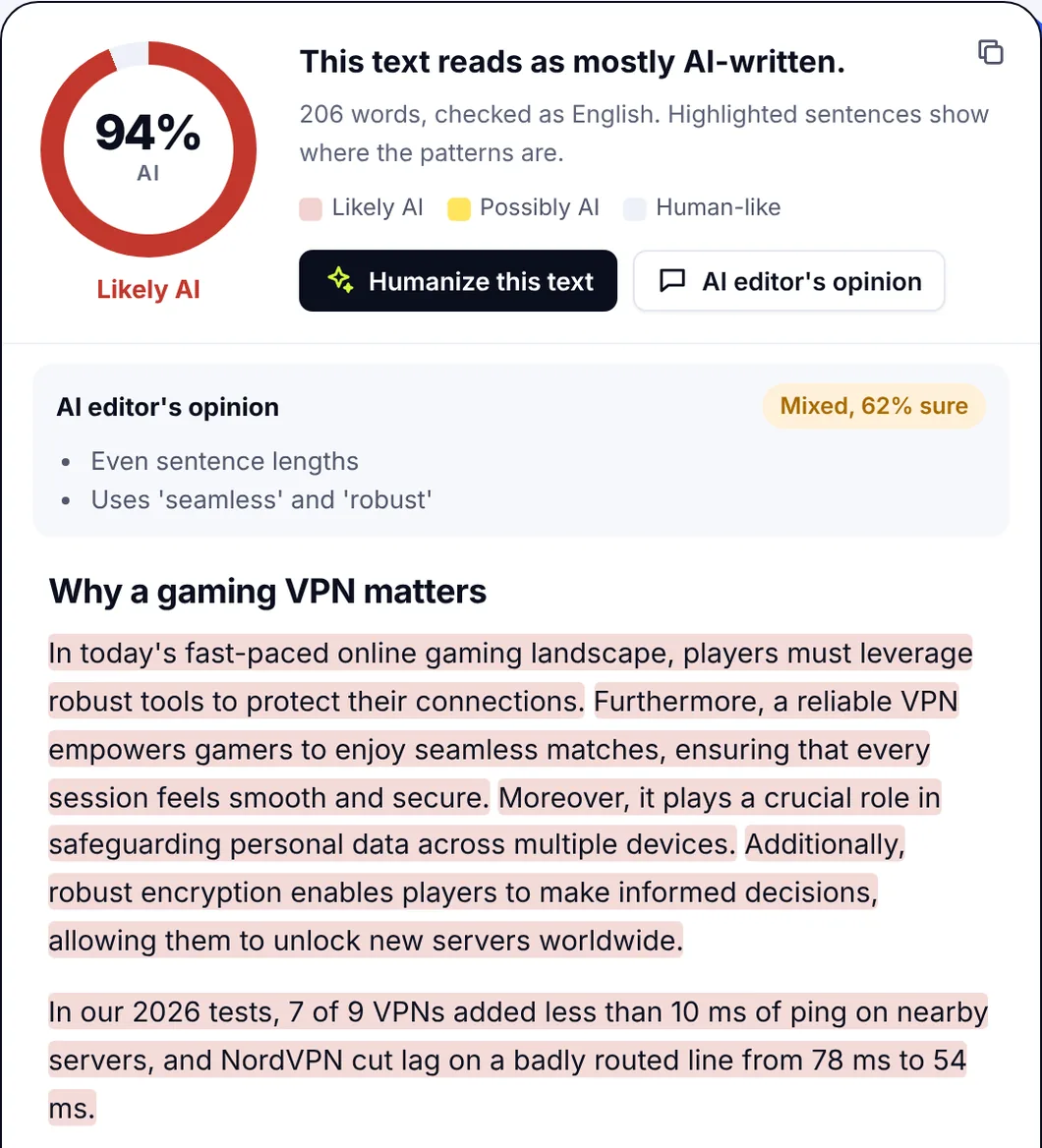
The samples. Three AI-generated passages of about 220 words each, written by a chat model of the ChatGPT and Claude Sonnet kind from a one-line test prompt, with no human editing (a 200-word AI-generated paragraph is enough for a reliable score; under 125 words most detectors get noisy, and 300 words is plenty):
- A generic blog section on why small businesses should start a newsletter (no numbers or names to protect).
- A formal business policy on remote-work expenses, with four facts that must survive: $50 a month, receipts within 30 days, paid with the next payroll.
- A technical explainer of HTTP caching with ETag and Cache-Control, with seven technical terms and numbers (a 304 response, a max-age of 3,600 seconds).
The passes. Each passage went through two humanizing modes, which cover what most humanizer tools offer:
- Natural style, the default light touch: natural rhythm, plain words, re-check and fix on.
- Strong style with Strict mode, the heavy option: every sentence restructured, re-checked until the text reads at 0 to 5% AI or nothing more can be improved.
What we scored. Before and after each pass, the text went through the same AI detector, and we recorded three things: the detection rate (the AI score), how many protected facts (numbers, names, links) were still present, and the Flesch reading ease as a readability metric. Speed was not a factor: every pass finished in under a minute. We used one detector for consistency; other detectors will give different absolute numbers, which is a limitation we come back to.
Results: a review of each mode we tested
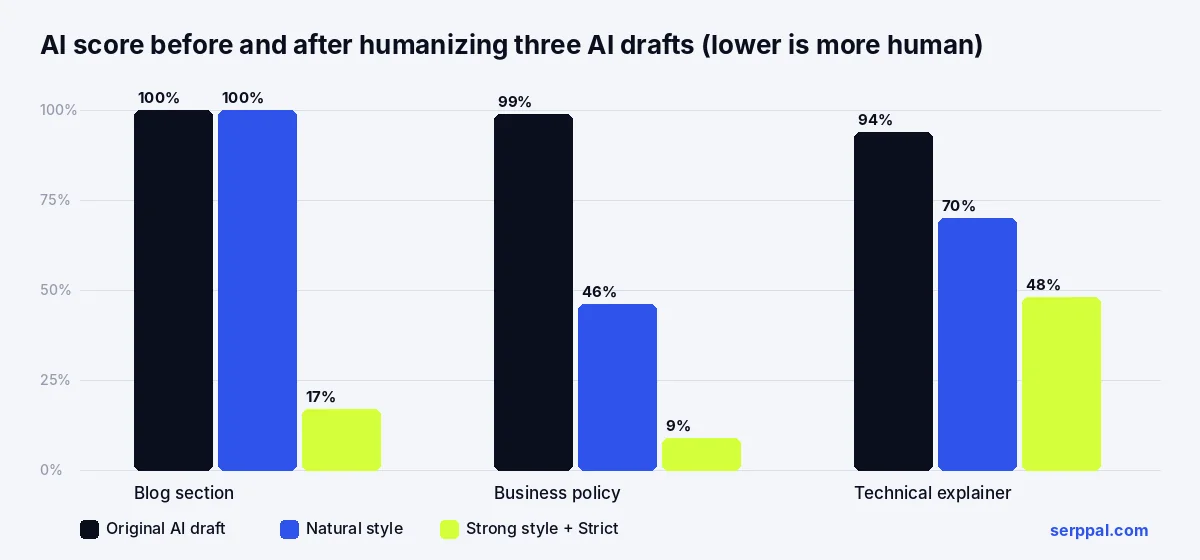
| Sample | AI score before | Natural style | Strong + Strict | Facts kept | Readability (before to after) |
|---|---|---|---|---|---|
| Blog section (222 words) | 100% | 100% | 17% | no facts to protect | 62 to 64 (Natural), 62 to 69 (Strong) |
| Business policy (218 words) | 99% | 46% | 9% | 4 of 4 | 46 to 50 (Natural), 46 to 54 (Strong) |
| Technical explainer (220 words) | 94% | 70% | 48% | 7 of 7 | 58 to 60 (both) |
Three things stood out, and we evaluated each mode on the same three questions: did the detection drop, did the facts survive, did it still read well.
Pros and cons of each mode
Natural style. Pros: fast, keeps the voice closest to the original, enough for formal business text. Cons: barely touches generic blog copy; one of our samples didn't move at all.
Strong style with Strict. Pros: the biggest drops in AI score, better readability, every fact preserved. Cons: changes more of the wording, so it needs a read-through, and it can over-polish text that was already fine.
Manual editing only. Pros: total control and your own voice. Cons: slow, and most people don't know which sentences a detector flags without a sentence-level view.
A light touch doesn't move generic AI text
On the newsletter sample, the Natural pass changed plenty of words and the AI score didn't move at all. Reading the two versions side by side explains why: the sentences kept the same shape, the same even length and the same order of ideas. The detector doesn't care that "stay in touch" became "a direct line"; it cares about rhythm and structure. Only the Strong pass, which rebuilt sentences and merged or split them, took the score from 100% to 17%.
Facts, writing quality and meaning preservation
Every protected fact came through every pass, with the tool preserving the $50 cap, the 30-day deadline, the 304 status code and the 3,600-second max-age. Readability improved slightly in all six runs, because the humanized text used shorter words and more varied sentence lengths, and the tone stayed the same: formal for the policy, plain for the blog. That's the opposite of what cheap synonym-swapping tools do, where a "utilize" replaces every "use" and the reading level goes up. The output was readable, polished and still said what the original said.
Technical content is the hardest to humanize
The HTTP caching explainer dropped from 94% to 70% with Natural and 48% with Strong, and it stayed in the "mixed" range: no detection bypass here, only an improvement. Technical writing is precise and formal by nature; a correct explanation of a cache header looks a lot like a textbook, and textbooks look like AI to a detector. The fix isn't more passes. It's a human adding an example from real life ("we set max-age to an hour on our product images and cut image bandwidth by about a third") that no model would have written.
Is any AI humanizer undetectable? Detector reliability and limitations
No, and the test shows why the question is wrong. There is no such thing as undetectable AI text, only text that a given detector doesn't flag today. AI detection is inconsistent by nature. The same text scored 100% on one pass and 17% on the next with the same detector, and a different detector would have produced different numbers again. Detectors are trained on different data, use different thresholds and are updated as models change, so "undetectable" today means "untested tomorrow". The honest version of the claim is: a good humanizer removes the patterns AI text tends to have, which lowers detection on most detectors most of the time. Nobody can promise to fool detectors that haven't been built yet.
The better question is what the text is like afterwards. In our test, the Strong pass produced copy we'd publish after a read-through: varied, plain, accurate. That's the output you're paying for. A low score on polished-sounding nonsense is worth nothing, and a low score on text that lost a number is worse than nothing. Judge a tool on output quality first and detection second.
Comparison table: what the leading humanizer tools should offer
Use these criteria to rank any tool, including ours, and give each one a grade. They're what separated a useful result from a cosmetic one in the tests, and they're the strengths and weaknesses to compare across the market.
| Feature | Why it matters | How to check |
|---|---|---|
| Before and after AI score | You can see whether the pass worked instead of guessing | Humanize a 200-word sample and compare |
| Re-check and fix | Works again on lines that still read as AI instead of stopping after one pass | Look for passes or a "polishing" step in the progress view |
| Facts kept | Numbers, names, links and citations survive | Humanize text with three numbers in it and count them afterwards |
| Formatting kept | Headings, lists, tables and bold stay where they were | Paste from Google Docs or your editor, not plain text |
| Styles and modes | Natural, strong, academic, simple, casual, professional voices for different jobs | Try the same paragraph in two modes |
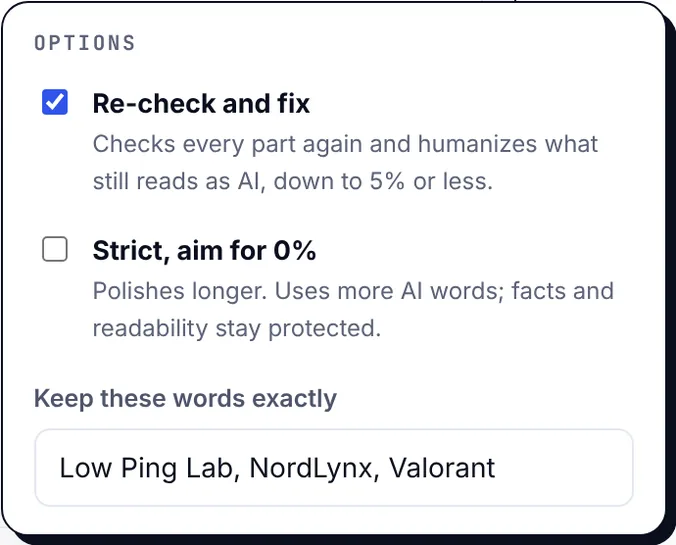
| Keep these words | Brand names and keywords stay exactly as typed | Important for SEO content and product docs |
| Language support | Humanizes and scores in the language of the text | Test a non-English paragraph if you need one |
| Sentence-level highlights | Transparent view of which sentences still read as AI so you can edit by hand | Open the result in the AI checker |
| Citation and link handling | Citations, links and a citation finder for academic work stay intact | Humanize a paragraph with two references |
| Interface and dashboard | A clean interface, a recent list and progress you can follow | Humanize a long text and switch tabs |
| API access | An API for high-volume processing from your own tools | Check the docs for API keys and limits |
| Word limits and pricing | Free plans cap words per month; paid plans run from about $9/mo to $99/month across the market | Count your monthly volume before comparing |
Free vs paid AI humanizer tools
Pricing deserves a note. Most humanizer tools sell words: a free trial or free allowance (SerpPal's free plan includes 500 words a month in the humanizer to try it), then monthly plans that scale with volume. The best free tier is the one that lets you test a real passage with formatting, not a 50-word teaser. Cheap, low-cost plans (often $9/mo to $19/mo) suit a student budget and bloggers; the $99/mo tiers are for teams; a mid-range plan suits freelancers; high-volume content creators and agencies need the bigger tiers, where raw volume economics matter, or a plan where humanizing is included with the writing tools. Compare the cost per 1,000 words at your real volume, not the headline price; at 10,000 words a month the pricing gap between tools is large.
Privacy, data handling and security
Read the data terms before pasting client work, unpublished research or anything confidential. Look for how long text is stored, whether it's used for training, and whether you can delete it. A tool that runs the processing on its own servers and lets you delete results is safer than one that's vague about where your words go.
Best choices by use case
The same tool behaves differently depending on what you feed it, so pick the style and workflow for the job. The humanization step should fit the rest of your writing workflow, not sit outside it. Overall, the casual pick for most people is a tool with a built-in detector and a strong style; the rest depends on the work.
Bloggers, SEO content and blog posts
Use the strong style on generic AI content, keep your target keywords with the "keep these words" option, then run the content score so you don't lose terms. The best place to do this is inside the editor where the article lives: humanize a paragraph or the whole piece, check the human tone card, publish. SerpPal's editor does the whole loop; the humanize in the editor guide shows the steps.
Business and professional writing
The natural or professional style is usually enough for emails, proposals and policy pages, and our business sample went from 99% to 46% with the light pass alone, with the tone preserved. Protect names, amounts and dates, and read the result once before sending. Don't paste confidential material into any tool whose data terms you haven't read.
Students and researchers: academic integrity and responsible use
Start with your institution's rules. Many allow grammar and clarity help and forbid submitting generated text; some require disclosure. Where the humanizer is allowed, the academic style keeps the formal register and every citation. Where it isn't, a humanizer is the wrong tool and the AI score is the wrong goal: keep your notes and early versions, and write the thing yourself. A tool's reputation for passing a plagiarism checker is irrelevant here; plagiarism and AI use are different questions, and originality in the sense that matters comes from your own thinking.
Technical, long-form and agency volume
Expect the hardest results here. Humanize in parts, read each one, and add a real example or a first-hand observation to every section. The pass gets you from "obviously machine" to "mixed"; your experience gets it the rest of the way. The humanizer is one editing step, not the last one, and the result is enhanced by you, not finished by the tool. For an agency that writes long-form content at volume, or a ghostwriter juggling clients, an API or a bulk option beats pasting one piece at a time, and short-form social copy barely needs it.
How to revise AI-assisted writing effectively: humanize AI text in seven steps
- Paste the text with its formatting. Headings, lists and links should come back in the same places.
- Pick the style for the job. Natural for a light touch, Strong for stubborn generic AI writing, Academic or Professional for a formal register.
- Protect what must not change. Add brand names, keywords and key terms to the keep list.
- Run it, then read the before and after scores. If the score barely moved, as our blog sample showed, try Strong with Strict rather than running Natural again.
- Check the facts badge. If anything is flagged as missing or changed, fix it manually.
- Open the AI checker view and edit the sentences still highlighted. Add a specific example, a number from your own work, an opinion.
- Re-score the content if it's for SEO, so the terms you need are still there.

What to avoid when choosing a tool
- Chasing 0%. Past a certain point, extra passes degrade clarity without making the text more human. Strict mode exists for stubborn texts, not for every one.
- Bypass-first marketing. A tool that leads with "bypass AI detection", "stealth" and "undetectable AI" and never mentions facts, readability or output quality is optimizing for the wrong thing.
- Trusting one detector. Scores vary across detectors and over time. Compare versions of the same text in the same detector; don't compare tools by a single number.
- Skipping the read-through. A humanizer can't know your product. Every result needs a human read for meaning, tone and tweaks.
- Humanizing instead of editing. If the draft is wrong, thin or generic, no style setting fixes that. Humanize the writing, then improve the content.
- Using it to hide something. In classrooms and workplaces with AI rules, the consequences of concealment are worse than the consequences of disclosure.
Conclusion
The best AI humanizer isn't the one with the boldest bypass claim. It's the one that lowers the AI score for a reason you can see in the text (varied rhythm, plain words, restructured sentences), keeps every fact, and tells you where to edit next. In our test, that combination took generic AI text from 99 to 100% down to 9 to 17%, kept 11 of 11 protected facts, and made the text easier to read, while reminding us that technical content still needs a person. Run the same test with your own text before you pay for anything, and ask whether it maintains meaning while sounding natural. Originality still has to come from you.
Frequently asked questions
What is the best AI humanizer?
The best AI humanizer preserves your meaning, facts and formatting, varies sentence rhythm and vocabulary so the text reads naturally, re-checks its own output, and shows an AI score before and after. In our tests, a strong pass with re-checking cut AI scores on generic AI text from near 100% to under 20% without losing a single protected fact.
Do AI humanizers really work?
Yes, on the patterns detectors measure: sentence rhythm, stock phrases, predictable wording. A light pass may change words without changing those patterns, which is why one of our samples stayed at 100%. A stronger pass that restructures sentences works far better. None of this adds experience or expertise, which still has to come from you.
Can a humanizer make text undetectable?
No tool can promise that. Detectors disagree with each other and are updated often, so a score is only meaningful for one detector at one moment. A good humanizer lowers scores on most detectors most of the time by removing AI patterns; "undetectable" is marketing.
Does humanizing change the facts in my text?
It shouldn't, and a good tool checks. In our test all 11 protected numbers and terms survived both passes. Look for a facts-kept badge or a changed-facts warning, and always read the result for meaning before you use it.
Is it free to humanize AI text?
Most tools offer a free allowance, often a few hundred words a month, and then charge by volume. SerpPal's free plan includes 500 words a month in the humanizer and a free AI detector with no sign-up, which is enough to run the test in this article on your own text.