On this page
- Quick answer: do AI humanizers actually work?
- How AI humanizers work
- What we tested: evidence from our own test and the research
- What detectors still catch after an AI humanizer
- Does an AI humanizer work for students?
- The risks of humanizing AI text
- How to improve AI-assisted writing responsibly (so the humanizer actually works)
- FAQ
Does an AI humanizer work? The direct answer: yes, when it restructures sentences and removes the patterns AI text tends to have. In our test, a strong pass took AI-generated content from 99 to 100% "likely AI" down to 9 to 17%. A light pass that only reworded things did almost nothing, and technical text stayed in the "mixed" range no matter what. No humanizer tools reliably fool every detector, and the ones claiming to bypass AI detection every time are selling the claim.
This article explains how AI humanizers work, shows the independent data from running three real AI drafts through humanizing tools, lists what AI detectors still catch afterwards, and covers the risks, especially for students and researchers. It doesn't promise that anything is undetectable, because nothing is, and it says explicitly where the test stops.
Quick answer: do AI humanizers actually work?
- On the patterns detectors measure, yes. Even sentence lengths, stock phrases, stiff transitions and predictable wording are what AI detection tools score, and a good humanizer changes exactly those. Do they beat detectors? Yes, the weak ones, and sometimes the strong ones.
- Not with a light touch. Rewording while keeping the sentence shapes left one draft at 100% AI. Restructuring the sentences dropped it to 17%.
- Not for everything. Formal, technical text is hard to humanize because correct technical prose looks like a textbook, and textbooks look like AI to a detector.
- Not against every detector forever. Detectors disagree with each other and are updated often. A low score today is one detector version's opinion today, and free detectors and paid ones differ again.
- Never as a way to hide prohibited AI use. For students, the risks of concealment are bigger than the risks of disclosure.
How AI humanizers work
An AI humanizer is a tool that takes AI-generated content, the output of AI writing tools and chatbots, and changes the features that make it read machine-made. AI models (large language models, or LLMs) write by predicting the most likely next word, which produces smooth, evenly paced, generic prose. Detectors are trained to spot that. A humanizer, which is usually another AI model with different prompting, varies the sentence lengths, replaces stock phrasing with plain words, breaks up the tidy three-part lists and introduces the small irregularities a human writer produces naturally. The result is cleaner, less stiff prose that still preserves the meaning.
Three kinds of tools get called humanizers, and they're not equal:
| Type | What it changes | What it does to a detector score |
|---|---|---|
| Synonym swapper or paraphraser | Words, not structure | Little. A paraphrase alone keeps the rhythm a detector flags, and often degrades the writing |
| Single-pass humanizer | Sentence structure and wording, once | Often a big drop on generic text, less on formal text |
| Re-checking humanizer | Structure and wording, then re-checks its own output and works again on the lines that still read as AI | The biggest and most consistent drops, with a before and after score you can see |
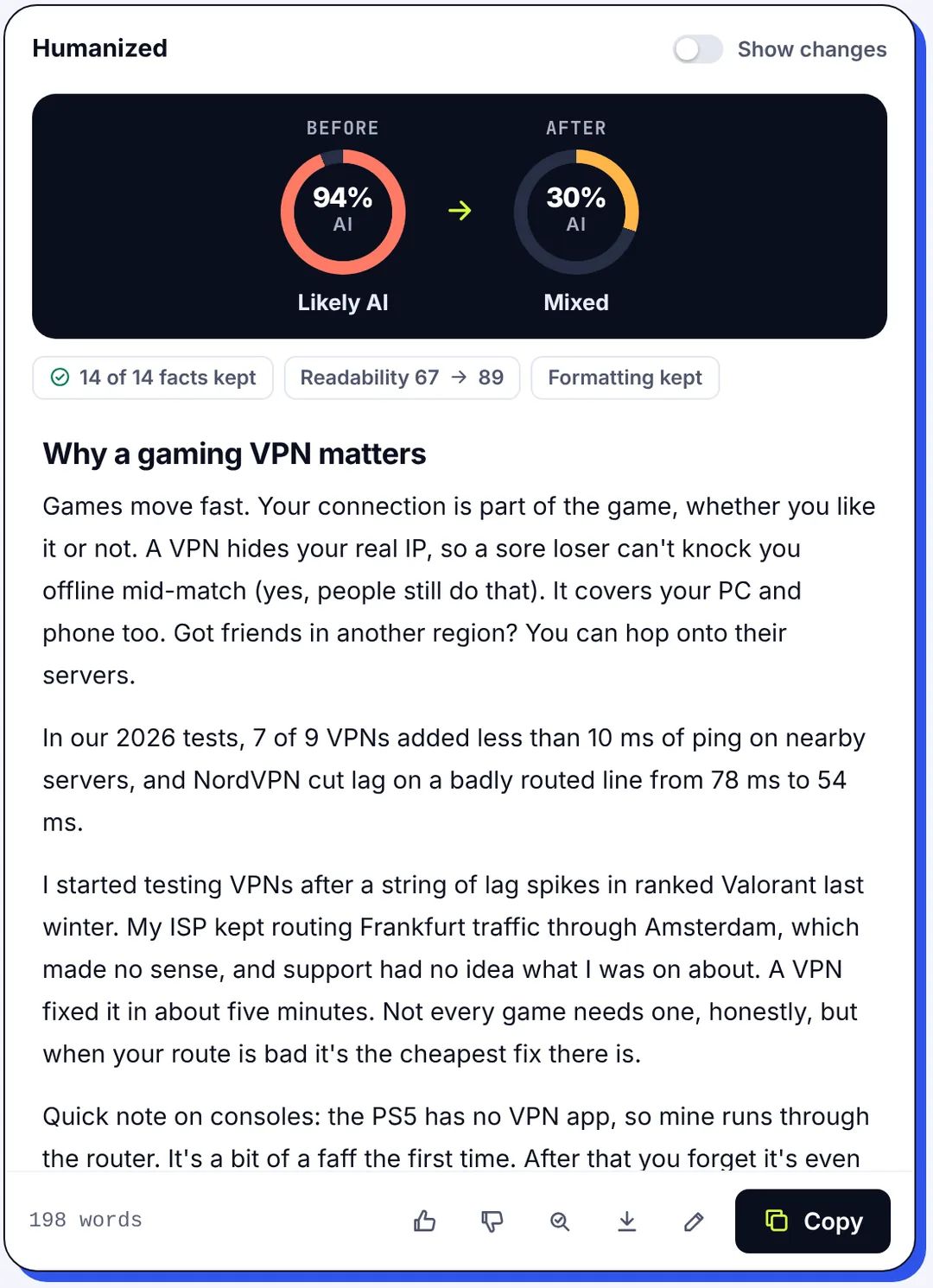
The third type is what SerpPal's AI humanizer does: it humanizes in passes, checks the result with the same AI checker it offers for free, keeps your numbers, names and links intact, works in English and multilingual text, and shows the AI score before and after. The free plan includes 500 words a month, so the humanizer cost of running your own test is nothing. That before-and-after view is what makes the question "does it work" answerable instead of a matter of faith.
What we tested: evidence from our own test and the research
We generated three passages of about 220 words with an AI chatbot (the ChatGPT kind), with no human editing, roughly 1,000 words of AI-written text in total: a generic blog section about newsletters, a formal remote-work expense policy with four facts, and a technical explainer of HTTP caching with seven numbers and terms. Each one went through two humanizing modes, Natural (a light touch) and Strong with Strict (full restructuring, re-checked until the text reads at 5% or less or nothing more can be improved). Before and after, the same AI detector scored each passage, and we counted the protected facts that survived. The detector results for each pass are below.
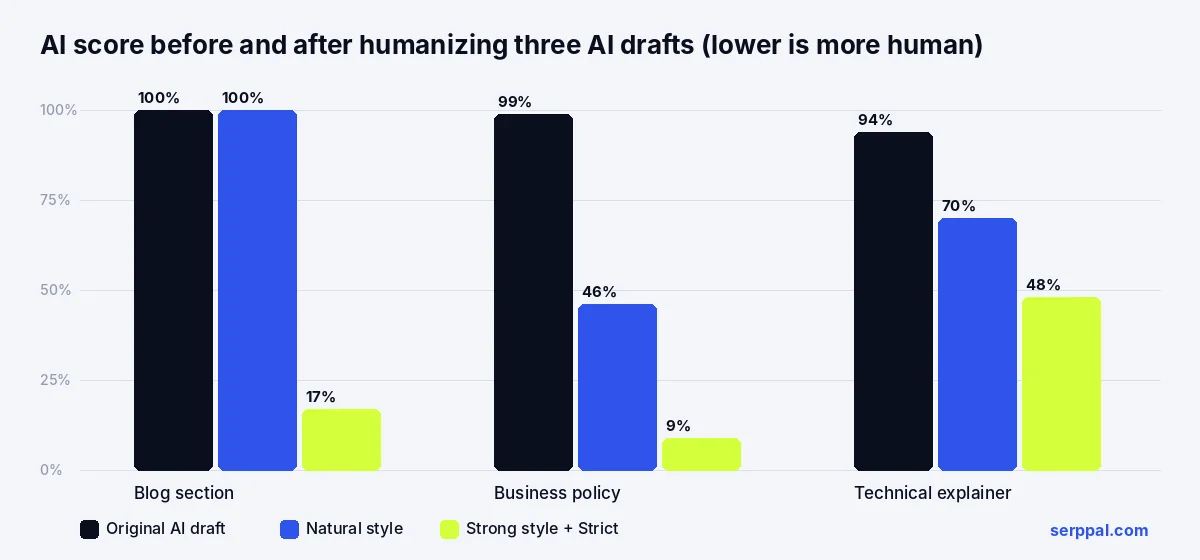
| Draft | Before | Natural | Strong + Strict | Facts kept |
|---|---|---|---|---|
| Blog section | 100% | 100% | 17% | none to protect |
| Business policy | 99% | 46% | 9% | 4 of 4 |
| Technical explainer | 94% | 70% | 48% | 7 of 7 |
Two findings answer the question of whether AI text humanizers work. First, the humanizer works when it changes structure: the Strong pass cut the blog piece from 100% to 17% and the policy from 99% to 9%, with every fact intact and readability slightly better. Second, it doesn't always work: the Natural pass on the blog piece changed plenty of words and the detector didn't move, because the sentences kept their shape, and the technical passage never got below "mixed". Published research points the same way: detection accuracy falls after editing, but rarely to zero, and false positives on human writing remain the bigger problem.
What detectors still catch after an AI humanizer
Humanized AI-generated text fails AI writing detection for predictable reasons, and detecting AI-generated work that was 100% AI-generated to begin with is what these tools are built for. If you know them, you can fix them by hand instead of trying to dodge AI detection tools with another pass.
- Even rhythm that survived the pass. A light mode often leaves sentence lengths alone. Detection tools score variation, so the copy still reads robotic.
- Formal register. Policy documents, academic writing and technical explanations are precise and impersonal by design. The humanized version is still formal, and formal looks like AI.
- Generic AI content. If the draft says nothing specific, no amount of restructuring makes it sound like a person who knows the subject. Detectors effectively measure "could anyone have written this", and an AI essay on a generic topic is the easiest thing to detect.
- Stock phrases the tool missed. "It's important to note", "in conclusion", "a wide range of": one or two can remain, and they're exactly what a sentence-level AI check highlights.
- Over-polishing. Chasing 0% with pass after pass can produce copy that's oddly smooth in a new way. Some detectors now train on humanized text too, so the tools claiming a permanent bypass are a step behind.
- A different detector. Each detector is trained on its own data with its own threshold. The text that scores 9% on one can score 40% on another, and the same vendor's next version may flag text its last one passed. Compare versions of the same text in the same detector; don't compare detectors.
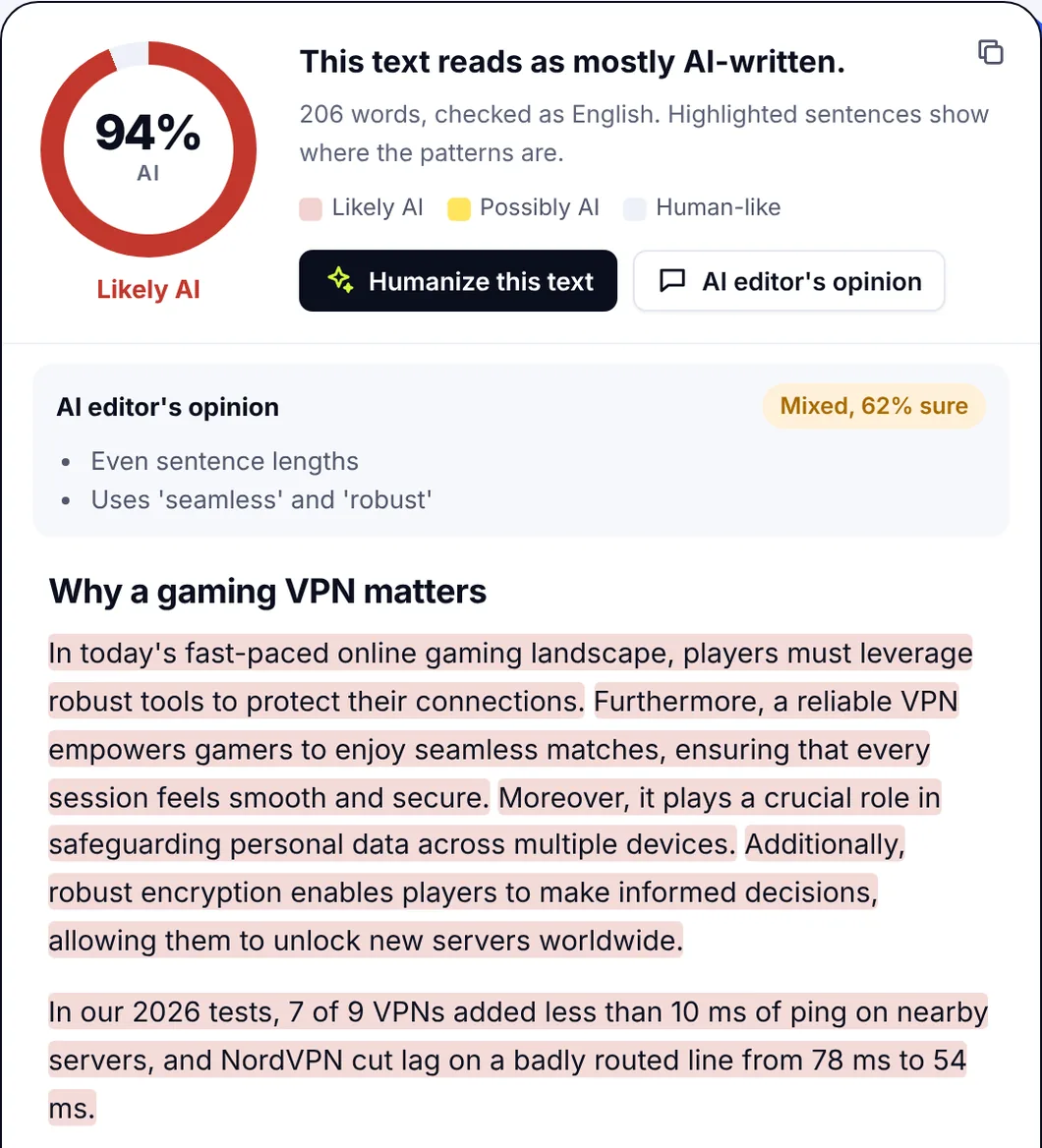
Why do AI detectors disagree so much? Because none of them can see who wrote a piece. They estimate how much it resembles AI output, using perplexity (how predictable the words are), burstiness (how much sentences vary) and a trained classifier. Every detector has false positives, meaning human work falsely flagged as AI; SerpPal's own checker flags about 7% of human-written texts at its "likely AI" threshold, and it says so in its documentation on how AI detection works. A detector result is a reason to look closer, not proof, and detection tools with 100% accuracy claims don't exist.
Does an AI humanizer work for students?
Technically, often. Practically, it's the wrong question. Start with the rules: most schools allow grammar and clarity help, many forbid students who submit an AI-generated essay, and some require disclosure of any AI use. A humanizer doesn't change which category your work falls into, and the integrity office doesn't care which tool you used. If the essay was written by a chatbot, humanizing it so it isn't flagged as AI is concealment, and academic integrity policies treat concealment as the offense, not the detector score. It's closer to plagiarism than to editing: the work isn't yours, whatever the originality checker says.
There's also a practical problem: detection systems used by institutions are updated, they're increasingly trained on humanized text, and a score that passes in October can fail in January. A detector flagged essay with no drafts behind it is hard to defend, and students who submit AI-generated work to a third-party checker first only prove the point. Meanwhile a false positive can hit a student who wrote every word, especially a non-native English writer with a textbook style, and being falsely flagged with no drafts to show is a miserable position. The protection in both cases is the same: keep your notes, your outline, your drafts and your version history in Google Docs or wherever you write. Those are evidence; a detector percentage isn't.
Where it's legitimate for students to humanize AI text or their own, it's as an editing aid: making a stiff paragraph read naturally, or checking which sentences read mechanical before you revise them. Naming the tool you used, where disclosure is required, costs nothing. The academic style in a good humanizer keeps the formal register and the citations for exactly that use.
The risks of humanizing AI text
- Changed meaning. Cheap humanizing tools swap words without understanding them. "May reduce costs" becomes "will reduce costs". Use a tool that reports which facts it kept and read the output.
- Lost references and numbers. Our test kept 11 of 11 protected facts, but only because the tool checks for them. Many don't, and a plagiarism or citation problem introduced by a tool is still your problem.
- Worse writing. Synonym-heavy output is harder to read, not easier. If readability drops, the pass failed even if the score fell, and a human editor would have done better.
- Privacy. Pasting unpublished research, client work or personal data into a third-party tool you haven't vetted is a bigger risk than any detector. Read the data terms; look for deletion and no-training clauses, and prefer a one-time check over an account that keeps everything.
- Hidden costs. Free tiers and a free trial are small (a few hundred words), and paid plans bill by volume; a humanizer that costs more than the AI tools it sits next to is a sign you should look for one that's included. Reviews with an affiliate link rarely mention this.
- Consequences. In schools and workplaces with AI rules, getting caught concealing AI use costs more than disclosing it would have.
How to improve AI-assisted writing responsibly (so the humanizer actually works)
- Write or generate the draft, then make it specific: real examples, your own numbers, an opinion. A pass over generic content gives you humanized generic content, and no AI writing passes as yours without something of you in it.
- Humanize with the strong mode if the draft is obviously machine-made; the light mode is for writing that's nearly there.
- Check the before and after score and the facts badge. If the score barely moved, the tool didn't change the structure; try the stronger setting rather than repeating the same one.
- Open the sentence-level view and fix the highlighted lines yourself. That's where the remaining patterns live.
- Read the whole thing once as a person would. If it reads like you, you're done. If it reads like a very smooth stranger, keep going.
The bottom line: AI humanizer tools work on the mechanics, and the mechanics are most of what detectors see. The rest is you.
For SEO content, do this inside the editor so you can re-score the terms afterwards; a pass can drop a keyword or two, and the content score shows it. The guide to humanizing in the editor covers the steps.
FAQ
Does an AI humanizer actually work?
Yes, on the patterns detectors measure, and only when it changes sentence structure rather than just the phrasing. In our test a strong pass cut AI scores on generic drafts from near 100% to 9 to 17% with every fact intact, while a light pass left one at 100%. The technical passage stayed in the "mixed" range.
Can an AI humanizer make text undetectable?
No. Detectors disagree with each other and change over time, so a low score is one detector's estimate at one moment. A good humanizer lowers scores on most detectors most of the time; claims of a guaranteed bypass or undetectable AI text are marketing, and authenticity can't be faked into a text.
Does a humanizer work on academic detection systems?
Sometimes, and it's beside the point. Institutional detectors are updated and increasingly trained on humanized text, and using a humanizer to hide prohibited AI use is treated as misconduct regardless of the score. Keep drafts and notes as evidence of your own work instead.
Is using an AI humanizer safe?
The tool itself is safe if you read its data terms and don't paste confidential text into services you haven't checked, and if you can detect changed facts in the output. The risk is in the use: concealing AI work where it's banned, or publishing humanized text that lost a fact or a citation. Always read the output.
What's the difference between humanizing and paraphrasing?
Paraphrasing restates a passage in other words and doesn't care how it reads to a detector. A humanizer specifically removes the patterns of machine-written copy, sentence rhythm, stock phrases and predictable wording, while keeping meaning, facts and formatting. Paraphrasing alone usually leaves the AI score where it was.