On this page
- Key takeaways
- How AI detectors work, in short
- What AI detection accuracy means
- Side-by-side comparison: human vs AI vs hybrid text
- The best AI detectors for teachers and institutions
- The best AI content detector for writers, editors and SEO teams
- Free AI detectors versus paid plans
- How to choose the right AI detector
- Mistakes to avoid
- Conclusion
- FAQs
What is the best AI detector? The most accurate one is the one that publishes its false positive rate, shows you which sentences it flagged and why, and is honest that no score proves who wrote a text. Judged that way, the best AI detectors for teachers and writers are the ones you can check, not the ones with the boldest accuracy claim.
This guide explains how detector accuracy is actually measured, why "99% accurate" claims mislead, what we saw when we ran human, AI-generated and edited text through an AI detection tool, how to choose the right AI detector for a classroom, a newsroom or an SEO team, and how to use a result without hurting anyone.
Key takeaways
- Accuracy has two halves: how many AI texts a detector catches and how many human texts it wrongly flags. The second number matters most, and most vendors don't publish it in their pricing or their detailed reports.
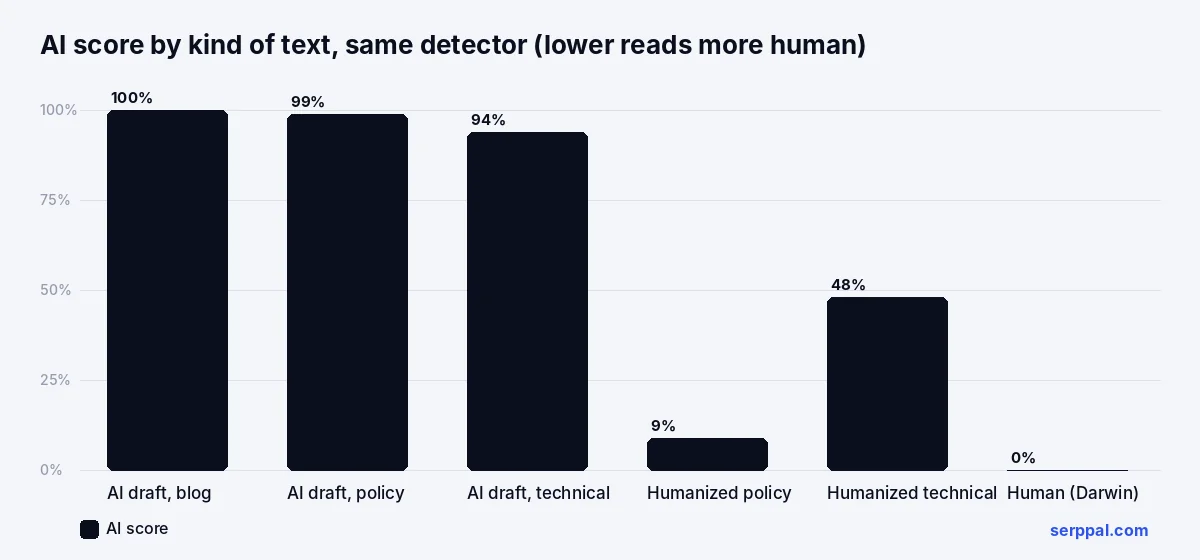
- In our test, unedited AI drafts scored 94 to 100% AI, a public-domain human passage scored 0%, and AI output restructured by a humanizing pass scored 9 to 48%. Edited AI is where every detector struggles.
- For teachers, the best AI detector is one that fits the learning platform, highlights sentences, and comes with a policy that a score alone never decides a case.
- For writers, content creators and SEO teams, a free detector with sentence-level feedback is enough, because the goal is editing, not judgment.
- Free detectors cap words per check; paid plans add length, batch scans and integrations. Test on your own writing before paying.
How AI detectors work, in short
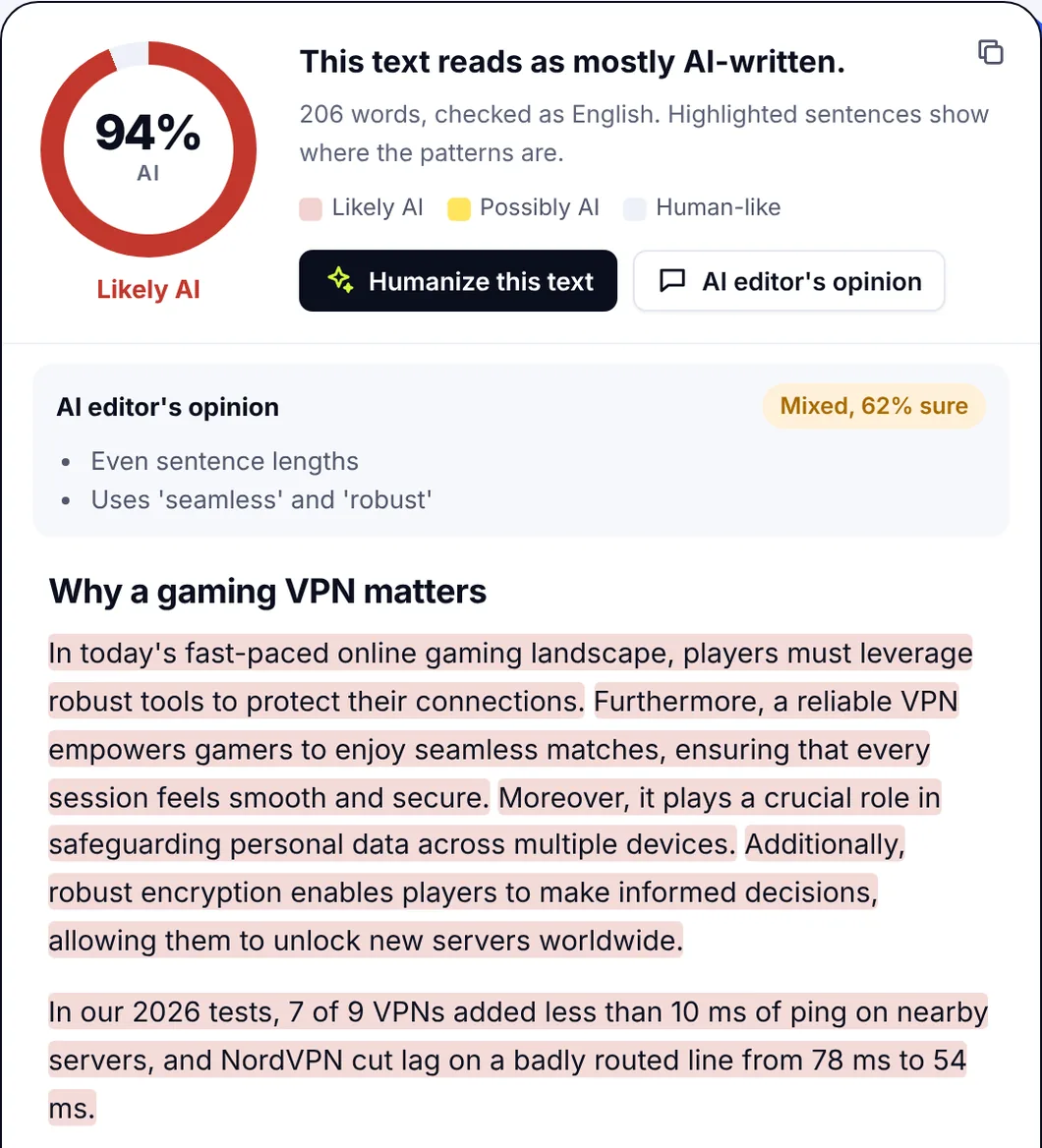
Every AI detector estimates how much a text resembles machine-generated text. It measures perplexity (how predictable each word is), burstiness (how much sentence length varies), vocabulary and structure, then a classifier trained on labeled human and AI samples turns the analysis into a probability score and a label: likely human, mixed, likely AI. It never sees the author; it sees AI patterns. Newer AI models such as the ones behind ChatGPT, Claude and Gemini write differently from older ones, so detectors are retrained to keep identifying AI-generated content.
That design has consequences. Formal, polished, textbook-style writing shows the same low-variation patterns as AI output, so human writers, especially ESL writers taught a formal style, get flagged. Heavily edited AI output loses those patterns and slips through. Short text has too little to measure. The full explanation of how AI detection works covers each of these.
What AI detection accuracy means
Vendors advertise a single accuracy number. It hides the two numbers you need, and an in-depth look at them is the most useful thing you can do before buying.
| Measure | What it means | Why it matters |
|---|---|---|
| True positive rate | Share of AI-written content the detector flags | A low rate means AI work passes |
| False positive rate | Share of human-written content wrongly flagged as AI | A 5% rate means one student in twenty is accused for nothing |
| False negative rate | Share of AI content it misses | Rises sharply on edited or humanized writing |
| Threshold | The score above which text is labeled AI | Moving it trades wrong flags on humans for missed AI |
| Sample | What the tool was tested on | Results on academic essays don't transfer to code, poetry or other languages |
A detector that "catches 99% of AI writing" at a threshold that also marks 15% of human writing is a bad detector for a classroom. SerpPal publishes both halves for its own checker: at the "likely AI" line (60% and up) it flags about 91% of AI-written texts and about 7% of human-written ones in its evaluation set. That 7% is why the documentation says the score can be wrong about who wrote a text, and it's the kind of number to demand from any vendor.
Why "100% accurate" is a warning sign
Language models change every few months and detectors are retrained to follow them, so any fixed accuracy claim is out of date by the time you read it. Humanizing tools are trained specifically to remove the patterns detectors measure. And no detector has been independently tested on every language, genre and model. A tool that says 100% is describing its marketing, not its algorithms.
Side-by-side comparison: human vs AI vs hybrid text
To show how the categories behave, we ran four kinds of text through the same AI checker, with the same settings, on the same day: unedited AI-generated text, a human passage, and AI output that had been through a humanizing pass. The quick comparison table below has the results. Each sample was about 220 words; under 100 words most tools won't score at all.
| Text | Source | Words | AI score |
|---|---|---|---|
| Blog section on newsletters | Unedited AI draft from a chat model | 222 | 100% |
| Remote-work expense policy | Unedited AI draft | 218 | 99% |
| HTTP caching explainer | Unedited AI draft | 220 | 94% |
| Passage from Darwin's On the Origin of Species | Human-written, public domain | 233 | 0% |
| Expense policy, restructured by a humanizing pass | AI output, heavily edited | about 220 | 9% |
| HTTP caching explainer, restructured by a humanizing pass | AI output, heavily edited | about 220 | 48% |
Three things to take from it. The detector separated raw AI drafts from a human passage cleanly, which is the easy case: identify AI-generated text nobody touched, and any decent tool works best. Edited AI output is the hard case: the same policy went from 99% to 9% after a strong humanizing pass, and the technical explainer only fell to 48%, "mixed". And a single 150-year-old human passage proves nothing about modern student essays; that's exactly why you should test a detector on your own writing before trusting it. The free AI detector runs this check on any text with no sign-up, and the test takes two minutes.
The best AI detectors for teachers and institutions
For educators, accuracy is necessary but not sufficient. The pros and cons of each AI detection tool matter less than the process around it. A detector used on students needs:
- A published false positive rate, so you know how many innocent students a threshold will flag.
- Highlighting by sentence, so you can read the marked passages instead of reacting to a number.
- Workflow fit: a tool that can integrate with the LMS you use (Canvas, Moodle, Blackboard or another), take PDF and Google Docs submissions, and produce reports you can attach to a case. Check the URL of the privacy page and the pricing page before the demo.
- Language coverage that matches your students; most detectors were built on English and are less reliable elsewhere.
- Privacy terms that say where student text is stored, for how long, and whether it trains anything.
- A policy around it. The tool should start a conversation, not end one.
Institution-managed detectors built into plagiarism checking platforms are convenient because they sit in the submission workflow. Pros: no extra step, academic integrity records in one place. Cons: students can't self-check, and the premium pricing is yearly and per seat. The trade-off is that students can't check their own work in the same tool, and the score arrives with an authority it hasn't earned. Several universities have switched these features off after wrongful accusations; the ones that keep them pair the score with earlier versions, revision history and a chance for the student to explain.
A fair process for a marked assignment
- Read the highlighted sentences and the whole piece. Does it read like this student's other work, and how does it compare with their usual writing styles?
- Ask for earlier versions, notes, outline and revision history. Google Docs keeps one automatically.
- Talk to the student about how they wrote it, without opening with an accusation.
- Apply the same standard to everyone, and write down the detector, date, settings and sample length.
- Decide on the evidence, with the score as one item in it.
The best AI content detector for writers, editors and SEO teams
For writers, the question is different: not "did a person write this" but "does this read like a person wrote it". The best tool for that job is a free AI content detector with a user-friendly interface and sentence-level feedback, used while editing. Pros: instant, free, built for revision, and a Chrome extension or a bookmark puts it one click away. Cons: it tells you nothing about facts or grammar, so keep a grammar checker and your own judgment in the loop. Paste text, fix the highlighted sentences (even rhythm, stock phrases, generic claims), add the specific example only you could add, and check again. Compare versions of the same piece; that's where a detector performs reliably.
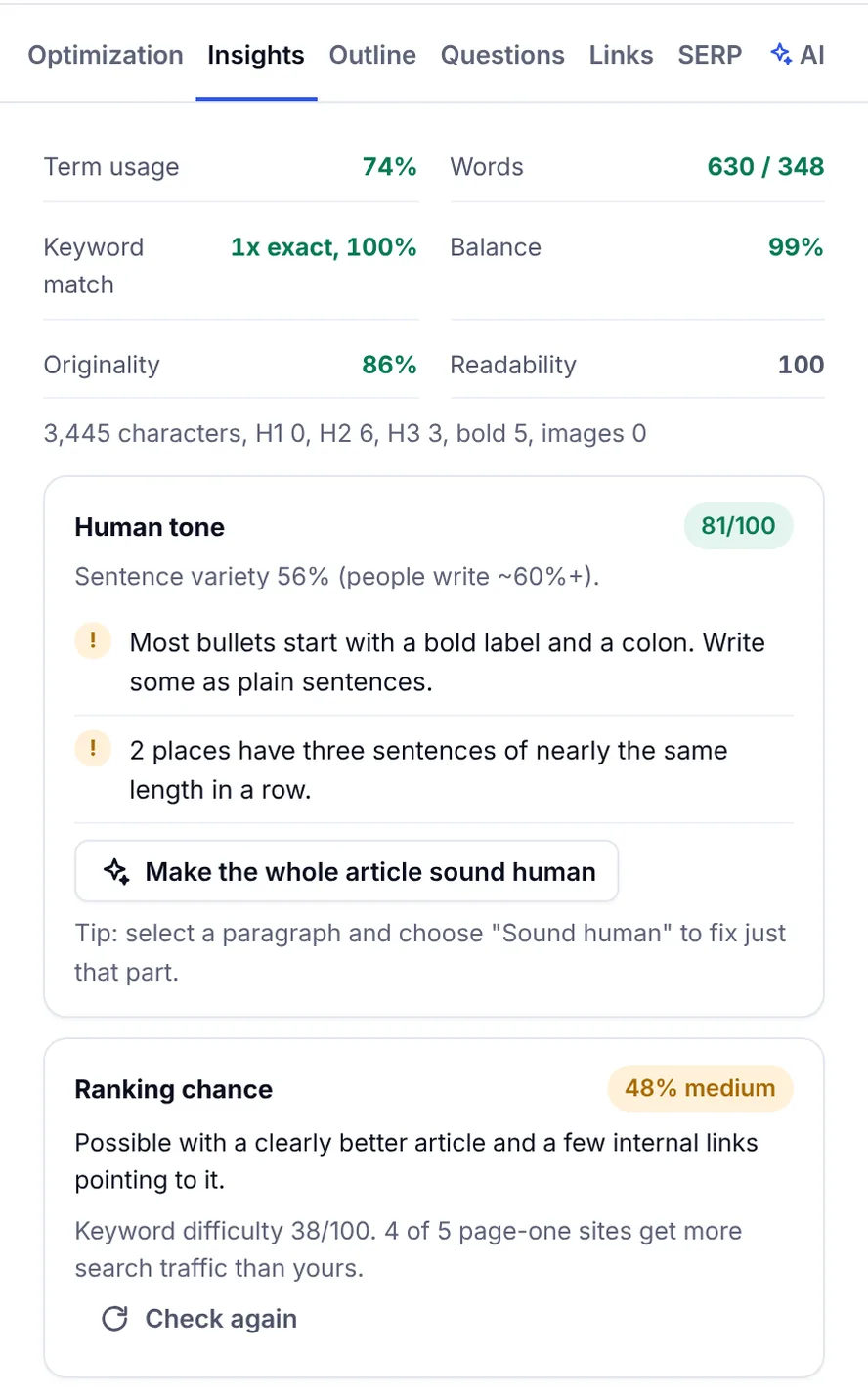
For SEO teams and publishers, the useful setup combines the detector with the AI writing tools: a content score for coverage, a human tone check while you write, a humanizing pass for stiff paragraphs, a readability check, and the detector to confirm. A paraphrasing pass alone doesn't change the patterns a detector sees. SerpPal's editor keeps all of that on one screen, and the detector is also a standalone free tool. An AI scan adds little if the real risks are wrong facts or thin content, so keep fact-checking ahead of detection in the workflow.
Free AI detectors versus paid plans
Free detectors are enough for most individual use. The usual limits: a cap per check (often 1,000 words or 5,000 characters), a monthly number of checks, and no file upload. Free trial offers on paid tools usually convert to a yearly subscription, so read the pricing page. SerpPal's free detector takes any text, and the free plan adds 10 checks a month of up to 1,000 words each plus an AI editor's opinion on the style.
Paid subscriptions add length (tens of thousands of words per scan), batch scanning text in bulk, PDF and document upload, API access, team seats, a dashboard with history and detailed reports, and sometimes a Chrome browser extension or an LMS integration. Pay when the volume or the integration needs it, not for a higher accuracy number; the detection model is usually the same on both tiers.
| Need | Free is enough | Consider paid |
|---|---|---|
| Check your own drafts while editing | Yes | No |
| Occasional check of a submission | Yes | No |
| Scan every assignment in a course | No | Learning platform integration, reports |
| Review a stream of freelance articles | Maybe | Batch scans, API, team seats |
| Check PDFs and scanned documents | No | File upload, OCR |
How to choose the right AI detector
- Decide what the result is for. Editing your own writing, screening submissions, or evidence in a decision about a person. The third needs a published false positive rate and a process; the first needs highlights.
- Test it on known text. Paste text you wrote, text a model wrote, and a hybrid, and analyze the results. If the detector flags your own writing, you've learned something about both of you.
- Check the languages and formats you actually use: multiple languages, PDF, Docs, long documents.
- Read the privacy terms before uploading student work or unpublished research.
- Look for inconsistent results. Run the same text twice and with small edits. Wild swings mean a low-quality model; a standout tool gives the same answer for the same text.
- Prefer tools that explain. A score with highlighted sentences and a short review of the style is worth more than a bare percentage, and it lets you verify the verdict yourself.
Mistakes to avoid
- Treating the score as proof. It's an estimate of style, not a record of authorship. Analyze text with it; don't convict with it.
- Comparing scores across detectors. Each uses its own model and threshold; the same text can be 10% in one and 60% in another.
- Scanning tiny samples. Under 100 to 200 words, results are noise, whichever AI detection tools you use.
- Ignoring ESL and formal writers. They're marked most often and have the least recourse.
- Rewriting to beat the detector. For writers, chasing a low score degrades the text. Edit for readers; the score follows.
- Confusing plagiarism detection with AI detection. A plagiarism checker finds copied text; an AI detector finds machine-like patterns and can only detect style. Original AI-generated content passes the first; copied human text passes the second.
Conclusion
The most accurate AI detector is the one whose errors you understand. Look for a published false positive rate, highlights you can read, a model that's maintained, and honest documentation. Then use it for what it's good at: showing writers where their text reads mechanical, and giving teachers a reason to look closer, never a verdict. Run your own test with human, AI and edited text first; it tells you more than any ranking.
FAQs
What is the best AI detector?
The best AI detector publishes its false positive rate, highlights the sentences that read as AI, explains its result, and fits your workflow (the learning platform for teachers, the editor for writers). No detector proves authorship, so the best one is the one whose limits you know. Test any candidate on your own writing and on AI text before relying on it.
What is the most accurate AI detector?
There is no verified universal winner, because accuracy depends on the text, the language, the model that wrote it and how much it was edited. Reputable tools publish both their detection rate and their false positive rate; SerpPal's checker, for example, reports about 91% and 7% at its "likely AI" threshold, and it analyzes text in the language it's written in. An AI detection tool that can identify AI-generated text from every AI model does not exist. Any tool claiming 100% should be doubted.
What is the best free AI detector?
A free detector with no sign-up, no hard word cap for a quick check, and sentence-level highlights covers most needs. SerpPal's free AI detector does that, and the free plan adds a monthly allowance of longer checks with an AI editor's opinion. Free and paid tiers usually share the same detection model.
Can AI detectors be wrong?
Yes, in both directions. Formal, polished or non-native human writing gets flagged (false positives), and edited, humanized or casual AI output passes (false negatives). In our test, AI output that had been restructured scored 9 to 48% while the raw drafts scored 94 to 100%.
Should teachers use AI detectors?
As one input, with a process: read the marked sentences, ask for earlier versions and notes, talk to the student, apply the same standard to everyone, and never decide on the score alone. Used that way, a detector helps a teacher look closer. Used as a verdict, it punishes the wrong students.