On this page
- Key takeaways
- What content optimization tools do
- How content optimization tools work
- Important features to look for in a content optimization tool
- Types of content optimization tools: a quick comparison
- The best AI content optimization tools for beginners
- How to pick one: a step-by-step process
- Pricing and free options
- Optimizing existing content with a tool
- Content optimizer or AI SEO agent?
- Common mistakes when using these tools
- Conclusion
- FAQ
Content optimization tools read the pages that already rank for a keyword, work out which terms, subheadings and questions those pages share, and then score your draft against them while you write. They don't rank a page for you, but they take most of the guesswork out of covering a topic well.
This guide explains how these SEO tools work, which key features actually matter, how pricing usually traps small teams, and how to pick one for your situation: solo blogger, agency, in-house content team, enterprise editorial team or SaaS marketer. It doesn't rank vendors; it gives you the checklist to run your own trial, with the pros and cons of each type of tool.
Key takeaways
- A content optimization tool compares your draft with the top-ranking pages for a target keyword and shows gaps in terms, topics and structure.
- The content score is a coverage metric, not a ranking promise. A page can score 95 and still lose to a better answer.
- The features that matter most: SERP research, a brief, a content editor with real-time feedback, readability checks and a way to track content performance after publishing.
- Pricing is mostly about limits (articles, keywords, seats, AI words). Work out your monthly volume before comparing plans.
- Run a trial on one real page from research to publishing before you pay for a year.
What content optimization tools do
Search engine optimization has many moving parts: technical SEO, backlinks, site audits, rank tracking, a crawler (or spider) for finding broken pages. A content optimization tool focuses on one of them, the page itself. It answers a narrow question: does this page cover what people searching this keyword expect, as well as the pages already on page one?
To do that, the tool runs a SERP analysis for your target keyword, fetches the top-ranking pages, and pulls out the words and phrases they share, the heading phrases they use, the queries they answer, the names they mention and how long they are. It turns that into a brief, then into a live score as you write.
That's different from all-in-one SEO tools, which cover keyword research, backlink audits and crawl reports across a whole site, and from AI tools for writing, which generate text from a prompt. Many products now combine the three on one dashboard. Whatever the bundle, the optimization part is the piece that tells you what a complete page on this topic looks like.
What they can't do
An optimizer doesn't know your customers, can't verify a claim and can't decide whether a page deserves to exist. If the top results are all thin, the tool will happily tell you how to match thin pages. Use its recommendations to check for omissions and clarity, and keep the editorial judgment with a person.
How content optimization tools work
Most tools follow the same pipeline, and knowing it helps you judge the quality of what you're paying for.
- Keyword and location. You enter a target keyword and pick a country and language, because the top pages differ by market.
- Search results. The tool fetches the results and reads the competitor pages, usually the top 10 to 30, analyzing each one the same way.
- Term extraction. Using NLP (natural language processing), it finds the terms and semantic variations those pages use more than the web in general, plus the names and entities they mention.
- Brief. It lists recommended terms with a range for each, common subheadings, questions from People also ask, and a target length.
- Scoring. As you write, the content editor counts your term usage, structure and length against the brief and shows a score with suggestions. Some products call this content scoring, some a grading system; it's the same idea.
- Checks after publishing. Better tools connect to Google Search Console so you can see clicks, impressions and position for the page and refresh it when it slips.
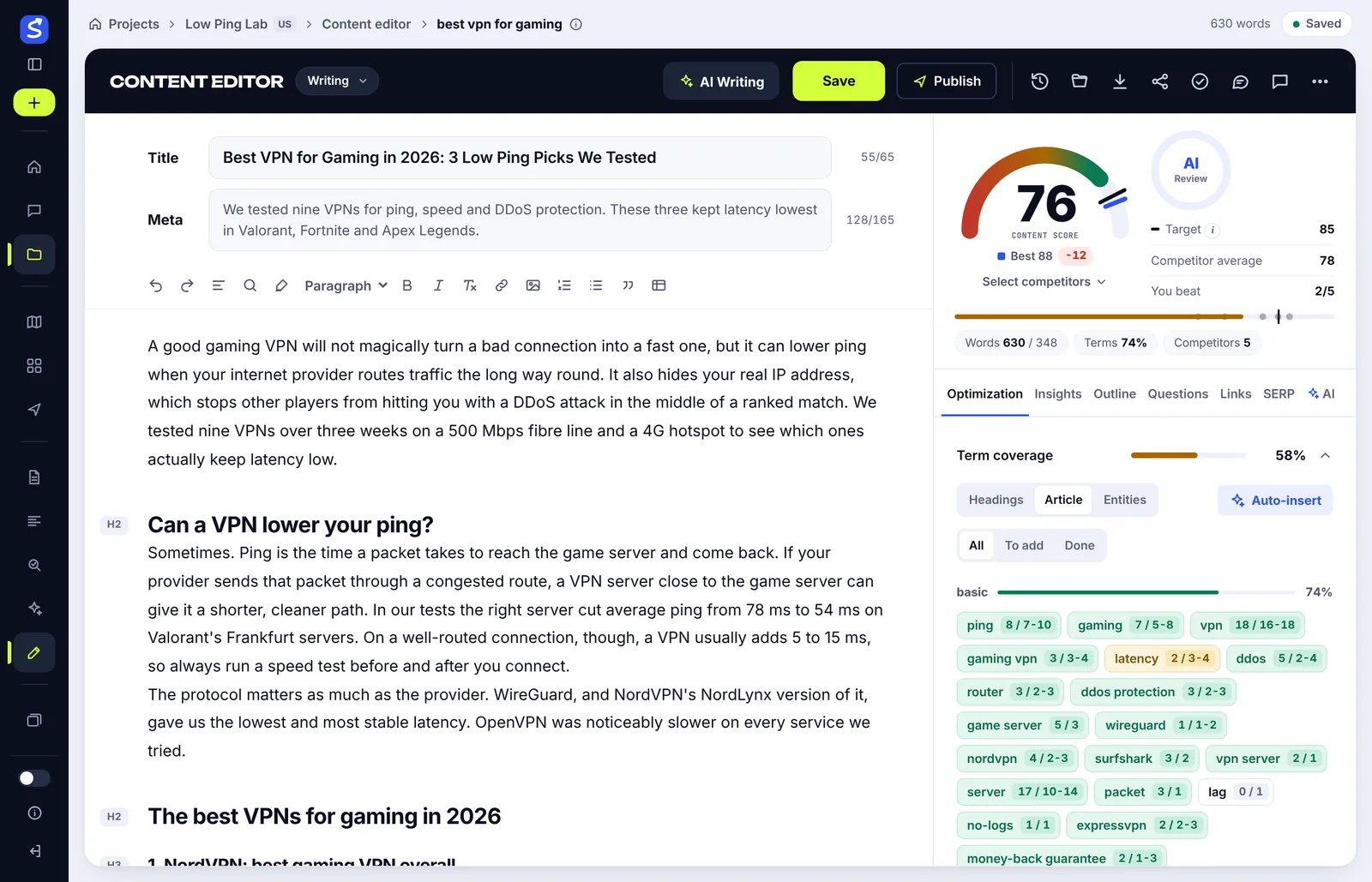
The content score explained
The score is a weighted comparison: how many of the recommended terms you use within their range, whether the heading phrases and names appear, whether you cover the shared topics, and whether the length and structure match. It's a relevance check against the competition, built on the same NLP analysis as the brief. The exact weights vary by product, but the idea is the same everywhere. Because the score is relative to competitors, a typical page-one result lands around 60 to 70 and the best page in the 80s.
Two things follow. First, you don't need 100; matching the best competitor is the goal. Second, the score rewards coverage, so it can be gamed by stuffing. A good tool flags overuse as well as gaps, and a good writer treats both as prompts to edit, not orders. The post on what a content score is goes deeper on reading one without keyword stuffing.
Important features to look for in a content optimization tool
Not every feature on a pricing page matters. These are the ones that change the work day to day, for a beginner and for an enterprise content team alike.
| Feature | What it should do | Why it matters |
|---|---|---|
| SERP research | Read the real top pages for your country and language, and let you add or remove competitors | Wrong competitors give a wrong brief |
| Content brief | Terms with ranges, heading phrases, questions, entities, target length, shareable link | Writers and content creators can follow it without a seat |
| Content editor | Real-time score, term chips you can click, highlights of overused terms | Feedback while writing, not after |
| Readability | Reading ease, sentence variety, stock AI phrases | Optimized content still has to be readable |
| Content gap analysis | Topics competitors cover that your site doesn't, for long-term planning | Builds topical authority page by page |
| AI writing | Outline, draft and optimize actions that use the brief | Faster first drafts that start on-topic |
| Internal linking | Reads your sitemap and suggests links to your own pages | Links are part of on-page SEO, not an afterthought |
| Publishing | Push to WordPress or your CMS with the meta description and images | Fewer copy-paste errors |
| Tracking | A rank tracker and Search Console data per article | You learn which recommendations worked |
Term coverage and keyword density
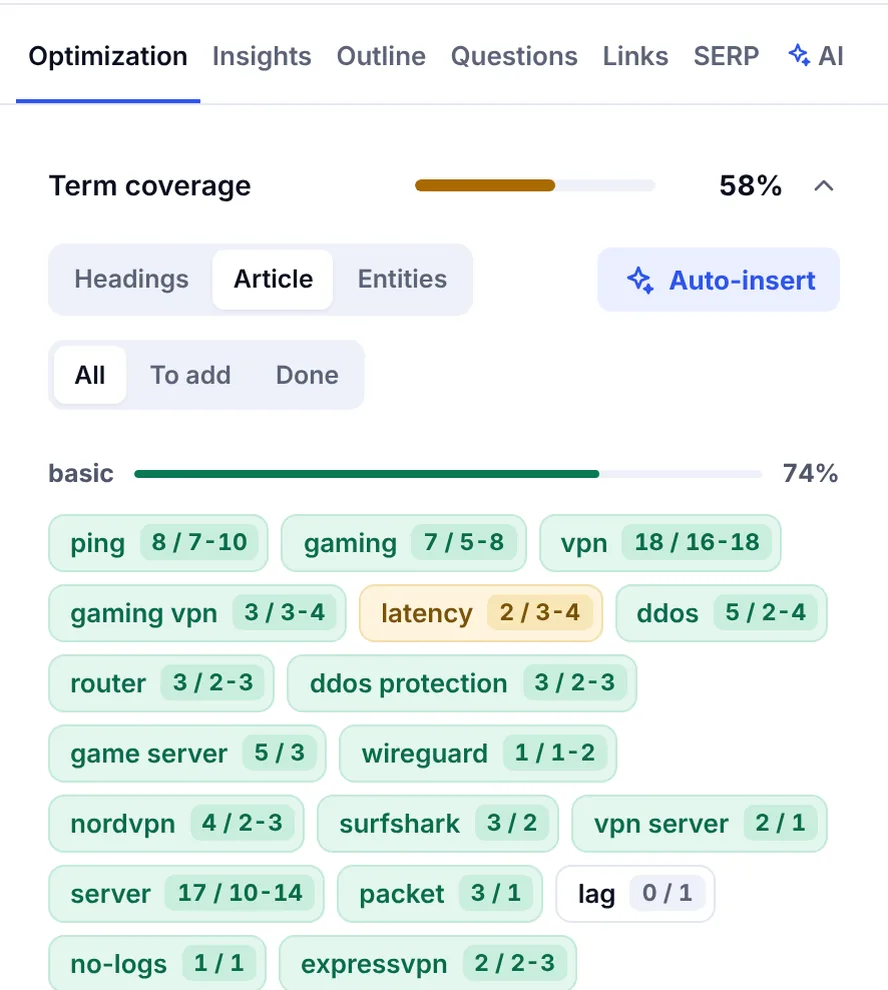
Older tools pushed a single keyword density number. Modern ones give each term a range taken from the top pages, which is more useful: it tells you "clustering" belongs in this article once or twice, and "keyword" belongs in it twenty times. Look for a tool that shows the range next to your count, and that lets you filter to the terms still missing. A premium grading tool and a budget one differ less here than their pricing suggests.
Topics, questions and subheadings
Term lists are only half the brief. The other half is the topics the top-ranking pages cover and the questions people ask. A tool that reads the pages with AI and writes a short topical brief ("cover pricing, cover the free options, explain the difference from content generation") saves more time than a longer term list, because it tells you what sections to write.
Readability and human tone
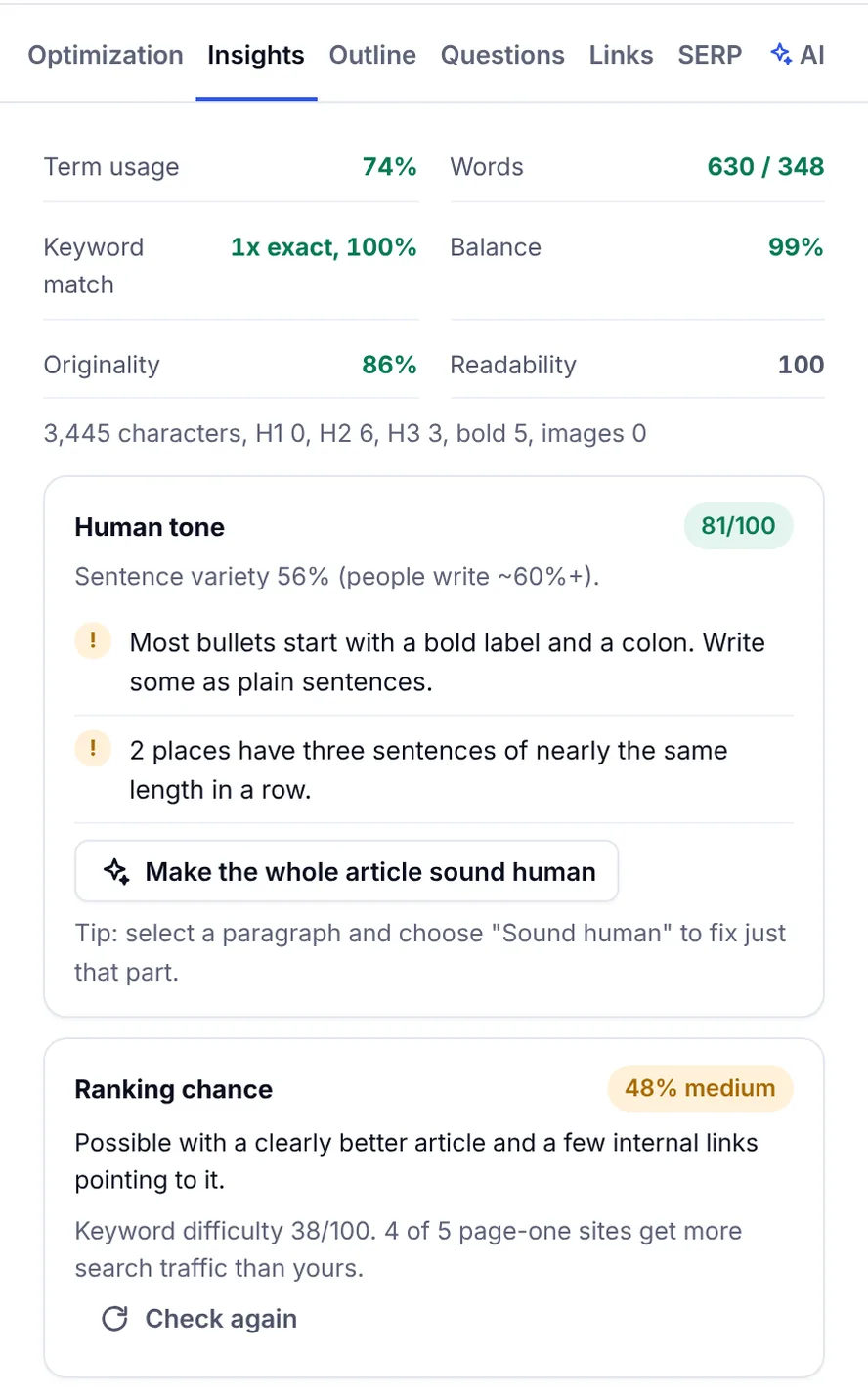
Optimized content that reads like a term list won't hold anyone. The better editors add readability scores and a human tone check that spots the patterns AI text tends to have: even sentence lengths, stock phrases, stiff transitions. If you use AI to draft, you'll use this panel more than the score.
AI search visibility and GEO
Search is no longer only ten blue links. AI Overviews and AI Mode in Google, plus ChatGPT, Claude, Gemini and Perplexity, answer many questions directly and cite a handful of sources. Some content optimization tools now check whether those answers mention your brand and who they name instead, usually under an AI visibility label. Some sell it as GEO (generative engine optimization). Treat this as monitoring, not a ranking lever: nobody can guarantee a citation, but knowing you're absent from the answers for your main keywords is useful insight into your search visibility.
Types of content optimization tools: a quick comparison
Rather than a list of brands, it helps to think in categories, because the pros and cons are the same within each one. Here they are at a glance.
| Type | Pros | Cons | Best for |
|---|---|---|---|
| Dedicated content optimizer | Deep brief, live editor, clear focus | Needs separate tools for backlinks and site audits | Content teams, freelancers, bloggers writing blog posts |
| All-in-one SEO suite with an SEO writing assistant | One subscription, shared keyword data | Editor is often basic; expensive if you only write | Teams already paying for the suite |
| AI writing tool with SEO add-on | Fast drafts, cheap | Thin research, scores that reward length | High-volume, programmatic content creation with human review |
| WordPress SEO plugin | Built-in, checks the title and meta description | No competitor analysis at all | Basic on-page checks at publish time |
| Free tools | Search Console, Google Analytics, a free readability or keyword density checker | No brief, manual work | Checking performance and polishing drafts |
A dedicated optimizer that also writes, humanizes and publishes, which is what SerpPal's features cover, sits between the first and third rows: the brief and the editor come first, and the AI-powered writing uses them. Enterprise editorial teams usually add a content strategy layer on top: a planner that clusters keywords, spots content cannibalization between similar pages and prioritizes refreshes.
The best AI content optimization tools for beginners
If you're new to SEO, you don't need the biggest platform. The best AI content optimization tools for a beginner do three things well: explain each suggestion in plain words, keep the score honest about overuse, and let you create content from the brief without leaving the page. An intuitive interface matters more than a long feature list, because a tool you don't open doesn't help.
AI content optimization platform or single-purpose tool?
An AI content optimization platform bundles research, writing, humanizing, publishing and tracking. A single-purpose tool does one of those. Beginners and small content teams are usually better off with the bundle, as long as the pricing fits their volume; agencies with an existing stack often only need the optimizer.
How to pick one: a step-by-step process
Start with your bottleneck, not the longest feature list. If your writers are good but research is slow, you need a strong brief. If production is slow, you need AI drafts that start on-topic. If you publish a lot and never look back, you need tracking.
Step 1: Count your monthly volume
Write down how many articles you publish a month, how many keywords you research, how many people need to log in and how much AI text you'd generate. Most plans are priced on exactly these limits, so this number decides the real cost more than the headline price.
Step 2: Shortlist by workflow fit
Check where your team actually writes. If it's Google Docs, you want a tool that imports and exports cleanly. If it's WordPress or another CMS, you want direct publishing. Agencies need shareable briefs and client-safe view links; in-house teams need comments and versions.
Step 3: Run the same page through each trial
Pick one real page that needs a refresh. In each tool, analyze its keyword, read the brief, optimize the page to the target score, and publish. Run it on an existing blog post, not a new one, so you have a baseline. Note three things: how long it took, whether the suggestions were actionable or generic, and whether the interface felt intuitive or had a learning curve your writers won't climb.
Step 4: Check the recommendation quality
Good suggestions name a missing subtopic, an unanswered question or a term the top pages all use. Weak ones tell you to add the keyword to every paragraph or to write 4,000 words because competitors did. Data-driven doesn't mean blindly matching averages, and AI content still needs a person to judge relevance.
Step 5: Compare the total cost, not the entry plan
Add seats, extra AI words, add-on packs and the annual-only discounts, and compare the pricing and key features side by side. A cheap entry plan with a 10-article limit can cost more than a mid plan once you're over it. Also check what happens to your articles if you cancel.
Pricing and free options
Content optimization tools are usually priced per month with a cap on analyses or articles, plus limits on AI words, humanizer words and team seats. Premium tools aimed at editorial teams cost several times more than tools aimed at creators and small businesses, and the research quality is not always better. Entry plans suit one person optimizing a handful of pages; agencies and content teams need higher tiers or extra seats, which is where the total cost climbs.
Free options exist and are worth using alongside any paid tool. Google Search Console shows which pages are losing clicks, Google Analytics shows what visitors do after they land, and free single-purpose tools cover readability, a density check and SERP previews. What free tools don't give you is the brief, which is the part that saves the most time. SerpPal's free SEO tools are a good way to see the difference before signing up.
Optimizing existing content with a tool
The highest-return use of an optimizer isn't new pages, it's the pages already sitting on page two. This is also where content marketing budgets go furthest, because the page already has some search engine trust. The workflow:
- In Search Console, find pages with impressions but falling clicks, or positions between 8 and 20.
- Analyze the page's main keyword in the tool and import the live page to score it.
- Read the gaps: missing terms, missing sections, questions competitors answer that you don't.
- Refresh the page: add the missing sections, update facts, fix the title tag, add internal links. Don't rewrite what already works.
- Republish and note the date. Check clicks and position again after a few weeks.
Content reports in the tool, or a simple spreadsheet, keep the before and after so you learn which changes moved the page. For regulated industries, the same records double as compliance monitoring for what changed and when.
Content optimizer or AI SEO agent?
A newer category promises automation: an AI-driven agent that researches, writes and even publishes changes on its own, with technical SEO fixes and reporting thrown in. For most teams this is the wrong trade. An optimizer advises while a person decides, which is what you want for anything with facts, brand voice or legal exposure. Automation makes sense for narrow, repetitive jobs such as flagging pages with missing meta descriptions or drafting updates for review. Keep publishing rights with people until the automated work has earned trust on a small set of pages.
Common mistakes when using these tools
- Writing for the score. Hitting 100 by stuffing terms produces a page nobody wants to read. Aim for the target the tool sets from the competition, then stop.
- Trusting the default competitors. If a forum thread or a product page is in the competitor set, remove it; the brief will change.
- Ignoring intent. The tool reports what ranks; it doesn't tell you a listicle is the wrong format for your brand. Check the SERP yourself.
- Skipping the human pass. AI-generated drafts optimized to a high score still need editing for accuracy, examples and tone. Search engines reward pages people finish reading.
- Never measuring. If you don't integrate Search Console or at least track positions, you can't tell which recommendations helped.
Conclusion
Content optimization tools are worth paying for when they shorten the path from keyword to a complete, readable page and show you what to fix afterwards. Pick by workflow fit and real monthly volume, test the recommendation quality on a page you know, and remember that the score measures coverage, not quality. If you want to see the pipeline end to end, SerpPal's editor runs the analysis, writes the brief, scores the draft live and publishes to WordPress from one screen, and the guide to SEO content writing covers the writing side.
FAQ
What is the best AI content optimization tool?
The best one is the one that fits how your team already works: a dedicated optimizer if you write a lot and need strong briefs, an all-in-one suite if you already pay for one and only need basic checks, and free tools if you publish a few pages a month. Test one real page in each before deciding, and ask whether the SEO scoring explains itself.
Do content optimization tools actually improve rankings?
They can, indirectly. They help you cover a topic as completely as the pages already ranking, which removes one common reason a page stalls. They can't create expertise, earn links or fix a slow site, and search engines weigh all of that too. Measure the effect on your own pages with Search Console rather than trusting the score.
How much do content optimization tools cost?
Entry plans for one person typically start in the range of a modest monthly subscription and climb with the number of articles, keywords, seats and AI words you need. Compare the total for your real monthly volume, including add-ons, rather than the cheapest advertised plan.
Can AI content optimization tools replace human writers?
No. They produce outlines, drafts and term suggestions quickly, but accuracy, original examples, brand voice and accountability still come from a person. The practical setup is AI for the first draft and the gap check, a writer for everything that makes the page worth reading.
How often should I re-optimize existing content?
When the data says so: a page losing clicks or impressions, facts that changed, or a SERP that now favors a different format. There's no fixed interval. Prioritize pages by traffic and business value, and check them against a fresh analysis a few times a year.