On this page
- Key takeaways
- What content optimization means
- Why content optimization strategies matter
- Step 1: Audit your existing content
- Step 2: Research keywords and search intent
- Step 3: Build a content brief
- Step 4: Optimize content for SEO: the page and its metadata
- Step 5: Improve readability, structure and mobile experience
- Step 6: Strengthen links, trust and conversions
- Step 7: Publish, measure and refresh
- Common content optimization mistakes
- A content optimization checklist
- Conclusion
- FAQ
A content optimization strategy is a repeatable way to make the content you already have, and the content you're about to publish, rank higher, read better and convert more. It covers SEO, readability, structure and conversions together, because a page that ranks but frustrates visitors doesn't do much for the business.
This guide walks through the process in seven steps: audit the content you have, research keywords and intent, build a brief, optimize the content and its metadata, make it readable and mobile-friendly, strengthen links and calls to action, then measure and refresh. Each step comes with a short checklist you can reuse on any blog post or landing page.
Key takeaways
- Content optimization means improving a piece of content so it matches search intent, covers the topic fully and is easy to read and act on.
- Start with a content audit: most sites have content on page two that a focused update will move faster than new content.
- Optimize content for people first and search engines second; keyword stuffing hurts both.
- Readability, structure, images and mobile optimization are ranking factors in practice because they decide whether visitors stay.
- Measure traffic, engagement and conversion rate per page, then refresh old content when the data says it's slipping. Content optimization is continuous, not a one-off.
What content optimization means
Content optimization is the process of improving a piece of content's accuracy, structure, coverage and presentation so it performs better for a goal. In SEO, that goal is usually search visibility: showing up in the search engine rankings for relevant keywords and earning the click. But the same technique also improves the reading experience, time on page, bounce rates and conversions, so it's worth treating as one job rather than two. The practice involves research, writing, on-page SEO and measurement, and it applies to any digital content: blog posts, landing pages, product pages, help articles.
Content optimization strategies add the planning layer: which content to work on first, what "better" means for each piece, and how you'll know it worked. Without the strategy, optimizing your content becomes a pile of random tweaks that nobody can evaluate.
SEO content optimization versus general content optimization
SEO content optimization focuses on how search engine algorithms read the content: the target keywords and relevant keywords and phrases, the title and meta description, subheadings, internal linking, images and the HTML structure a crawler sees when it crawls the page. General content optimization adds everything the person on the page cares about: a clear answer at the top, examples, a readable layout on mobile devices, a CTA that fits what they came for. Great content does both, and this guide treats them as one process. High-quality content that is also well optimized is the goal.
Why content optimization strategies matter
Content creation is expensive; optimizing content is cheap. A page that already ranks on page two has most of what it needs. Updating it with the missing sections, fresher facts and a better title can move it to page one in weeks, while a new article takes months to earn the same trust. Content marketing teams that build a refresh habit usually get more organic traffic from the same budget than teams that only create content and never look back. New content still matters, but it should be planned alongside the refreshes, not instead of them.
A strategy also makes content performance explainable. When every piece of content has a goal and a number attached, you can show which topics bring qualified visitors, which content drives conversions and where the content ROI is, which is what marketing teams need when the budget is questioned. It also aligns writers, editors and SEO specialists around the same plan.
Step 1: Audit your existing content
Before writing anything new, list the content you have. Export the page list from your CMS and join it with Google Search Console data (impressions, clicks, average position, searches) and Google Analytics data (engaged sessions, conversions). Look at a long enough period to smooth out seasonality, then analyze the content by topic and purpose.
Then sort each page into one of five buckets:
| Decision | When | What to do |
|---|---|---|
| Keep | Accurate, ranking, converting | Nothing, check again next quarter |
| Update | Good page, stale facts or missing sections | Refresh and republish |
| Consolidate | Several pages compete for the same keywords | Merge into one thorough page, redirect the rest |
| Redirect | The page is gone or replaced | 301 to the closest relevant page |
| Retire | No traffic, no links, no purpose | Remove it (check backlinks first) |
The content worth optimizing first is the content with meaningful visibility and a clear, fixable problem: a position between 8 and 20, lots of views in the search results but a low click-through rate, or traffic that's falling while the topic isn't. Write the decision and the reason next to each page so you can revisit it later. This is where the insights come from; the rest of the strategy is implementing them.
Step 2: Research keywords and search intent
Keyword research for optimization starts from the language your target audience already uses. Pull questions from Search Console, sales calls, support tickets and site search before opening a keyword tool. Then expand that list with related keywords, search volume and difficulty so you can prioritize strategically.
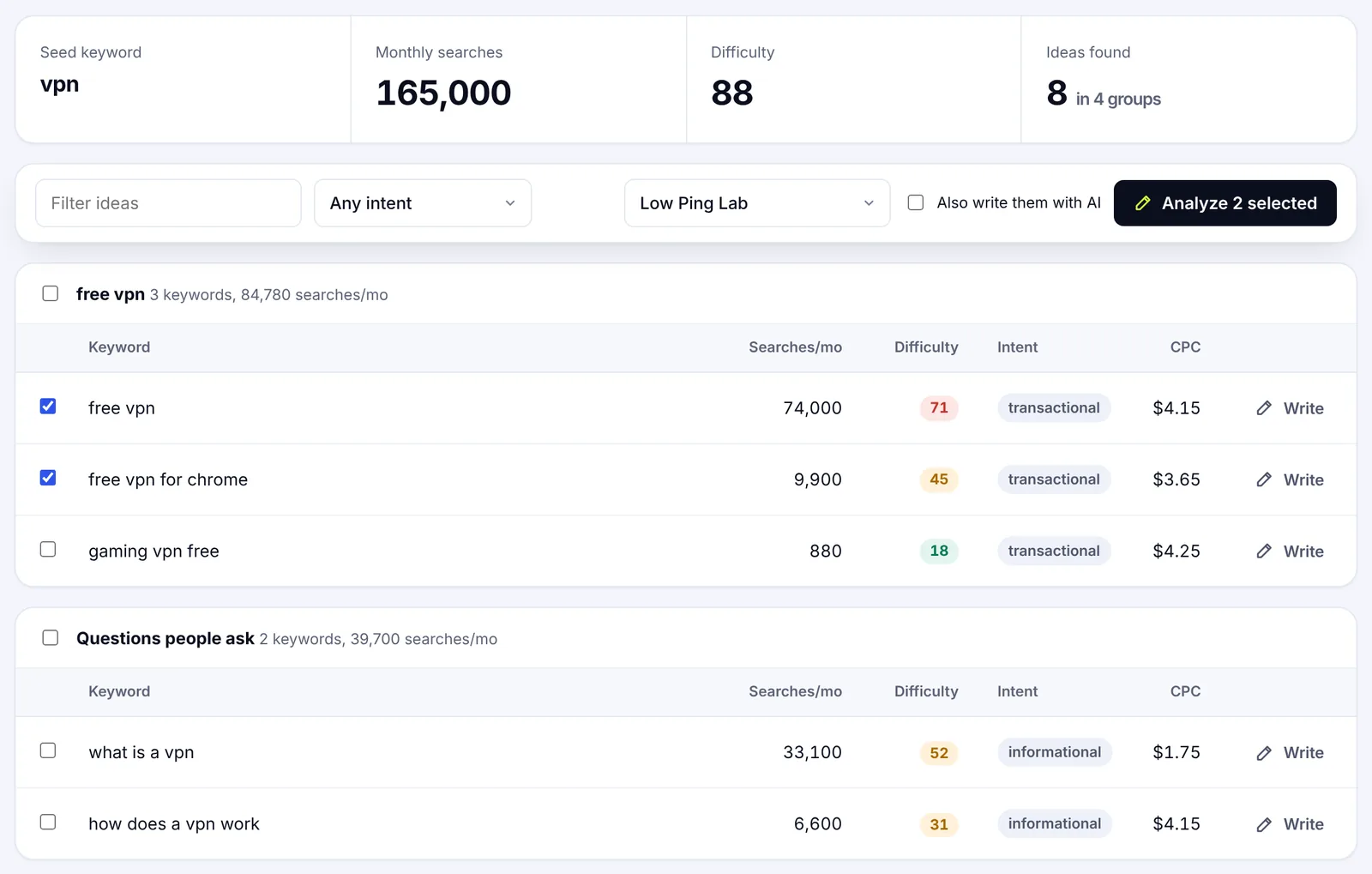
Give each piece of content one primary keyword and a handful of supporting target keywords that express the same need. Different intents get different content: "what is content optimization" is a definition, "content optimization checklist" is a how-to, "content optimization tools" is a comparison. Mapping them separately stops your own content from competing with itself.
Read the search results before you write
Search the primary keyword and look at the SERPs. Are the results guides, lists, product pages, videos? How long are they, what questions do they answer, what do they all miss? The results tell you the format and depth people expect, and the behaviors behind the search. They're evidence, not a template: your angle should be the thing the top content leaves unclear, not a longer copy of the same outline.
A content optimizer does this part automatically. SerpPal's content analysis reads the top content for a keyword and turns it into a brief with the terms, subheadings and questions it shares, so the intent research takes minutes instead of an hour per page.
Step 3: Build a content brief
A brief turns research into instructions a writer can follow and an editor can check. It also stops last-minute "SEO changes" from distorting content that was written without a goal. AI assistants such as ChatGPT can draft from a brief, but they can't write the brief for you.
A good brief records:
- the audience and where they are in the buying process;
- the primary keyword, supporting keywords and the intent;
- the goal of the page and its main metric;
- the main answer, in one or two sentences;
- the outline: H2 and H3 headings in the order a reader needs them;
- the questions to answer, including the ones from People also ask;
- internal links to add and credible external sources to cite;
- the CTA and where it goes.
Use subheadings to make the content easy to navigate, not to repeat keywords. A useful structure follows the reader's questions: establish the problem, explain the options, show how to act, handle the objections. Compelling content comes from the angle, not from the keyword list.
Step 4: Optimize content for SEO: the page and its metadata
This is the on-page SEO step, and it's where most "optimize your content" advice stops. It matters, but it's a checklist of best practices, not the whole job.
- Title tag. Describe the page accurately, put the main keyword near the front, keep it under 60 characters. Title tags are the headline in the search results, so give people a reason to choose yours.
- Meta description. A 120 to 160 character preview with the keyword and a reason to click. Google may rewrite it, but a good one lifts click-through rate on the pages where it's shown.
- Subheadings. One H1, then H2s and H3s in a logical structure. They help visitors scan and help search engines map the topic.
- Keywords. Use the primary keyword in the first 100 words and in a couple of subheadings, and use related keywords naturally where they fit. There's no magic density; the top content sets the range.
- Web address. Short, lowercase, with the keyword, and don't change it on existing content unless you redirect.
- Images. Optimize images: compress them, use clear file names and alt text, and only add media that explains something.
- Schema. Add FAQ, HowTo or Article structured data where it matches what's on the page. It can earn richer results; it doesn't guarantee them.
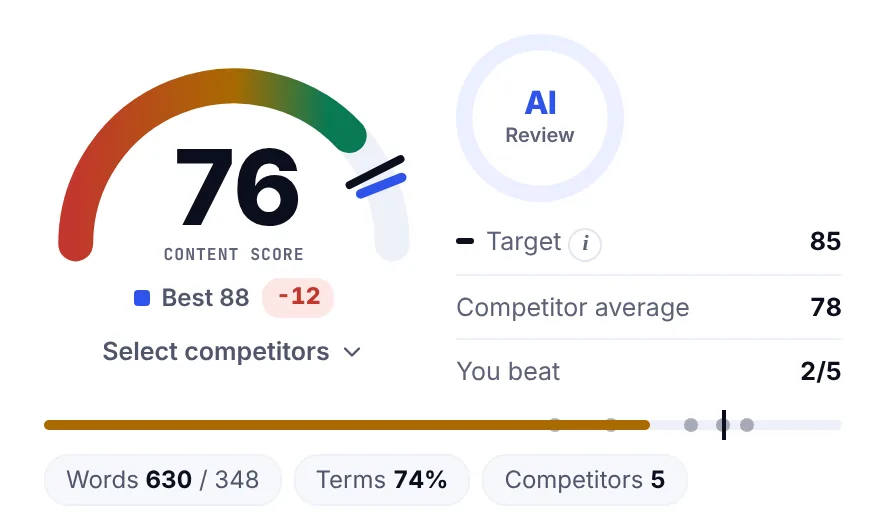
A content score helps here because it measures coverage against the content that already ranks rather than against a generic rule, which is a more reliable way to boost search rankings. The gauge shows your score, the target set from the competition and the best competitor, so you know when to stop. The post on content optimization tools explains how to pick one.
Step 5: Improve readability, structure and mobile experience
Optimized content still has to be read. Readability is where most SEO-driven content fails: dense paragraphs, no examples, jargon nobody explained. The fixes are simple and they're the same ones that improve engagement.
Readability
- Put the main answer in the first two sentences.
- Keep sections short: a new H2 every 200 to 350 words, two to four sentences per block.
- Use bullet lists for options and numbered lists for steps.
- Explain specialist terms the first time they appear.
- Read it aloud. If a sentence makes you stumble, rewrite it.
A readability score (Flesch reading ease or similar) is a useful check, and a free readability checker gives you one in seconds. Aim for the range the top content sits in; a legal guide and a recipe shouldn't score the same. Tailoring the reading level to the audience is part of refining the content, not a separate task.
Structure and media
Subheadings, tables and images break the content into pieces people can scroll and scan. Add a comparison table where you compare, a diagram where a process has steps, and a screenshot where you describe a tool. Captions and transcripts make media accessible and searchable. Skip decorative stock photos; they add weight and nothing else.
Mobile optimization and accessibility
Most visitors arrive on a phone, and Google indexes the mobile version of your content first. Test on a real device: readable text without zooming, buttons you can tap, forms that work, no banner hiding the answer. Check keyboard access, color contrast and link text for people using assistive technology. These aren't extras; they decide whether the page gets read at all.
Step 6: Strengthen links, trust and conversions
Internal linking connects the content to the rest of the site. Link to related guides with clear anchor text, link from older content to the new piece, and check that important content isn't orphaned. External links should support claims or point to primary sources, such as Google's own guidance on helpful content.
Trust comes from visible accuracy: an author or reviewer, cited sources, a "last updated" date and honest limits. E-E-A-T (experience, expertise, authoritativeness and trustworthiness) isn't a score you add; it's what the page shows.
Match the CTA to intent
A CTA should be the natural next step for the person reading. Someone learning a concept wants a related guide or a checklist, not a demo request. Someone comparing options may be ready for a trial. Place the CTA where it follows from the content, encourage the click with a clear benefit, and make clear what happens next. One well-placed button converts better than five scattered ones.
Step 7: Publish, measure and refresh
Before publishing, check links, spelling, metadata, image sizes, forms and analytics tags. Then distribute the page: a newsletter, LinkedIn, a social post scheduled through a tool like Buffer or HubSpot. Search takes time; distribution gets the first visitors and sometimes the first links.
Track content performance: traffic, engagement and conversions
Pick the numbers that match the content's goal and record a baseline before you change anything:
- Search: clicks, click-through rate and position in Search Console.
- Engagement: engaged sessions, scroll depth, time on page, bounce rates in analytics.
- Business: sign-ups, leads, sales or another conversion tied to the page.
Judge content against its own baseline, not against the whole site. A small position change matters little if the content reaches the right people and converts; a traffic jump is worthless if the visitors have no connection to the goal. Watch how the content performs over a few months, and adapt the plan when the data points somewhere new.
Refresh old content when the evidence calls for it
There's no fixed update schedule. Refresh content when facts change, when a page loses visibility, when Search Console shows searches it doesn't answer, or when a competitor publishes something better. Update what needs it, keep what works, note what you changed and when, and check the numbers again in a month. SerpPal's Search Console integration lists pages losing clicks so you don't have to hunt for them.
Common content optimization mistakes
- Keyword stuffing. Repeating the keyword in every paragraph reads badly and doesn't help. Cover related phrases instead.
- Writing to a word count. Length should match the task. Adding paragraphs to match a competitor adds nothing.
- Optimizing without a goal. If you can't say what number the content should move, you can't tell if the work helped.
- Ignoring mobile and accessibility. A page that's hard to use on a phone loses most of its visitors before they read a line.
- Measuring vanity numbers only. Rank and traffic without conversions tell you half the story.
- Treating a content score as a verdict. The score spots gaps and overuse; a person decides what the page needs.
A content optimization checklist
- Audit: list pages, join Search Console and analytics data, decide keep, update, consolidate, redirect or retire.
- Keywords: one primary keyword per page, supporting keywords mapped by intent.
- Brief: audience, intent, goal, answer, outline, questions, links, CTA.
- On-page: title tag, meta description, subheadings, keyword placement, web address, images, schema.
- Readability: answer first, short sections, lists, plain words, mobile check.
- Links and trust: internal links, sources, author, date, one clear CTA.
- Measure: baseline, KPIs, refresh when the data says so, and keep implementing the loop.
Conclusion
Content optimization for SEO isn't a one-off polish before publishing. It's a loop: audit, research, brief, optimize content, measure, refresh, continuously. Run it on the pages that are close to page one first, keep the reader ahead of the keyword, and track the result per page. Do that consistently and the same content budget produces more traffic, better engagement and more conversions. For the writing side of the loop, the SEO content writing guide picks up where this one leaves off.
FAQ
What is content optimization in SEO?
Content optimization in SEO is improving a page so it matches search intent, covers the topic as well as the top results, and is easy for search engines to read: a clear title and meta description, descriptive headings, natural keyword use, internal links, optimized images and structured HTML. The aim is more visibility and more clicks for relevant searches.
How do I optimize my content step by step?
Audit the content's current performance, confirm its primary keyword and intent, compare it with the top-ranking content to find missing terms and sections, fix the title, meta description and subheadings, improve readability and mobile layout, add internal links and a fitting CTA, then republish and track the results for a few weeks.
How often should you update content?
When the data says so, not on a calendar. Review pages whose clicks or position are falling, pages with changed facts, and pages whose topic has moved on. Fast-moving subjects need a look every few months; evergreen guides can go a year if they're still performing.
What metrics should I track to monitor content performance?
Clicks, click-through rate and position from Google Search Console for search; engaged sessions, scroll depth and bounce rates from analytics for reading; and sign-ups, leads or sales for business results. Track them per piece of content against a baseline you recorded before optimizing.
Does content length matter for SEO?
Only as far as the topic needs it. Check how long the pages ranking for your keyword are and aim for that range. A complete answer in 900 words beats a padded 3,000-word page, and a thin 400-word page rarely competes with thorough guides.