On this page
- AI models versus AI writing software
- Best AI writers by job: the best AI writing tools compared
- ChatGPT vs Claude vs Gemini for writing
- Best AI writing tools beyond ChatGPT, Claude and Gemini
- Best AI for essays and academic writing
- Best AI for SEO content and blog posts
- Best AI for fiction, creative writing and overcoming creative blocks
- Best AI for editing and rewriting
- Free versus paid AI writing tools: cost-effective and scalable
- How to choose: streamlining your content creation workflow
- Responsible use of AI text generation
- Conclusion: the best AI writing setup for you
- FAQ: best AI writing tools
The best AI for writing is not one product. It is a match between the job and the assistant: ChatGPT for fast, flexible drafting in any format, Claude for long documents and prose that needs less smoothing, Google's assistant when your writing already lives in Google Docs and Gmail. On top of the assistants sit AI writing tools that add what a chat window lacks: search research, a brand voice, templates, a content score, insights into what is missing, and a humanizing pass. The best AI writing setup is usually one assistant plus one tool.
This guide explains the difference between an assistant and a writing tool (the chatbot versus the AI-powered platform around it), compares the three major models by task, gives a test you can run in twenty minutes with your own material, and covers free versus paid access without pretending prices will stay still.
Key takeaways
- A model (GPT, Claude, Gemini) generates text. AI writing software wraps an engine with research, structure and checks for a specific job: content creation, copywriting, creative writing. Decide which layer you need first.
- For general writing and brainstorming, any of the three big assistants is fine; the prompt matters more than the pick.
- For essays and long reports, the one that handles the most context with the fewest invented facts wins, and for many writers that is Claude, with ChatGPT close.
- For SEO content, the engine is the least important part. The research and the human review around it decide whether the page ranks.
- Test with your own three jobs before paying for anything. Ten minutes of comparison beats any ranking, including this one.
AI models versus AI writing software
An AI model is the engine: a large language model (LLM) such as OpenAI's GPT series, Anthropic's Claude or Google's Gemini. You can use each through its own chat app, through an API, or inside other products. Ask it for an email and it writes an email; ask for ten social media captions and it will generate content for all ten, with a free trial or free tier on every major one.
AI writing software is a product built around one or more of those engines for a particular kind of writing. A content tool adds keyword research, search analysis, a brief, templates, a term list and a content score, plus optimization and rank tracking after you publish. A fiction tool adds a story bible and scene continuation. A proofreading tool adds a built-in grammar checker, tone and clarity checks inside the place you already write, often as a browser extension. The engine inside may be the same; the process around it is what you pay for.
That distinction answers most "which is best" questions. If you write occasional emails, briefs and recaps, an assistant's chat app is enough. If you produce the same kind of writing every week (blog posts, product pages, reports, chapters), a tool built for that job saves more time than switching assistants ever will. Marketers and content creators who publish daily are the people AI writing tools were built for; occasional writers rarely need one. A plain AI content generator is a different thing again: it produces text at volume with no research or review, and that is the output search engines have learned to ignore. In a content tool, what you choose is the brief, the voice and the checks, not the engine. The AI writer page explains what that looks like for SEO content.
Best AI writers by job: the best AI writing tools compared
| Job | Best fit | Why | What to add around it |
|---|---|---|---|
| Everyday writing: emails, recaps, structure | ChatGPT or Claude | Fast, flexible, good at format changes | Clear prompts with audience and purpose |
| Essays and academic writing | Claude first | Handles long source material; fewer confident inventions | Your own sources; a citation check; the course policy |
| Long reports and documents | The long-context assistant | Keeps the thread across large context | A decisions log; section-by-section requests |
| SEO blog posts and web content | Any assistant inside a content tool | Research and scoring matter more than the engine | Search analysis, term list, content score, editing |
| Fiction and book writing | Either generalist, with a story bible | Good at voice when given examples | Character and plot notes supplied each session |
| Editing, proofreading, tone | Any assistant with a precise instruction | All three edit well when told exactly what to change | "Preserve all facts, list every change" |
| Marketing copy at team scale | A content tool with saved style rules | Consistency across writers, intuitive for new hires | Approved claims, banned words, examples |
| Short-form social media and ad copy | Any assistant, with examples | Quick variations, easy to review | Your best past posts as the writing style sample |
| Working inside Google Workspace | Google's assistant | Lives in Docs, Gmail and Sheets | Check what your plan includes |
The table is deliberately short on "best for everything". No assistant is. The sections below explain the reasoning so you can disagree with it for your own case.
ChatGPT vs Claude vs Gemini for writing
The three major models are closer than their fans admit and different in ways that matter for specific jobs.
ChatGPT
ChatGPT is the most flexible generalist. It moves between formats quickly, follows structured prompts well, offers several versions of the same paragraph on request, and has the largest ecosystem of custom GPTs, a canvas for long-form content, and integrations that automate repetitive writing tasks. Its weaknesses in writing are familiar: a tendency toward evenly paced, slightly generic prose, stock transitions, and confident errors stated as fact. With a specific prompt (audience, purpose, length, what to avoid, an example of your voice) most of that disappears. For brainstorming ideas, structure, emails, summarizing and first drafts of almost anything, it is the sensible default, and the Pro tiers add faster, stronger engines for people who draft all day.
Claude
Claude's reputation among writers rests on two things: prose that often needs less smoothing out of the box, and comfort with long material. Give it a 40-page report and ask for the contradictions, and it stays on task. Ask it to revise a chapter in your voice with three sample chapters attached, and the result reads like a careful editor's pass. It is also more willing to say when it does not know something, which matters for essays. Its interface is plainer and its ecosystem smaller; for writers that rarely matters.
Gemini
Its case is convenience. If your drafts, email and spreadsheets are in Google Workspace, having the assistant inside Docs and Gmail removes the copy-and-paste step, and that is a real saving for people who write all day in those apps. Microsoft Copilot inside Word plays the same role for Office users. Judge its writing on your own tasks rather than on the integration; the quality is competitive for everyday writing, and the plan you are on decides which features you actually get.
How to run the comparison yourself
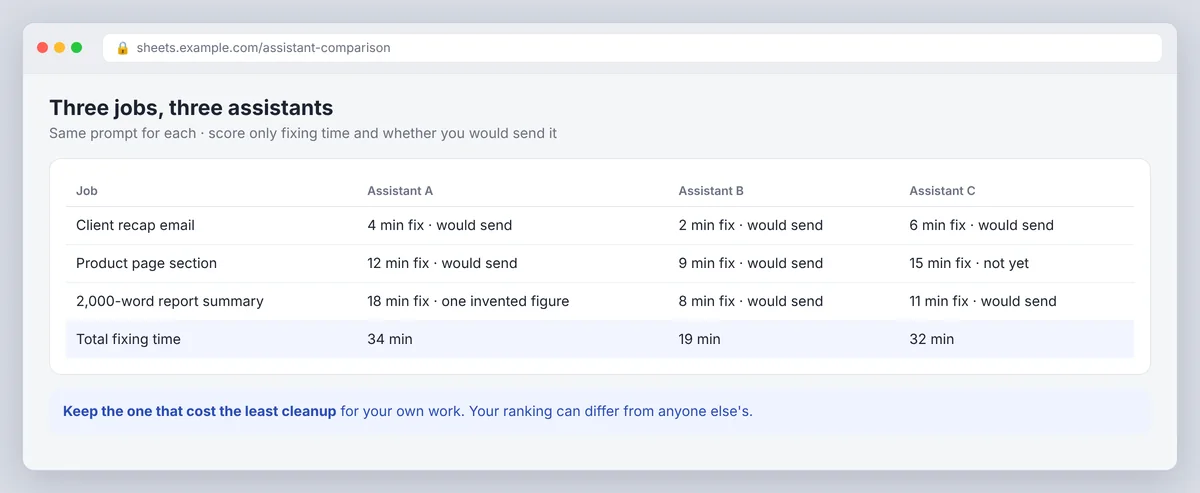
Pick three things you write every week. Run each through all three with the same prompt, and score only two things: how long you spent fixing the output, and whether anything in it was wrong. The one that costs you the least cleanup on your own work is the best AI for your writing, whatever a ranking says. Twenty minutes, done.
Best AI writing tools beyond ChatGPT, Claude and Gemini
The big three assistants are engines. The AI writing tools below are built on engines like them for one job each. This is not a ranking, and plans and features change often, so check each official site before you pay.
| Tool | Best for | What it adds to the engine |
|---|---|---|
| ChatGPT | Everyday drafting, ideas, rewrites | Custom GPTs, a canvas, file uploads |
| Claude | Long documents, essays, editing | Long context, projects that keep your files |
| Google's assistant | Writing inside Docs and Gmail | Lives where your drafts already are |
| Jasper | Copywriting at team scale | Style settings, templates, a team workspace |
| Writesonic | SEO articles and ad copy | Article writer, AI search tracking |
| Sudowrite | Fiction | Story bible, scene expansion |
| Grammarly | Editing and proofreading | Clarity and tone checks wherever you write |
| Surfer or SerpPal | SEO content that has to rank | SERP analysis, term list, content score |
For marketing copy: Jasper, Copy.ai and Writesonic
Jasper is built for marketing teams: brand voice, templates for ads, emails and landing pages, and a shared workspace so a whole team writes in one style. Copy.ai and Writesonic cover similar ground, with Writesonic leaning toward SEO articles and AI search tracking. They are AI content generators with team features and some automation for recurring jobs, and the templates save the most time. Pick one of these when your workflow is many short pieces in one voice.
For SEO content: content optimization tools
SEO writing tools such as Surfer and SerpPal analyze the pages that already rank and put a term list and a content score beside the draft. The AI writing assistant inside drafts to that brief, and you edit with the gaps in view. This is the right layer when your writing has to rank.
For editing: Grammarly and QuillBot
Grammarly checks grammar, clarity and tone inside your browser, email and documents, and can generate quick drafts too. QuillBot is best known as a paraphrasing tool, with a summarizer and other checks alongside. Both are editors first; neither does research.
For fiction: Sudowrite
Sudowrite is built for novelists: its own fiction model, Muse, a story bible, scene expansion and options to rewrite a passage in several directions. Sudowrite can also help with an outline and with generating several versions of a scene, which you then choose from and edit. It suits writers who would otherwise keep notes and paste them into a general assistant every session.
Best AI for essays and academic writing
For essays, use the assistant as a study partner and an editor, not as the author. The useful tasks are: turning the question and your notes into an outline, explaining a concept you half understand, finding the gap in an argument, and marking unclear sentences without rewriting them. Its long-context handling and lower rate of invented facts make Claude the first pick here; ChatGPT does the same jobs well with a tighter prompt.
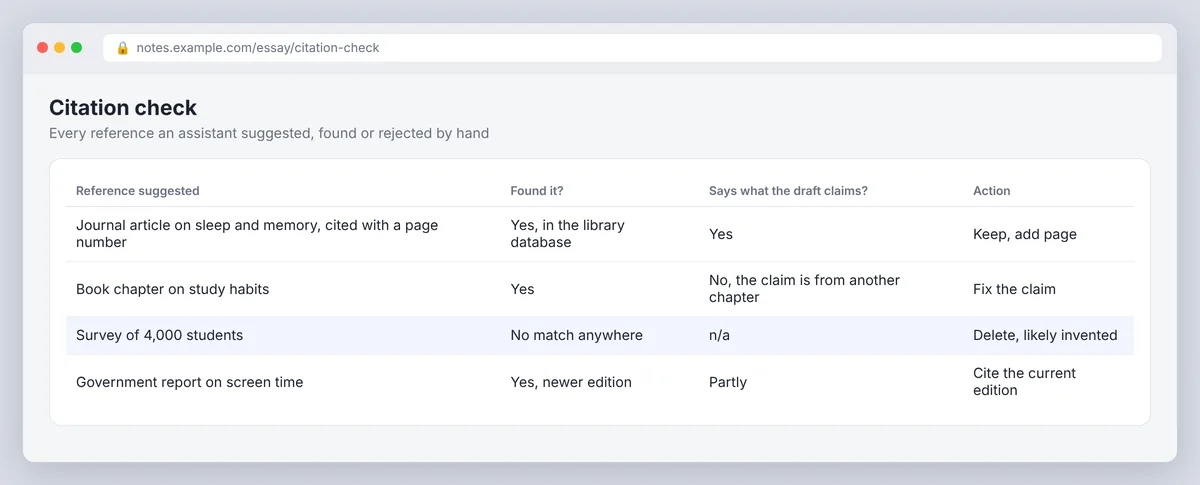
Two rules override the choice of assistant. First, never accept a citation an assistant produced without finding the source yourself; assistants invent plausible references. Second, follow the institution's policy on AI use and disclosure, which varies by course. SerpPal's essay writer is built around the outline-first approach and pairs with the citation tool, which is the workflow that stays on the right side of most policies.
Best AI for SEO content and blog posts
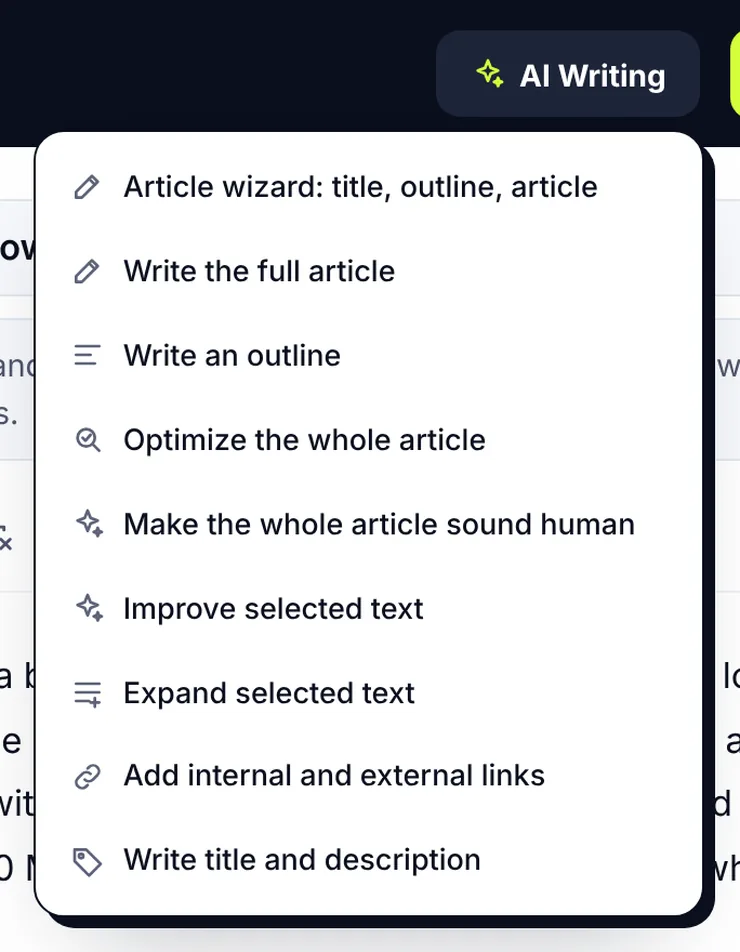
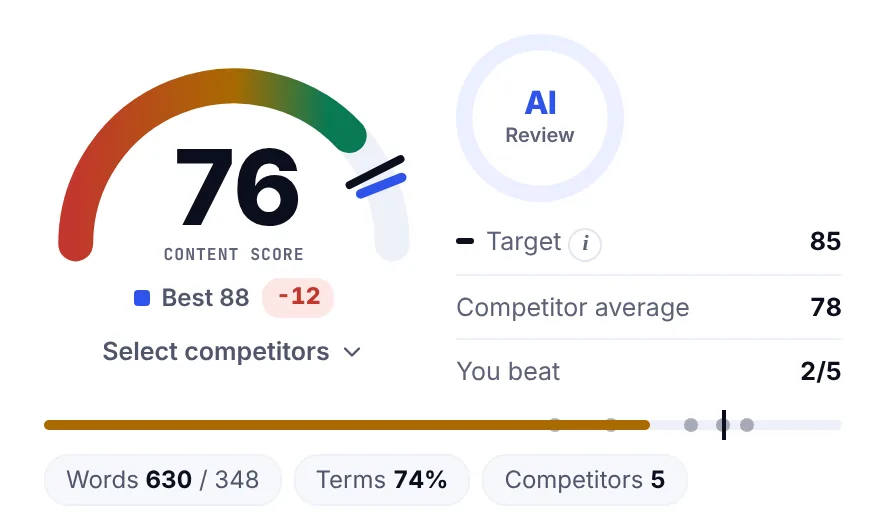
This is where the engine matters least, and where AI on its own does the least to boost rankings. All three assistants write a competent 1,500-word post on any topic, and all three write the same post as everyone else, because they are drawing on the same web. High-quality content ranks because of what happens around the engine: research into what the top pages cover and what they miss, an angle, a brief, a term list drawn from the actual search results, a content score to check coverage, a review pass that adds experience and verifies facts, and a humanizing pass for AI-generated content that still reads as generated.
That is what AI tools built for content writing add. In SerpPal, the draft starts from an analysis of the ranking pages, the terms and questions sit beside the editor, the score shows what is missing in real time, and the humanizer and AI detector are one click away. The engine inside is interchangeable; the process is the product. Our guide to AI writing tools covers what to expect from that process, and how to write SEO content that ranks covers the editing that follows.
Best AI for fiction, creative writing and overcoming creative blocks
For fiction, the question is voice and continuity. Artificial intelligence is at its most useful here as a way past a blank page: ask for five ways the scene could start and the block usually breaks. Both generalists can continue a scene convincingly when given the character's motive, the scene's purpose and two or three paragraphs of your own prose as a style sample; without the sample, both default to the same smooth, cliché-prone register. The long-context one tends to hold a voice longer across a long passage; the other tends to offer more alternatives faster.
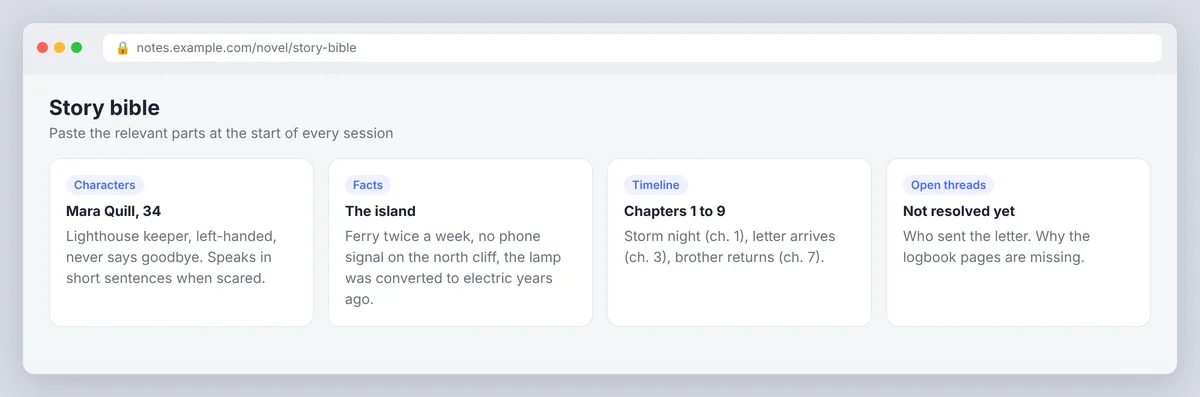
Neither assistant remembers your book between sessions. Keep a story bible (characters, facts, timeline, open threads) and paste the relevant parts into each request. Use the assistant to generate options (three ways this scene could turn) and to flag continuity problems, and keep the decisions yourself. Specialist fiction software adds exactly that scaffolding: persistent notes, scene cards, continuation modes. Whether it is worth paying for depends on whether you would maintain the notes anyway.
Best AI for editing and rewriting
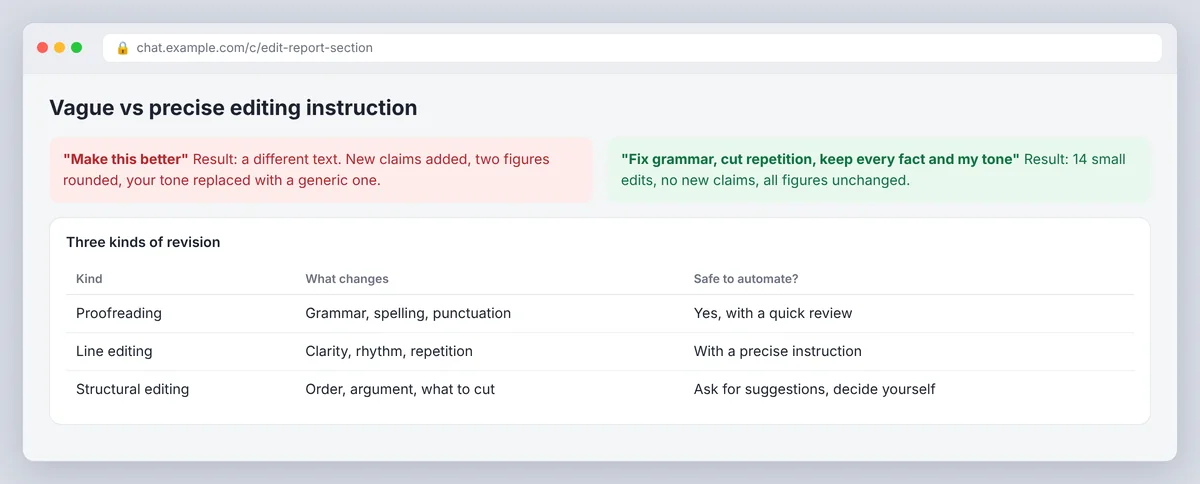
For editing, all three assistants are good, and the instruction is everything. "Make this better" produces a different text. "Fix grammar, cut repetition, keep every fact and name, do not change the meaning, and list each change" produces an edit you can check. Ask for the list of changes every time; it is the only way to catch a qualifier that quietly became an absolute.
Three kinds of revision are worth separating. Proofreading (grammar, spelling, punctuation) is cheap and safe to automate with a grammar checker, and a plagiarism checker belongs in the same pass for anything long-form. Tone and clarity (shorter sentences, plainer words, warmer or more formal register) is where you refine the copy, and where a humanizing pass fits; SerpPal's humanizer does this while keeping facts and showing what changed. Substantive editing (is the argument sound, is anything missing, is this the right order) still wants a person, with the assistant as a second reader that points at weak paragraphs.
Free versus paid AI writing tools: cost-effective and scalable
Every major model has free access with caps on usage, quality or features, and the caps change often enough that any specific number here would be wrong within months. Pricing for the Pro and team tiers changes just as often. Compare pricing the same way for AI tools in every category: what the free plan or free trial includes, what counts as usage, and what the next tier adds. OpenAI, Anthropic and Google each list their current plans on their own pricing pages. The practical test is simple: if the free tier interrupts you during real work more than once a week, you have outgrown it.
Paid plans are worth it when they buy time you can measure: a faster or better engine for daily drafting, document uploads for research-heavy work, or, for writing tools, the research and checks that turn a draft into a publishable page. SerpPal's free plan includes the editor, the AI writer, the humanizer and the AI detector with monthly limits and no card; the pricing page has the current numbers. Before paying for anything, check how usage is counted (messages, credits, words), how it is billed (monthly or annual, per seat or per workspace), whether a 7-day free trial needs a card, and whether the feature you want is in the plan you are looking at rather than the one above it. Pricing pages change; the dashboard inside the product tells you what you actually have.
How to choose: streamlining your content creation workflow
- Name the three things you write most. Emails and recaps point to an assistant's chat app. Ads and product copy at volume point to a content tool with a brand voice. Weekly blog posts point to a content tool. Chapters point to fiction software or an assistant plus a story bible.
- Decide how much checking the work needs. A product description tolerates a quick draft and a quick review. A researched essay or a medical page needs sources, verification and a named person responsible.
- Check where you write. An assistant inside Docs or Word saves steps only if that is where your drafts live.
- Read the privacy terms before pasting client material, unpublished manuscripts or internal documents into any service.
- Run the twenty-minute test from the comparison section with the shortlist, and pick the one that cost the least cleanup.
Responsible use of AI text generation
Fluency is not accuracy, however powerful AI gets. Every assistant produces confident errors, invents references, and drifts toward generic phrasing when the prompt is thin. Human review matters most where facts, reputation or a reader's decisions are at stake, and the person who publishes or submits the text is responsible for it. Add the examples, decisions and specific knowledge only you have, disclose AI use where a policy requires it, and read the final version aloud. An AI writing assistant should make your judgment faster to apply, not replace it.
Conclusion: the best AI writing setup for you
The best AI for writing is the one that fits the job you do most. For everyday writing, try ChatGPT and Claude on the same three tasks and keep the one that needs less cleanup. If your writing lives in Google Docs and Gmail, try Google's assistant there. For recurring work such as SEO content, marketing copy or fiction, add one AI writing tool built for that job, and keep a person responsible for the facts and the final edit; that is where high-quality results come from. If your job is content that has to rank, start on SerpPal's free plan and run one keyword through the whole workflow. One assistant plus one tool is enough to streamline most writing.
FAQ: best AI writing tools
Which AI is best for writing?
For general writing, ChatGPT and Claude are the two to try first; the first for flexibility and speed across formats, the second for long documents and prose that needs less cleanup. Google's assistant is the pick when your writing lives in Google Docs and Gmail. For a specific recurring job such as SEO content or fiction, a writing tool built for that job matters more than which engine is inside it.
Is Claude or ChatGPT better for writing?
Claude tends to produce prose that needs less smoothing and handles long source material well, which suits essays, reports and manuscripts. ChatGPT is faster at format changes, alternatives and brainstorming, with a larger ecosystem of add-ons. Run the same three tasks through both and keep the one that costs you less cleanup time.
What is the best free AI for writing?
All three major assistants offer free access with caps, and any of them is enough for occasional emails, short copy and quick drafts. For content work, SerpPal's free plan includes the AI writer, editor, humanizer and detector with monthly limits and no card. Upgrade when the caps interrupt real work, not before.
Which AI writing tool is best for SEO content?
One that starts from an analysis of the pages that already rank and keeps the terms, questions and a content score beside the draft. The engine inside is secondary; the research and the human review around it decide whether the page ranks. A plain chatbot can produce the draft, but you will do the research and checking by hand.
Do professional writers use AI writing tools?
Many do, for structure, research recaps, rough drafts, alternatives and proofreading, and most still write and verify the final text themselves. Policies differ by employer, publisher and client, so check what is permitted and what must be disclosed before using AI on commissioned or assessed work.