On this page
- Key takeaways
- What a meta title is and why meta tags matter for SEO
- How to check a meta title: the 5 key checks
- Meta title length: characters vs pixels
- Why Google rewrites titles, and how to stop it
- Duplicate titles and missing title tags
- Meta title vs meta description (and the description checker)
- The other meta tags a checker should read: robots, canonical, Open Graph
- How to write a well-optimized meta title (with examples)
- Checking titles across a whole website
- Google-style preview, social preview and AI Overviews
- Free meta title checker tools compared
- Conclusion
- FAQs: meta title and meta tags
A meta title check tells you three things about a page's title tag: whether it fits in the search snippet before it gets truncated (about 580 pixels on desktop, usually 50 to 60 characters), whether it contains the primary keyword the page targets, and whether it reads well enough to earn the click. You can run a check in seconds with a free SEO tool such as SerpPal's SERP preview, which shows the title and description as Google displays them on desktop and mobile, with width and character counts. This guide explains how to check a meta title properly, what the length limits really are, how to fix titles that are too long, duplicated or rewritten by Google, how the other meta tags (description, robots, canonical, Open Graph) fit in, and how to check every title on a website at once.
Key takeaways
- Google truncates titles by width (around 580px on desktop, less on mobile), not by a fixed character limit. 50 to 60 characters is the safe range; wide letters use more room.
- A meta title check should cover length, target keyword placement, uniqueness across the site, and how the title and description read together in a Google-style preview.
- Google rewrites titles it considers too long, stuffed, boilerplate or mismatched with the page. A good title tag is the best way to keep control.
- Check single pages with a free preview tool; check whole sites with a crawler's title report (length, duplicate titles, missing titles).
- The title tag and the H1 can differ, but they should describe the same page. Robots directives and the canonical URL decide whether the page appears in search results at all, so a full meta tag checker checks those too.
What a meta title is and why meta tags matter for SEO
The meta title, or meta title tag, is the <title> HTML element in a webpage's head, the first of the meta tags a checker looks at: <title>Meta Title Check: Free Checker for Length and Preview</title>. It's the blue clickable headline in Google's search results, the text on the browser tab, and the default title when the page is shared (unless an Open Graph og:title overrides it on LinkedIn and other networks). It's also one of the few on-page elements Google has confirmed as a ranking signal: the words in the title tell search engines what the page is about, and a clear, relevant title earns a higher click-through rate (CTR) from the same position. The description doesn't affect rankings but shapes the search snippet, so title and description are checked together.
That's why a title check is worth doing on every important page. A title that's too long loses its ending, a title without the keyword loses relevance, and a title that reads like keyword stuffing loses the click. The algorithms that build the snippet reward titles that accurately describe the content.
How to check a meta title: the 5 key checks
- Length and width. Paste the title into a SERP preview and look at the desktop and mobile renderings. If the end is truncated mid-sentence with an ellipsis, shorten it or move the important words forward.
- Keyword placement. The page's primary keyword should appear once, as close to the front as reads naturally; relevant keywords beyond that belong in the content, not the title. "Meta Title Check: Free Checker..." beats "The Complete Guide to Checking Your Meta Title".
- Uniqueness. No other page on the site should have the same title. Duplicate title tags confuse Google about which page to rank and look like a template fault.
- Accuracy and intent. The title must accurately reflect what the page actually delivers and match the search intent of the query: a how-to title for a tutorial, a comparison title for a comparison.
- Readability. Read it aloud as a headline. Separators (colon, pipe, dash) are fine; keyword lists and ALL CAPS are not. Brand name at the end if there's room, dropped if there isn't.
Meta title length: characters vs pixels
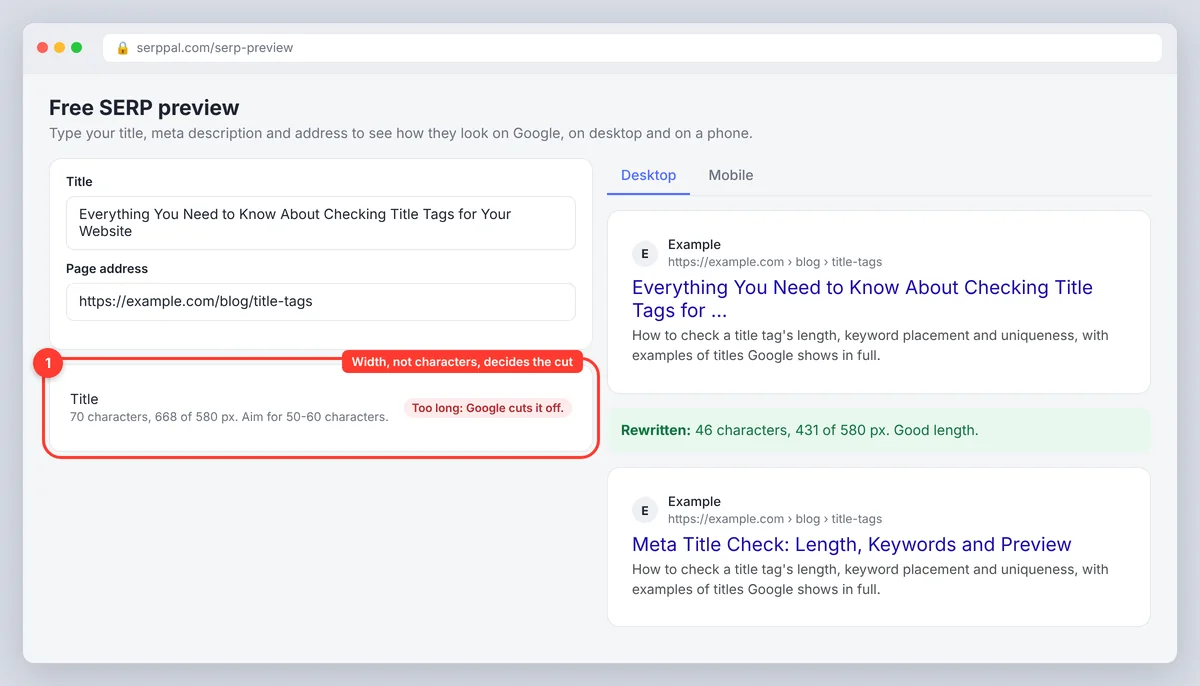
Google doesn't count characters. It renders the title in its results font and cuts it at a display limit: roughly 580 pixels on desktop (some tools quote 600 pixels) and a little less on mobile, where the title can wrap to two lines. Because letters have different widths, "Will William Win?" takes far more room than "Little Lilli" at the same character count. That's why the usual advice of 50 to 60 characters is a rule of thumb: a title full of narrow letters can run to 65 characters and display in full, while a title heavy in capitals and Ws can be cut at 52.
| Check | Guideline | What happens if you exceed it |
|---|---|---|
| Desktop width | About 580 px (roughly 50 to 60 characters) | Google truncates with an ellipsis or rewrites the title |
| Mobile width | Slightly narrower, may wrap to 2 lines | Second line may be cut |
| Minimum | About 30 characters | Very short titles waste the space and give Google little to work with |
| Meta description | About 920 px on desktop (120 to 158 characters; 160 characters is the usual ceiling) | Truncated, or replaced with a page excerpt |
A meta title length checker that reports width in px is therefore more useful than a character counter. If your tool only counts characters, aim for 55 or fewer and keep wide capitals to a minimum.
Why Google rewrites titles, and how to stop it
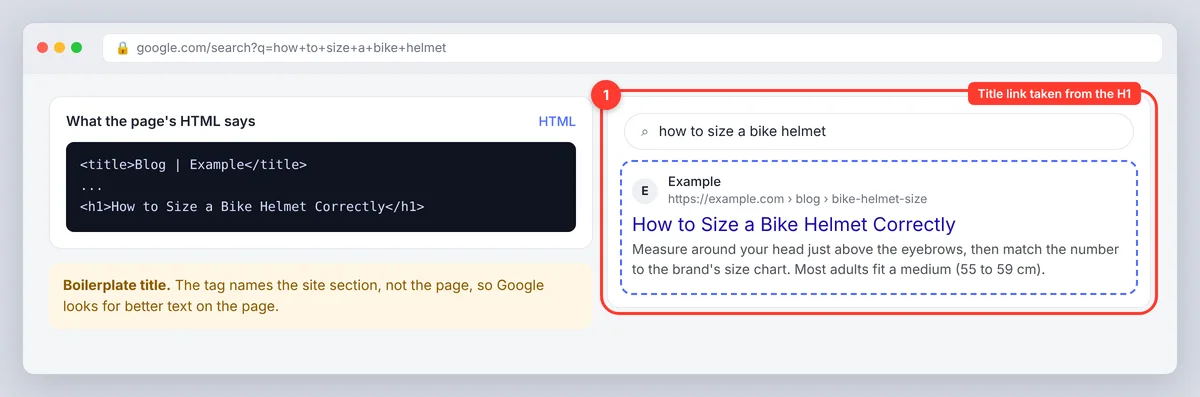
Google replaces the title tag in results more often than most site owners realize. In its documentation on title links, Google says it may use other text from the page (the H1, prominent headings, anchor text from links) when the title tag is too long, stuffed with keywords, boilerplate ("Home", "Untitled", the site name alone), duplicated across pages, or doesn't describe the page well. The fix is the checklist above: a unique, accurate, reasonably short title with the keyword near the front. When the title tag and the H1 agree on what the page is about, Google has little reason to swap them.
Duplicate titles and missing title tags
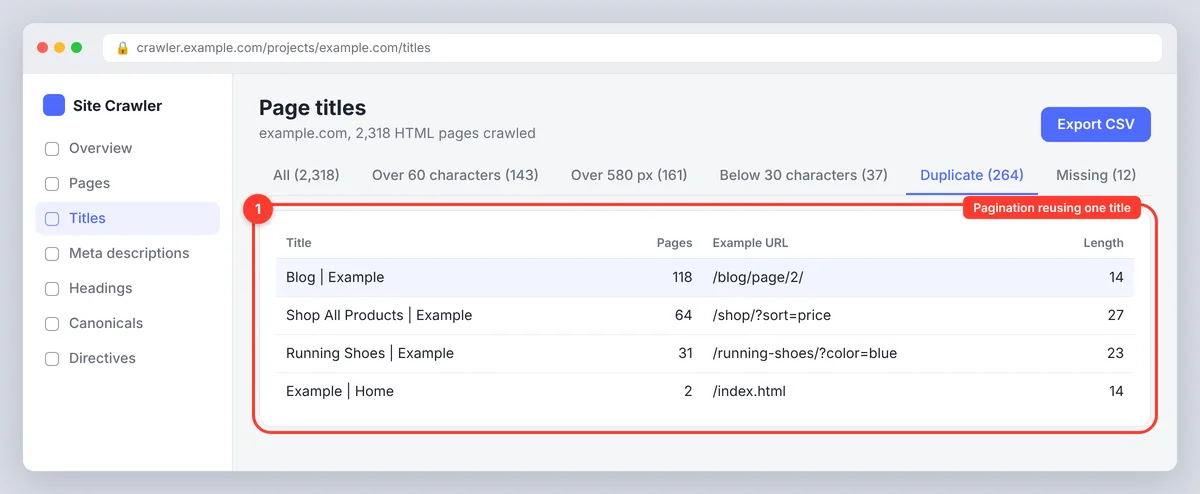
Duplicate titles usually come from a template: a category page template that only outputs the site name, pagination that reuses the first page's title, or an SEO plugin falling back to a default. Missing titles come from new pages published without the SEO fields filled in, or from a theme that doesn't output the tag at all. Both are found the same way: crawl the site and sort the title column. Multiple H1s on one page show up in the same crawl and are worth fixing at the same time, since Google uses H1 tags as a fallback title. Fix the template first, then write unique titles for the pages that get impressions. Our guide to duplicate meta descriptions and titles walks through the audit in detail.
Meta title vs meta description (and the description checker)
The title is the headline; the description is the two-line summary under it. The title is a ranking signal and must contain the keyword; the description is not a direct ranking factor but drives click-through rate, so a compelling description should explain what the searcher gets. Limits differ too: about 580 px for the title, about 920 px (120 to 158 characters, under 160 characters) for the description. A good meta description checker tests both at once, because title and description are read together in the search snippet, and the pair should not repeat each other word for word. Google may also swap a description for a page excerpt when another passage answers the query better, so the on-page content should back up what the description promises.
The other meta tags a checker should read: robots, canonical, Open Graph
A URL-based meta tag checker fetches the live HTML header and reports more than the title and description. The robots meta tag (and the X-Robots-Tag header) carries the robots directives: noindex keeps the page out of the index, nofollow stops link following; a stray noindex left over from staging is the classic reason a perfect title never appears in search results (Google's robots meta tag reference lists every directive). The canonical tag names the preferred canonical URL when several URLs serve the same content; if it points elsewhere, Google indexes that page instead of this one, whatever the title says. hreflang tags map language versions. Open Graph tags (og:title, og:description, og:image) control the preview on LinkedIn and other social networks and can differ from the SEO title. The favicon link and the viewport tag round out the header. Verify all of these after migrations and theme changes, when canonical and robots settings most often break, and when a title check alone would miss the real problem: indexing.
How to write a well-optimized meta title (with examples)
- Lead with the keyword or the promise: Before: "Everything You Need to Know About Checking Title Tags for Your Website" (70 chars, truncated). After: "Meta Title Check: Length, Keywords and Preview" (46 chars). Concise wins.
- Be specific: Before: "Running Shoes". After: "Trail Running Shoes for Wet Terrain: 2-Minute Fit Guide".
- Drop the boilerplate: Before: "Blog | Acme Corp". After: "How to Size a Bike Helmet Correctly | Acme".
- Match the format to the topic and intent: a tutorial gets "How to", a comparison gets "vs" or "Compared", a product page gets the product name and its key attribute.
- One keyword, one idea. "Meta Title Checker, Title Tag Tester, SEO Title Analyzer Free" is a keyword list, and Google will rewrite it.
Checking titles across a whole website
A preview checks one title at a time. For a site, use a crawler: it fetches every URL and exports the title, its length in characters and px, duplicate titles, missing values, robots directives and canonical URLs. Filter for over 60 characters, under 30 characters, duplicates, blanks and noindex, then prioritize by the pages that get impressions in Google Search Console, where search visibility by page is easy to read. On WordPress, the SEO plugin's post list shows SEO titles with a length indicator, which covers small sites. For sites with thousands of pages, the fix is almost always in the template that generates titles, not in the individual pages.
Google-style preview, social preview and AI Overviews
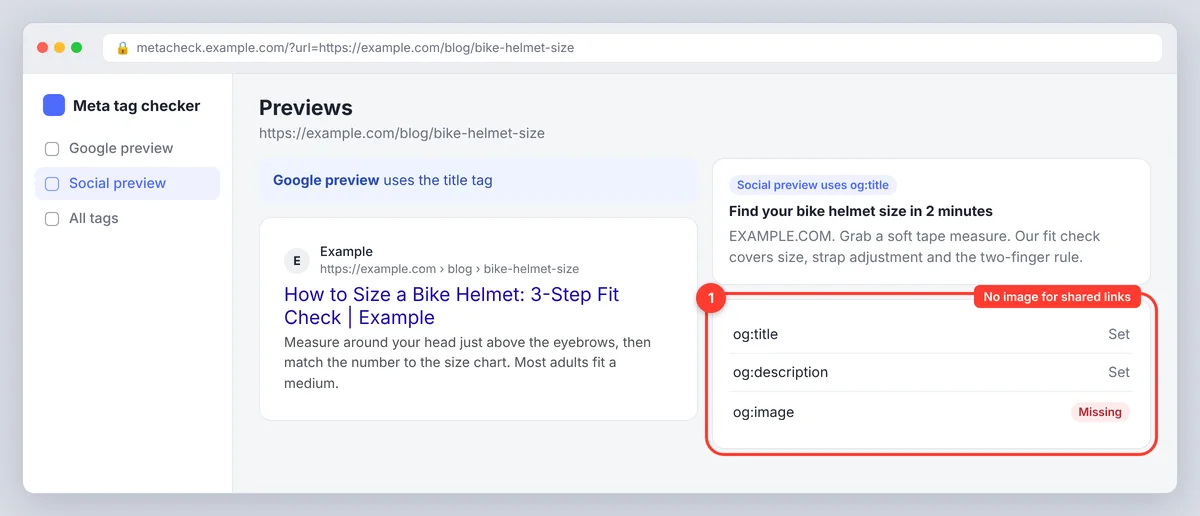
The title tag is what Google shows, but shared links on LinkedIn, Facebook and messaging apps use the Open Graph tags when present. A full metadata check looks at both: the Google-style preview for search, the social preview for sharing. AI search engines (Google's AI Overviews, ChatGPT search, Perplexity) read the same title and headings to decide what a page covers, so a clear, descriptive title helps there too. There's no separate "AI title"; the same accurate title serves search results, AI Overviews and social feeds.
Free meta title checker tools compared
| Tool type | What it checks | Best for |
|---|---|---|
| SERP preview (such as SerpPal's free tool) | Title and description as Google shows them, width, character count, desktop and mobile | Writing or fixing one page's title before publishing |
| Meta tag checker (URL-based) | Fetches a live URL and shows title, description, robots, canonical, hreflang, Open Graph | Auditing a published page |
| Site crawler | Every title on the site: length, duplicates, missing, noindex, canonical | Sitewide audits and migrations |
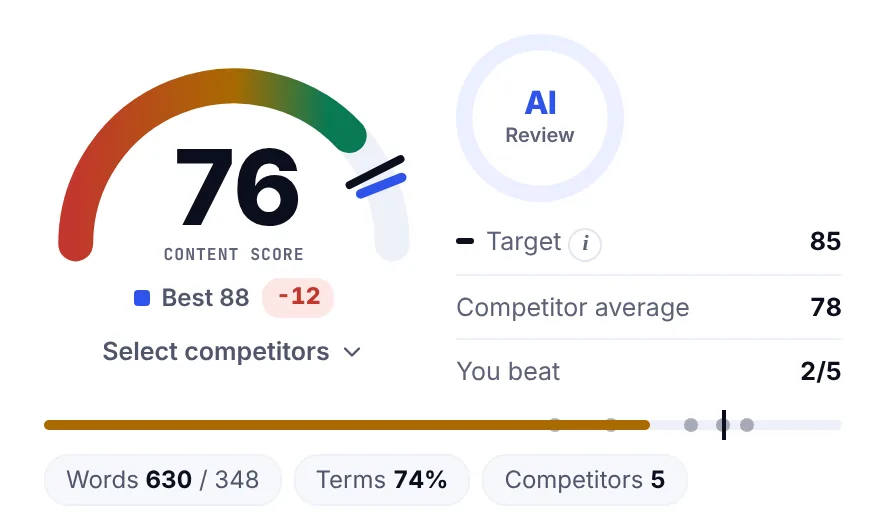
| Content editor with score | Title length and keyword as part of an overall content score | Checking while writing; SerpPal's editor does this on every article (how the content score works) |
Conclusion
A meta title check takes a minute and catches the problems that cost clicks: a title cut off by pixel width, a missing or buried keyword, a duplicate from a template, or a title Google is likely to rewrite. Check single pages with a SERP preview before publishing, check whole sites with a crawler after any template or migration change, and read the robots and canonical tags at the same time so a good title isn't wasted on a page that can't rank. For the writing side, with more examples, see our title tag SEO guide.
FAQs: meta title and meta tags
How long should a meta title be?
Keep it under about 580 px on desktop, which is usually 50 to 60 characters. Use a checker that measures width, because wide letters and capitals shorten the limit.
How do I check a meta title for free?
Paste the title into a free SERP preview tool to see how it renders on desktop and mobile, or paste the page URL into a meta tag checker to read the live tag along with the description, robots and canonical. For a whole site, use a crawler's title report.
Does Google always use the title tag?
No. Google rewrites titles that are too long, keyword-stuffed, boilerplate, duplicated or inaccurate, usually using the H1 or other prominent text. A unique, descriptive title of sensible length is used as written most of the time.
Are duplicate title tags bad for SEO?
Yes. They make it harder for Google to tell pages apart and are a common reason titles get rewritten. Find them with a crawl and fix the template or default that produces them.
Should the meta title match the H1?
They don't have to be identical, but they should describe the same page and share the main keyword. A title tag can be shorter and more search-focused; the H1 can be longer and more descriptive.