On this page
- What a title tag is (and what it is not)
- Why title tags matter for SEO
- Optimal title tag content: how to write an effective title tag
- Title tag length: keep it concise, but don't overthink it
- Title tag examples by page type
- Can Google rewrite my title tag?
- How to audit and improve title tags
- Common title tag mistakes
- Conclusion: putting it all together
- Frequently asked questions
Title tag SEO is the work of writing the one line Google shows as the clickable headline for your page: the HTML <title> element. A good title tag names the page's topic in the first few words, uses the focus keyword once, fits in about 580 pixels (usually 50 to 60 characters) so Google does not truncate it, is unique on your site, and reads like something a person would click. It is a ranking signal, a small one, and a click-through lever, a large one, which makes it the most important on-page SEO element you can fix in a minute.
This guide covers the title tag best practices that hold up: what the tag is and how it differs from the H1 and the meta description, how long it should be, where the keyword goes, before-and-after examples for every common page type, why Google rewrites titles, and how to audit and optimize the titles you already have. Paste any draft into a free SERP preview to see how it will look on desktop and mobile before you publish.
Key takeaways
- The title tag is the
<title>HTML tag in the page head. It shows in search results and the browser tab; the H1 is the heading on the page itself, and the description tag is the snippet text under the title. - Google cuts titles by pixel width, around 580 px on desktop. Fifty to sixty characters is a drafting guide, not a limit.
- One core keyword, near the start, once. Lists of relevant keywords separated by pipes read as spammy and get rewritten.
- Every indexable page needs its own title. Duplicate title tags are the most common title problem on real sites.
- Google rewrites titles that are too long, stuffed, boilerplate or off-topic. Accurate, specific titles are shown as written.
What a title tag is (and what it is not)
The title tag is an HTML element inside the <head> of a web page: <title>How to Prune Roses in Spring | Greenhouse Notes</title>. It does not appear in the body of the page. You see it in three places: as the title link on search engine results pages, in the web browser tab, and as the default title when the page is bookmarked or shared on social media and in some apps (Open Graph meta tags override it on most platforms).
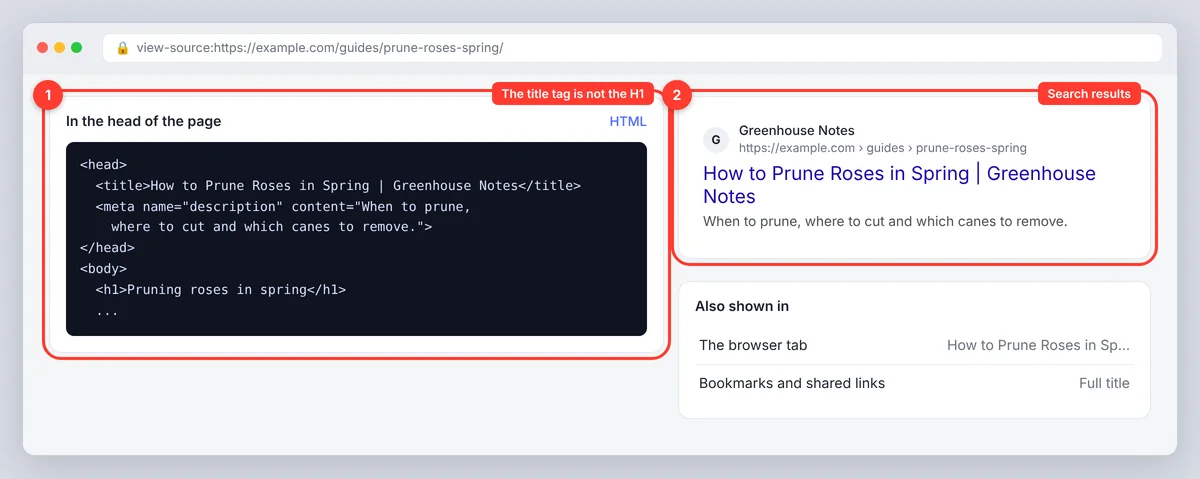
It is not the H1, which is the visible main heading on the page, and it is not the description, the short summary that appears under the title in results. In a CMS, "page title" can mean the title tag, the H1, both or the internal name of the page, so check which field you are editing. People also call the title tag the SEO title or meta title; they mean the same element.
Title tag vs H1 vs page title
| Element | Where it shows | Who controls it | Typical length |
|---|---|---|---|
Title tag (<title>) | Search results, tab, bookmarks | You, in the page head or SEO settings | About 580 px |
| H1 | Top of the page content | You, in the page body | Any; usually shorter |
| Meta description | Under the title in search results | You, in the page head | 120 to 158 characters |
| CMS page title | The editor's page list | You | Internal |
The title tag and the main heading can differ. A title tag might read "How to Prune Roses in Spring | Greenhouse Notes" while the heading is "Pruning roses in spring"; the first adds context for a search result, the second is a cleaner heading. Matching them is a fine default and carries no penalty either way.
Why title tags matter for SEO
Search engines read the title as a strong statement of what the page is about, so it helps them match the page to relevant search queries. Google says it uses the title tag as the main source for the title link, so it is also what most searchers read before deciding to click. A clear, compelling title raises click-through rate and organic traffic from the same position; a vague one wastes the ranking you already have. That is why title tags sit at the top of every on-page SEO checklist: the effort is small and the visibility gain is measurable.
It is one ranking factor among hundreds. A keyword in the title will not rescue thin content, and a long title will not outrank a short one. Think of the title as a promise: "Composting for beginners: a simple start" sets an expectation the page then has to meet.
Optimal title tag content: how to write an effective title tag
Choose one core keyword focus
Pick the main keyword the page should rank for and put it in the first half of the title, where it survives a cutoff and matches what the searcher typed. Multiple target keywords, synonyms and a second phrase separated by a pipe do not add relevance; repeating them dilutes it and signals keyword stuffing. "Running Shoes | Best Running Shoes | Running Shoes Sale" says less than "Best running shoes for flat feet: 8 pairs tested".
Match the search intent too. A page for "how to fix a dripping tap" needs a how-to title, not a product category title that implies you sell taps.
Write page titles for people first, search engines second
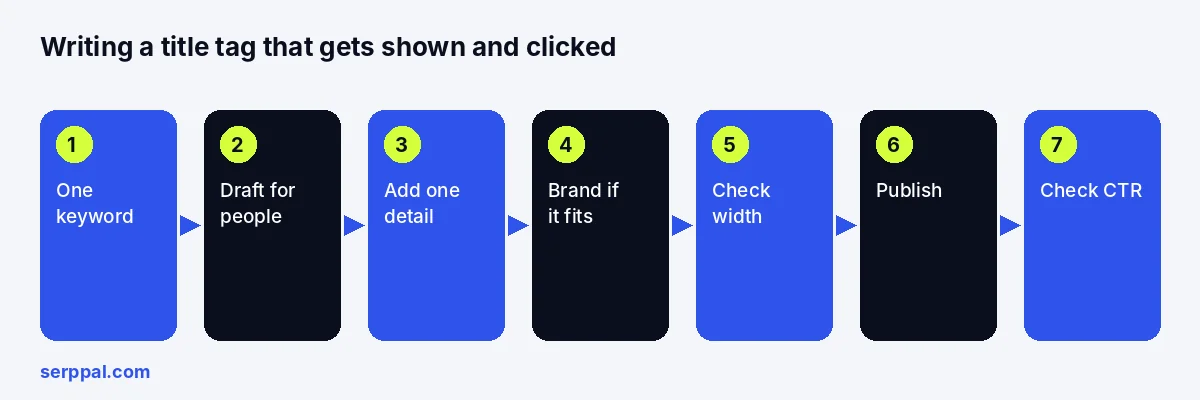
Draft the title as a sentence a person would click: topic first, then the specific detail that makes this page different (a number, a year of data, a location, a result) and aligns with what the page delivers. Read it aloud for clarity. If it sounds like a row of keywords, it will be rewritten; if it sounds like a headline, it will be shown.
Power words, modifiers and CTAs: decide case by case
Modifiers such as "beginner's guide", "pricing", "near me" or "checklist" set expectations when they match the page. A call to action in the SERP ("Book a repair", "Compare prices") suits a service or product page with that action available, and feels pushy on a reference article. Power words ("ultimate", "essential") add nothing a searcher can verify and rarely boost clicks on their own; use them only if they are true. The format that attracts clicks most reliably is topic, specific detail, brand.
A simple technique for brand strength and boilerplate relevancy
Search for your brand name. If the results are full of your pages and people search for the brand by name, the brand suffix earns its space and can go on every title. If your brand is unfamiliar, the topic deserves the room; keep the suffix for the home page and a few key pages, and never append a long slogan to every title as boilerplate. Google treats repeated boilerplate as a reason to rewrite.
Provide unique titles across the site
Every indexable URL needs a distinct title that reflects its distinct content. On template-driven sites (products, locations, categories) build the template from the fields that differ: "Insulated steel bottle, 750 ml | Fieldworks", not "Product | Fieldworks". Two pages with identical titles compete with each other and make it harder for Google to pick the right one; unique title tags also help people navigate when they have multiple tabs open. Prioritize the pages that get impressions when you fix duplicates manually.
Title tag length: keep it concise, but don't overthink it
Google does not set a character limit. The title link is displayed in a fixed pixel width, about 580 px on desktop, and anything wider is cut with an ellipsis; mobile wraps the title onto a second line and shows more. Wide letters (W, M, capitals) take more room than narrow ones (i, l, t), so two titles with the same character count can behave differently, and the common "600 pixels" figure in other guides is the same idea with a slightly different measurement.
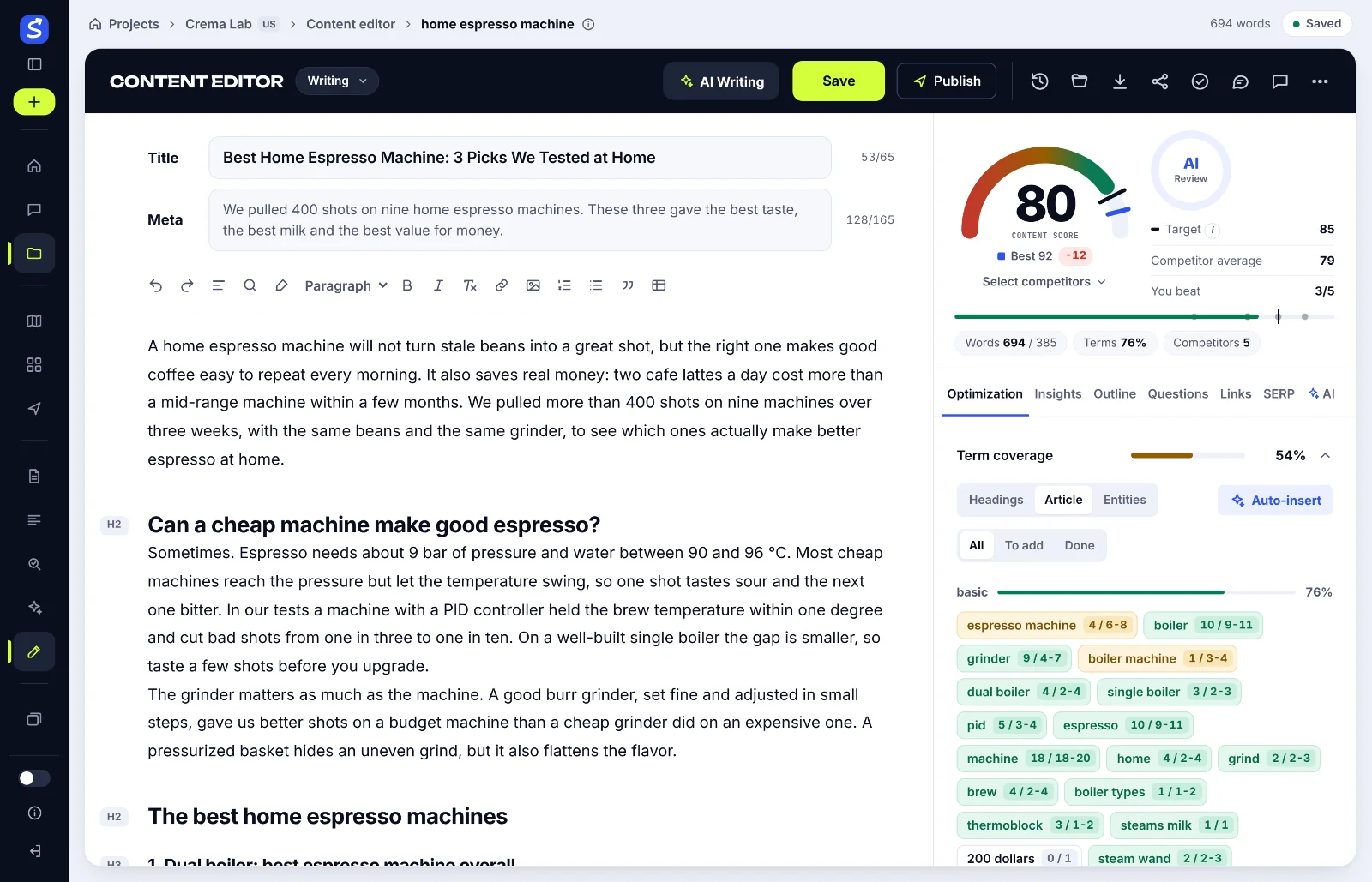
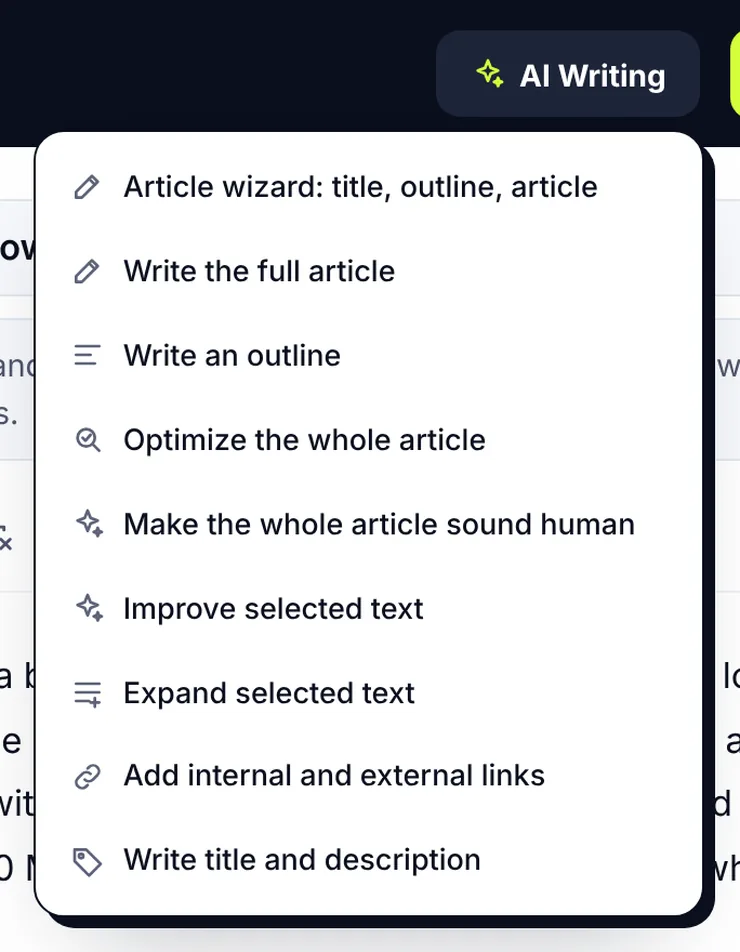
Use 50 to 60 characters as a drafting guide. Put the topic early so the title still makes sense if the end disappears, check it in a SERP simulator, shorten it if the meter exceeds the limit, and stop. Shaving one character to hit the guide number is time better spent on the wording. SerpPal's editor shows a title counter against 65, turning red above it, and the content score checks that the keyword appears in the title, so a too-long or keyword-free title costs points before it costs clicks.
Title tag examples by page type
Topical page title tag examples
| Page type | Before | After |
|---|---|---|
| Home | Welcome to Our Website | Northfield Garden Supplies: Tools, Seeds and Advice |
| Product | Stainless Steel Bottle | Insulated Steel Water Bottle, 750 ml | Fieldworks |
| Service | Our Services | Boiler Repair in Leeds, Same-Day Visits | Hearthside |
| Local | Plumbing Services | Emergency Plumber in Leeds: 24-Hour Call-Out |
| Blog post | Gardening Tips | How to Prune Roses in Spring: A Step-by-Step Guide |
| Category | Shoes | Women's Trail Running Shoes: 42 Styles | Fieldworks |
| Comparison | CRM Software | Best CRM for Small Business: 9 Tools Compared |
The pattern in every "after": the topic first, one specific detail to differentiate the page, the brand last if it fits. The home page names the business and its offer, because the brand is the keyword there. The blog post names the task. The category gives the count, which tells the searcher there is choice.
Case 1: you use WordPress
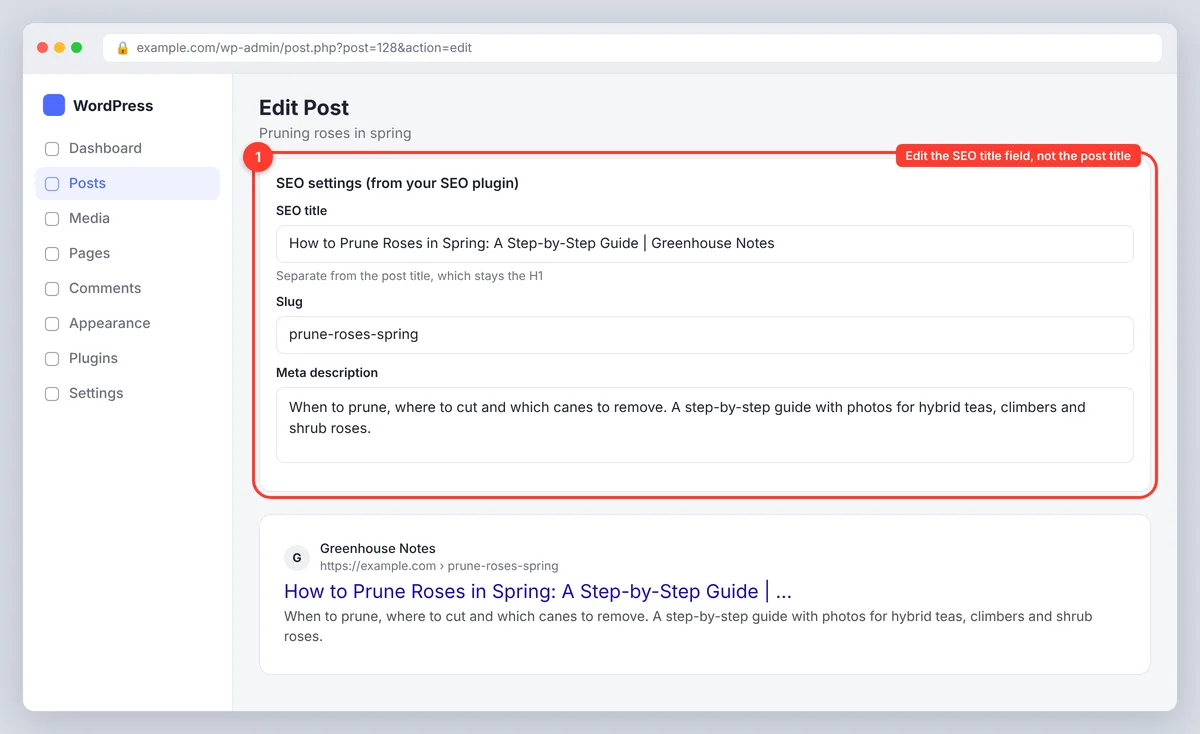
WordPress generates a title from the post title and the site name by default ("Post title - Site name"). An SEO plugin such as Yoast SEO or Rank Math gives you a separate SEO title field, usually with a preview, so the heading and the title tag can differ. Edit the SEO title field, not the post title, when you want a longer heading and a shorter title; this is the one piece of technical SEO most WordPress owners can do themselves. When you publish from SerpPal to WordPress, the post title starts as the article's SEO title and the excerpt as its meta description, so both arrive with the post; tweak the plugin's SEO title field afterwards only if you want the title tag and the heading to differ.
Case 2: you edit HTML or a template
Edit the <title> in the head directly, or the template variable that fills it. On static site generators and frameworks the title usually comes from front matter or a metadata object; make sure every page sets its own rather than inheriting the site default.
Add emojis? Usually not
Emojis and special symbols sometimes display in title links and sometimes get stripped; they rarely fix a weak title and can look out of place on a serious query. Skip them unless the brand voice calls for it and you have checked the result.
Can Google rewrite my title tag?
Yes, and it does so regularly. Google's documentation on title links lists the triggers: titles that are too long, stuffed with keywords, boilerplate repeated across pages, missing, or not descriptive of the page. In those cases Google builds a title link from the main heading, other headings, anchor text pointing at the page or the page content.
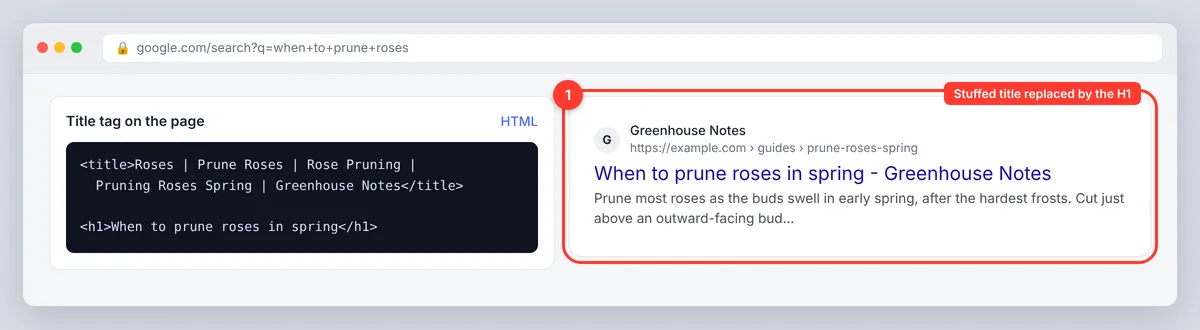
The search engine found a title that better matches search intent
Google also rewrites per query. If a searcher's words match your heading better than your title tag, the result may show the heading for that search and your title for another. A rewrite is not a penalty; repeated rewrites across many queries mean the title is unclear or does not match the page, and the fix is a more accurate title, not a louder one. Check the rewrites in Google Search Console: a query with high impressions and a low click-through rate on a page whose title you thought was good is the first place to look.
How to audit and improve title tags
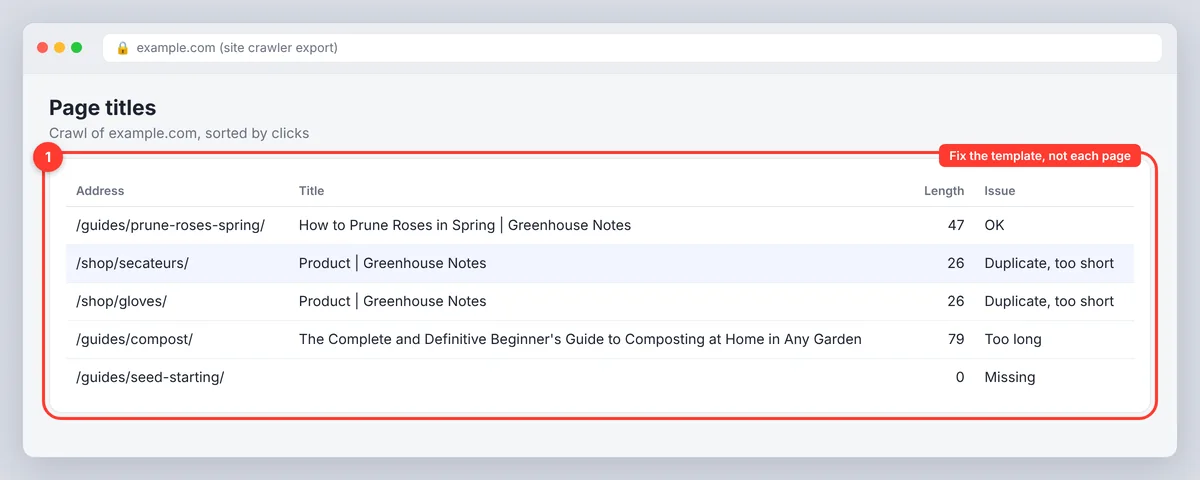
- Crawl the site, or export a list of URLs with their titles from your CMS or an SEO crawler. Flag titles that are missing, duplicated, longer than about 60 or shorter than about 30. Crafting new ones is quicker once the list is sorted by search traffic.
- Check accuracy, not just length. Open ten pages at random and ask whether the title describes the page. A 55-character title that misses the topic is worse than a longer one that nails it.
- Compare with Search Console. For important pages, review impressions, clicks, CTR and average position. A page with steady visibility and a lower CTR than similar pages is a title candidate; a title change there turns the same visibility into more traffic.
- Change one group at a time and note the date. Title changes affect clicks within a couple of weeks and rankings more slowly, and other changes (new content, seasonality, position shifts) confound the result if you change everything at once.
- Re-check in the preview after each edit, and keep a record of before-and-after titles so you can roll back the ones that did not help.
Common title tag mistakes
- Duplicate titles across pages, usually from a template or a default. Fix the template.
- Keyword stuffing: the same phrase repeated, variants separated by pipes, every keyword the tool suggested.
- Boilerplate that crowds out the topic: a long slogan or category path on every page.
- Promises the page does not keep: a discount, a result or a feature that is not there. The click converts to a bounce.
- Treating the character guide as a hard limit and cutting the one word that made the title specific.
- Forgetting the title entirely on new templates, so Google shows the URL or the heading.
- Scrolling past the snippet. Optimization stops at the title for many teams; the description is the other half of the snippet and is displayed with it.
Conclusion: putting it all together
A title tag is a one-line promise about the page, and the title tag SEO strategy that works is short. Choose one keyword, lead with the topic, add one detail only this page can claim, keep the brand if it earns the space, check the width, and make every page's title different. Then watch click-through rate in Search Console and fix the titles the data points to. Our meta description guide covers the line under the title; together they are the whole snippet, and the two optimized tags reduce wasted impressions faster than anything else on the page.
Frequently asked questions
Do title tags still help SEO?
Yes. The title tag helps search engines understand the page's topic and is the main source of the title link people read in results, so it affects both relevance and clicks. It is one signal among many, not a shortcut to rankings.
How long should a title tag be?
Fifty to sixty characters, which usually fits Google's desktop display width of around 580 px. The width is the real limit, so check the title in a SERP preview rather than counting characters, and put the topic first so a cutoff does not hide it.
What is the difference between a title tag and an H1?
The title tag is in the page head and shows in search results and the browser tab. The H1 is the main heading in the page body. They can use the same wording or different wording; both should describe the same page.
Does a duplicate H1 and title tag hurt SEO?
No. Matching them is common and carries no penalty. Change one only when a shorter or more descriptive version serves searchers better, for example a title tag with the brand name and a heading without it.
Why does Google show a different title from my title tag?
Because the tag was too long, keyword-stuffed, boilerplate, missing or a poor description of the page, or because another part of the page matched the searcher's query better. Make the title accurate, specific and concise, and Google shows it as written for most queries.