On this page
- What a meta description does (and doesn't do)
- How duplicate meta descriptions affect SEO
- Common causes of duplicate meta descriptions
- How to find duplicate meta descriptions: checker tools and methods
- How to fix duplicate meta descriptions
- Missing meta descriptions, duplicate meta titles and other meta tags
- When similar descriptions are acceptable
- Best practices for unique meta descriptions and an audit schedule
- Frequently asked questions
- Conclusion
Duplicate meta descriptions are identical (or nearly identical) description tags on multiple pages of the same website, the most common duplicated metadata problem a crawl finds. They don't trigger a Google penalty and they rarely move rankings directly, but they cost you clicks: when every result from your site shows the same summary in the SERPs, searchers can't tell the pages apart, and Google usually ignores the duplicated tag and writes its own snippet. The fix is a short audit (crawl, group, verify), then correcting the template or CMS setting that produced the duplicates, then writing unique descriptions for the pages that earn impressions. This guide covers all of that, plus the related cases of missing meta descriptions, duplicate meta titles and the old "meta description vs keywords" confusion.
Key takeaways
- Duplicate meta descriptions are a click-through problem, not a ranking penalty. Google rewrites or ignores them, so your pages lose the chance to pitch themselves.
- Most duplicates come from one cause: a template, theme or SEO plugin applying a sitewide default. Fix the source, not the rows in the spreadsheet.
- Find them with a site crawl, Google Search Console, or your SEO plugin's report; group identical values; verify the URLs are distinct indexable pages, not URL variants of one page.
- Write unique descriptions for important pages first, around 150 characters, naming what the specific page offers. Use templates with page data for large catalogs.
- A missing description is better than a duplicate one; both are worse than a good one.
What a meta description does (and doesn't do)
The meta description is an HTML element in the page head, one of the meta tags that summarize web pages for search engines and browsers: <meta name="description" content="Compare hiking boots for wet trails, rocky paths and everyday walks.">. Google may show it as the snippet under your title in search results, or it may generate a different snippet from the page content when it thinks that answers the query better. Google's own snippet documentation says it is more likely to use your description when it accurately describes the page and isn't boilerplate.
What it doesn't do is affect rankings directly. Google confirmed years ago that the description isn't a ranking signal, and its list of meta tags Google supports treats it as a snippet hint, not a ranking input. Its SEO value is indirect: a specific, accurate summary earns a higher click-through rate (CTR) than a generic one, and more clicks from the same position means more organic traffic. That's also why duplicates matter: they throw away the one thing the tag is for.
Meta description vs meta keywords
The meta keywords tag is a different, dead tag. Google has ignored it since 2009 and most other search engines followed; filling it does nothing. Treat "keywords" in a meta description guide as meaning the words searchers type, which Google bolds in the snippet when they match. The description should contain the page's main keyword naturally so the highlighted words help the result stand out. For a full writing guide with examples, see how to write meta descriptions that get clicks.
How duplicate meta descriptions affect SEO
Not in the way a manual action or duplicate content does. There's no penalty, and Google has said duplicated descriptions are a problem it simply works around by writing its own snippet. The damage is practical:
- Lower CTR. Ten results from your website with the same sentence give potential visitors no reason to pick the right one and confuse them about which page answers their search queries. A page-specific summary differentiates each result.
- Lost control of the snippet. When Google rewrites, its bot pulls whatever content best matches the query, which may be a cookie notice or a navigation fragment.
- A symptom of bigger issues. Mass duplication usually means a template is misconfigured, which often also produces duplicate meta titles, missing H1s or duplicate pages that waste crawling budget. The description audit finds the template bug.
- Relevance signals, weakly. Description text isn't a ranking factor, but a unique description that matches the page's intent is one more consistent signal alongside the title tag and H1.
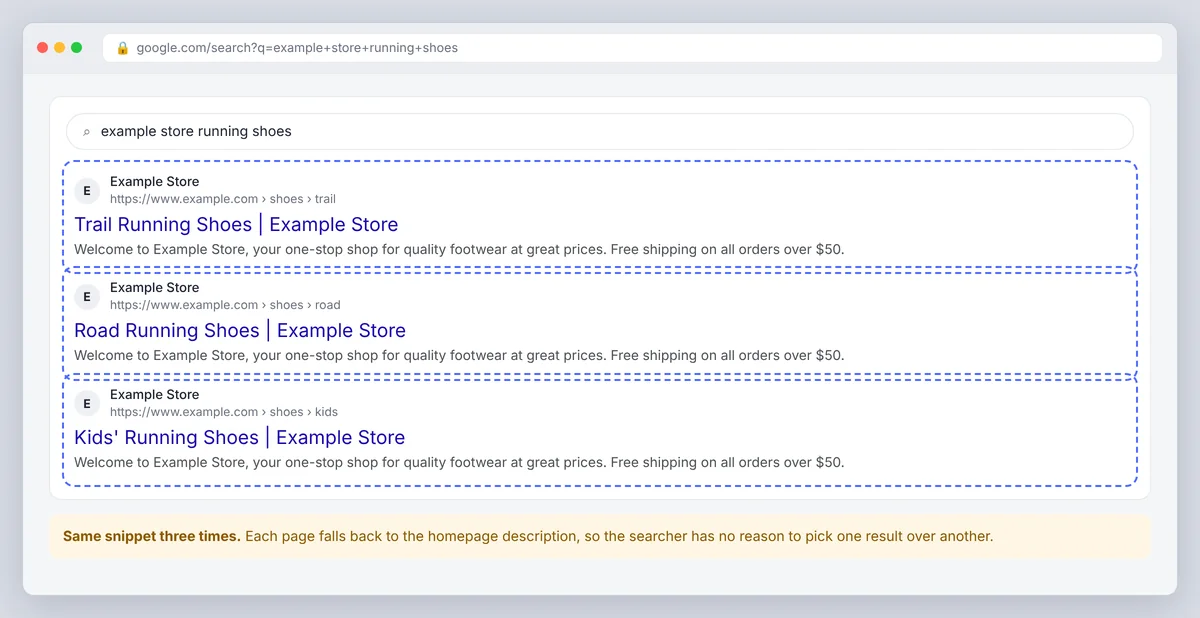
So the SEO impact of duplicate meta descriptions is best summarized as: zero direct ranking effect, measurable CTR and organic visibility effect, and a reliable warning sign that your templates need attention. Search engines' algorithms don't punish the duplication; they just stop trusting the tag.
Common causes of duplicate meta descriptions
- Sitewide default. The theme or SEO plugin falls back to the homepage description (or the site tagline) whenever a page has no description of its own. On a WordPress blog this is the single most common cause.
- Template boilerplate. E-commerce category and product pages generated from a CMS template that only changes the product name, or doesn't change anything at all. This occurs on most store platforms until someone edits the template.
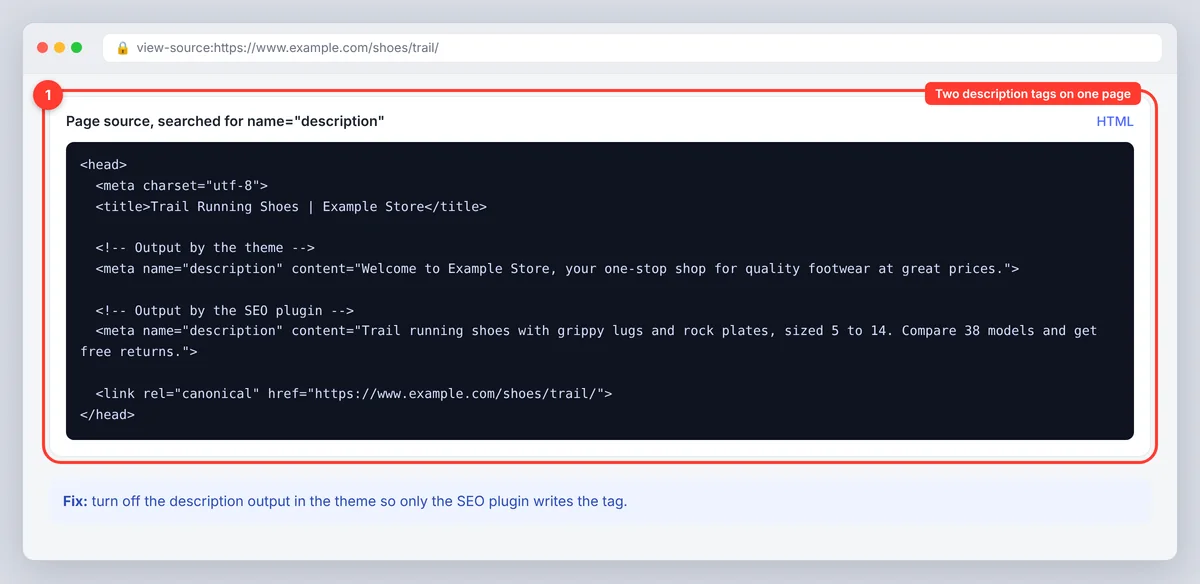
- Two sources writing the tag. A plugin and a theme both output a description, or a page builder adds its own, so the HTML code has two tags and crawlers report whichever comes first.
- URL variants of one page. Pagination (
?page=2), tracking parameters, filters, print versions, http vs https, trailing slash differences. These show as duplicates in a crawl but are really one page with several URLs, which is a canonical problem rather than a description problem. - Copy-paste. Writers reusing a description across similar posts, or a migration that copied one value into every record.
- Multilingual or regional copies. Translated pages left with the source language's description.
How to find duplicate meta descriptions: checker tools and methods
Option 1: Crawl the site
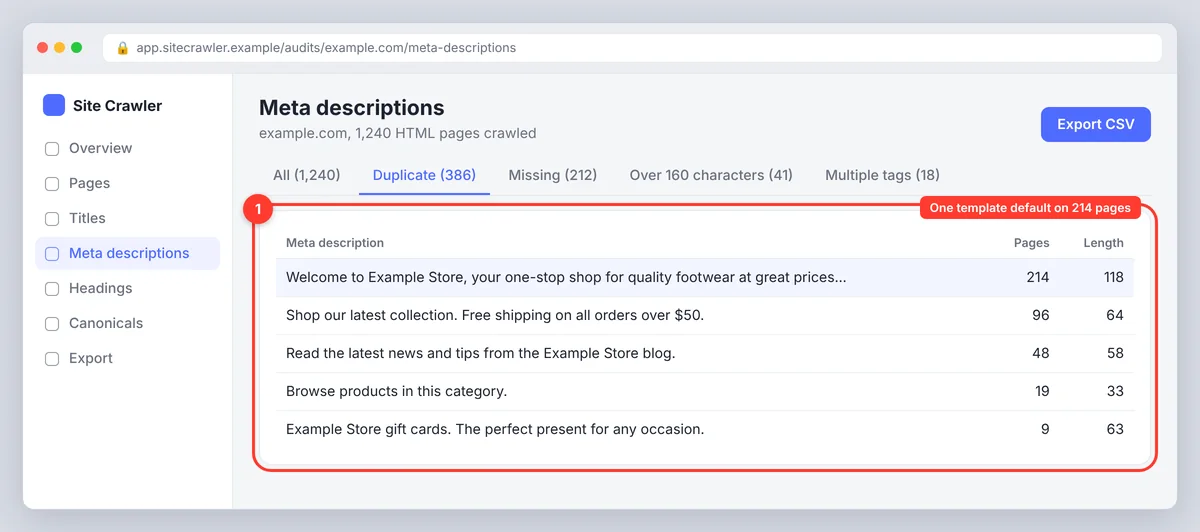
A site crawler (several offer a free tier for a few hundred URLs) fetches every page and exports page URL, title tag, meta description and status code to CSV. Sort or pivot on the description column and every repeated value lines up. Most crawlers also have a dedicated duplicate meta descriptions checker with the count and the URLs for each group, plus "missing" and "over length" filters. This is the most complete method and the only practical one for identifying duplicates across large websites or multiple domains.
Option 2: Your SEO plugin or CMS
WordPress SEO plugins list posts with their SEO title and description in the post list, and some flag duplicates directly. Shopify, Webflow and most headless CMS platforms expose the metadata field in an export or through the API, so a quick script can group values. For a handful of pages, checking manually works: open each page in a browser tab, view source and search for the tag.
Option 3: Google Search Console plus a sample
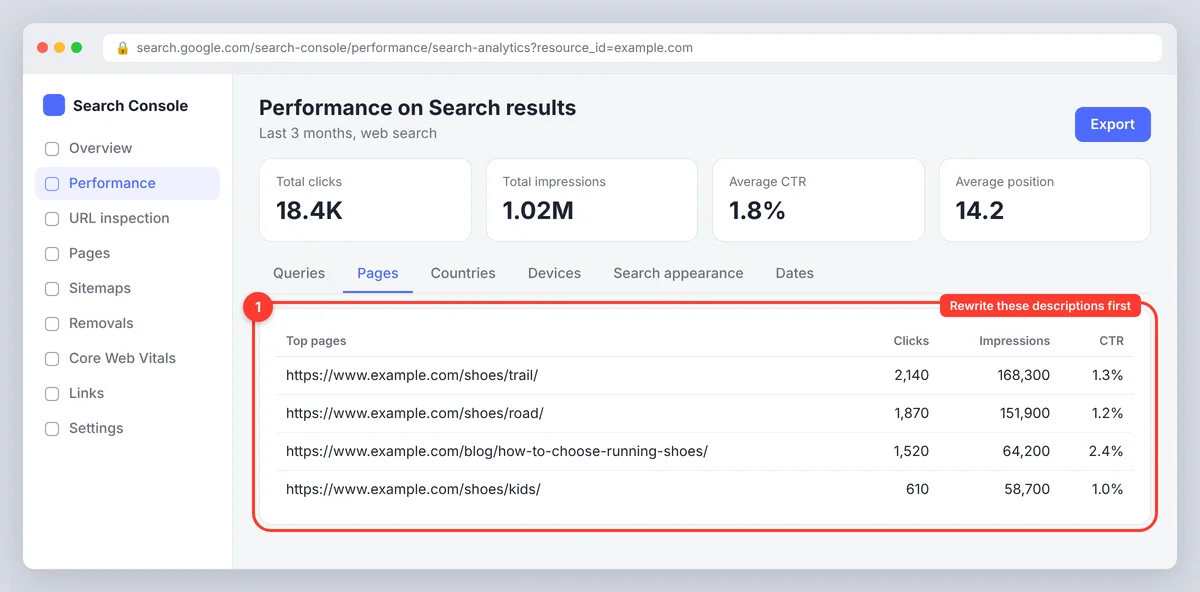
Search Console no longer has the old HTML Improvements report, but the Performance report tells you which pages get impressions. Export the top pages, then check their descriptions in a crawl or by viewing source (or paste each URL into a meta tag checker). This prioritizes the audit: duplicates on pages with zero impressions can wait. A meta tag checker that lets you paste a URL and see the title, description and robots directives is enough for spot checks.
Verify before you fix
For each group of duplicates, open two or three URLs and determine whether these are distinct pages that should both be indexed. If yes, they need distinct descriptions. If they're URL variants of one page, fix the canonical tag, redirect or parameter handling instead (Google's guide to consolidating duplicate URLs explains each option); rewriting descriptions on pages that shouldn't exist separately is wasted work. Also check for the two-tags case by searching the page source for name="description".
How to fix duplicate meta descriptions
- Fix the template or default first. Change the fallback so that pages without a custom description get a generated one built from page data (title, category, key attribute), not the homepage text. Make sure only one source outputs the tag; disable the duplicate output in the theme or plugin.
- Prioritize by impressions. From Search Console, list the pages that actually appear in search. Rewrite those by hand, starting with the top 20 to 50.
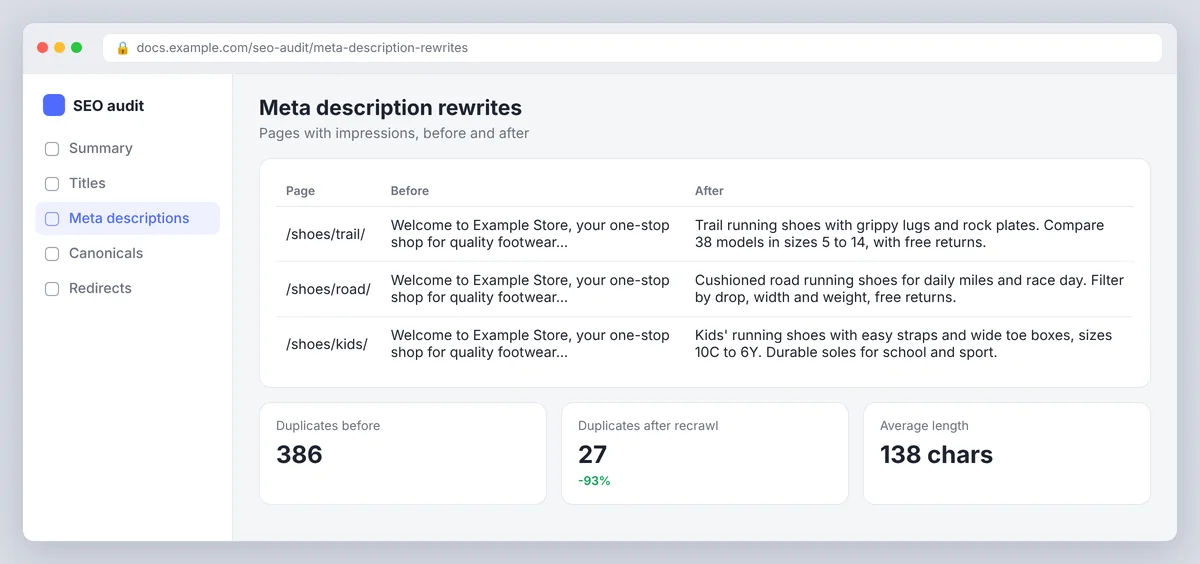
- Write unique meta descriptions. One or two descriptive sentences, roughly 120 to 155 characters so they display in full on most devices, containing the page's main keyword naturally (Google highlights matching words in the SERPs), saying what this page offers that the sibling pages don't. A compelling meta description is specific, not clever. For a product: model, standout feature, who it's for. For a blog post: the question it answers and the angle.
- Generate the long tail with rules. For catalogs of thousands of web pages, a programmatic template such as "[Product name] in [colour]: [key spec]. Free delivery over [threshold]." produces unique, accurate descriptions, generating uniqueness from the data rather than from copywriting. Review a sample from every template for broken fields and awkward phrasing.
- Handle URL variants separately. Canonical tags for parameters and filters, redirects for http/https and slash variants, noindex for print pages. Those duplicates disappear from the crawl without any copywriting.
- Recrawl and monitor. Crawl again to confirm the duplicate count dropped, nothing important is blank and the indexing status of the fixed pages is unchanged, then watch CTR in Search Console over the following weeks. Expect modest gains; a few percentage points of CTR on high-impression pages is a real traffic increase.
Preview before publishing. SerpPal's free SERP preview tool shows how a title and description will look in Google on desktop and mobile, with the pixel width and truncation point, so you can see whether the unique part of the description survives the cut. Inside the editor the same check runs on every article's title and meta, as described in insights and checks.
Missing meta descriptions, duplicate meta titles and other meta tags
A missing meta description isn't an error. Google generates a snippet from the page, which for a well-structured article is often fine. It's still worth adding one to important pages so you control the pitch, but a crawl showing hundreds of missing descriptions on tag archives and paginated pages is not an emergency. Prioritize the same way: pages with impressions first.
Duplicate meta titles (title tags) are more serious, because the title tag is a ranking signal and the most prominent part of the result. The same audit finds them, usually with the same template cause, and the fix is the same: unique meta titles with the page's keyword, under about 60 characters. Fix duplicate meta titles before duplicate descriptions when both appear. Our title tag SEO guide covers how to write them correctly. Robots meta tags and canonical tags belong in the same review, since a page-level noindex or a wrong canonical changes which duplicates matter at all.
When similar descriptions are acceptable
- Paginated series (page 2, page 3 of a category) that are canonicalized or noindexed anyway.
- Near-identical product variants (sizes, colours) where the canonical points to the parent product.
- Low-value utility pages: login, cart, tag archives, author pages. Noindex or leave them.
- Templated descriptions that differ in the parts that matter (name, location, price), even if the sentence structure repeats. Google treats those as unique.
Best practices for unique meta descriptions and an audit schedule
- One description per page, written for the person searching, containing the main keyword once, 120 to 155 characters; optimal length depends on the device, so err short.
- Accurate: promise what the page delivers. A description that over-promises gets the click and loses the visitor.
- Consistent with the title tag and H1, without repeating them word for word; the three elements together are the page's on-page pitch, and optimizing them is the cheapest on-page SEO work there is.
- Audit after every redesign, migration, theme or plugin change and bulk import, and on a schedule (quarterly for most sites, monthly for large e-commerce catalogs).
- Track CTR by page in Search Console before and after rewriting, so you learn which description styles work for your audience. Webmasters who modify descriptions and measure learn more than those who optimize once and forget.
- Link the relevant pages to each other while you're in there; a description audit is a good moment to notice which pages lack internal links.
- Check the markup itself, not just the text: one
<meta name="description">per page, in the head, with no stray quotes that cut the content short. A broken tag doubles the work later because it looks fine in the CMS.
Frequently asked questions
Do duplicate meta descriptions hurt SEO?
Not directly. They aren't a ranking factor and there's no penalty. They hurt click-through rate because people can't distinguish your pages in the search results, and Google usually rewrites the snippet, so you lose control of how the page is presented.
How do I find duplicate meta descriptions on my website?
Crawl the site with an SEO crawler and sort the meta description column, or use the crawler's duplicate meta descriptions checker. For WordPress, the SEO plugin's post list shows descriptions; for other platforms, export the field or query the API and group identical values to identify every duplicated meta description.
Is it better to have a missing meta description than a duplicate one?
Slightly. With a missing description Google writes a snippet from the page content, which is usually relevant. With a duplicate, Google often does the same but you've also signalled a template problem. The best option is a unique description on every page that matters.
How long should a meta description be?
Around 120 to 155 characters. Google truncates by pixel width rather than characters, so shorter is safer on mobile. Put the distinguishing information in the first sentence, and specify what the page covers rather than what the site does.
What is the difference between a meta description and meta keywords?
The meta description is a summary Google may show as the snippet. The meta keywords tag is an obsolete list of terms that Google has ignored since 2009. Write a good description and leave the keywords tag out entirely.
How often should I check for duplicate meta descriptions?
Run a crawl after every site change that touches templates, such as a redesign, a migration, a new theme or a bulk import. On top of that, a quarterly check is enough for most sites, and a monthly one for large stores where new web pages appear every week.
Is perfect uniqueness always necessary?
No. Uniqueness matters on pages that should rank and get clicks. Paginated pages, filtered URLs with a canonical tag and utility pages like login or cart can share a description, or have none, without any effect on indexing or traffic. Spend the time on the pages with impressions.
Conclusion
Duplicate meta descriptions are a small, fixable problem with a clear payoff. Find the template or plugin default that creates them, fix that source once, then write unique descriptions for the pages that earn impressions and let rules handle the long tail. A well-crafted meta description won't lift rankings on its own, but it gives each page its own pitch in the results, and that is where the extra clicks come from. Treat it as part of regular on-page optimization, not a one-time cleanup.