On this page
- What Open Graph tags are: the Open Graph protocol
- Available types: required and optional tags in the Open Graph protocol
- Open Graph examples: a complete HTML block for the head
- og:description vs the SEO description (and what happens when it's missing)
- og:image: the image size and format rules that work everywhere
- Twitter Cards and other social networks
- Adding Open Graph tags to your website or web application, with content from your CMS
- How to test, audit and refresh a social sharing preview
- Common Open Graph mistakes and best practices to optimize previews
- Do Open Graph tags affect SEO?
- Conclusion
- Additional resources
- Frequently asked questions about Open Graph meta tags
<meta property="og:description" content="..."> is the Open Graph tag that sets the summary text shown when a web page is shared on Facebook, LinkedIn, Slack, WhatsApp and most other social media platforms and apps that render link previews; <meta property="og:title"> sets the headline and <meta property="og:image"> the picture. Together these Open Graph meta tags control the social sharing preview the way the SEO title and meta tags control the Google result on your website. This guide explains what each og tag does, with examples of the exact HTML to add to the head of your site, how og:description differs from the search description, the image size that works everywhere, the Twitter Card equivalents, and how to test and refresh a preview that won't update.
Key takeaways
- Open Graph tags are
<meta property="og:...">elements in the page head. The four that matter: og:title, the summary tag, og:image and og:url, plus og:type. - og:description is for people deciding whether to click on social media; the standard description tag is for search engines. They can be the same text, but they often shouldn't be.
- Use an absolute URL for og:image, at 1200 by 630 pixels, under about 5 MB, served over HTTPS.
- Platforms cache previews. After changing tags, re-scrape the URL with the platform's debugger or the preview won't update.
- Open Graph has no direct SEO effect, but it drives the click-through rates (CTR) and shares on social networks that lead to links, traffic and visibility; those are the metrics to watch.
What Open Graph tags are: the Open Graph protocol
The Open Graph protocol was created by Facebook so that any web page could describe itself as a rich object (an article, a product, a video) with a title, summary and image that other sites could display. It uses standard HTML <meta> elements with a property attribute instead of the usual name, which is why you'll see meta property="og:description" rather than meta name="description". The og: prefix is the Open Graph namespace, and the full specification lives at ogp.me. Almost every platform that shows link previews reads these og meta tags: Facebook, LinkedIn, Slack, Discord, WhatsApp, iMessage, Telegram, Pinterest and many more. X (Twitter) reads them too, with its own Twitter Card tags taking priority when present.
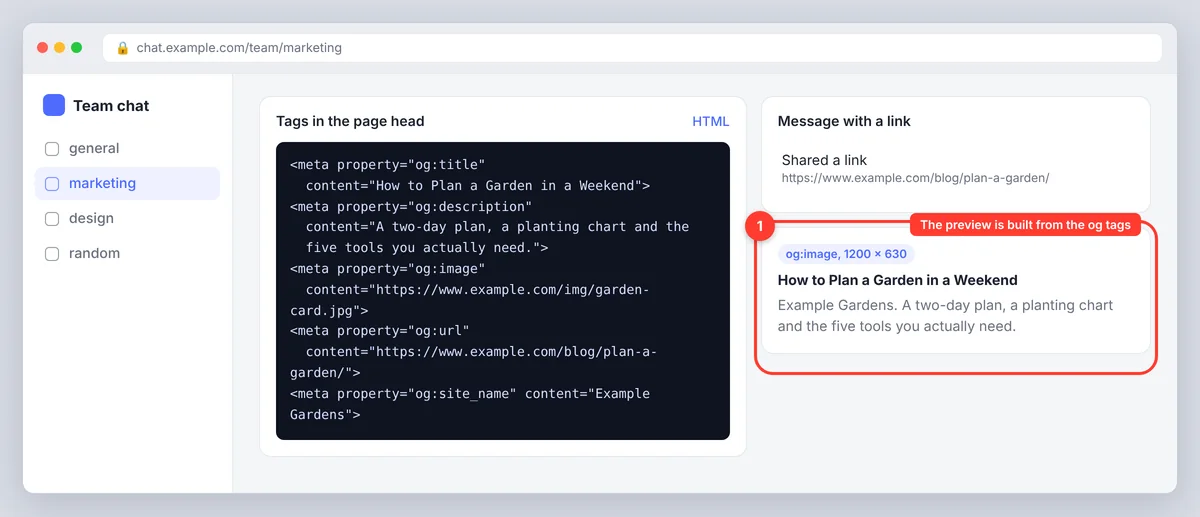
Available types: required and optional tags in the Open Graph protocol
| Tag | What it controls | Guidelines |
|---|---|---|
og:title | The headline of the preview card | Under about 60 characters so it doesn't truncate; can differ from the SEO title tag |
og:description | The summary text under the preview title | One or two sentences, around 100 to 200 characters; most platforms apply truncation at roughly 200 |
og:image | The preview image | Full, secure URL (https), 1200 x 630 px (1.91:1), JPG or PNG format, under 5 MB |
og:url | The canonical URL of the page | Absolute URL, no tracking parameters; matches your canonical tag |
og:type | The kind of object | website for most pages, article for posts, product for products |
og:site_name | The site's name shown on the card | Plain brand name |
og:locale | Language and region | en_US, en_GB, de_DE |
og:image:alt, og:image:width, og:image:height | Image accessibility and dimensions | Width and height let platforms render before downloading the image |
article:published_time, article:modified_time, article:author | Article metadata when og:type is article | ISO 8601 dates such as 2026-11-21T09:00:00Z; author as a profile URL; optional but useful for news and blog content |
Open Graph examples: a complete HTML block for the head
<head>
  <title>Open Graph Tags: og:title and og:image Explained</title>
  <meta name="description" content="What the og tags do, the HTML to add, and how to test the preview.">

  <meta property="og:type" content="article">
  <meta property="og:title" content="Open Graph Tags Explained: og:title, og:description, og:image">
  <meta property="og:description" content="Control how your page looks when it's shared. The exact tags, image sizes and debugging steps.">
  <meta property="og:image" content="https://www.yoursite.com/images/og-open-graph-guide.jpg">
  <meta property="og:image:width" content="1200">
  <meta property="og:image:height" content="630">
  <meta property="og:image:alt" content="Diagram of an Open Graph link preview">
  <meta property="og:url" content="https://www.yoursite.com/blog/open-graph-tags/">
  <meta property="og:site_name" content="Your Site">
  <meta property="og:locale" content="en_US">

  <meta name="twitter:card" content="summary_large_image">
  <meta name="twitter:title" content="Open Graph Tags Explained">
  <meta name="twitter:description" content="The exact og tags, image sizes and debugging steps.">
  <meta name="twitter:image" content="https://www.yoursite.com/images/og-open-graph-guide.jpg">
</head>
og:title, og:type, og:image and og:url are the four required tags in the protocol; everything else is optional, and og:description is the optional tag you should never skip. Note the two attribute styles: Open Graph uses the property attribute (property="og:..."), Twitter uses the name attribute (name="twitter:..."). Put all of these HTML tags inside the HTML head; crawlers that build previews only read the header of the document and ignore tags in the body HTML. Schema.org structured data (JSON-LD markup) is a separate layer for rich results in search engines; it doesn't replace og tags and they don't replace it. Dates in the article tags use the ISO format, so 2026-11-21T09:00:00Z is correct and "21 Nov 2026" is not.
og:description vs the SEO description (and what happens when it's missing)
The standard meta name="description" tag is written for search engines: it should match the query, include the page's keyword and tell a searcher what they'll find. og:description is written for someone scrolling social media who has no query in mind: it can be more conversational, lead with the benefit or the surprising fact, and skip the keyword entirely. If og:description is missing, Facebook and LinkedIn fall back to the standard tag, which is usually acceptable but rarely ideal; if that's missing too, the scraper grabs the first content it finds, which is how cookie banners end up as previews. In the SERPs, Google ignores the og summary entirely. The same logic applies to og:title versus the SEO title: the SEO title carries the keyword and brand, while the og:title can be a sharper headline. Preview both before publishing: SerpPal's free SERP preview shows the Google version of the title and description with pixel widths, and the og tags should be checked with each platform's own inspector (below).
og:image: the image size and format rules that work everywhere
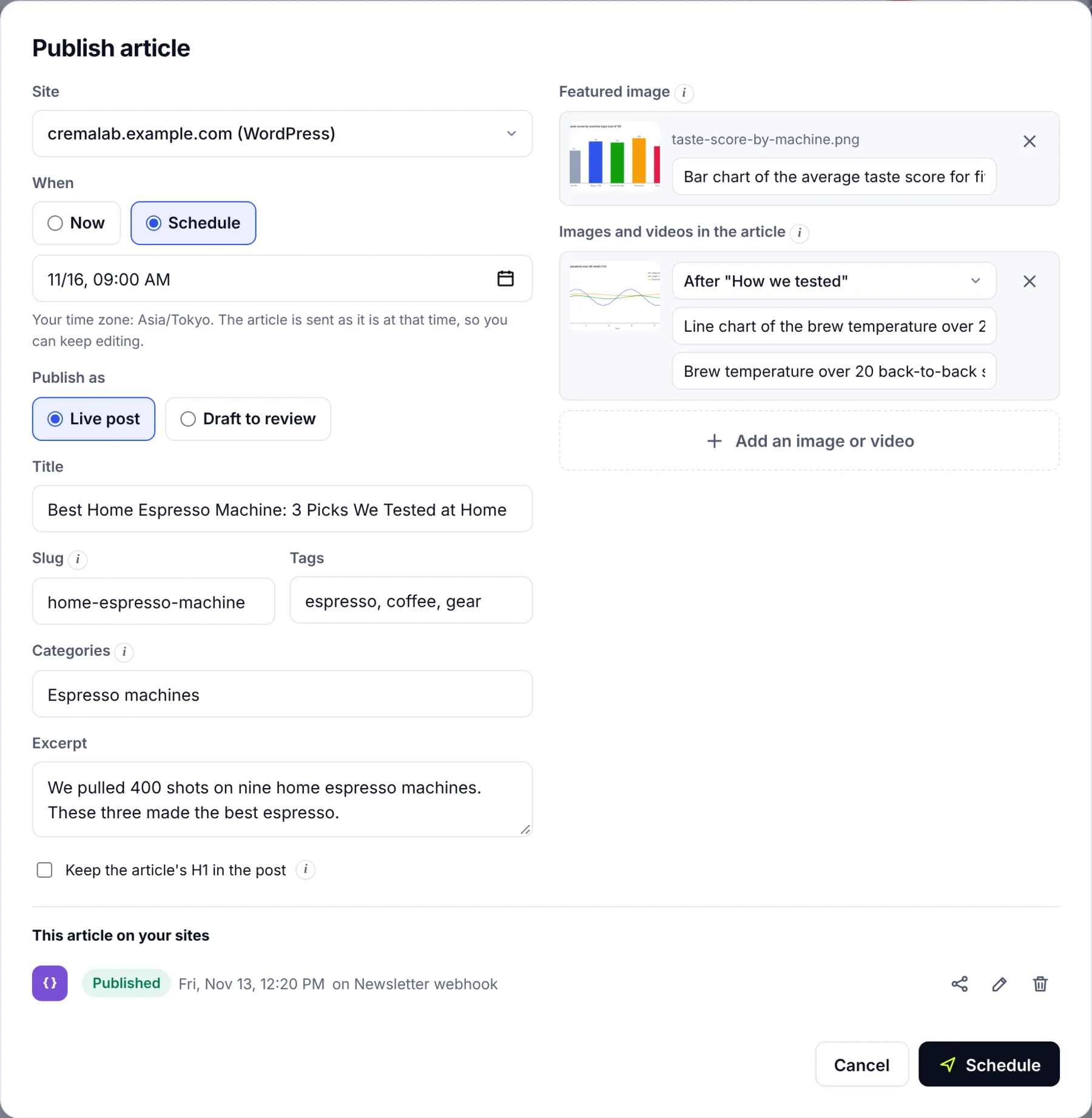
- Dimensions: 1200 x 630 pixels is the safe image size (a 1.91:1 ratio). Facebook, LinkedIn and X all display it at full width; images under 600 px wide get shown as a small thumbnail.
- Format and file size: JPG or PNG, ideally under 1 MB and never exceed about 5 MB (Facebook's limit is 8 MB; LinkedIn's is 5 MB). WebP support is improving but not universal; stick to the JPG format for the og:image even if the webpage uses WebP elsewhere.
- Full, secure URL:
https://www.yoursite.com/images/card.jpg, not/images/card.jpg. Relative paths fail on most social sites, and http images are refused on https pages. - Keep text inside the safe area: some apps crop to a square; keep the headline and logo in the central 600 by 600 region.
- One image per page: multiple og:image tags are allowed but platforms pick the first; make it the right one.
- Specify width and height:
og:image:widthandog:image:heightlet the first share display the image immediately instead of showing a blank card until the platform has downloaded it.
Twitter Cards and other social networks
X reads Open Graph tags but gives priority to its own twitter:* tags. The one you must add is twitter:card, which chooses the layout: summary_large_image for the big picture card, summary for a small one. If the twitter:title, summary and twitter:image tags are missing, X falls back to the og equivalents, so the minimum setup is the og block plus one twitter:card line. LinkedIn, Slack, Discord, WhatsApp and iMessage read the og tags only. Pinterest reads og tags and its own Rich Pins markup. Google doesn't use Open Graph for ranking, but Google Discover and some rich results can pull the large image from og:image when there's no structured metadata image.
Adding Open Graph tags to your website or web application, with content from your CMS
- WordPress with an SEO plugin: Yoast SEO and the other major SEO plugins add og and Twitter tags automatically from the blog post title, excerpt, author and featured image, with a social tab per post to override them. Set a default og:image in the plugin's social settings so pages without a featured image still get a card. If you publish from SerpPal through its WordPress connection, the post's title, excerpt and featured image are set in WordPress, and your SEO plugin turns them into og:title, og:description and og:image.
- Shopify, Squarespace, Wix, Webflow: built in; edit under the webpage's SEO or social settings and specify a default image for the whole website. Shopify uses the product's featured image as og:image.
- Static sites and frameworks (Next.js, Astro, Hugo, Jekyll): add the tags to the head template and fill them from each page's front matter or CMS fields. Generate og:url from the canonical URL to keep them identical.
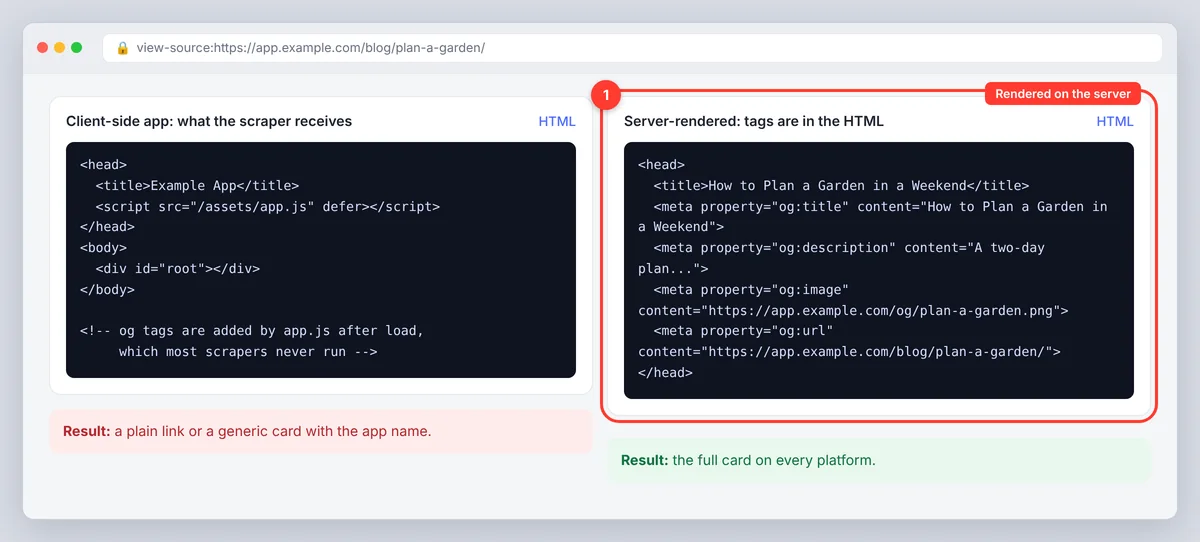
- Dynamic pages and JavaScript: a React or Vue single-page app that sets og tags client-side is a problem, because most scrapers don't run JavaScript. Render the tags on the server (SSR, static generation or an edge function) so they're in the HTML the scraper receives. Setting them with JavaScript after load works only for platforms that render pages, and few do.
- Dynamic og:image: for sites with many pages, generate the image on the fly (an HTML template rendered to PNG) so every article gets a card with its own title. Several open-source libraries and edge functions do this, and the consistency across cards helps a brand get recognized in feeds.
How to test, audit and refresh a social sharing preview
- Inspect the source. Open the published page, view source and search for
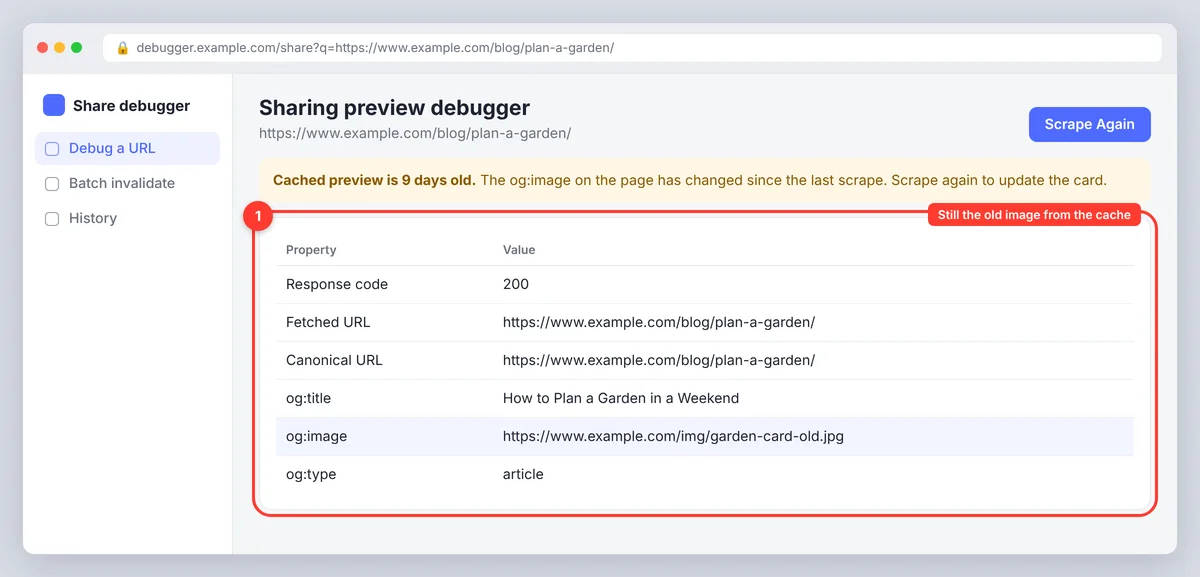
og:. Confirm the tags are in the head, have full URLs and the content is what you expect. Server-rendered tags are safest; tags injected by JavaScript after load are often missed by scrapers. - Use the platform tools. The Facebook Sharing Debugger shows exactly what Facebook scraped and lets you "Scrape Again". The LinkedIn Post Inspector does the same for LinkedIn. X retired its Card Validator; paste the link in a draft post to see the card.
- Clear the cache after changes. Platforms cache the first scrape for days or weeks. A changed og:image won't appear until you re-scrape with the sharing tool, and old shares keep the old card.
- Check the image loads. A 403 for the scraper's user agent, a blocked path in robots.txt, or an image behind a login all produce an empty card. The sharing tool reports the fetch error.
- Check redirects and canonical. If the shared URL redirects, the scraper follows it and reads the destination's tags. og:url and the canonical tag should both point at the final URL.
Common Open Graph mistakes and best practices to optimize previews
- Relative image paths, or http images on an https page.
- og:title or og:description missing, so the preview falls back to whatever the scraper finds first (often a menu item or cookie notice).
- Images that are too small (under 600 px wide) or the wrong ratio, so the card shows a cropped or tiny version.
- Forgetting
twitter:card, which leaves X with a plain link. - Tags added by JavaScript after page load, which many scrapers never see.
- Changing the image but not re-scraping, then concluding the tags are broken.
- Different og:url and canonical URL, which splits share counts and confuses the scraper.
Do Open Graph tags affect SEO?
Not directly: search engines don't use og tags as a ranking signal and read the standard SEO title and meta tags on the webpage instead. Indirectly they matter a lot. A page with a proper card gets shared more and clicked more from social and chat apps, which brings traffic, attention and eventually links; check your analytics for social referrals before and after fixing the tags and the difference is usually obvious. Treat the og block as part of on-page work: every important page should have a unique og:title, a unique summary written for social media, and a real og:image, the same way it has a unique SEO title and description. Open Graph tags help the web understand what your content is, and the same content gets more reach when it's presented well.
Conclusion
Open Graph tags are a few lines of simple HTML in the head of each page, and they decide how your content looks every time someone shares it. Add og:title, og:description, og:image and og:url (plus og:type and one twitter:card line), write the og summary for people scrolling a feed rather than for a search query, use a large 1.91:1 image with a full HTTPS URL, and re-scrape after every change. They won't move rankings or rich snippets on their own, but better previews earn more clicks and shares, which makes them cheap optimization. For the search side of the same metadata, see our guide to writing meta descriptions.
Additional resources
- The Open Graph protocol specification lists every property, the available types and their optional sub-properties.
- The Facebook Sharing Debugger (linked above) and the LinkedIn Post Inspector for testing and refreshing previews.
- SerpPal's free SERP preview for the Google side of the same metadata.
Frequently asked questions about Open Graph meta tags
What does meta property og:description do, and what does og mean?
It sets the summary text shown under the headline when the page is shared on Facebook, LinkedIn, Slack, WhatsApp and other apps that render link previews. "og" stands for Open Graph, the protocol that defines these tags. If og:description is missing, most platforms fall back to the standard meta description.
What's the difference between og:title and the title tag?
The title tag is what search engines show in results and the browser tab; og:title is what social platforms show on the preview card. They can be identical, but og:title can be a shorter, punchier headline without the keyword and brand suffix.
What size should an og:image be?
1200 x 630 pixels (1.91:1) as a JPG or PNG under about 5 MB, referenced by a full HTTPS URL. Add og:image:width and og:image:height so the card renders immediately on first share.
Why isn't my Open Graph preview updating?
The platform cached the old scrape. Re-scrape the URL in the Facebook Sharing Debugger or the LinkedIn Post Inspector. Also confirm the new tags are server-rendered in the head and the image URL loads without a login or a 403.
Do I need Twitter Card tags if I have Open Graph tags?
Add at least twitter:card with the value summary_large_image. X falls back to the og equivalents for the rest, so the single extra line is usually enough.