On this page
- What a meta description checker measures in the SERP preview
- How to use the checker
- What makes a strong, compelling meta description
- Google rewriting and truncation
- Meta tag checker: the tags to check at the same time
- Common use cases for checking website metadata
- A meta description checklist
- Conclusion
- Frequently asked questions
A meta description checker measures the description you plan to publish the way Google will display it in search results: in pixels, not characters, on desktop and mobile, with the point where it gets truncated marked. A meta tag checker does the same for the whole set of tags in the page head, from the page title to the robots and Open Graph tags. Paste a draft into a free meta description checker and you see the character count, the pixel width against Google's limit (about 920 px on desktop, usually 120 to 158 characters) and a live SERP preview of the finished search snippet, rendered on desktop and mobile. Checking takes seconds; writing a description worth checking is the harder part, and this guide covers both.
A meta description does not affect rankings. It affects whether the person who sees your result clicks it, which for a page in the top 10 is the only lever metadata has on visibility: the same position, more of the clicks. So the goal is a description that fits, matches the page, matches the search intent, and gives one specific reason to click.
Key takeaways
- Google truncates by width: roughly 920 px on desktop. That is 120 to 158 characters for most text, but wide letters eat room, so check the pixels.
- Google rewrites descriptions it considers weak or off-query, and uses page text instead. A specific, accurate description is shown as written more often.
- Length is not a ranking factor. Click-through rate is what a good description moves.
- Put the keyword and the benefit in the first 100 characters; a cut-off ending costs nothing if the start carries the message.
- Run a meta tag checker on the title tag, canonical and robots tags at the same time; a perfect description on a noindexed page is wasted.
- Verify in Search Console after publishing. Impressions and click-through rate per page tell you whether the new description earned the engagement you wrote it for.
What a meta description checker measures in the SERP preview
A description-only checker tool takes your text and reports three things: the character count, the estimated pixel width in the font Google uses for descriptions (Arial, 14 px), and whether that estimate exceeds the desktop limit. A good one also renders the search snippet so you can read it as a searcher would, and renders a mobile version, where the description wraps to more lines and the page title gets more room. The HTML element it is checking is the description tag, <meta name="description" content="...">, one line in the page head that search engines read and the page itself never displays.
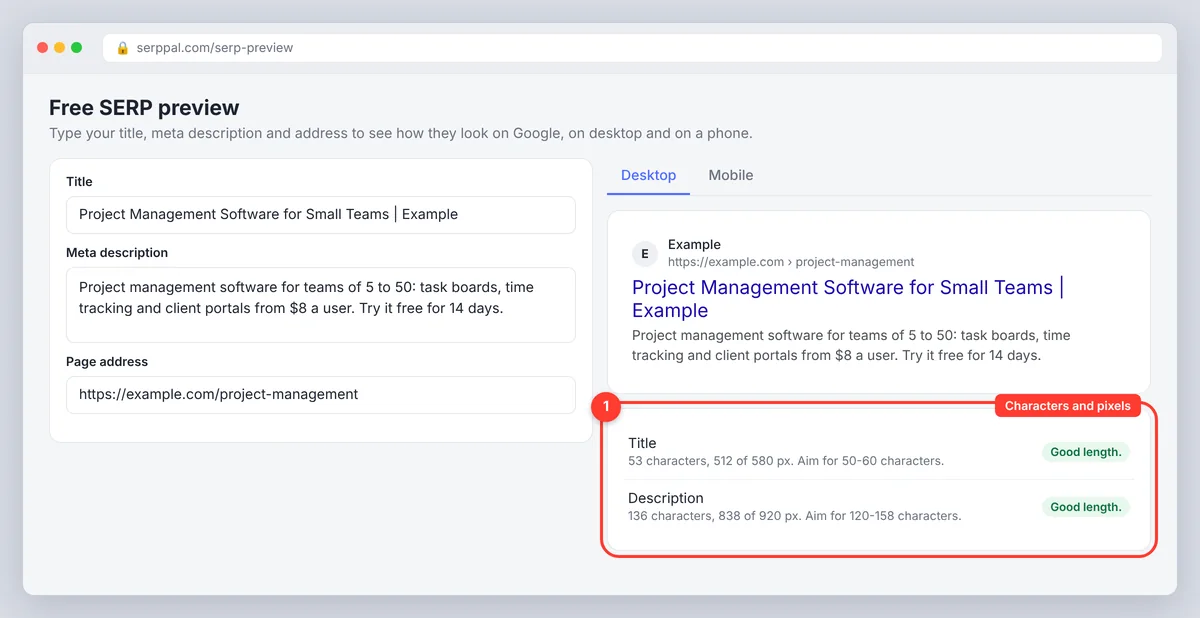
SerpPal's SERP preview does exactly that for the title, the meta description and the page URL: two preview cards for desktop and mobile, a meter under each field that checks length in characters and pixels, and a verdict of good length, a bit short or too long. Enter the three fields, read the result, and change the text until the meters are green. It is free, needs no account and runs in your browser, so nothing you paste is stored or uploaded. Our SERP simulator guide covers the preview side in more depth; this post is about the description itself.
Description length and pixel width
The old "150 to 160 characters" rule is a proxy for the real limit, which is width. Google gives the description about two lines on desktop, around 920 px in total, and cuts the rest with an ellipsis. Narrow letters (i, l, t) and spaces take few pixels; capitals and wide letters (W, M, m) take many. A description of 155 characters in ordinary prose usually fits; one full of capitalised product names or numbers can be cut at 140. On mobile the description wraps to three or four lines and shows a little more text, but the desktop limit is the one to design for.
| Measure | Desktop | Mobile |
|---|---|---|
| Description width | About 920 px, roughly two lines | Wraps to 3 to 4 lines, slightly more text visible |
| Safe character range | 120 to 158 | Similar; test both |
| Title width (meta titles) | About 580 px, 50 to 60 characters | Wraps to two lines |
| Breadcrumb | www.example.com > blog > page | example.com, path collapsed |
| Below the limit | Cut with an ellipsis | Cut with an ellipsis |
Aim for the middle of the range rather than the 150-160 chars people quote. A concise description at 125 characters that says one thing clearly beats one at 158 that trails off, and the checker's "a bit short" warning is advice, not a fault.
How to use the checker
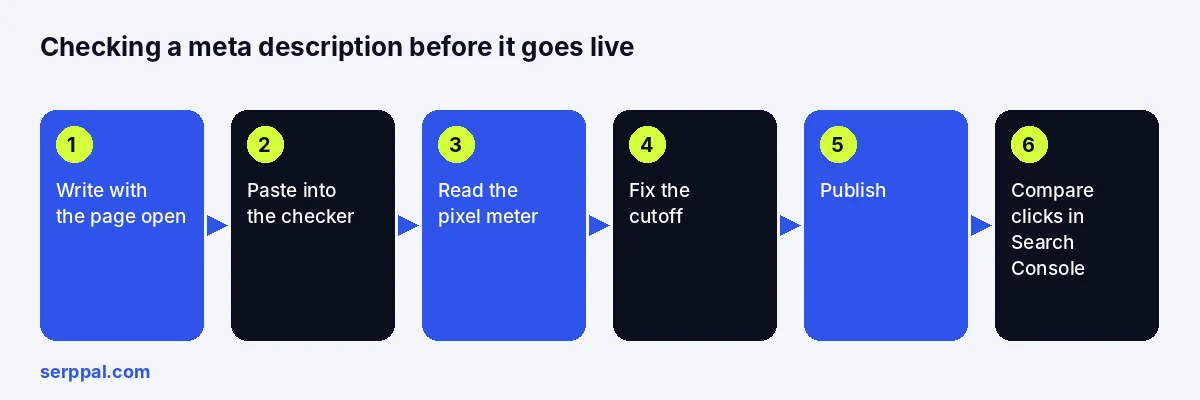
- Write the description with the page open, not from memory. It should promise what the webpage delivers, in a format a searcher can scan.
- Paste or enter the title, description and page URL into the checker tool. The URL builds the breadcrumb, which is part of what the searcher sees.
- Read the meters. Red means Google cuts it. Yellow means you have room. Fix the title first if both are red; it is the part people read.
- Read both cards aloud. If the description does not make sense cut off where the desktop card cuts it, move the important clause forward.
- Paste again after editing. Two rounds is normal.
- Publish and verify. Update the fields in your CMS SEO settings, then view the live page's source, or use Google Search Console's URL Inspection tool to confirm the tags Google sees after it crawls the page. Indexing and verification are Search Console's job; the preview only estimates.
Every one of these updates is optional except the last; the checker is a convenience, the verification is the proof.
Checking metadata from a URL or HTML online
A paste-in checker tests a draft. To check what a published page already has, open it, view the source (Ctrl+U in most browsers) and search for <meta name="description"; a meta tag checker online does the same scan for you by fetching the URL and listing every tag it finds, which is quicker when you are checking twenty pages rather than one. For a page you want to improve rather than just inspect, SerpPal's editor can import a live page by URL and copy its title and meta description into the Title and Meta fields, where the counters show characters against the 65 and 165 limits and both feed into the content score. Pages that block crawlers, need a login or inject tags with JavaScript may not import cleanly; the live source is the final word.
What makes a strong, compelling meta description
The checker tells you whether it fits. These rules tell you whether it works, and they are the same rules a well-optimized page follows everywhere else: specify, do not generalise.
- Match the search intent. Someone searching "meta description checker" wants a tool; someone searching "how long should a meta description be" wants a number. Give each what they came for in the first clause.
- Be specific. "Learn about our services" says nothing. "Compare 9 CRMs for teams of 2 to 20, with prices" says what the page is. Numbers, names and concrete nouns are what make a snippet distinct from the nine around it.
- Use the focus keyword once, naturally. Google bolds query terms in the snippet, which draws the eye; repeating the target keyword looks like spam and gets rewritten. Optimization here means one clear mention, not density.
- Lead with the benefit, end with a reason to click. The last clause is the one that gets cut, so make it the least important.
- Write in the active voice, as a sentence. Fragments and keyword lists read as machine output and get replaced.
- Make it true. A description that promises more than the page delivers earns a click and a bounce, which helps nobody.
- Write one per page. Duplicate descriptions across a site are the most common reason Google ignores them entirely, and consistency between the title, the description and the H1 is what makes a page look deliberate.
Clarity, relevance and a quick score
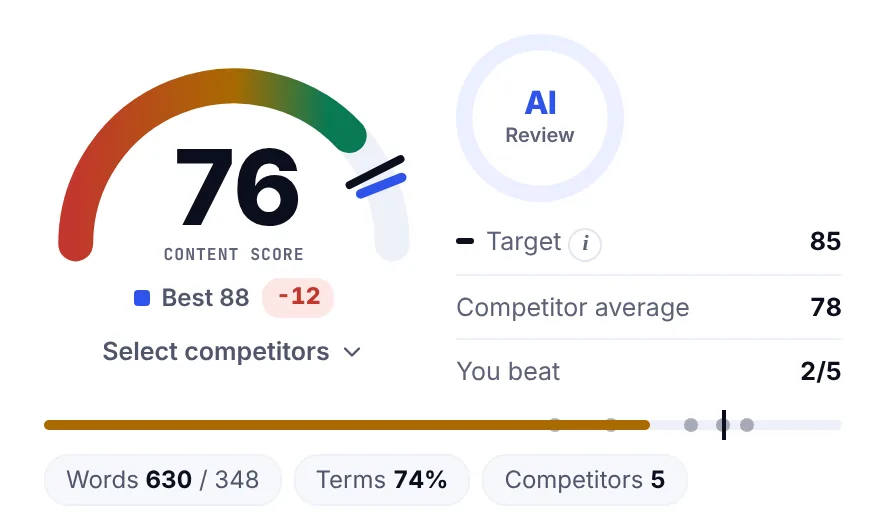
A useful test: cover the title and read the description alone. If you cannot tell what page it belongs to, it is too generic. In SerpPal's editor, the Meta row of the content score applies a simpler check (title 30 to 65 characters, description 110 to 165, keyword present) so an empty or overlong description costs SEO score points before it costs clicks. The insights that matter, though, come from reading it as a stranger would.
Before and after: copy the better version
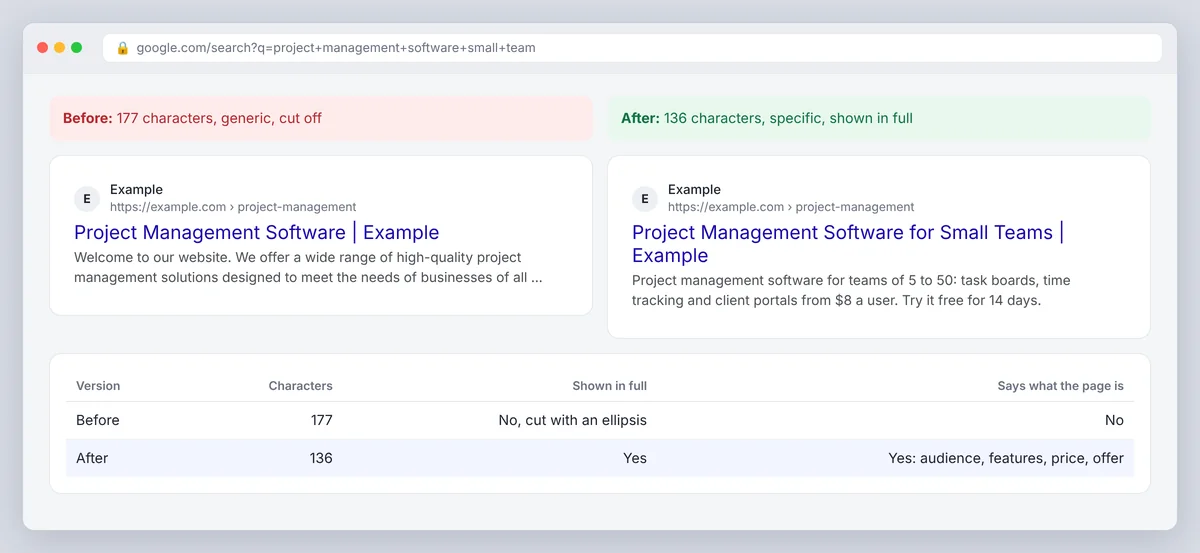
Before (177 characters, generic): "Welcome to our website. We offer a wide range of high-quality project management solutions designed to meet the needs of businesses of all sizes. Contact us today to learn more."
After (136 characters, specific): "Project management software for teams of 5 to 50: task boards, time tracking and client portals from $8 a user. Try it free for 14 days."
The second fits, names the product, the audience, three features, the price and the offer, and every one of those is a word a searcher might have typed. Copy that version into the CMS, run the checker once more, and the engagement follows from the specificity.
Google rewriting and truncation
Google's own documentation on snippets says the meta description is one source for the search snippet, not the only one, and the guideline it gives is the one above: describe the page accurately and specifically. When the description is missing, duplicated, keyword-stuffed or does not address the query, Google generates a snippet from the page text instead. Studies by SEO tools have found Google rewrites a large share of descriptions; the share is lower for descriptions that are specific, accurate and within the limits, because those are the ones Google has no reason to replace.
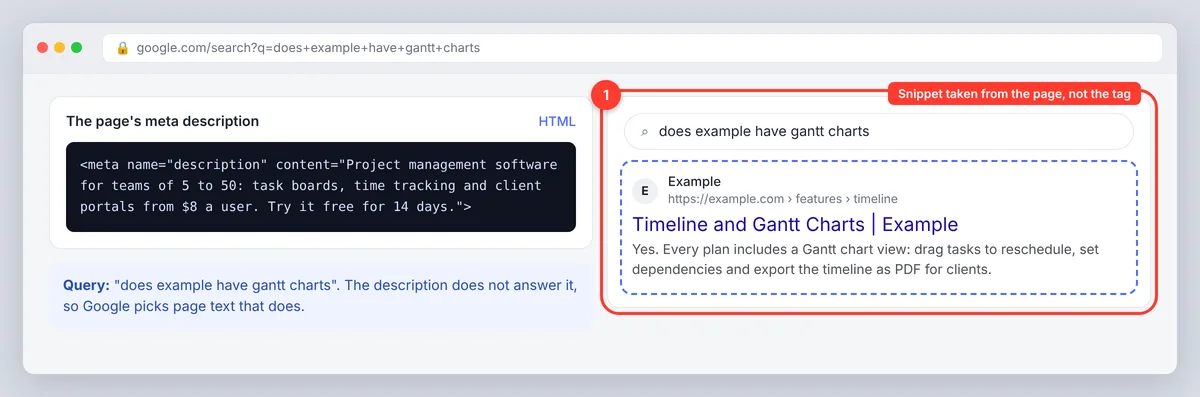
Truncation is separate from rewriting. A description can be shown as written and still be cut off because it is too wide for the space. The checker catches truncation; only good writing prevents rewriting. Both happen per query, so the same page can show your description for one search and a page excerpt for another.
Does meta description length affect rankings?
No. Google has said for years that the meta description is not a ranking signal, and length does not change that; the description tag has no effect on search rankings, only on what the search engine displays. What it changes is click-through rate, and a page that earns more clicks from the same position gets more traffic without moving a rank. Treat the description as ad copy for the organic result, not as an optimisation target.
Meta tag checker: the tags to check at the same time
A page-wide meta tag checker, or a quick look at the source, should confirm five tags together, because a problem in one cancels the others. Meta titles and descriptions are the visible pair; the canonical and robots tags decide whether they are shown at all.
| Tag | What to check | Why |
|---|---|---|
<title> | 50 to 60 characters, keyword early, unique per page | Google's main source for the title link |
<meta name="description"> | 120 to 158 characters, specific, unique | The snippet you want shown |
<link rel="canonical"> | Points to the preferred URL of this page | Stops a duplicate URL taking the ranking |
<meta name="robots"> | No accidental noindex or nosnippet | nosnippet hides the description entirely |
Open Graph tags (og:title, og:description, og:image) | Filled in, sensible image | Control the preview when the page is shared |
Twitter tags (twitter:card, twitter:title) | Optional; fall back to Open Graph | Control the card on X and apps that read Twitter tags |
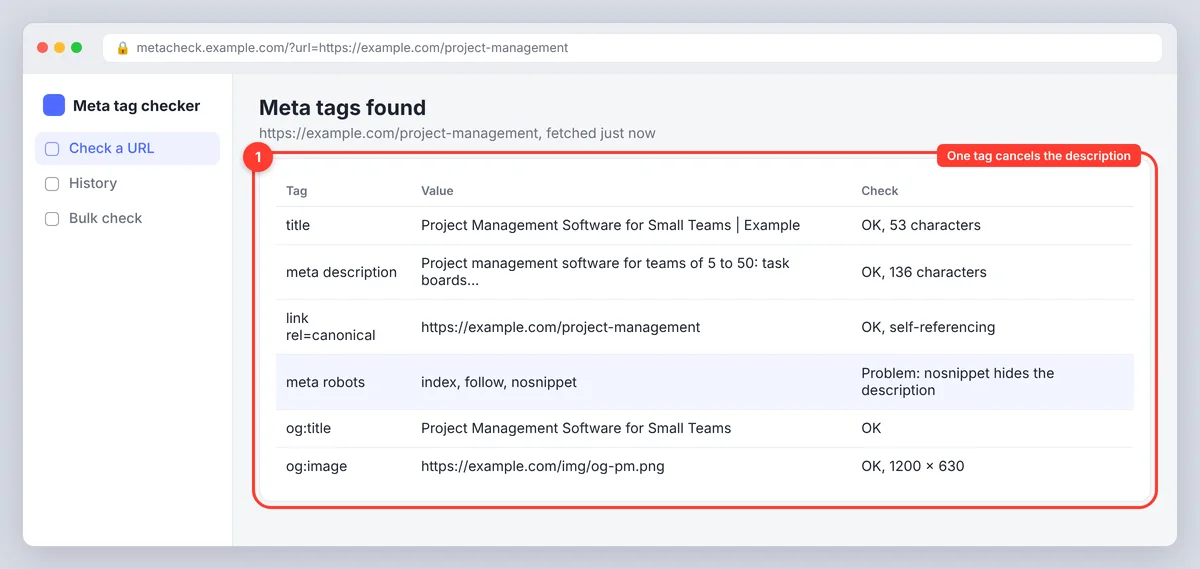
The robots tag is the one people forget (Google's robots meta tag reference lists every directive). A nosnippet directive or a max-snippet value lower than your description length overrides everything the checker told you, and a noindex removes the page from search results entirely. A meta tag checker lists these next to the description so the on-page picture is complete; a structured report of all five tags per URL is what an SEO audit should produce.
Common use cases for checking website metadata
- Before publishing a post. The writer pastes the title and description into the checker as the last step before the CMS settings, to catch a truncated ending while it is still cheap to fix. In SerpPal, the editor's Write title and description action drafts a 50 to 60 character title and a 140 to 155 character description ending with a reason to click, and the preview confirms the fit.
- After a site migration or template change. Run a meta tag checker over a sample of URLs for missing descriptions, duplicated meta titles and canonical tags pointing at the old domain, then watch the crawl stats in Search Console for a week as Google re-crawls the site.
- During an SEO audit. Pages with high impressions and low click-through rate in Google Search Console are the ones whose descriptions to rewrite first; the data tells you where the words are failing, and updating those ten pages usually does more for visibility than adding ten new ones.
- For product and category pages at scale. Use a template that drops in the product name, one attribute and the price, then check a dozen of the longest names in the preview to make sure the template fits the worst case.
A meta description checklist
- Between 120 and 158 characters and under the pixel limit on the desktop card.
- Keyword once, in the first half.
- Says what the page is, with at least one specific detail.
- Ends with a complete clause and a reason to click.
- Unique to this page.
- Title, canonical and robots tags checked alongside it.
- Rechecked in Search Console after a few weeks: did the click-through rate move?
An FAQ section on the page, by the way, does not change the description, but questions and answers in the body give Google more candidate text to show when it decides to replace yours, so make the first answer a good one.
Conclusion
A meta description checker answers one question well: will Google show the whole description, or cut it off? Use it on every important page, but remember that fit is only half the job. The other half is writing: match the search intent, say what the page offers with one specific detail, use the keyword once, and end with a reason to click. Check the title, canonical and robots tags at the same time, publish, and then let Search Console tell you whether the click-through rate moved. A well-optimized description doesn't change rankings, but it decides how many people choose your result once you're there. You don't need to upload anything or install an analyzer to start; the free SERP preview runs in your browser.
Frequently asked questions
How long should a meta description be?
Between 120 and 158 characters for most text, which keeps it under Google's desktop width of about 920 px. The width is the real limit, so a description with many capitals or numbers can be cut earlier; a pixel-based meta description checker shows exactly where.
Does meta description length affect SEO rankings?
No. The description is not a ranking factor at any length. A good one raises click-through rate, which brings more visitors from the position you already have; it does not change the position.
Why did my meta description get cut off under 160 characters?
Because Google truncates by pixel width, not character count, and wide characters use more of the roughly 920 px available. Paste the description into a checker that measures width; if the meter is red, trim or swap the widest words.
Why does Google show a different description from mine?
Google replaces descriptions it judges generic, duplicated, keyword-stuffed or irrelevant to the specific query, using text from the page instead. Make the description specific, accurate and unique, and it is shown as written more often. There is no way to force it.
What is a meta tag checker?
A tool that reads a page's metadata (page title, description, canonical, robots, Open Graph and Twitter tags) and reports what is missing, too long or inconsistent. A meta description checker is the narrower version focused on the search snippet text and its width; view-source and Search Console's URL Inspection cover the rest for a single page.