On this page
- How to use the readability and reading level checker
- What the Flesch-Kincaid readability scores mean
- What is a good readability score?
- Worked example: from very hard to easy in four edits
- Improving readability without changing the meaning
- Why readability matters for SEO and accessibility
- Accuracy and limits of readability tests
- Conclusion
- Frequently asked questions
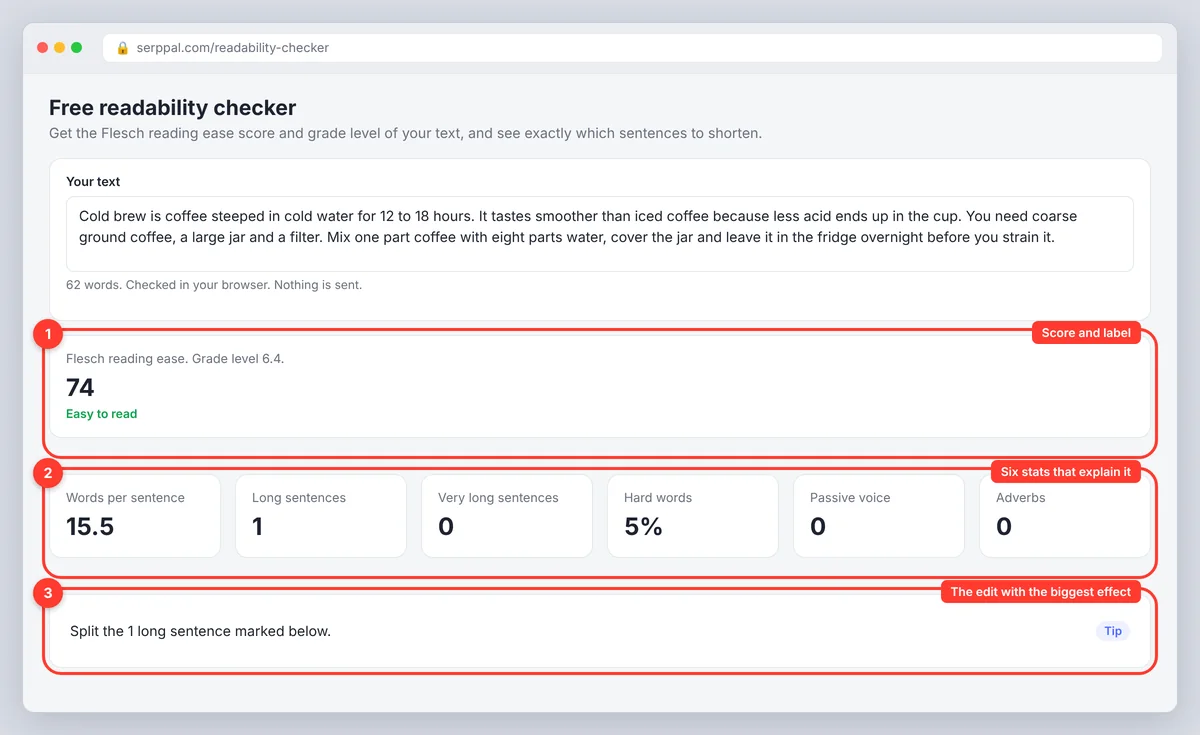
A readability checker tells you how hard your text is to read and, if it is a good one, which sentences are causing the difficulty. It is a Flesch-Kincaid readability calculator with a highlighter attached. Paste at least 30 words into SerpPal's free readability checker and you get a Flesch reading ease score from 0 to 100, a Flesch-Kincaid grade level, and six supporting numbers (words per sentence, long and very long sentences, hard words, passive voice, adverbs), with every sentence over 20 words marked yellow and every sentence over 30 marked red. The online readability checker runs in your browser; nothing is sent anywhere.
This guide shows how to use the checker, what each number in the readability analysis means, what a good score is for your audience, and a worked example that takes a paragraph from "very hard" to "easy to read" in four edits.
Key takeaways
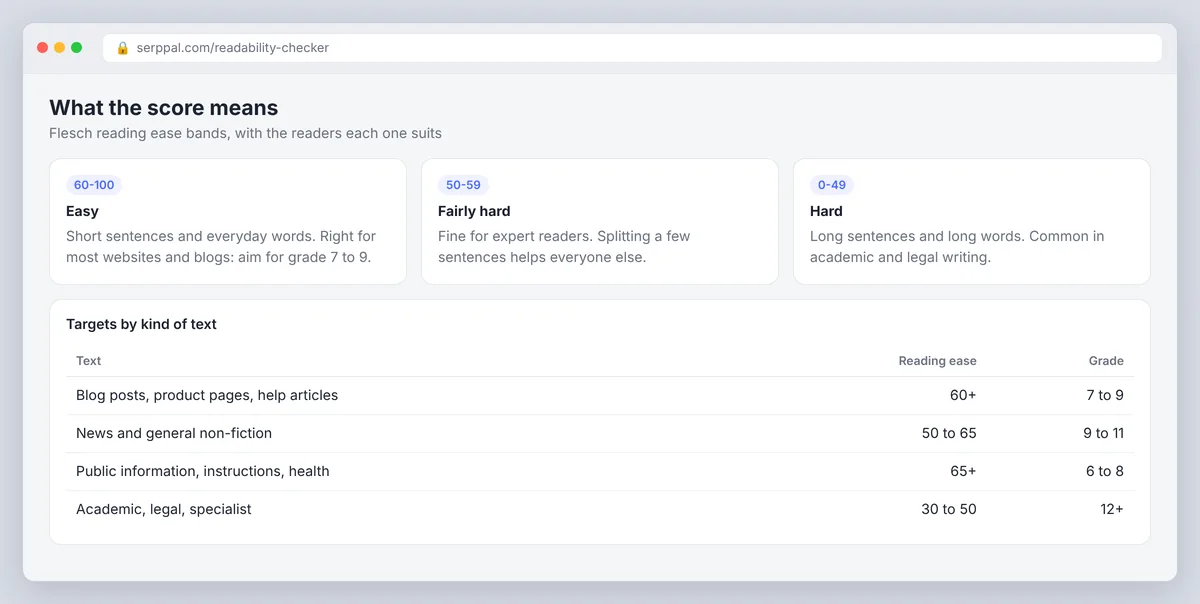
- Reading ease 60 to 100 is easy; 50 to 59 is fairly hard; below 50 is hard. Most web writing should sit at 60 or above.
- Grade level is the US school year a reader needs to follow the text comfortably. Grade 7 to 9 suits most websites.
- The standard formulas see only sentence length and the number of syllables. They cannot judge whether the text is clear, correct or interesting.
- Fix the highlighted sentences first. Splitting one 40-word sentence does more for the score than any word swap.
- Readability is not a Google ranking factor by itself, but text people can read is text people finish, share and link to.
How to use the readability and reading level checker
- Paste your text. Any topic, any format: a blog section, an email, an essay, a policy. A paragraph is enough to test; a full page gives a steadier score. The counter shows the word count, and the score appears once you pass 30 words.
- Read the headline result. The big number is the Flesch reading ease score with a label: very easy (80 and up), easy to read (60 to 79), fairly hard (50 to 59), hard (30 to 49) or very hard (below 30). Under it is the Flesch-Kincaid grade level.
- Check the six stats. Words per sentence, long sentences (over 20 words), very long sentences (over 30), the share of hard words (three or more syllables), passive constructions, and adverbs ending in -ly.
- Follow the tips. The checker suggests the edit with the biggest effect: split the marked sentences, swap some long words, use the active voice more, or cut adverbs. If nothing needs fixing, it says so.
- Edit and re-run. The score updates as you type. Stop when the label matches your target audience, not when the number stops rising. Higher scores past that point mean you are simplifying for nobody.
What the Flesch-Kincaid readability scores mean
Flesch reading ease (the Flesch score) runs from 0 to 100, and higher is easier. The calculator works it out from two inputs only: average words per sentence and average syllables per word. A score of 60-70 reads as plain English for the average reader; newspapers land around there, academic papers around 30, and children's books above 90.
Flesch-Kincaid grade level uses the same two inputs and converts them to a US school grade; it was developed for the US Navy by J. Peter Kincaid and colleagues in 1975, which is why Kincaid shares the name. Grade 8 means a typical eighth grader can comprehend the text; the 12th grade and above means college-level reading, and lower grades mean simpler text. Because both scores come from the same inputs, they usually agree: a reading ease of 60 corresponds to roughly grade 8 or 9.
The other four metrics explain the score. A high words-per-sentence figure (the avg the tool shows) drags reading ease down fastest; a high share of complex words does it more slowly. Passive voice and adverbs do not enter the formulas at all, but they are the two habits that make a grammatically fine sentence feel longer than it is, so the checker counts them too.
Readability formulas compared
| Formula | Inputs | Output | Where you meet it |
|---|---|---|---|
| Flesch Reading Ease | Words per sentence, syllables per word | 0 to 100, higher is easier | Web writing, word processors |
| Flesch-Kincaid Grade | Same inputs | US grade level | Education, government, this checker |
| Gunning Fog Index | Words per sentence, share of 3+ syllable words | Fog grade | Business writing |
| SMOG Index (Simple Measure of Gobbledygook) | Polysyllabic words per 30 sentences | SMOG grade | Health materials |
| Coleman-Liau Index | Characters per word, sentences per 100 words (ignores syllables) | Grade level | Automated grading |
| Automated Readability Index | Characters per word, words per sentence (ignores syllables) | Grade level | Technical documents |
The grades disagree with each other by two or three years on the same text because each readability test weights length and complexity differently, and Coleman-Liau and ARI count characters instead of syllables. Pick one readability index, use it consistently, and compare drafts against each other rather than against another calculator's number. Our guide to readability scores covers each formula in detail.
What is a good readability score?
The right readability level depends on who reads the text and why, not on a universal number.
- Blog posts, product pages, help articles: reading ease 60 or higher, grade 7 to 9. A general audience is skimming on a phone and will leave rather than reread, which shows up as bounce rate.
- News and general non-fiction: 50 to 65, grade 9 to 11.
- Public information, instructions, health content: 65 or higher, 6th grade to 8th. Plain-language guidance for government and health writing points to the same range, and understandable language is the whole point of such pages.
- Academic, legal and specialist material: 30 to 50 is normal, because precise terms are long. Shorten the sentences anyway; the vocabulary is the part you cannot change.
A score far above the target is not a virtue. Text written for experts at grade 5 reads as padded, and a formula cannot tell you that; simplicity is a means, not the goal. Use the label to confirm you are in range and your own ear for everything else.
Worked example: from very hard to easy in four edits
Here is an 82-word paragraph of the kind that lands in every employee handbook:
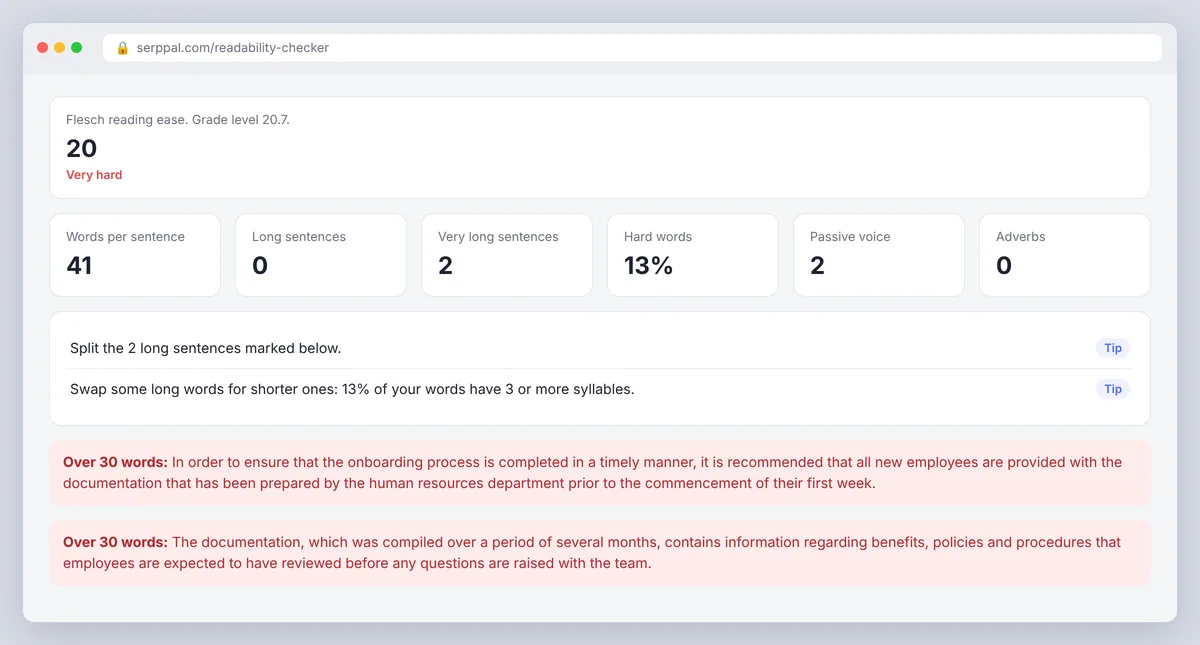
In order to ensure that the onboarding process is completed in a timely manner, it is recommended that all new employees are provided with the documentation that has been prepared by the human resources department prior to the commencement of their first week. The documentation, which was compiled over a period of several months, contains information regarding benefits, policies and procedures that are considered to be essential, and it should be reviewed thoroughly before any questions are directed to the relevant team.
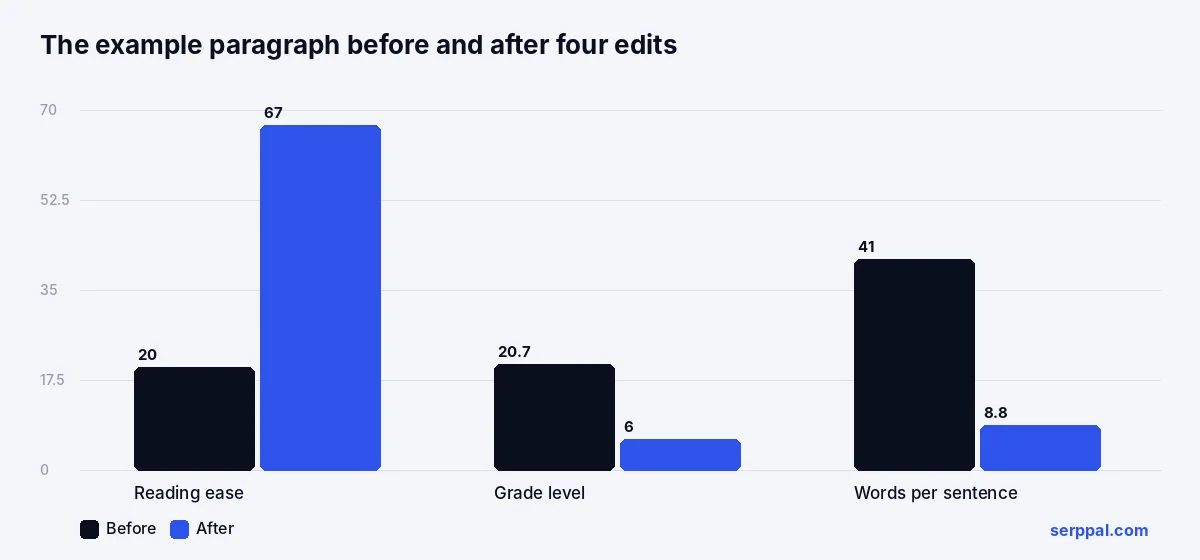
Check readability on it and the analyzer scores it about 20 (very hard), grade level around 20, 41 words per sentence, both dense sentences marked red, two passive constructions and 13 percent complex words. Four edits: split each sentence, cut the throat-clearing ("in order to ensure that", "it is recommended that"), turn the passives active, and drop the detail nobody needs (how long the pack took to compile).
New employees should get the HR documentation before their first week starts. That keeps onboarding on schedule. The pack covers benefits, policies and procedures. Read it first, then send any questions to the HR team.
Now 35 words in four sentences, about 67 reading ease (easy to read), grade 6, under 9 words per sentence, no highlighted sentences and no passives. Same facts, less than half the length, and a reader gets the instruction in the first sentence.
Improving readability without changing the meaning
- Split the marked sentences. Find the "and", "which" or comma where two ideas meet and put a full stop there. Shorter sentences are the one edit that moves every formula.
- Front-load the point. Put the instruction or the claim first and the reason second; readers who stop early still get the message.
- Prefer the short word when it means the same thing: use, not utilize; help, not facilitate. Keep the technical term when your readers need it, and explain it once.
- Make the sentence active. "The team reviewed the form" instead of "the form was reviewed by the team"; shorter and clearer in one move.
- Cut adverbs and qualifiers that add nothing: very, really, thoroughly, in a timely manner.
Support scanning with structure
Headings every few paragraphs, bullet points for steps, short paragraphs and a FAQ at the end make a page scannable. The formulas ignore formatting, but readers do not: the same 1,000 words in six sections with headings get read; in one block they get skimmed and abandoned.
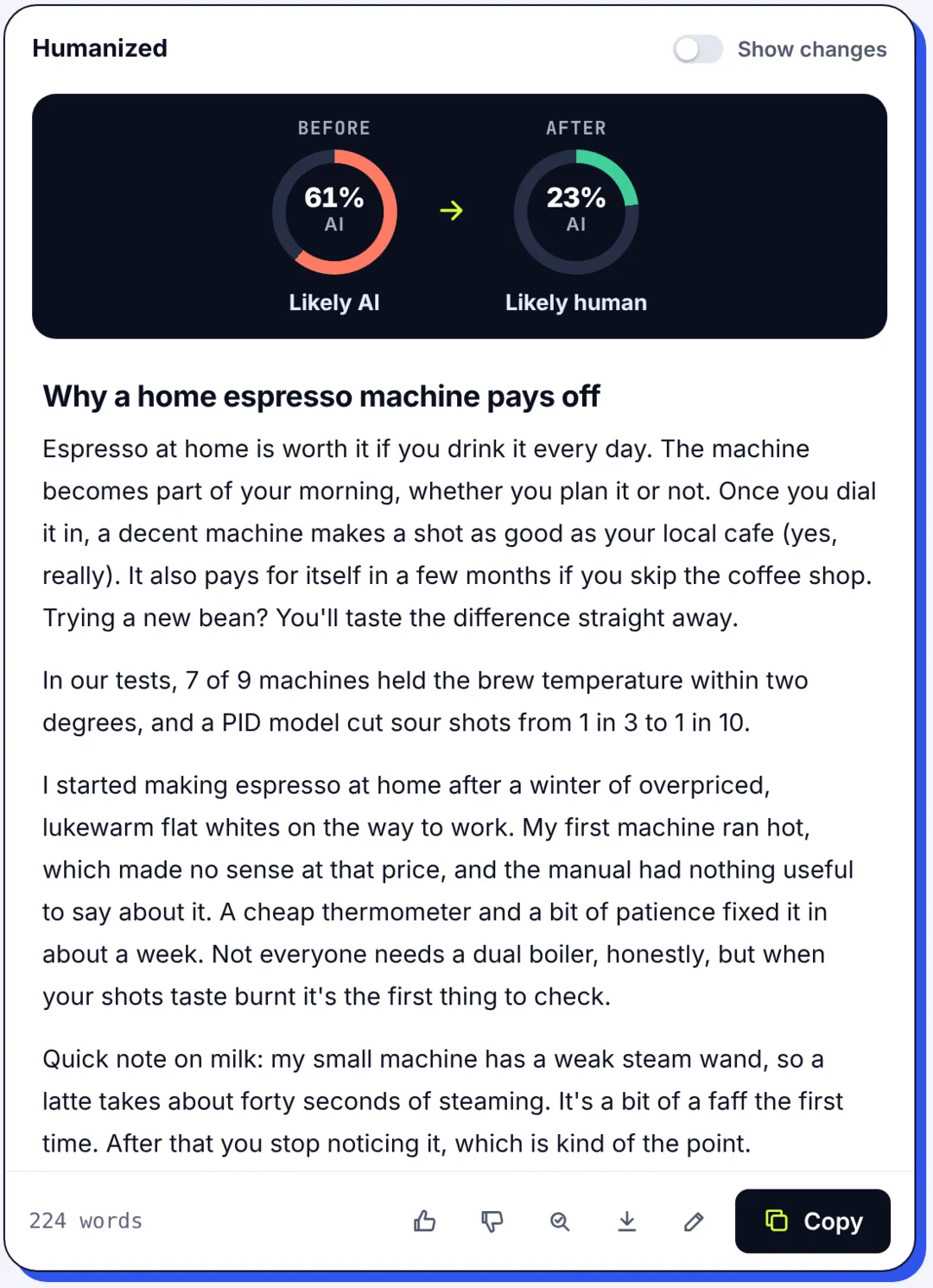
Make one kind of edit at a time and re-run the check, so you can see which change did the work. For a long AI-assisted draft, SerpPal's humanizer does the sentence-level pass, keeps the facts and warns you if the text got harder to read; the structural edits are still yours.
Why readability matters for SEO and accessibility
Google's search representatives have said readability scores are not a ranking signal, and no specific grade level is required to rank. The connection is indirect but real: pages people can read get finished, quoted, shared and linked, and those are the signals that do count. Readability also shapes how a page performs once it ranks, since a visitor who bounces from a wall of 40-word sentences is a visitor the ranking did not help.
For accessibility, the Web Content Accessibility Guidelines include a Level AAA criterion (3.1.5) that asks for a supplementary version when the text requires more than a lower secondary education reading level, roughly grade 9. A readability checker is the quickest way to find out whether a page is near the WCAG line and needs a supplemental plain version. Plain language also helps readers with cognitive disabilities, limited literacy or English as a second language, which is a far larger group than any one of those labels suggests.
Accuracy and limits of readability tests
The algorithms count. They do not read, and no calculation evaluates whether an argument makes sense. A list of ten technical nouns scores as "very hard" and a paragraph of short nonsense scores as "very easy", so a good score is necessary but not sufficient. Syllable counting is also an estimate: English spelling does not map cleanly to syllables, so two tools can give slightly different results for the same text, and the formulas were built for English prose, so scores for other languages are only a rough guide. Headings, bullet fragments and dialogue skew the sentence count too; paste body paragraphs for the cleanest reading.
Treat the number as a smoke detector. It tells you where to look; what you do when you get there is still writing.
Conclusion
A readability checker is a quick way to find the sentences that slow readers down. Paste your text, look at the reading ease and grade level, fix the sentences marked yellow and red, and stop when the label fits your audience. The score points you to the problem; clear, accurate writing is still your job.
Frequently asked questions
What is a good Flesch reading ease score?
For most web content, 60 or above; that reads as plain English for a general adult audience. News sits around 50 to 65, public information should be 65 or higher, and academic or legal writing is often 30 to 50 because the vocabulary is long. Match the label to the readers rather than chasing the highest number.
What grade level should my writing be?
Grade 7 to 9 for websites, blogs and marketing; grade 6 to 8 for instructions and health or government information; higher is fine for a specialist audience that expects it. The grade is an estimate of the schooling a reader needs to follow the text comfortably, not a judgment of the reader.
How is the readability score calculated?
Flesch reading ease is 206.835 minus 1.015 times the average words per sentence minus 84.6 times the average syllables per word. Flesch-Kincaid grade is 0.39 times words per sentence plus 11.8 times syllables per word minus 15.59. Both calculations depend only on sentence length and word length, which is why shortening sentences is the fastest fix. Gunning Fog and SMOG grade texts the same way but count only the complex words; Coleman-Liau and ARI use characters per word instead of syllables.
Does Google use readability as a ranking factor?
No, not as a direct signal. Readable pages tend to earn the engagement and links that do matter, and they convert better once they rank, which is reason enough to check. There is no grade level that Google requires.
Is my text saved when I use the online readability checker?
No. SerpPal's readability checker runs entirely in your browser; the text is never uploaded or stored, so drafts, client work and confidential documents are safe to check.