
On this page
Ecommerce keyword research is the process of finding the search terms buyers use, then matching each one to the right category, product or guide in your store. Done well, it tells you what to build, what to improve and how to tell whether your SEO strategy is bringing buyers rather than browsers. This guide covers search intent for online stores, a seven-step workflow, free versus paid keyword research tools, how to map keywords to the right place in your store and the mistakes that waste months.
Key takeaways
- Start with your catalog and your customers' language, not a keyword tool. Search engine optimization for a store begins in the product data.
- Intent decides the destination: categories for broad product searches, product listings for specific items, guides for questions.
- Long-tail search terms convert better than head terms, and they're where a small store can win first.
- Judge keywords on relevance, intent and commercial value, not monthly search volume alone.
- One primary keyword per page. Two pages targeting the same term compete with each other.
The importance of keyword research for an ecommerce store
Search behavior gives you clues about demand, product needs and the words people use to describe them, whether your store runs on Shopify, WooCommerce on WordPress or a custom platform. When a page matches both a searcher's query and their goal, it has a far better chance of driving traffic that converts. Good research isn't a contest to collect the most search terms. It helps you identify relevant keywords for content you can build or improve, and avoid terms that attract visitors who aren't looking for what you sell.
Match keywords to search intent and purchase stage
Consider "how to choose a camping stove" versus "buy lightweight camping stove". The first is informational and belongs on a guide. The second is transactional and belongs close to a product listing or category. Commercial searches such as "best camping stove for backpacking" show someone comparing options. Loyalty searches such as "[brand] stove replacement parts" come from existing customers who need support, accessories or a repeat purchase. Each stage has a job, and the search results show you which stage a query belongs to. Transactional terms are the smallest group and the most valuable one.
Why long-tail queries convert better
"Water bottle" could mean anything. "Insulated water bottle for hiking 1 litre" tells you exactly what the buyer wants, and a product listing that matches it will see far more conversions per visit. Long-tail keywords have lower monthly search volume individually, but there are thousands of them, the competition is weaker, and the user intent is clear. For a new ecommerce site these specific keywords are the only realistic starting point.
Ecommerce keyword types, with examples
| Type | Example | Best page |
|---|---|---|
| Category terms | women's trail running shoes | Category page |
| Product terms | [brand] speedcross 6 wide | Product page |
| Comparison | trail shoes vs road shoes | Guide or comparison post |
| Problem-based | shoes for wide feet and overpronation | Guide linking to products |
| Brand searches | [brand] running shoes | Brand category page |
| Loyalty and support | [brand] insoles replacement | Accessory page or help article |
A 7-step keyword research workflow for online stores
Step 1: Define your products, audience and goals
Before opening a tool, list the products and categories you want to grow. Note who the potential customers are, which needs they solve and any constraints such as stock or shipping regions. A premium coffee grinder and a budget travel grinder serve different buyers and deserve separate targets. Set a business goal, such as more qualified visits to a profitable category or better product discovery, and pick a measurement that fits it: organic clicks, product-page visits or completed orders.
Step 2: Find seed keywords in your catalog and customer language
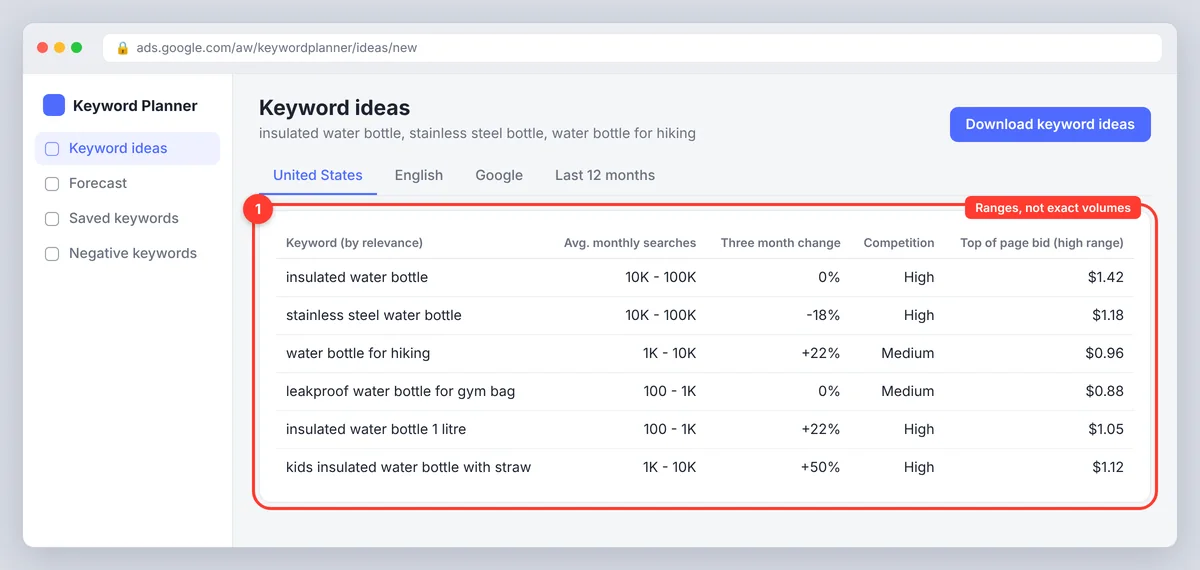
Your catalog supplies product names, categories, materials, sizes, features and use cases. A store selling reusable bottles might start with "insulated water bottle", "stainless steel bottle" and "water bottle for hiking". Then listen to customers: support tickets, product reviews, site-search logs and questions from the service team. Customers describe a bottle as "leakproof for a gym bag", not with your technical product term, and that wording is a keyword opportunity that shows up nowhere in a keyword search tool. Reddit and other forums reveal phrasing and concerns too; treat them as idea sources and validate with search data.
Step 3: Expand the keyword ideas with research tools
Turn the seed keywords into a broader keyword list of potential keywords. Google Keyword Planner suggests ideas and shows approximate monthly search demand. The Performance report in Google Search Console reveals search queries that already bring impressions or clicks to your site, including ones you never targeted. Google Autocomplete and the related searches at the bottom of the results page add more.
A keyword research tool with clustering saves the sorting. SerpPal's Content Planner takes a seed topic and returns related keywords with volume, difficulty, intent and CPC, grouped into topics, so a category and its supporting guides come out as one cluster, which is handy when you're optimizing a whole section of the store at once. Our keyword research template gives you the spreadsheet to keep it all in.
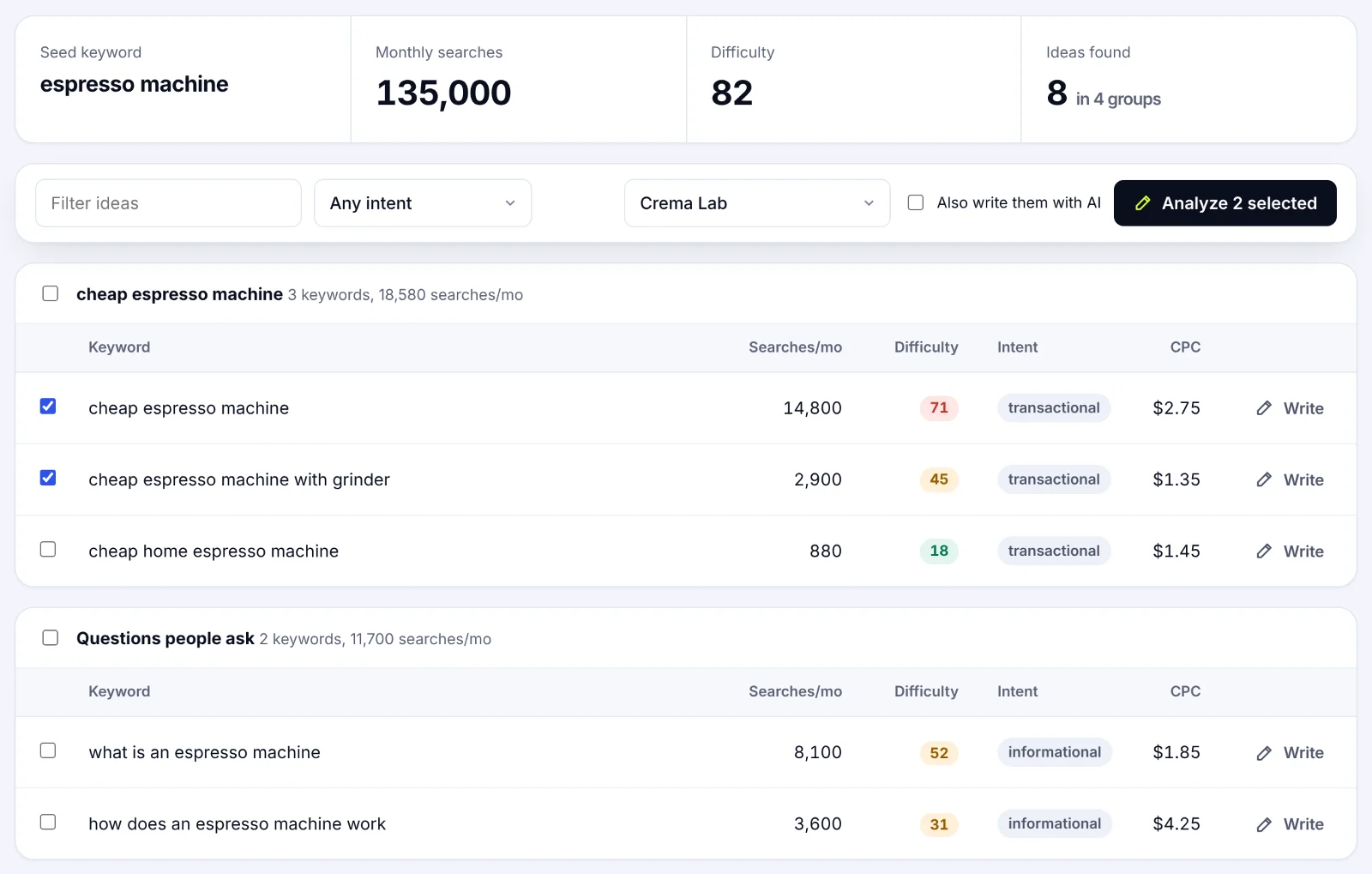
Use tools to expand and organize ideas, not to treat every suggestion as a target. Metrics vary by provider, and a suggestion doesn't prove the phrase fits your products.
Step 4: Check the search results and competitor keywords
Search your strongest candidates and analyze the SERP. Which page types rank: product listings, category pages, buying guides, videos, marketplaces like Amazon? If the results are mostly category listings, a blog post won't match what search engines think the query wants.
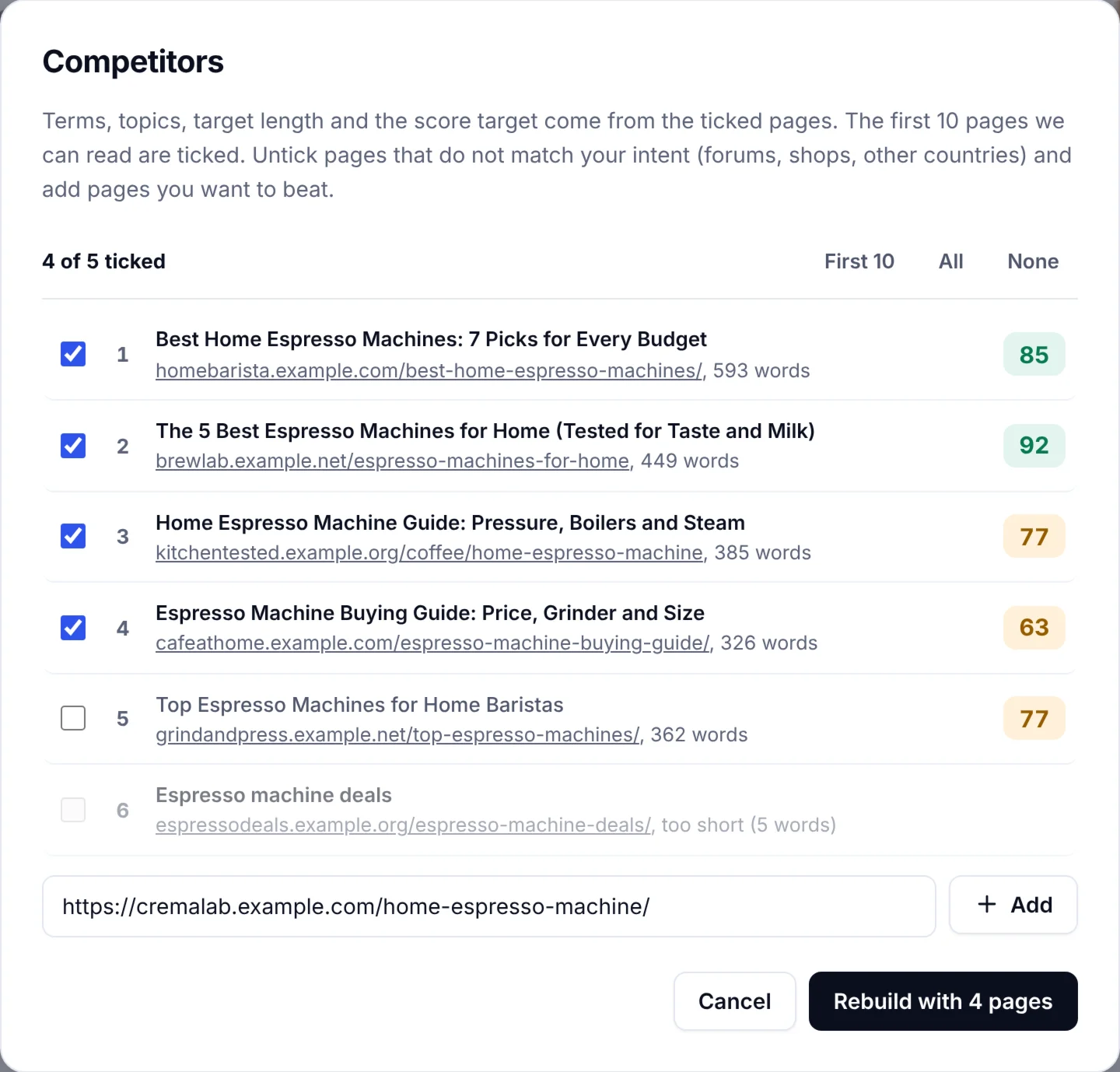
Then do a keyword gap analysis: which terms do competing stores rank for that you don't? Their rankings expose gaps, but don't copy their wording or assume their strategy is right. Check whether your store can answer the query better, with clearer sizing, compatibility details or a better range. SerpPal's competitor view shows the ranking results for a keyword with their structure and score, which makes this comparison quick.
One practical note on e-commerce scraping challenges: scraping competitor sites and marketplaces at scale is a headache. Large ecommerce platforms block bots, change layouts and serve different content by region, so a tool that reads the results for you beats a homemade scraper for all but the biggest teams.
Step 5: Evaluate value beyond search volume
Search volume is one signal, not a sales forecast. A broad phrase may attract plenty of traffic with weak purchase intent, while a specific query sends fewer searchers who know exactly what they need. For each candidate, weigh:
- Relevance: can your products genuinely meet the need in the query?
- Intent: learning, comparing, buying or support?
- Keyword difficulty: do the ranking sites look attainable for your store's authority? Keyword difficulty is an estimate, so compare it across candidates rather than trusting the number.
- Commercial value: margin, average order value and the chance of a repeat purchase.
- Seasonality: steady, seasonal or fading demand.
- CPC: the Google Ads price hints at how much advertisers value the click, which is useful context for PPC and organic alike.
Step 6: Prioritize keywords with the highest chance of success
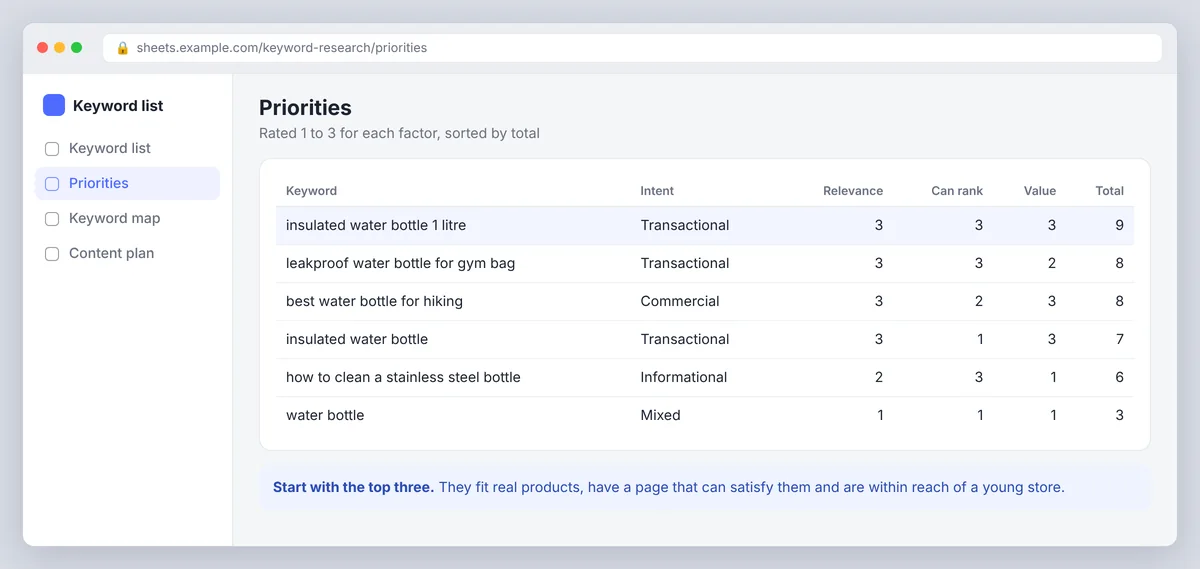
Give each candidate a simple rating for relevance, intent, realistic ranking potential and business value. A strong candidate fits a real product, has a destination that can satisfy the search and is within reach of your site. Focus where you can make a clear improvement: a relevant category with impressions but few clicks may just need a more specific title and a stronger product selection. A highly competitive term with no suitable destination can wait. The right keywords for a new store are the ones it can actually win this quarter.
Step 7: Build clusters and map keywords to the right pages
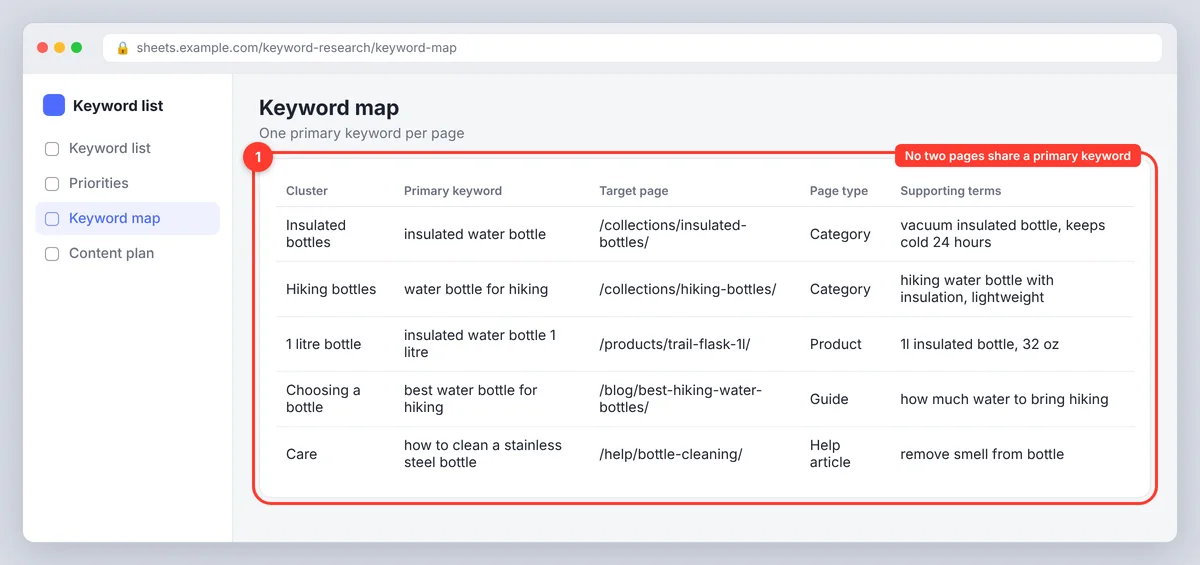
Group terms that share meaning and intent rather than making a page for every wording. "Insulated bottle for hiking" and "hiking water bottle with insulation" belong to one cluster if the results and the need overlap. Keep a working keyword list with the term, intent, target URL, search data, priority and SERP notes, and remove duplicates and terms your catalog can't satisfy.
Then assign one primary keyword to the most suitable destination. Category pages cover broad product groups, product listings target specific items and attributes, editorial content answers questions and supports comparisons, and landing pages serve a distinct audience or promotion. Don't force the same target onto several pages; two that serve the same intent compete with each other. Give each one a clear purpose and connect related categories, products and guides with internal links.
Turn keyword research into measurable SEO improvements
Use keywords naturally on pages
Place the main keyword where it helps people understand the page: title, main heading, meta description, category or product copy. Use related keywords where they add detail, such as material, fit, compatibility or intended use. Don't repeat a keyword to hit a density target; write for the shopper first and let search engines interpret the related language. When you optimize a category, the product selection and filters matter as much as the copy.
Support product pages with helpful content
Some questions need more space than a product listing provides. A buying guide, size guide, care instructions or comparison post can answer them and link naturally to products. Build these around real customer needs, not a pile of related keywords, and give each guide its own purpose. A guide to choosing running shoes that links to trail, road and wide-fit categories is a cluster that helps both shoppers and search engines understand your ecommerce website.
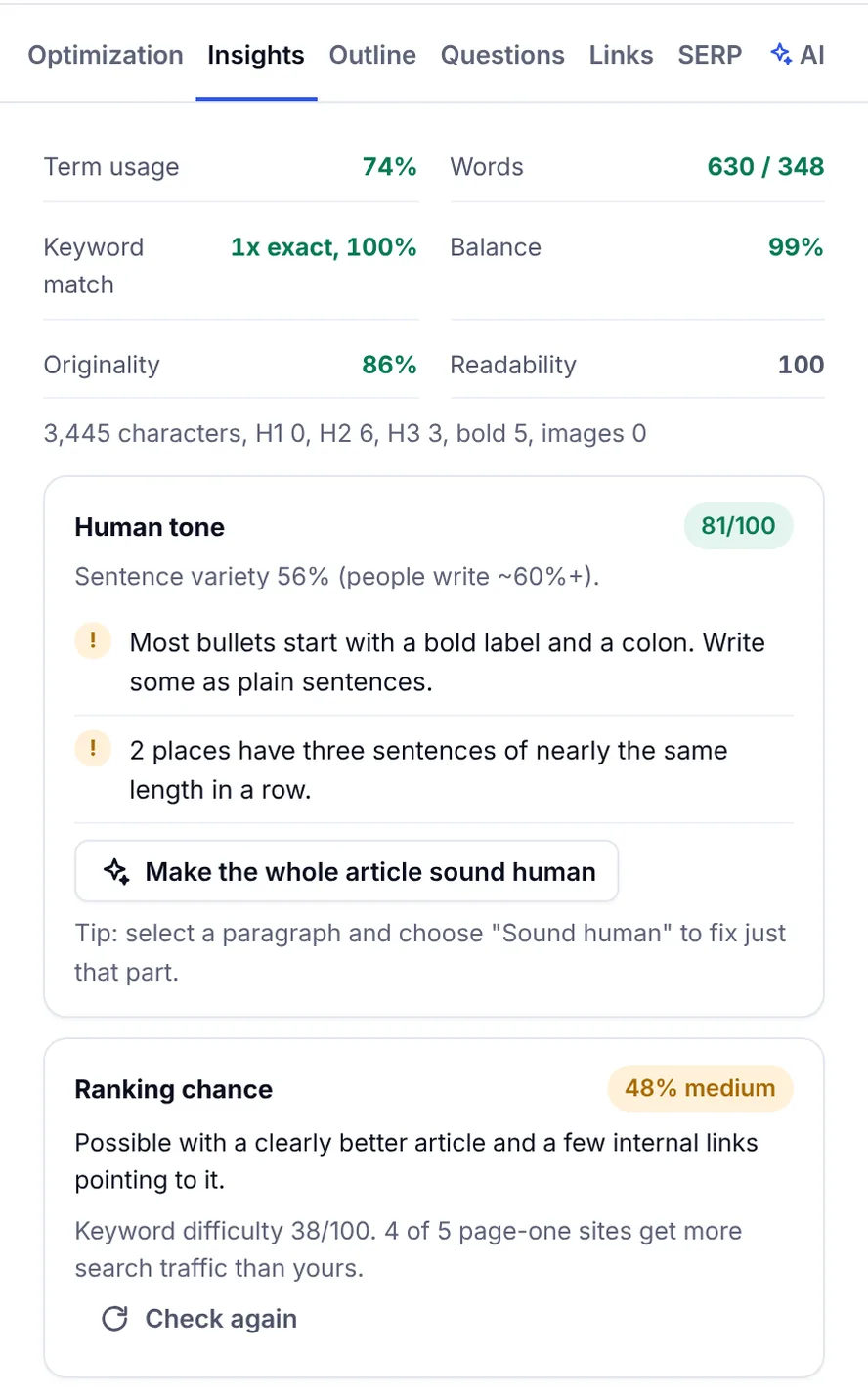
If you write these guides in SerpPal, the editor scores the draft against the pages already ranking and suggests internal links from your sitemap, so the guide covers what shoppers ask and points them to the right products. The features overview shows how analysis, writing and publishing fit together.
Measure results and refresh the research
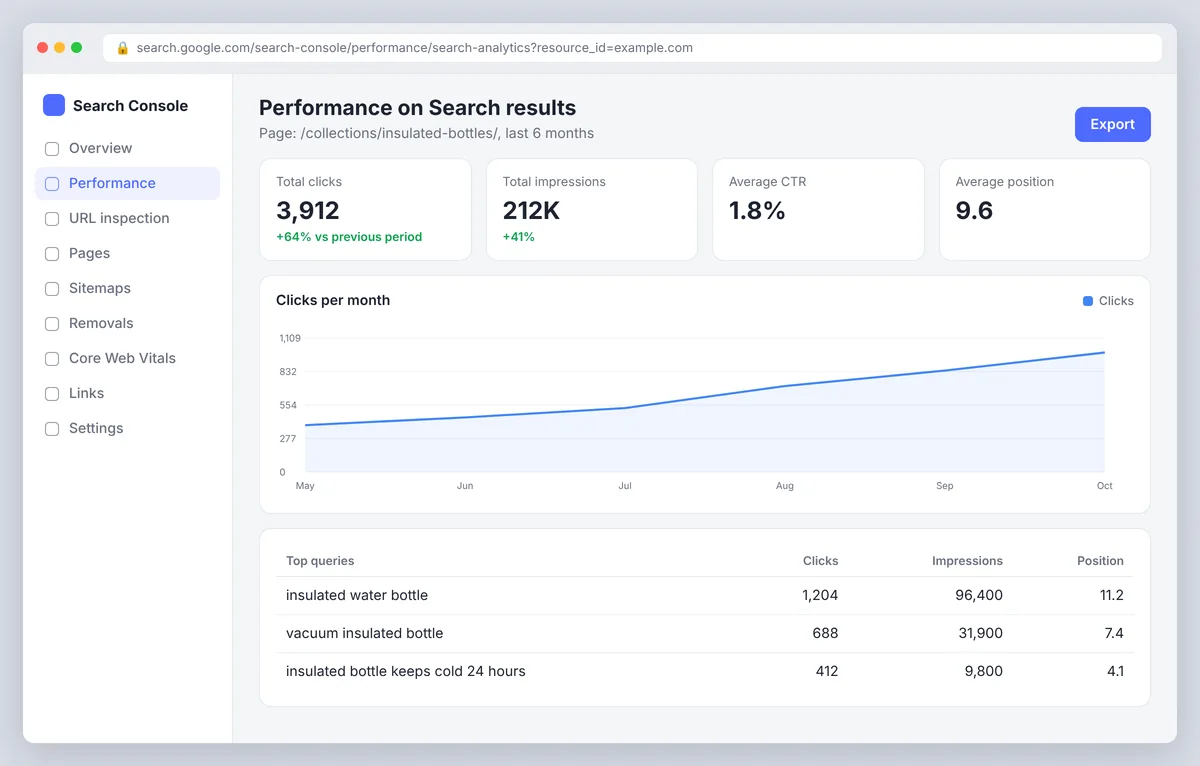
Track URL and query together, and watch visibility for the whole cluster, not just one term in the top 10. The performance report shows impressions, clicks and average position; Google Analytics shows visits and on-site actions; connect organic landing pages to purchase data where your setup allows. Give pages time to be crawled and earn data, then look for growth in relevant impressions, rankings, click-through, conversions and sales. Refresh the research when products, customer preferences, competition or seasonal demand change, and keep analyzing the queries your site already appears for: they're the cheapest keyword insights you'll get.
Free vs paid keyword research tools for ecommerce
Whatever you pick, the best keyword research tool for a store does a few things well: it shows search phrases with volume and difficulty for your country, labels intent, groups keywords into topic clusters, and lets you export the list. Browser extensions that show volume next to Google results are handy for quick checks, but they don't replace a proper list.
The best free keyword research tools
Google Keyword Planner, Google Search Console, Google Trends, Autocomplete and Bing search suggestions cover a lot for a small store doing focused research. Keyword Planner is built for Google Ads, so its volumes are bucketed unless you run campaigns, but it's enough to compare candidates. SerpPal's Content Planner is included on every plan with a monthly number of keyword plans, and it adds the clustering and intent labels the free Google tools lack.
When to pay for keyword research tools, and paid keywords
Paid SEO tools such as Semrush, Ahrefs and Moz Keyword Explorer make sense when you need frequent competitor research, a keyword gap report against several stores at once, a keyword strategy across many markets, large keyword exports, or difficulty estimates for a big catalog. Before upgrading, check that the data answers a business question you actually have, and don't pay for overlapping subscriptions if your team uses one feature. For marketing teams running both SEO and paid search, one tool that shows organic and paid keywords side by side is worth more than two that don't talk to each other.
Use AI for discovery, then validate
AI chatbots can brainstorm synonyms, audience questions, use cases and clusters. Ask for phrases from a defined customer, such as "queries from parents comparing insulated lunch bags for school", then check the suggestions against keyword data, the real results and your catalog. AI invents phrases people rarely search and mislabels intent, so treat its output as a draft, not evidence of demand. AI search answers (Google AI Overviews, ChatGPT shopping) draw on the same clear product and guide content, so the work aligns.
Common keyword research mistakes in ecommerce
- Chasing volume alone. A popular phrase brings unqualified traffic if it doesn't match your products.
- Skipping modifiers. Words like "cheap", "sale", "discounts", "near me", "for men" or a size uncover different buyers. Check each modifier's results before you lump it into the main term.
- Ignoring intent. A guide won't satisfy someone ready to buy when the results call for a category page.
- Repeating targets across pages. Give each one a distinct job to avoid cannibalization.
- Stuffing keywords into copy. Use keywords where they clarify the offer, then write naturally.
- Trusting tool scores blindly. Validate estimates with the search results and your own data.
- Forgetting the homepage and category meta. Titles and meta descriptions on categories are the highest-leverage text in most stores, and often still say "Home".
Conclusion
Keyword research for an online store works when it stays attached to pages and sales. Start with the catalog, listen to customers, expand with tools, check the results, judge value beyond volume, prioritize what you can win, and map one keyword to one page. Then analyze the results, and do it again next quarter.
Frequently asked questions
What is keyword research for ecommerce?
Finding and evaluating the search terms customers use, then matching them to relevant store content. The aim is useful organic traffic that buys, not ranking for the most terms.
How do you do keyword research for ecommerce?
Start with your products and customer language, expand ideas with tools, inspect the search results, assess intent and value, prioritize, group related terms and assign them to the right pages. Then measure and refine.
Are free keyword research tools enough?
For many small stores, yes. Google's own reports and Keyword Planner give usable data, and a planner with clustering fills the gap. Paid tools pay off when you need large exports, deeper competitor analysis or ongoing research for a big catalog.
How many keywords should a product page target?
One primary keyword plus a handful of close variants and attributes (size, color, material). Everything broader belongs on the category; everything question-shaped belongs in a guide.
Can keyword research tools find profitable keywords?
They can find keywords based on demand, difficulty and CPC, which hints at commercial value. Profit is your call: compare the terms with your margins, stock and average order value, and favour high-quality, specific queries that match products you can ship today.
How often should you redo the research?
Review the search queries monthly, refresh priorities each quarter, and run a full pass when you add a product line, enter a new market or see a competitor take a category you care about.