On this page
What AI detector do teachers use? Most schools and colleges use Turnitin, because its AI writing detection is built into the plagiarism checker many already pay for and it plugs into Canvas, Blackboard, Moodle and other learning platforms. Teachers without Turnitin often use GPTZero or Copyleaks, and many also rely on Google Docs version history and their own reading.
No detection tool is fully reliable, though. This guide explains which tools educators use, how professors check for AI-generated content in practice, how accurate the results are, and what to do if your own writing gets flagged.
Key takeaways
- Turnitin is the most common AI checker in schools and universities, mostly because it's already part of their plagiarism checking.
- GPTZero and Copyleaks are the next most common, often used by individual teachers or schools without Turnitin.
- Canvas, Google Classroom and Google Docs have no AI detector of their own. Schools add one through an integration.
- Detectors give an estimate, not proof. False positives happen, especially on short, formal or non-native English writing.
- Most teachers combine a detector result with drafts, version history and a conversation with the student.
Which AI detectors do teachers use most?
There is no single official tool. The answer depends on what the institution has licensed and what an individual teacher chooses. These are the top AI detectors teachers mention most.
Quick comparison table
| Detector | How teachers get it | What it shows |
|---|---|---|
| Turnitin | School or district license, inside the LMS | An AI writing percentage next to the similarity report |
| GPTZero | Free and paid plans for individual teachers and schools | An overall AI estimate with highlighted sentences |
| Copyleaks | School license with LMS integrations, or an individual plan | AI content detection alongside plagiarism checking |
| Winston AI, ZeroGPT and other checkers | Web tools a teacher pastes text or uploads files into | A percentage, usually with less context |
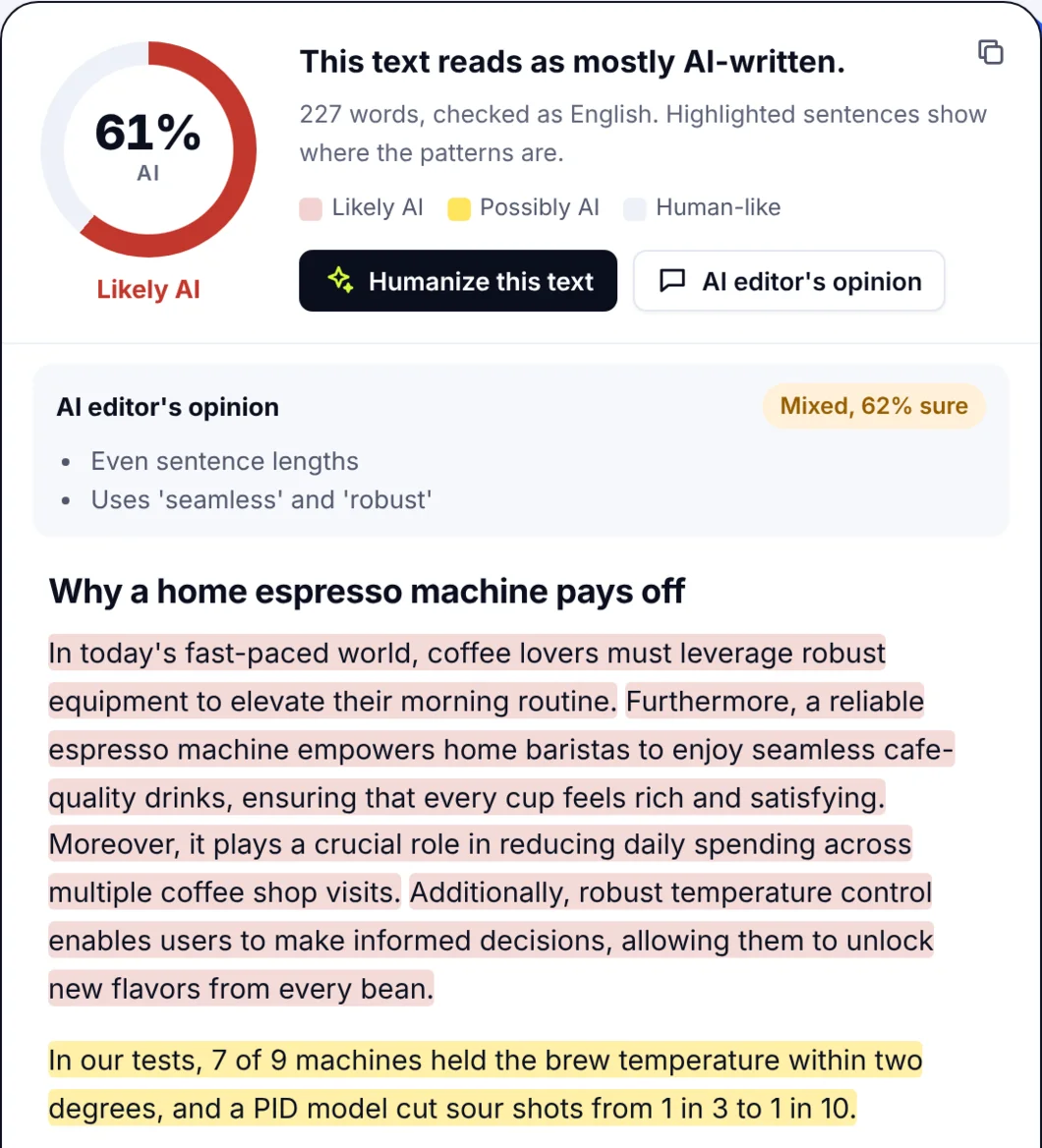
You can test any text yourself with a free AI detector that highlights the sentences that read most like AI-written text. It is a useful way to see what a teacher might see before you submit.
Turnitin: the default in most schools
Turnitin has been the standard plagiarism checker in education for years, so when it added Turnitin AI writing detection, many schools got it without buying anything new. When a student submits an assignment through Canvas, Moodle, D2L Brightspace or another LMS, the teacher sees an AI writing indicator next to the usual similarity report, as part of the normal grading workflow.
One detail matters: having Turnitin doesn't always mean the AI feature is on. It depends on the license and the institution's settings, and some universities, including Vanderbilt, publicly chose to turn the AI detection off over accuracy concerns. If you want to know what your school uses, the syllabus or the academic integrity policy usually says.
GPTZero: popular with individual teachers
GPTZero became well known as one of the first free AI detection tools for teachers. A teacher can upload or paste essays into a simple interface and get an overall estimate plus highlighted sentences. It also offers paid plans for schools, batch scanning of student submissions, an API and integrations, which makes it common in classrooms without a Turnitin license.
Copyleaks: plagiarism and AI checks together
Copyleaks combines plagiarism detection with an AI content detector and connects to common learning platforms. Some colleges use it instead of, or next to, Turnitin.
Other AI checkers teachers try: Winston AI, ZeroGPT and more
Beyond the big three, teachers who pay for their own tools or test essays by hand often use one of these:
- Winston AI: a paid AI checker aimed at educators and publishers, with OCR so it can read scanned or handwritten work.
- ZeroGPT: a free web checker that many people try first because it needs no account.
- Pangram and Sapling: detectors built on their own AI models, sometimes used by schools that want a second opinion.
- Checkers inside writing tools: QuillBot, Grammarly, Scribbr, Smodin and BrandWell (formerly Content at Scale) all offer AI detection alongside their main product.
These tools look for the same kind of patterns, but each is trained differently, so their outputs often disagree. That's one reason careful teachers never rely on a single result. For borderline cases, many use more than one detection mode or tool and compare: if two of the best AI checkers disagree, the score alone settles nothing.
How professors and teachers detect AI: the full process
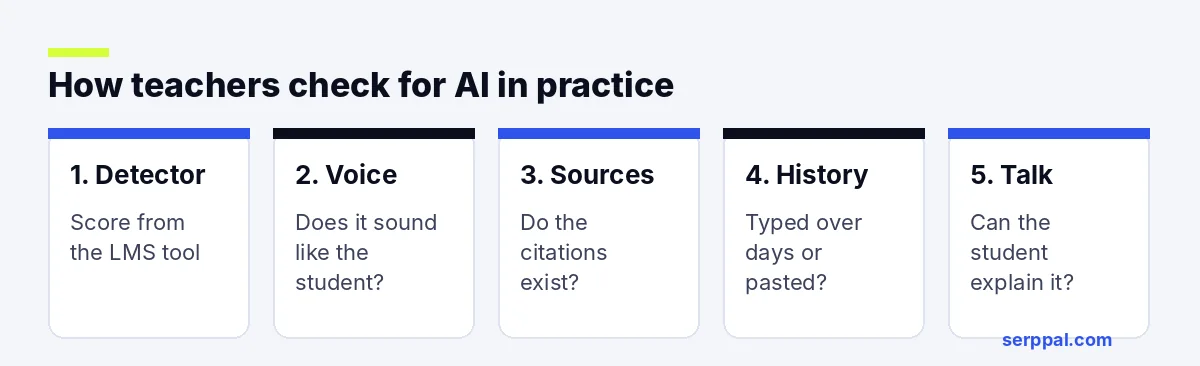
A detector result is usually just the starting point for catching AI use. In practice, teachers use several checks together to identify AI-generated work:
- Run the AI detector. In most schools this happens automatically when you submit through the LMS.
- Read for a change in voice. Teachers know how their students write. A sudden jump in vocabulary, a very smooth but generic tone, or missing class-specific details stand out.
- Check the sources. AI tools sometimes invent citations, even with newer models like GPT-4o or Claude. A reference that doesn't exist is stronger evidence than any percentage.
- Look at the writing history. In Google Docs, version history shows whether an essay was typed over days or pasted in all at once. Some teachers use a Chrome extension that replays the typing.
- Talk to the student. Asking someone to explain their argument or a word they used is often the clearest test.
What AI detector does Canvas use?
Canvas doesn't have its own AI detector. Schools connect an outside tool to it, most often Turnitin, and the AI result then appears in SpeedGrader or the assignment view. The same is true for Blackboard and Google Classroom.
How to check for AI in Google Docs
Google Docs has no built-in AI detection. Teachers check for AI in Google Docs in two ways: by reviewing version history (File, then Version history) to see how the document grew, and by copying the text into a separate AI detector. Long passages that appear in a single edit are what usually catch their eye. The originality of the ideas matters too: AI-generated content tends to be general where a student's own work is specific.
How accurate are AI detectors? AI detection limits
AI detectors work by looking for statistical patterns that AI text tends to have, then giving a probability. That means they can be wrong in both directions: they miss some AI-generated text, and they flag some human writing. Our explainer on how AI detectors work covers the method in more detail.
Some known limitations:
- False positives on formal writing. Clear, simple, rule-following prose (the kind many students are taught to write) can look "machine-like".
- Bias against non-native writers. A Stanford study found that several detectors flagged more than half of essays written by non-native English speakers as AI, while rating essays by native speakers far more accurately. ESL students carry a higher risk of being wrongly accused.
- Short texts. A paragraph or a discussion post gives the detector very little to work with.
- Edited AI text. Text that was drafted with AI and then changed by a person is hard for any tool to classify.
- Different tools disagree. The same essay can score very differently in two detectors.
Is any AI content detector 100% accurate?
No. Even OpenAI, the maker of ChatGPT, withdrew its own AI text classifier because of its low accuracy. That is why most guidance for educators says an AI score should never be the only evidence for a misconduct case.
Pros and cons of AI detection in the classroom
| Pros | Cons |
|---|---|
| Quick first check across many student submissions | False positives can hurt honest students |
| Points to essays worth a closer look | Results vary between tools |
| Built into tools schools already use | Weaker on short or heavily edited text |
| Encourages talks about honest AI use | Can create distrust if used as proof |
What to do if your writing is flagged as AI
A high AI score is not a verdict. If you wrote the work yourself, stay calm and gather your evidence:
- Version history: share the Google Docs or Word history that shows your essay growing over time.
- Notes and drafts: outlines, research notes, earlier drafts and sources you read.
- Explain your work: offer to walk your teacher through your argument and how you found your sources.
- Know the policy: read your school's academic integrity and AI policy so you know your rights and the appeal process.
Our guide on what to do when your writing is flagged as AI goes through each step.
How teachers can use detectors fairly
Some teachers turn detection into a classroom AI literacy lesson: they run a sample essay through a detector together, show where it gets the score wrong, and agree on rules for when AI help is allowed. Clear course settings and policies (for example, AI allowed for brainstorming but not for drafting) prevent most disputes before they start.
For students, the advice is simple: write in a tool that keeps version history, save your notes, and check your class's AI rules before you use any AI tools for brainstorming or grammar help.
FAQs
Can Turnitin tell if you used ChatGPT?
Turnitin's AI writing detection is designed to detect text that looks like it came from large language models such as ChatGPT. It often catches unedited AI text, but it gives an estimate, not proof, and it can miss edited text or flag human writing.
Do professors use AI detectors?
Many do, mostly through Turnitin in their learning platform. But a growing number treat the number as a hint rather than evidence and rely more on drafts, in-class writing and conversations with students.
What AI detector do college admissions offices use?
Colleges rarely say. Some admissions offices may run essays through a detector, but most focus on whether the essay sounds like the applicant in the rest of the application. Writing your own essay is the only safe approach.
Is there a free AI detector teachers can use?
Yes. GPTZero has a free plan, and there are other free AI checkers online, including our own free AI detector. Free tools usually have word limits and fewer reports than school licenses, so they suit a quick check better than a full class workflow.