On this page
- What is a paraphrasing tool?
- How to use an AI paraphraser online
- Paraphrasing modes: rewrite text in the right style
- Examples of paraphrases
- How to paraphrase in your own words, by hand
- AI paraphrasing, writing and plagiarism: do you still need a citation?
- How to choose the best paraphrasing tool
- Tips for better paraphrasing results
- Frequently asked questions
A paraphrase generator is an AI tool that says your text again in different words while keeping the original meaning. You enter a sentence or paragraph, select a style, and get rewritten text in seconds that you can refine and use.
This guide explains how an AI paraphrasing tool works, how to get a good result from one, how to reword sentences manually, examples, and when citing the source is still required.
Key takeaways
- A paraphrase generator rewords text with new vocabulary and sentence structure but the same meaning.
- The best results come from choosing a mode (standard, formal, simple, shorter) and checking every sentence afterwards.
- Paraphrasing someone else's work still needs a citation. Rewording does not make the idea yours.
- Use a paraphraser to improve clarity and fluency in your own writing, not to hide where information came from.
What is a paraphrasing tool?
A paraphrasing tool (also called a paraphraser, rewording tool or text rewriter) takes a passage and writes it again in different words. Older tools simply swapped terms one by one, which often produced awkward sentences. Modern AI-powered paraphrasing tools understand the whole sentence, so they can change the order, split long sentences and adjust the tone while maintaining the original meaning.
Students, writers, researchers, content creators and SEO teams use an AI paraphraser to:
- Rephrase a clunky sentence in their own draft.
- Simplify a dense paragraph for a wider audience.
- Make text more formal for a report, or more casual for a blog, so it fits the audience.
- Shorten a passage to make it concise without losing the key points.
- Find a fresh way to rewrite something they have said five times already.
SerpPal's paraphraser does this with ten modes and a synonyms slider, and it is included on the free plan. After you paraphrase, our free writing tools can check the word count and readability of the result.
How to use an AI paraphraser online
Most AI paraphrasing tools work the same way. Here is the process in SerpPal's paraphraser:
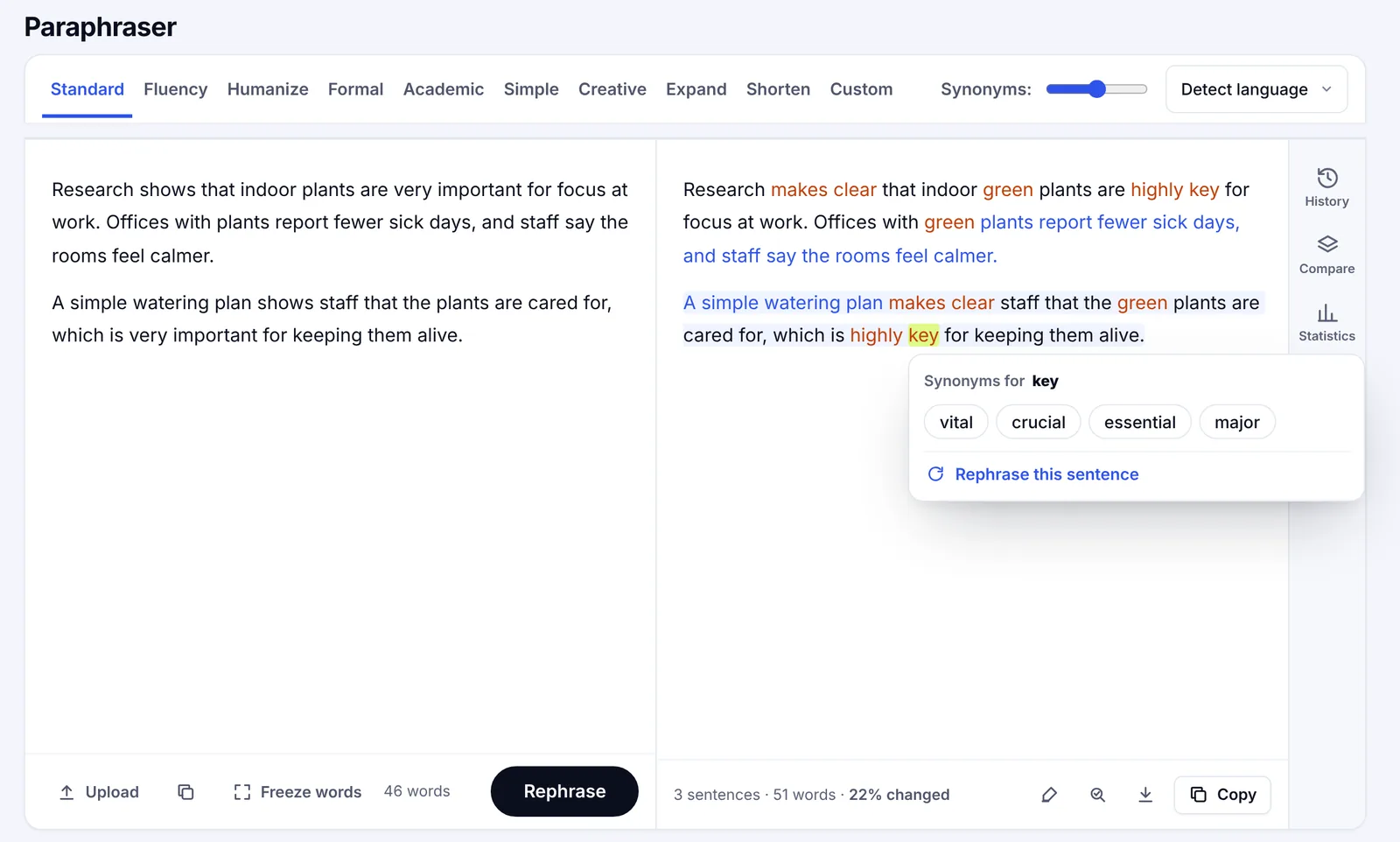
- Add your text. Paste a sentence, paragraphs or a whole page into the left box, or upload a PDF or Microsoft Word file. Formatting from Google Docs or Word is kept.
- Select a mode. Standard keeps the length and meaning. Fluency fixes awkward phrasing. Formal, Academic, Simple and Creative change the tone. Expand and Shorten change the length.
- Set how much to change. The slider goes from very light (a little rephrasing) to maximum (every sentence restructured).
- Click Paraphrase. The AI-powered model will generate a new version, and changes are highlighted so you can see what moved.
- Fine-tune. Click any word for synonyms or any sentence for new versions. Freeze terms you want kept, such as names. This is where you find synonyms with ease and refine the rewrite.
- Read it through. Check that every sentence still says what the original said, ensuring nothing was added or lost, then copy the rewritten text.
Paraphrasing modes: rewrite text in the right style
Modes let you tailor and transform the output instead of altering only a few terms. They help you adapt one draft for several readers and create content quickly without starting from scratch. Each one enables a different kind of rewrite:
| Mode | Use it when |
|---|---|
| Standard | You want the same meaning and length in new words |
| Fluency | The text is correct but reads awkwardly |
| Formal or Academic | You are writing a report, paper or work email |
| Simple | You need better readability for a general audience |
| Creative | You want livelier wording for marketing or a story |
| Shorten or Expand | You need to hit a word count |
Examples of paraphrases
Here's one original sentence rewritten three ways, so you can see how the style changes the result.
Original: "Regular exercise improves sleep quality because it helps the body regulate its internal clock and reduces stress."
- Standard: Exercising on a regular basis leads to better sleep, since it helps the body keep its internal clock steady and lowers stress.
- Simple: If you exercise often, you sleep better. Exercise keeps your body clock on track and makes you less stressed.
- Formal: Consistent physical activity enhances sleep quality by supporting the regulation of circadian rhythms and reducing stress levels.
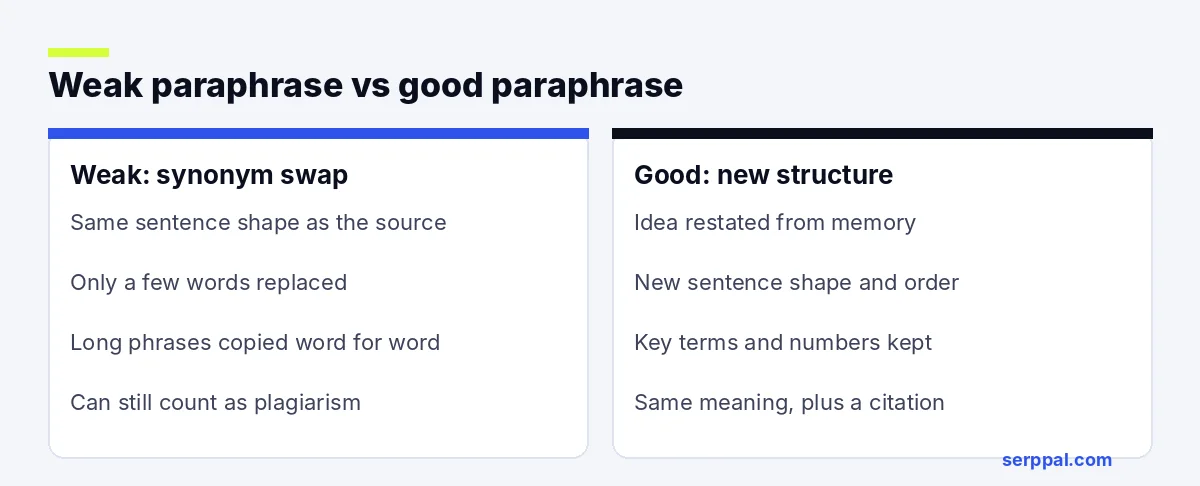
A weak version only swaps a few words ("Regular workouts improve sleep quality because they help the body regulate its internal clock"). That is too close to the original and can still count as plagiarism if the source isn't cited.
How to paraphrase in your own words, by hand
A paraphrase generator is fast, but knowing how to rephrase sentences manually helps you check its work. Use this method:
- Read the paragraph until you understand it. You can't reword an argument you don't follow.
- Cover the original and write the main point from memory. This forces new sentence structure instead of word swaps.
- Change the structure. Start with a different part of the idea, combine or split sentences, switch between active and passive.
- Keep key terms. Technical terms, names and numbers usually stay the same.
- Compare with the original. Make sure the meaning matches and no phrase of three or more words is copied unless you put it in quotation marks.
- Add the citation. Credit the source, even though the wording is now yours.
AI paraphrasing, writing and plagiarism: do you still need a citation?
Yes. Paraphrasing changes the wording, not the ownership of the idea. If the information comes from a book, article, study or website, you need a citation in whatever style your class or publication uses, such as APA or MLA. Most styles ask for the author and year (APA) or the author and page (MLA) right after the paraphrased text.
To avoid plagiarism with paraphrased text:
- Credit every source you paraphrase, not only the ones you quote.
- Don't put a source into a paraphraser and present the output as your own idea. Originality comes from your thinking, not from new synonyms.
- Use quotation marks for any exact phrase you keep.
- Check your school's or employer's rules about AI tools before you use one.
Is using a paraphrasing tool considered cheating?
It depends on how you use it and the rules you work under. Using a paraphraser to improve your own sentences is usually fine, much like a grammar checker. Running someone else's work through it to submit as yours is plagiarism, whatever tool you use. When in doubt, ask your teacher or editor.
How to choose the best paraphrasing tool
Free and paid paraphrase generators differ more than they look. Before you pick one, check these points:
- Meaning accuracy: test it on a paragraph you know well and see if anything changes.
- Control: modes, a strength setting and term freezing beat a single button.
- Limits: free plans cap words per run or per month; Premium tiers raise them.
- File support: PDF and Word upload save time compared with copying by hand.
- Privacy: read how the tool stores the text you enter, especially for unpublished research.
- Extras: a grammar check, a Chrome extension or a built-in AI detector can be useful for AI-generated drafts.
Tips for better paraphrasing results
- Paraphrase in chunks. A paragraph at a time is easier to check than a whole essay. No tool turns a full paper around effortlessly and perfectly in one pass.
- Paraphrase text in stages. Transform one section, check it, then move on.
- Start light. Use a low setting first; turn it up only if the result is still too close to the original.
- Protect key words. Freeze names, brand terms and jargon so the tool doesn't replace them with wrong synonyms.
- Read it out loud. If a sentence trips you up, try rephrasing it again, rewrite it by hand, or refine it with a different mode.
- Keep your voice. Edit the output so it sounds like the rest of your writing, then check grammar and formatting before you publish anything polished.
- Adapt for the reader. Pick a simpler mode for a general audience and a formal one for academic work; adapt the result again if needed.
Frequently asked questions
Can I use a paraphrasing tool for free?
Yes. Many paraphrasing tools have a free version with a word limit. SerpPal's paraphraser is available on the free plan, which includes a monthly allowance of AI words; paid plans raise the limit.
Does a paraphrasing tool count as plagiarism?
The tool itself isn't plagiarism. Presenting someone else's work without credit is, whether you do the rewriting by hand or with AI. Always cite the original source.
Which languages can a paraphraser work in?
Most AI paraphrasing tools handle major languages such as English, Spanish, French, German, Portuguese and Turkish. Results are usually best in English and in the language of the original text.
Will a paraphrase generator improve my essay?
It can improve clarity and flow in sentences you already wrote, and it lets you try several versions of a sentence effortlessly. It won't fix a weak argument or missing evidence, so use it at the editing stage, after the content is in place. A paragraph rewriter is a polishing tool for your writing, not a thinking tool, but it can help you communicate with confidence once the ideas are clear.