On this page
- How AI summarization works: a quick overview
- How to summarize text with AI
- Which summary format should you use?
- Summarize different documents: articles, PDFs, webpage content and video
- How to summarize a book or textbook with AI
- How to generate accurate AI summaries
- Privacy: check what the developer declares about your data
- Free vs unlimited AI summarizers
- Using AI summaries for school and work
- Frequently asked questions
An AI summarizer reads a long text and gives you its main points as bullets, a short paragraph or study notes. To AI summarize an article, a PDF, a book chapter or a textbook, you paste the text, upload the document or enter a URL, choose a format and length, and get a concise summary of the key points in seconds.
This guide gives an overview of how AI summarization works, how to summarize different documents, which format fits which job, how to handle lengthy books and textbooks, and how to check accuracy and privacy before you rely on the result.
Key takeaways
- An AI summarizer can condense lengthy content into digestible summaries: key points, a TL;DR, an outline or study notes.
- Pick the format for the job: bullet points to get the gist, study notes for exams, an executive summary for a manager.
- Long documents work best when the tool reads them in parts first, so nothing in the middle gets skipped.
- AI can miss nuance or get a number wrong. Check key facts against the source.
- Read the privacy policy before you upload private documents to any summarizing tool.
How AI summarization works: a quick overview
A text summarizer uses AI-powered algorithms, usually a large language model, the same kind of AI behind ChatGPT, to read a text and generate summaries that keep the main ideas. Older tools were extractive: they pulled out sentences that looked important and stitched them together. Modern AI summarization is abstractive: it writes new sentences that combine ideas from across the text, so the result reads naturally and follows the structured format you ask for. A general AI chat app like ChatGPT can summarize too, but a dedicated summarizing tool gives you fixed formats, length control and support for long documents.
People use one to:
- Skim online articles, a webpage or a report in seconds before deciding to read it in full.
- Identify key findings in academic papers and research papers, including what their citations point to.
- Turn a textbook chapter into structured study notes.
- Review a book they read months ago.
- Get actionable insights from a long email thread, chat log, transcript, slides or meeting notes.
Students, researchers, content creators, marketers and busy professionals all use digestible summaries the same way: to identify faster which content deserves a full read. SerpPal's summarizer works on the free plan with no card needed and reads pasted text, PDF and Word files, and web links. For quick checks that need no account at all, such as counting words or testing readability, see our free writing tools.
How to summarize text with AI
- Add the text. Paste it into the box, upload a PDF file, DOCX or TXT (the common file formats), or enter the URL of an article.
- Give it a title (optional). When you import a file or link, the title is filled in for you.
- Choose a format. Bullet points, a paragraph, key takeaways, a TL;DR, an executive summary, an outline, study notes with Q&A, or section by section.
- Choose a length. Short is about 10% of the source, medium about 20%, detailed about 30%. Short summaries are the most concise; detailed ones keep more insights and examples. Adding a focus ensures the summary covers what you care about.
- Add a focus (optional). For example, "only the findings about pricing" or "explain it for a 10th grader". You can also pick another language for the summary.
- Click Summarize. The AI tool will generate summaries almost instantly for short texts. Read the result, then copy it or download it as a Word file.
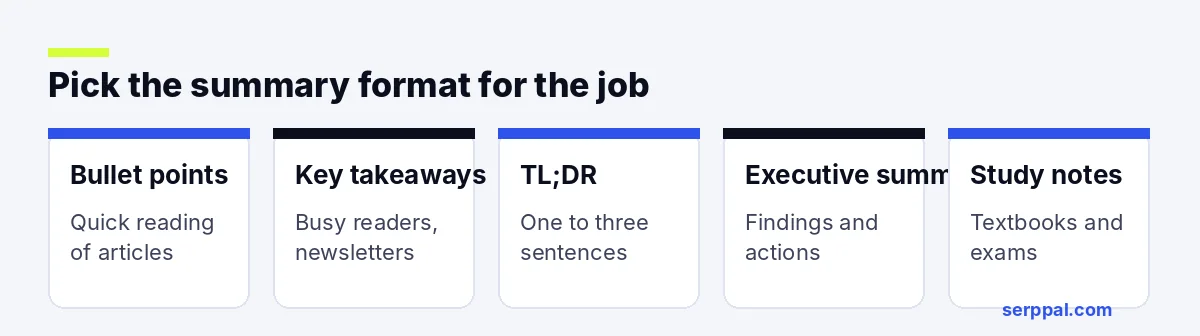
Which summary format should you use?
| Format | What you get | Best for |
|---|---|---|
| Bullet points | One easy-to-understand idea per bullet | Articles, quick reading |
| Paragraph | A short, well-written summary | Essays, book reports, abstracts |
| Key takeaways | 5 to 10 standalone, actionable points | Busy readers, newsletters |
| TL;DR (tldr) | One to three sentences, for instant summaries | Emails, sharing a link |
| Executive summary | Context, findings, implications and actions | Reports for a manager |
| Outline | Headings and sub-points that mirror the source | Long chapters, papers |
| Study notes + Q&A | Key concepts, definitions and review questions | Textbooks, exam revision |
| Section by section | A few lines per part of the source | Long reports, books |
Summarize different documents: articles, PDFs, webpage content and video
Article summary: paste text or a URL
Can you summarize this article for me? Yes, that's the most common job for an article summarizer. Paste the article's text or its URL, choose bullet points or key takeaways, and pick a short length. If a link fails, the webpage may need a login or block automatic readers, which is common for paywalled content; open it in your browser, copy the text and paste it in.
Summarize PDF reports and research papers
A PDF summarizer works only if the PDF has selectable text. Reports, academic papers and ebooks usually do. Scanned pages are images, so you need to copy the text in or use an AI chat that can read scans. For dense research papers, the outline format keeps the method, results and limitations apart, which makes the summarized version easier to check.
YouTube video summarizer
A video summarizer works from the transcript, not the video itself. Many AI YouTube tools fetch the captions and summarize them. You can do the same with any text summarizer: open the transcript, copy it, and paste it in. A one-hour talk is often around 8,000 to 10,000 words of transcript, so a text summarizer saves a lot of time, and a concise summary lets you skim the key moments before you watch.
Web summarizer extensions and desktop apps
Some summarizers run as a Chrome browser extension, a desktop app or a phone app, so you can summarize webpages without leaving them and navigate long pages more efficiently. Some add visual views such as mind maps of webpages, YouTube videos and PDFs. Office suites have joined in too: Copilot in Word can summarize a document you have open. They're handy for reading news, but check what data an extension can access in your browser before you install it.
How to summarize a book or textbook with AI
Books and textbooks are lengthy texts, so how the summarizer tool handles length matters. A good AI book summarizer reads lengthy documents in parts, writes notes on each part, and then writes the summary from those notes. Reading in parts ensures the middle chapters aren't skipped. That way a 300-page book gets the same attention at page 200 as at page 2.
Tips for long texts:
- Summarize a chapter at a time. One summary per chapter keeps more detail than one summary of the whole book. A whole-book summary of 100,000 words squeezed into a page loses most of it.
- Use the outline format when you need the structure, not just the conclusions. It turns a dense chapter into a structured map.
- Use study notes + Q&A for textbooks. You get definitions and review questions that help comprehension.
- Extract only what you need. Use the focus box. "Only the causes of the war" gives you a more useful summary than the whole chapter.
For flashcards and a practice quiz from the same chapter, SerpPal's study sets turn your notes into review material.
How to generate accurate AI summaries
AI summaries are usually good at capturing the main argument and structure of a text, and a concise prompt or focus helps the AI tool generate accurate output. Their accuracy drops on:
- Numbers and names. A good tool is told to keep them exact, but always check key figures against the source.
- Nuance. A careful "the data suggests" can turn into a flat "the data proves".
- Complex arguments. Multi-step reasoning can get flattened into a single claim. Analyze the source yourself when the logic matters.
- Tone. Opinion pieces, sarcasm and fiction can lose their meaning when compressed.
Use the summary to understand and decide, then go back to the source and its references for anything you quote, cite or act on. Whatever the summarizing tool promises, nothing replaces a quick check of the summarized facts.
Privacy: check what the developer declares about your data
Before you upload a contract, medical record or unpublished paper to any summarizing tool, read how it handles data. Look for whether the text is stored, whether it is used to train models, and how to delete it. For a browser extension, the store listing shows what the developer declares about data collection; reading it ensures you know what leaves your browser. For sensitive material, remove names and private details first, or summarize only the parts you need.
Free vs unlimited AI summarizers
Many tools advertise unlimited summaries, but read the fine print. "Unlimited" often means unlimited short texts with a cap per summary, or unlimited use only on a paid plan. Free plans usually limit the words per summary, the number of summaries per day, or the file size.
For occasional use, a free plan is plenty. If you summarize long reports every day, an unlimited or high-limit plan saves time. Either way, compare what each plan counts: words in, words out, or number of documents. Content creators who summarize research for posts and videos often hit free limits first.
Using AI summaries for school and work
For studying, summarizing is a strong learning technique when you do part of it yourself, and AI can transform how fast you get through a reading list. Read the summary first to get the map, then read the text, then write your own summary from memory and compare.
For school assignments, check your class rules. Using an AI summary to understand a reading is usually fine; handing in an AI summary as your own work usually isn't. If you use ideas from the source, cite the source, not the summarizer.
At work, summarizing content fits naturally into a reading workflow, and customizable formats help you create summaries for different readers: long reports, research, meeting notes and email threads. An executive summary with a focus on "decisions and next steps" is often all a manager needs.
Frequently asked questions
Is there a free AI summarizer?
Yes. Many summarizers have a free version with a word limit; few are truly unlimited, even when the app says so. SerpPal's summarizer is available on the free plan, which includes a monthly allowance of AI words, and paid plans raise it. Write your own polished version when clarity matters, for example in a cover note.
Can AI summarize a PDF?
Yes, if the PDF has selectable text. Upload it and choose a format. Scanned PDFs are images, so copy the text in or use a tool that can read scanned pages.
How long can the text be?
It depends on the tool. SerpPal's summarizer reads long documents in parts, so you can summarize a full report or a book chapter. The summary length is capped, so for very long texts use section by section for more detail.
Can an AI summarizer work in other languages?
Most can. Many tools summarize in the language of the source and can also write the summary in another language, such as Spanish, German or Turkish.