On this page
- Key takeaways
- What internal linking is and why it boosts SEO
- Internal linking tools compared: the best internal linking tools by type
- Features that matter in an internal linking tool (and in a link analysis report)
- Build a perfect link structure automatically? Decide how much automation you trust
- Internal linking strategies: build a powerful internal linking structure
- How to run an internal link audit
- Choosing the right internal linking tool by site type
- Internal linking best practices and common mistakes
- Conclusion
- FAQ
An internal linking tool finds the internal link opportunities your pages are missing: orphaned pages nobody links to, important pages buried five clicks deep, and sentences in old posts that could point to new ones. Does internal linking help SEO? Yes, in two measurable ways: it helps Googlebot discover and understand your pages, and it passes authority from the pages that have it to the pages that need it, which is why a good link structure can boost visibility across a whole site. This guide compares the types of internal linking tools (WordPress plugins, site crawl software, SEO suites with link analysis, editor-side link suggestions and the free Google Search Console report), the features worth paying for, how much automation to trust, and an internal linking strategy and review workflow you can run on any platform.
Key takeaways
- Internal links help SEO through discovery (crawlers follow links), relevance (anchor text and context) and authority (link equity flows from strong pages to weak ones).
- Tools come in five types: WordPress plugins, site spiders, SEO suite link analysis, editor-side link suggestions, and Google Search Console's free Links report.
- Contextual suggestions you approve beat automated linking. Automatic internal linking saves time but produces repetitive anchors and odd placements unless the rules are tight.
- An internal link audit has four steps: inventory the site, find orphaned and weak pages, add relevant internal links from your strongest pages, recheck after a crawl.
- Pick a tool by platform and site size. A 50-page site needs Search Console (GSC) and a spreadsheet; a 5,000-page site needs a spider and a dashboard.
What internal linking is and why it boosts SEO
An internal link is a hyperlink from one page on your website to another page on the same domain. In HTML it's an anchor element with an href pointing at your own URL and visible anchor text: <a href="/guides/site-audit">site audit guide</a>. Links live in navigation, breadcrumbs, footers, sidebars and, most usefully, inside body copy where the context explains why the link is there.
Three things happen when you link well:
- Discovery and crawlability. Search engines find pages by following links. A page with no internal links (an orphaned page) depends on the sitemap alone and is crawled less often.
- Relevance. Descriptive anchor text tells Google what the target page is about, and contextual links carry semantic relationships between topics. Twenty links saying "keyword research template" are a strong signal; twenty saying "click here" are nothing.
- Authority. Pages that earn backlinks accumulate authority, and internal links distribute it. Your most-linked pages are usually a few guides and the homepage; the pages you want to rank are often new and unlinked. Interlinking is how you connect the two, and the connections are what a tool uncovers.
Internal links don't create rankings on their own, and more isn't better. Relevance and placement matter more than count (Google's link best practices focus on crawlable links and descriptive anchor text), and Google's algorithms have long discounted sitewide boilerplate links in favour of contextual ones. But on most sites internal linking is the cheapest on-page SEO work available, because the authority already exists and simply isn't reaching the right pages. It's also the part of an SEO strategy most site owners can do without a budget.
Internal linking tools compared: the best internal linking tools by type
| Type | What it does | Best for | Watch out for |
|---|---|---|---|
| WordPress internal linking plugins | Suggest links while you edit, report inbound and outbound links per post, bulk-add links, find orphans | WordPress sites of any size; editors who want suggestions in the editor | Automatic keyword-to-link rules; plugin bloat; plan limits |
| Site spiders (desktop or cloud) | Visit every page, report inlinks, outlinks, anchor text, click depth, orphan pages, broken links | Large sites, any CMS, technical reviews | Learning curve; data, not suggestions |
| SEO suite link analysis | Site review module with internal link reports, linking opportunities, anchor analysis and a dashboard | Teams already paying for an all-in-one toolkit | Expensive if internal links are all you need |
| Editor-side link suggestions | The writing tool reads your sitemap and suggests existing pages to link as you write, often with AI reading the sentence | Content teams publishing regularly | Only covers new content, not the back catalogue |
| Google Search Console (free) | Links report: top internally linked pages, and incoming internal links per page | Everyone, as a baseline | Sampled, no anchor text, no suggestions |
Examples of each type
To make the categories concrete, here are well-known tools in each one. Features and plans change often, so check each tool's own site before you buy.
- WordPress plugins: Link Whisper suggests links inside the post editor and reports orphaned posts; AIOSEO's Link Assistant does similar work inside the All in One SEO plugin; Internal Link Juicer focuses on keyword-based automatic linking.
- Platform-independent link tools: LinkStorm works from a crawl of your live site, so it isn't tied to one CMS.
- Site spiders: Screaming Frog SEO Spider and Sitebulb report inlinks, click depth and orphans for any site.
- SEO suites: the site audit modules in Semrush and Ahrefs include internal link reports alongside everything else.
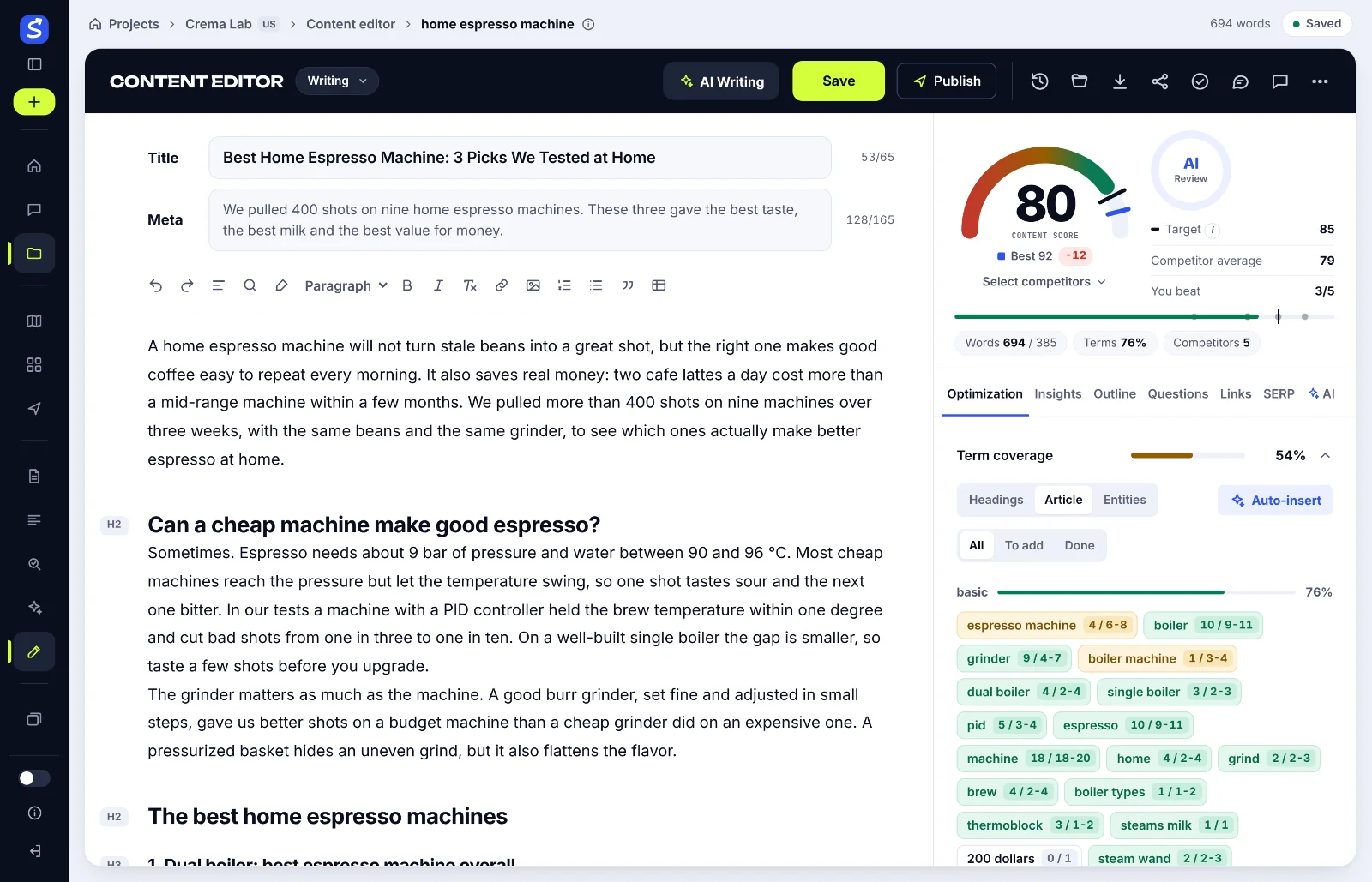
Most sites end up with two of these: a free baseline (GSC, or a spider's free tier) plus whichever one fits the publishing workflow. The pros of each type are real, so the comparison is about fit, not a single winner. SerpPal falls into the editor-side category: it reads your sitemap and suggests existing pages to link while you write, so new articles leave the editor already connected; see sitemap and internal links. It doesn't analyze your back catalogue, which is what the spider is for.
Features that matter in an internal linking tool (and in a link analysis report)
- Contextual link suggestions. A good suggestion names the source sentence, the anchor and the target page, and the anchor fits the sentence. Keyword matching alone produces links that read like ads; semantic matching, where the tool reads the meaning of the paragraph, produces far fewer rejects and finds semantic relationships a keyword list misses.
- Orphan page detection. Pages with zero links pointing to them. This is the single most valuable report; fix those first.
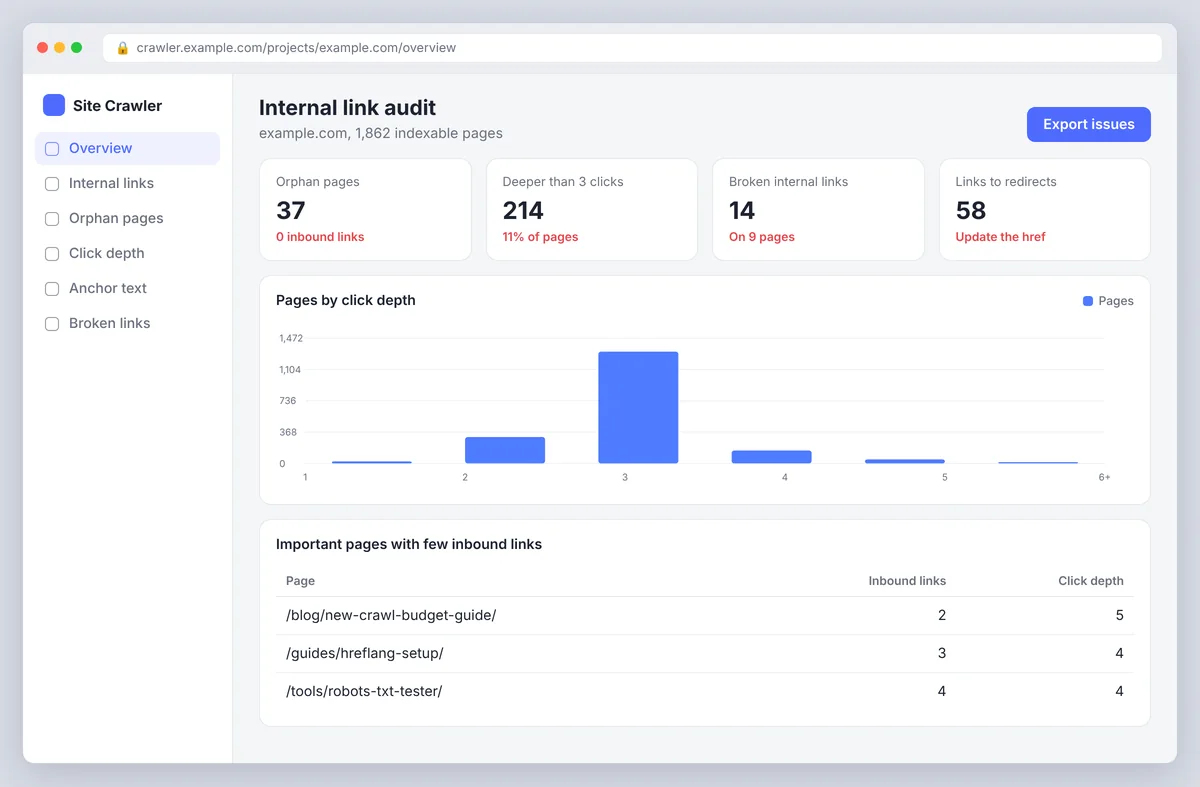
- Click depth. How many clicks from the homepage to reach each page. Important pages deeper than three clicks need links from higher up; optimize depth before anything else on large sites.
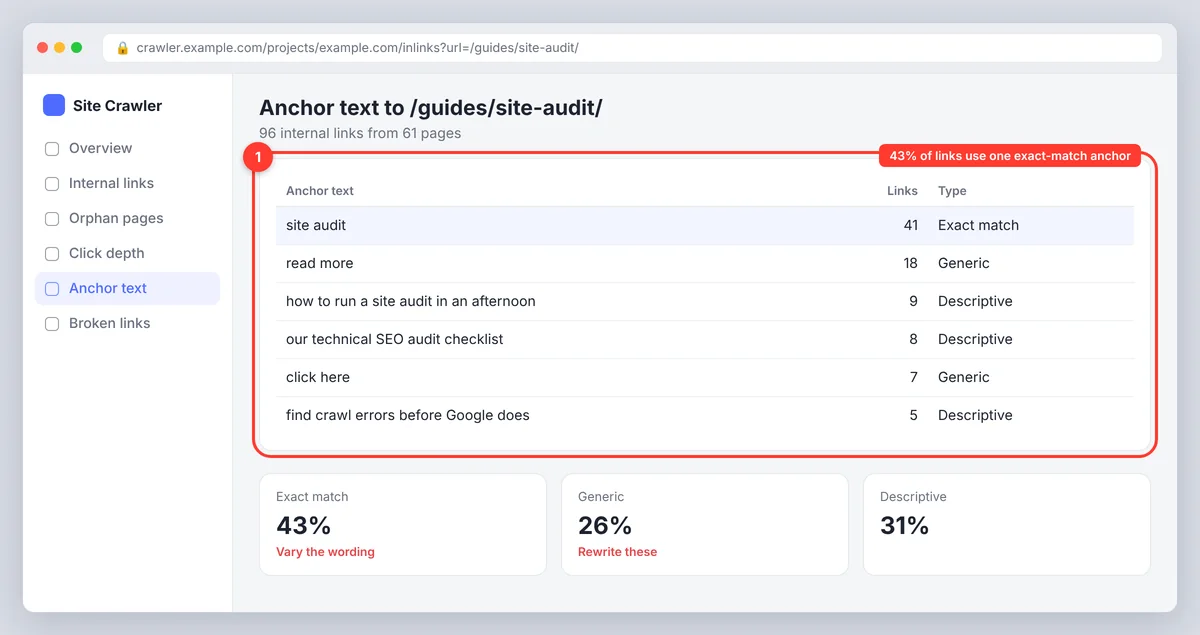
- Anchor text report. All anchors pointing to a page, so you can spot repetition, exact-match stuffing and vague "read more" links.
- Broken internal links and redirects. Links to 404s and to addresses that redirect waste crawl budget and authority. An internal linking checker should flag both, along with nofollow links and canonical mismatches.
- Inbound and outbound counts per page. Pages with hundreds of outbound links (navigation-heavy templates) dilute each link; pages with many inbound links are your authority sources. The insights here drive every other optimization.
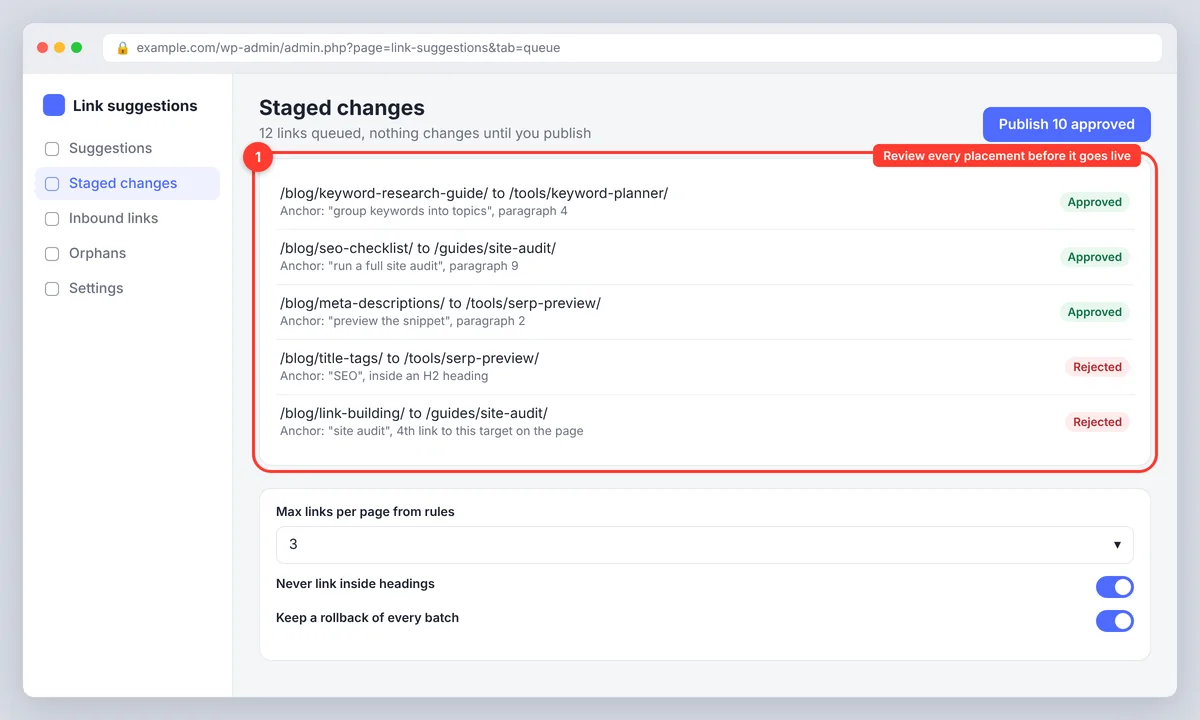
- Review before publish. Bulk changes should be staged, previewable and reversible. If a tool can't show you what it's about to change, don't let it change anything.
- Platform fit. A WordPress SEO plugin is useless on Shopify or a custom CMS. Spiders work everywhere because they read the live site, JavaScript-rendered pages included.
- Analytics. A dashboard that pairs link changes with impressions, CTR and clicks from GSC or Google Analytics, so you can see whether the work moved anything.
- Custom rules. The ability to exclude pages, cap links per page and set your own linking pattern, rather than relying on the tool's defaults. Custom anchor wording per link matters too; a tool that only embeds the exact keyword is impacting SEO negatively on every page it touches.
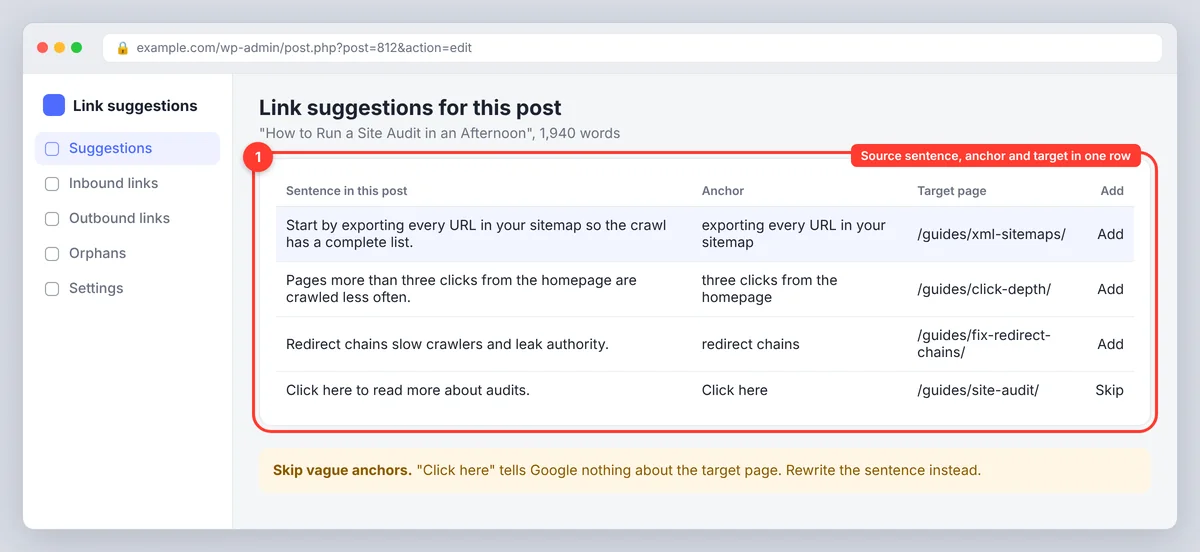
Build a perfect link structure automatically? Decide how much automation you trust
Tools offer three levels of automation. Suggestions only: the tool proposes, you decide, nothing changes until you click. Staged approval: the tool queues a batch of changes you review and publish together. Automated live linking: the tool inserts links on its own, usually by matching target keywords to a target URL across the site.
Use the least automated level that still saves you time. Automated keyword-based linking looks efficient and has predictable failure modes: the same exact-match anchor repeated on every page, links inserted into headings or the first sentence, loops between two pages, and links that make sense to a pattern matcher but not to a reader. If you do use automatic rules, cap the number of links per phrase and per page, exclude headings and navigation, leave existing links untouched, and sample twenty pages before enabling it sitewide. AI-powered suggestions that read the sentence are a step up from keyword rules, but they still need a human to confirm the link helps. Over-optimization is the risk in every automated setup: too many links, too similar anchors, too little judgment. Automate the finding, not the deciding.
Internal linking strategies: build a powerful internal linking structure
1. Start from your authority pages
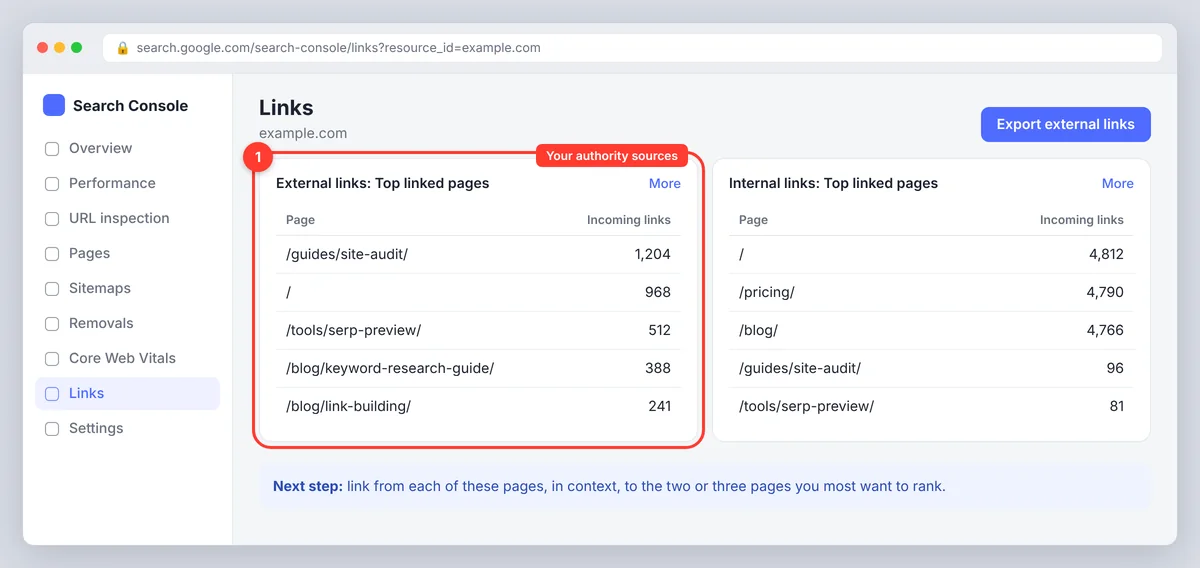
Open the Links report in Google Search Console (or your spider's inlinks report sorted by external links) and list the ten pages with the most backlinks. Those are your sources. Every one of them should link, in context, to the two or three pages you most want to rank. This single step moves more authority than any other.
2. Build topic clusters around a pillar page
Group related posts under a hub page that covers the topic broadly. The hub links to each supporting post; each supporting post links back to the hub and to its closest siblings. The structure tells Google which page is the main answer for the topic and keeps readers inside the cluster. Our guide to topical authority and content clusters covers how to plan the clusters.
3. Link forward from old content when you publish
New posts link backward naturally; nobody remembers to link forward. Make it a publishing step: when a post goes live, add links to it from three older posts that already rank for related terms. Editor-side link suggestions do the backward links; the forward links are the ones you have to schedule. Analyzing your last ten posts for forward links is a good first task for any new tool; it's the quickest way to maximize what a few hours of work returns.
4. Write descriptive, varied anchor text
Use anchors that describe the destination ("how to disavow links in Search Console") rather than generic phrases, and vary the wording across pages. Mention the anchor phrase in the sentence naturally before linking it, so the context supports the target. Avoid the same exact-match keyword as the anchor on every page; it reads like automation and adds nothing. Affiliate links and other external links are a separate question; the rel attribute matters there, not here.
5. Fix depth and orphans with navigation, not just body links
If a category has 300 posts and the category page shows ten, the other 290 are effectively orphaned. Add pagination that search engines can follow, related-post sections, breadcrumbs and an HTML sitemap page. Site structure fixes lift hundreds of pages at once; body links lift one at a time.
How to run an internal link audit
- Inventory your pages. Export the sitemap or crawl the site. Remove parameter URLs, redirects and anything noindexed. This is your page list.
- Collect link data. From a spider or an audit tool: inbound internal links, outbound links, click depth and anchor text per page. From GSC: the Links report's internal links table and, for authority, the external links table.
- Identify important content. Tag the pages that matter commercially or for traffic: money pages, pillar guides, posts ranking on page two. These are where the best opportunities live, and the ones to identify first.
- Find the gaps. Orphan pages (zero inbound), important pages with fewer than five inbound links or more than three clicks deep, broken internal links, links to redirecting addresses, and anchor text that repeats or says nothing. These are your linking opportunities.
- Add links from the strongest relevant sources. For each gap, find two or three pages with authority and a sentence where the link fits. Do this manually or from a tool's suggestions, but read every placement so each one is contextually right.
- Recheck and monitor. Run the spider again to confirm the changes, then watch impressions, CTR and average position in GSC over four to eight weeks. Treat improvements in SEO performance as signals to investigate, not proof; rankings move for many reasons.
Repeat the review at migrations, redesigns and every six months or so; more often for stores that add and remove products constantly.
Choosing the right internal linking tool by site type
- Small WordPress blog (under 200 pages): Search Console's Links report plus a WordPress internal linking plugin for suggestions, or your editor's sitemap-based suggestions. Manual forward-linking on publish.
- Content site with a team (200 to 5,000 pages): A spider for the quarterly review, editor-side suggestions for new content, and a documented publishing step for forward links.
- E-commerce or large site (5,000+ pages): A cloud spider scheduled weekly, click-depth and orphaned-page reports as KPIs, template-level fixes (pagination, related products, breadcrumbs) before any page-level work.
- Non-WordPress CMS: Spiders and SEO suite link analysis, since plugins won't install. The functionality is the same; only the editor integration differs. Editor-side suggestions still work if the tool reads your sitemap rather than your CMS, and a standalone tool is easier to integrate than a suite.
Internal linking best practices and common mistakes
- Counting links instead of judging them. Ten relevant links beat fifty forced ones; link count is the least useful of all the metrics a tool reports.
- Exact-match anchors everywhere. Vary the wording; the pattern is obvious to readers and to Google.
- Linking only from new posts to old ones and never the reverse.
- Ignoring navigation and templates, where one fix changes thousands of links.
- Letting automatic rules run without a cap, a sample test or a rollback.
- Linking to thin, outdated or redirecting pages. Check the targets too.
- Adding nofollow to internal links. There's almost never a reason; nofollow just blocks the authority you're trying to pass.
- Optimizing for a score. The goal is a site structure a reader can navigate, not a dashboard full of green. An optimized structure generates more linking opportunities over time because every new post has somewhere to point.
Conclusion
The best internal linking tool is the one that fits how you publish. Start with the free Links report in Search Console, add a spider or a plugin when the site outgrows a spreadsheet, and let your editor suggest links as you write. Then do the part no tool does for you: link forward from strong old pages, fix orphans and deep pages, and read every link before it goes live. For where links fit among the other page elements, see the on-page SEO checklist.
FAQ
Does internal linking help SEO?
Yes. Internal links help search engines discover pages, understand what they're about through anchor text, and pass authority from well-linked pages to others. They don't guarantee rankings, but a page with no internal links is at a clear disadvantage.
What is the best free internal linking tool?
Google Search Console's Links report is free and shows which of your pages have the most internal links and which pages link to any given page. Several spiders offer a free tier for small sites. Together they cover orphaned-page detection and a basic internal link analysis without spending anything, and most SEO tools with a free plan include some of this.
Is automatic internal linking safe?
Only with tight rules: limits per phrase and per page, no links in headings or navigation, existing links left alone, and a sample test before enabling it sitewide. Suggestion-based tools where you approve each link are safer and usually not much slower; the automated option is for stable terminology on large sites.
How many internal links should a page have?
There's no fixed number. Link wherever the reader benefits, typically a handful of contextual links in a long article, and make sure important pages receive links from several relevant pages rather than counting outbound links.
How often should I audit internal links?
After any migration or redesign, and otherwise every six months for stable sites. Stores and large publishers that add and remove pages constantly should run the spider monthly or weekly and track orphaned pages and click depth as ongoing metrics.