On this page
- What is the Grammarly readability score?
- Where to find the readability score in Grammarly
- What is a good Grammarly readability score?
- How to improve your readability score and writing
- Other readability formulas
- Limitations of readability scores
- Grammarly readability score alternatives
- Grammarly's AI writing features, AI detection and humanizers
- Frequently asked questions
The Grammarly readability score is a number from 0 to 100 that estimates how easy your text is to read, based on the Flesch reading ease formula. Higher is easier: a score of 60 or more is generally easy for most adults, while scores below 30 read like academic or legal text. Grammarly shows it in the Performance statistics of the Grammarly Editor, next to word length and sentence length.
This guide explains what the readability score means, where to find it, what a good score is, how to improve yours, and which free alternatives to use if you don't have Grammarly or want a second opinion.
Key takeaways
- Grammarly's readability score uses the Flesch reading ease scale: 0 to 100, higher means easier to read.
- It's driven by words per sentence and syllables per word, not by grammar, tone or meaning.
- For most web content and emails, aim for 60 or higher; academic writing is often lower, and that can be fine.
- Find it under Performance in Grammarly; the score shows alongside other text statistics like word count.
- Free alternatives such as SerpPal's readability tool, Hemingway or Microsoft Word's readability statistics give similar scores, often with sentence-level highlights.
What is the Grammarly readability score?
Grammarly is a writing assistant best known for grammar, spelling and clarity suggestions. Its readability score is one of the text statistics it reports. According to Grammarly, the score is based on the Flesch reading ease test, which looks at the average number of words per sentence and the average number of syllables per word.
The idea is simple: shorter sentences and shorter words are easier to read. A text full of long sentences and multi-syllable words scores low; a text of short, plain sentences scores high.
How to read the score
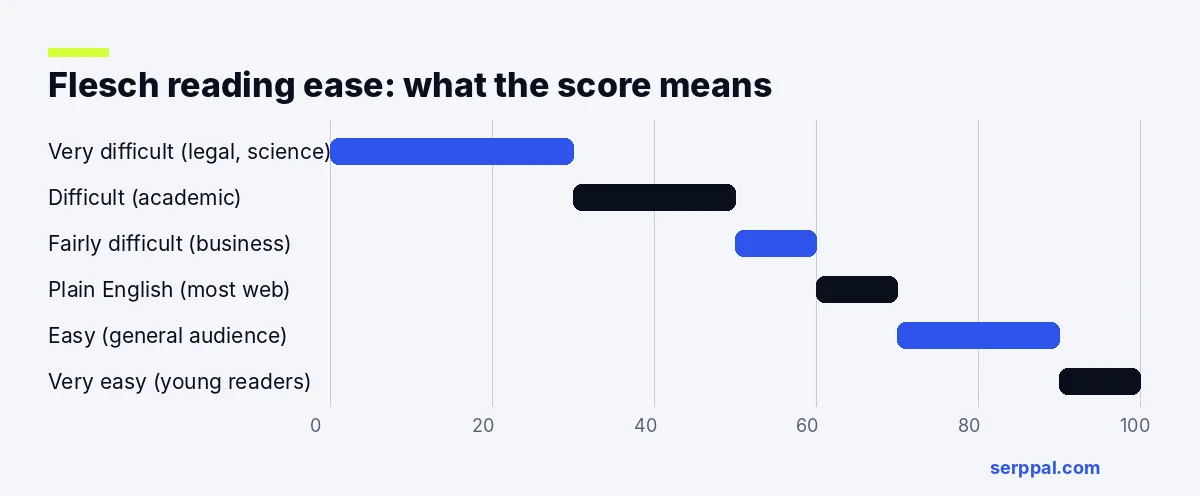
| Score | Difficulty | Roughly suits |
|---|---|---|
| 90 to 100 | Very easy | Young readers |
| 70 to 89 | Easy to fairly easy | General audiences, casual web content |
| 60 to 69 | Plain English | Most web content, emails, marketing |
| 50 to 59 | Fairly difficult | Professional and business writing |
| 30 to 49 | Difficult | Academic and technical writing |
| 0 to 29 | Very difficult | Legal and scientific papers |
Where to find the readability score in Grammarly
- Open your document in the Grammarly Editor (the web or desktop app), or select and copy your text and paste it into a new document. You can also upload a Word file or PDF.
- Click the overall score or the Performance option.
- Look under Readability for the readability score, alongside average word and sentence measures.
Grammarly also compares your text with other documents checked by its users, which can help you see whether a draft is harder to read than typical writing. The exact layout changes from time to time, so look for Performance or Statistics if the menu has moved.
What is a good Grammarly readability score?
It depends on your target audience and goals. In Grammarly you can set goals for audience, formality and domain, and suggestions adapt to your intended audience. As a guide:
- Blog posts, websites and marketing: 60 or higher.
- Emails and workplace writing: around 50 to 70.
- Academic essays and reports: 30 to 50 is common, because technical terms are longer.
- Legal or scientific writing: often below 30, which is expected for specialists but hard for anyone else.
A higher score isn't always better. If simplifying means losing precision, a lower score can be the right call. Complex topics sometimes need complex vocabulary; the goal is concise, readable writing, not the simplest possible words. Use the number to find dense passages, then decide case by case.
How to improve your readability score and writing
- Split complex sentences. Select the longest sentence in each paragraph and copy it into a new line to see if it can be two. Aim for an average of 15 to 20 words per sentence, and fix run-on sentences, which hurt both grammar and readability. Run-on fixes are one of the most instant wins, and they cut complexity fast.
- Use simpler vocabulary. "Use" instead of "utilize", "help" instead of "facilitate". Replace complex words when a common one works.
- Be concise. "In order to" becomes "to"; "due to the fact that" becomes "because". Grammarly's conciseness suggestions flag many of these.
- Prefer active voice. It's usually shorter and clearer.
- Vary sentence structure and sentence length (good sentence structure mixes short and long) so the text doesn't feel choppy, and simplify complex sentences that hide the point.
- Fix mistakes first. Spelling and grammar mistakes slow readers down more than any long word. Add names and technical terms to your dictionary so they aren't flagged.
- Break up paragraphs and add headings and lists; this formatting helps readers even though it doesn't change the formula.
Our guide on how to improve readability walks through 15 practical edits with a before and after example.
Other readability formulas
Flesch reading ease is only one way to measure readability. Other tools report:
- Flesch Kincaid grade level (often written Flesch-Kincaid): the U.S. school grade needed to understand the text; an eighth-grade level suits most web writing.
- Gunning Fog index: a grade level based on sentence length and the share of complex words (three or more syllables).
- Coleman-Liau index: a grade level based on characters per word instead of syllables.
- SMOG: estimates the years of education needed, often used for health writing.
Each measures complexity a little differently, so the same text can score differently, and none of them can tell whether your writing is readable for a specific audience. Some tools, such as Originality.AI's readability tool, show several formulas side by side, which helps you see the complexity of a text from more than one angle.
Limitations of readability scores
Readability formulas, including the one behind Grammarly's score, are useful but blunt:
- They don't understand meaning. A short, confusing sentence can still score well.
- They penalize necessary technical terms with many syllables.
- They ignore layout, headings and formatting.
- Different tools count syllables and sentences slightly differently, so scores vary between tools.
For a deeper look at the formulas behind these numbers, see our guide to readability scores.
Grammarly readability score alternatives
If you don't use Grammarly, or want a second opinion, these tools give a readability score too:
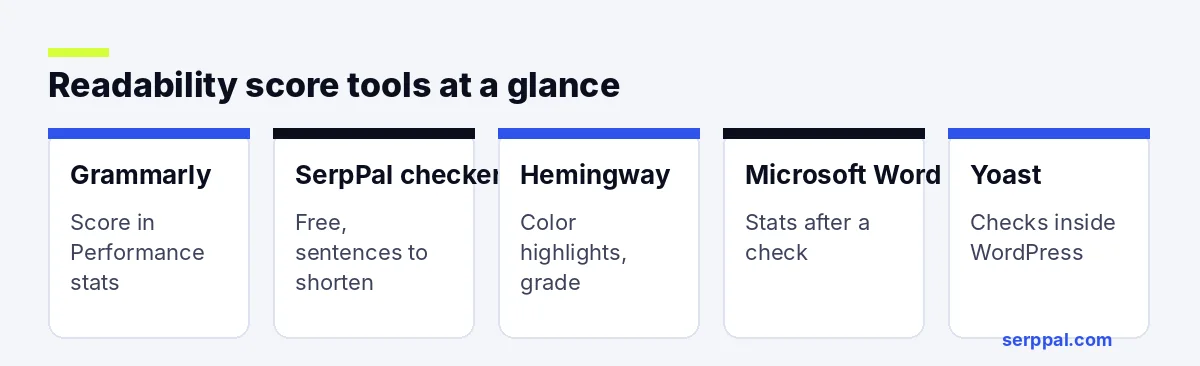
| Tool | Cost | What you get |
|---|---|---|
| SerpPal readability tool | Free, no sign-up | Reading ease, grade level and the sentences to shorten |
| Hemingway Editor | Free web version | Grade level and color highlights for hard sentences, adverbs and passive voice |
| Microsoft Word | Included with Word | Flesch reading ease and Flesch-Kincaid grade after a spelling and grammar check |
| Yoast SEO (WordPress) | Free plugin | Readability analysis with traffic-light checks inside WordPress |
| Readable | Paid, with a trial | Several readability formulas and detailed reports |
SerpPal's free readability checker
Our free readability checker runs in your browser with no sign-up and gives instant feedback after pasting your text. It's a quick way to improve your readability before you publish. Paste your text to see the Flesch reading ease, the grade level and a list of the sentences that drag the score down, so you know exactly what to shorten. If you write SEO content, SerpPal also shows reading ease in its Insights tab while you write.
Hemingway
Hemingway highlights hard-to-read sentences in yellow and red, flags adverbs and passive voice, and shows a grade level. It's great for spotting problem sentences at a glance.
Microsoft Word
Word can show readability statistics after a spelling and grammar check. Turn it on under File, then Options, then Proofing, by ticking "Show readability statistics".
Grammarly's AI writing features, AI detection and humanizers
Beyond readability, the Grammarly Editor suggests fixes for tone and word choice, offers a personal dictionary, plagiarism detection and AI detection on some plans, and works in the Chrome browser, Google Docs and many websites. Grammarly AI, its generative AI assistant, works in Chrome and adds generative writing help that can draft or adjust text. Paid plans, including Grammarly Pro, add more of these features, such as tools to detect AI text and check plagiarism in long documents; Grammarly Pro is aimed at people who write every day, and many people now search for a free AI humanizer from Grammarly or elsewhere. A readability score and an AI humanizer solve different problems: the score tells you how hard your text is to read, while a humanizer adjusts AI-sounding drafts so they read more naturally. If that's what you need, SerpPal's AI humanizer has a free allowance on the free plan.
Frequently asked questions
What does the Grammarly readability score mean?
It's a 0 to 100 score based on the Flesch reading ease formula. Higher scores mean shorter sentences and shorter words, which most readers find easier.
What is a good readability score on Grammarly?
For most web content and emails, 60 or higher. Academic and technical writing often scores 30 to 50, which is normal for those audiences.
Is the Grammarly readability score free?
Grammarly shows performance statistics in its editor; which statistics you see can depend on your plan and app. Free readability checkers give the same kind of score without an account.
Can Grammarly detect AI writing or plagiarism?
Grammarly offers an AI detector and a plagiarism checker, with more plagiarism checks on Pro plans. Like every tool that tries to detect generative AI text, its AI writing results are estimates, so don't treat one percentage as proof. A plagiarism check compares your text with web pages and papers, which is a different job from scoring readability.
Why do readability tools give different scores?
They count syllables, sentences and words slightly differently, and some use different formulas. Compare trends within one tool rather than exact numbers across tools.