On this page
- Method 1: Count words in PDF text with an online word counter
- Method 2: Convert PDF files in Google Docs
- Method 3: Convert PDF to Word in Microsoft Word
- Method 4: Convert PDF with Adobe Acrobat Pro
- Method 5: Count words from the command line
- How to count words in a scanned PDF
- Why your PDF word count might be off
- Pros and cons of each PDF word counter method
- What to look for in an online PDF word counter
- Who needs a PDF document word counter?
- How to count words in PowerPoint
- FAQ
The quickest way to count words in a PDF is to open the PDF document, select all the text (Ctrl+A, or Cmd+A on a Mac), copy it, and paste it into a free online word counter. If you need an accurate word count for a long file, convert the PDF to an editable document in Google Docs or Microsoft Word and use their built-in counter.
Most PDF readers, including the free Adobe Acrobat Reader and Mac Preview, don't show a word count on their own. This guide walks through five methods that work for PDF files, the pros and cons of each, how to handle scanned PDFs, and how to count words in PowerPoint too.
Key takeaways
- Copy-paste into an online PDF word counter is fastest and works for most text-based PDF files.
- Google Docs and Microsoft Word can convert a PDF and give an exact word count, including for long documents.
- Scanned PDFs are images, so you need OCR (text recognition) before you can count anything.
- Headers, footers, page numbers, captions and references inflate the number of words; remove them if your limit doesn't include them.
Method 1: Count words in PDF text with an online word counter
This works in any PDF reader or web browser, needs no software or sign-up, and takes about 30 seconds.
- Open the PDF document in Chrome, Edge, Adobe Acrobat Reader or Preview.
- Click inside the text and press Ctrl+A on Windows (Cmd+A on a Mac) to select all the words in the PDF.
- Press Ctrl+C (Cmd+C) to copy.
- Paste the text into a free word counter. You see the word count, character count, sentences, paragraphs and reading time right away. Nothing is uploaded, because the counter tool runs on your device.
If select-all only grabs one page, your reader may be in single-page mode. Switch to scrolling view in the toolbar, or select and copy page by page and add up the totals.
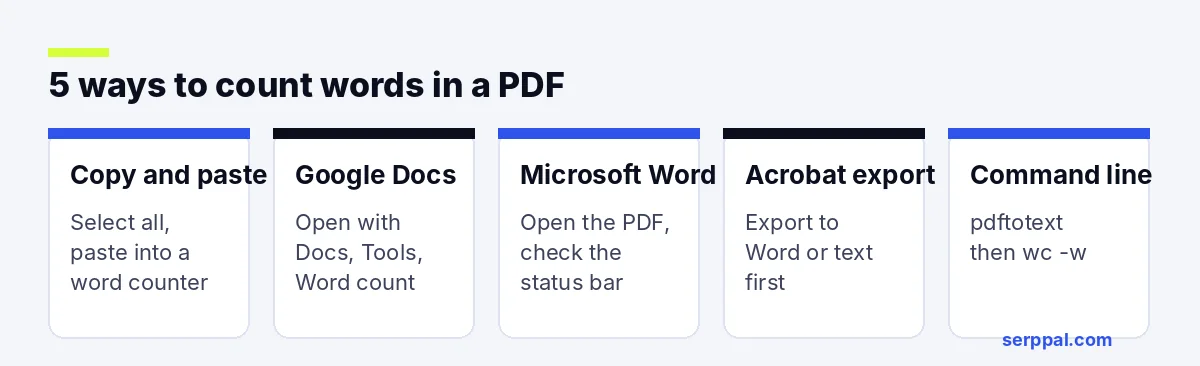
Method 2: Convert PDF files in Google Docs
- Upload or drag the PDF file into Google Drive (this requires a Google account).
- Right-click it and choose Open with, then Google Docs. The conversion turns the PDF into an editable document, and it also runs text recognition on scanned pages.
- Go to Tools, then Word count, or press Ctrl+Shift+C (Cmd+Shift+C on a Mac).
The dialog shows pages, words, characters and characters without spaces. Tick "Display word count while typing" to keep the count on screen. Our guide to the Google Docs word counter covers the tool in more detail.
Method 3: Convert PDF to Word in Microsoft Word
- In Word, go to File, then Open, and choose the PDF.
- Word warns that it will convert the PDF into an editable document. Click OK and wait for the conversion.
- Look at the word count in the status bar at the bottom, or go to Review, then Word Count.
Word's Word Count box can include or exclude text boxes, footnotes and endnotes, which helps when an assignment limit leaves them out. Complex layouts may not convert perfectly in PDF to Word conversion, but the word count is usually close. This is the method many writers and translators use for quotes.
Method 4: Convert PDF with Adobe Acrobat Pro
Adobe Acrobat Pro, the paid PDF editor, doesn't have a word count button either, but it can export the PDF to other file formats: choose Export PDF, pick Microsoft Word (DOCX) or plain text (TXT), and save. Then open the file in Word or paste the text into a counter. Other PDF converter software, such as Foxit or ABBYY FineReader, offers similar export capabilities.
Method 5: Count words from the command line
If you work with many PDFs, the free poppler tools can extract the text and count it in one line:
pdftotext report.pdf - | wc -wThis prints the number of words in report.pdf. Loop over a folder to count a whole batch of PDF files at once, which is handy for tracking word counts across many documents.
How to count words in a scanned PDF
If you can't select any text in the PDF document, it's a scan: each page is a picture of text. To count words, you first need OCR (optical character recognition):
- Google Docs runs OCR automatically when you open a PDF with it. Check the result for errors.
- Adobe Acrobat (paid) can recognize text with its Scan and OCR tool.
- Free OCR tools online can convert a scan to text, but read their privacy terms before an uploaded file leaves your computer.
OCR isn't perfect, especially on handwriting or low-quality scans, so treat the count as an estimate.
Why your PDF word count might be off
A PDF word counter can only count the text it can read, so the number you get depends on how the PDF was made and how you select the text.
Different tools count words in PDF files slightly differently, and PDFs add their own quirks. Watch for:
- Headers, footers and page numbers repeated throughout the file.
- Hyphenated line breaks that split one word into two.
- Tables, captions and footnotes that may or may not count toward your limit.
- References and bibliographies, which many assignments don't count.
- Multi-column layouts that copy in the wrong order (the count is still right, but the text reads oddly).
If your limit is strict, paste only the main body into the counter and leave out the parts your rules don't count.
Pros and cons of each PDF word counter method
| Method | Speed | Accuracy | Handles scans |
|---|---|---|---|
| Copy and paste into a word counter | Fastest | Good | No |
| Google Docs | Fast | Good | Yes (OCR) |
| Microsoft Word | Fast | Good, options for footnotes | Partly |
| Acrobat export | Medium | Good | Yes, with OCR (paid) |
| Command line | Fast for batches | Good | No |
The main pros of copy and paste are speed and privacy: no file leaves your device. The cons are that it can miss text in images and doesn't separate footnotes. Conversion in Google Docs or Word takes a minute longer but gives you an editable copy, which helps if you also need to trim the text.
What to look for in an online PDF word counter
If you'd rather upload the PDF than copy text, many online tools and popular PDF word counter tools accept the file directly, and some offer a free PDF plan or a desktop download for offline use. Before you use one, check:
- Privacy: where the uploaded PDF goes and how long it's kept. Avoid uploading contracts or unpublished work to unknown sites.
- File formats: whether it also reads DOCX, TXT and other formats you use.
- Counts beyond words: a character counter and counts with or without spaces matter for translators and forms.
- Batch processing: useful if you price or track many documents.
- Ease of use: drag and drop, an obvious upload button, no sign-up and a clear result you can navigate.
Who needs a PDF document word counter?
- Writers and editors tracking manuscript length or editing a draft someone sent as a PDF.
- Translators and agencies who price jobs per word and need to count PDF files before they quote. Specialist software such as AnyCount enables batch counts across many formats.
- Students checking that an essay saved as PDF stays within the limit.
- Researchers working to journal word limits that apply to the PDF version.
Most of them only need a quick count in PDF files now and then, which the free methods above cover. Tracking hundreds of files each month is where a paid document word counter or a script that requires no manual steps pays off.
How to count words in PowerPoint
PowerPoint has a word count, but it's hidden. On Windows, go to File, then Info, and click Show All Properties; the Words field shows the total for all slides. On a Mac, go to File, then Properties, then the Statistics tab. If you saved the slides as a PDF, any of the PDF methods above works as well.
FAQ
Does Adobe Acrobat Reader have a word count?
No. The free Acrobat Reader has no word count feature. Copy the text into a word counter, or open the PDF in Google Docs or Word to count it.
Can I count words in a PDF on my phone?
Yes. Open the PDF in the Google Docs or Word app, or copy the text from your PDF viewer and paste it into an online word counter on your phone.
How many words is a page in a PDF?
It depends on the font, size and spacing. A single-spaced page of 12-point text holds about 500 words; double-spaced, about 250. Count the actual words if you need an exact number.
Why does my word count differ between tools?
Tools treat hyphenated words, numbers, URLs and symbols differently, and some count headers or footnotes while others don't. Small differences between tools are normal.