On this page
- Understand how AI detection tools work
- Can you bypass AI detection? The honest answer
- How to avoid AI detection in writing: seven honest edits
- Paraphrasing and humanising tools for AI content: what they can and cannot do
- Interpreting AI scores: what the percentages mean
- Using AI without misrepresenting authorship: school, work, publishing, clients
- Conclusion: how to avoid AI detection in writing, honestly
- FAQs about avoiding AI detection as a writer
How to avoid AI detection in writing, honestly: make the writing genuinely yours. Vary the sentence rhythm, cut the stock phrases, replace vague claims with specific facts and anecdotes only you would know, fact-check everything, and keep the AI tools to the jobs your rules allow. Human-written content and well-edited AI-assisted content both read as human to people and to detectors alike, because detectors look for patterns, not authors. The dishonest ways, synonym swapping, hidden characters, "undetectable" services, produce worse text, still get flagged, and leave you with work you cannot explain.
This guide covers what AI detection actually measures, why it flags human writing, the realistic answer to "can you bypass it", seven edits that make AI-generated text sound like you, what paraphrasing and humanising tools can and cannot do, and what the detection scores mean when you check your own draft. It is written for writers using ChatGPT, Claude, Gemini or any other model within the rules, not for anyone trying to pass off AI-generated content as original writing. The ways to avoid AI detection that work are the ways that make AI text authentic.
Key takeaways
- Detectors measure patterns (uniform rhythm, predictability, flat tone), not authorship. Remove the patterns by writing better, and the score follows.
- No trick, tool or magic instruction guarantees an undetectable result. Anyone promising one is selling.
- Check the policy first. Using AI within the rules and disclosing it is fine; disguising it is the problem detectors exist for.
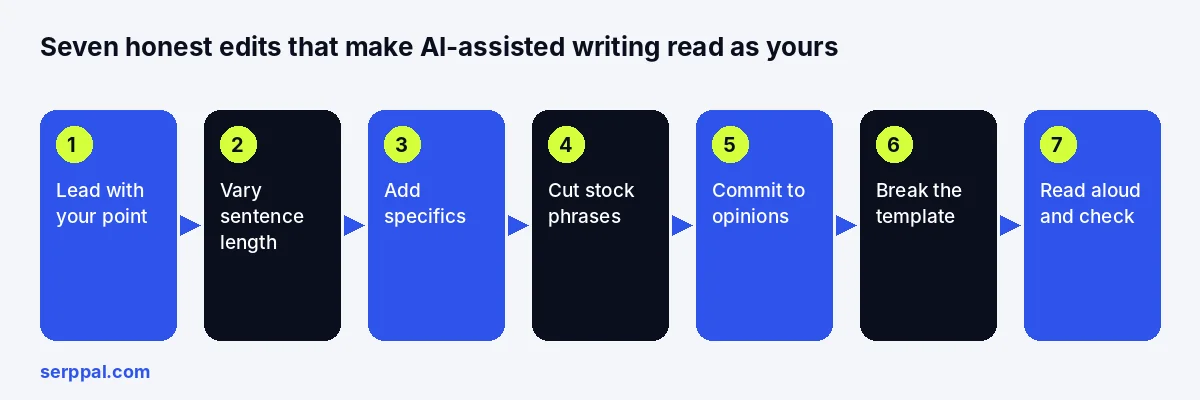
- The seven edits: lead with your point, vary the sentences, add specifics, cut stock phrases, commit to opinions, break the template, read it aloud.
- A humanizer helps with pacing and word choices on drafts you are allowed to use. The specifics still have to come from you.
Understand how AI detection tools work
AI detection tools are classifiers trained on large sets of human-written and AI-generated text. Their algorithms learn the statistical fingerprints of artificial intelligence output: how predictable each word is given the ones before it, how little the sentences vary, which transitions and vocabulary recur, how evenly the tone sits. Given your text, they analyze it for that fingerprint and report a likelihood. That is how they detect AI, and it is also why they cannot detect authorship.
Two things follow. The detector never knows who typed the words; it only sees patterns. And it is calibrated on raw chatbot output, so it is best at catching unedited ChatGPT and worst at everything in between, including careful human writing that happens to be formal, short or overly polished. Our guide to how AI detectors work goes deeper into how detection works; understanding the mechanics matters less than the consequence, which is that the same changes that make writing better also make it read as human.
The detectors you are likely to meet
Schools mostly use Turnitin, whose AI writing check sits in the same submission workflow as its plagiarism check. Teachers and editors also paste text into GPTZero or Copyleaks, and publishers and SEO teams often use Originality.ai. Each tool has its own training data and threshold, so the same text can get very different scores. None of them proves authorship, and the vendors themselves advise against treating a score as the only evidence. Relying on one number from any of them is a mistake, for writers and for the people checking their work.
Are AI detectors accurate? Why human writing gets flagged
Accurate on raw AI-generated writing, unreliable on everything else. False positives are routine. Even OpenAI withdrew its own AI text classifier in 2023 because of its low rate of accuracy. Academic essays, lab reports, legal summaries and non-native English writing all share the surface features of AI output: standard constructions, safe word choices, uniform pacing, formulaic structure. SerpPal's documentation says openly that its own detector can flag human-written texts; vendors that claim near-perfect accuracy often have not published their error rates at all. If you wrote something yourself and it was flagged, the answer is evidence of your writing process, not rewording. See why AI detectors flag my writing for that situation.
Can you bypass AI detection? The honest answer
Partly, and not reliably, and the question is the wrong one. Edited AI text can read as human and score as human, because a careful rewrite removes the patterns the classifier keys on; rewriting by hand is the one method that reliably does it. But no method guarantees a result on every detector, detectors change, and the same text can be flagged on one tool and clean on another. More to the point, if the rules of your course, publication or client forbid AI-written work, lowering a score does not make the work compliant; it makes it concealed, and concealed work you cannot defend is a worse position than an honest flag.
So the useful framing is this. If you are allowed to use AI for drafting or support, your job is to turn the draft into writing you stand behind, and detection takes care of itself. If you are not allowed, no technique here or anywhere changes that. Check the policy before anything else.
How to avoid AI detection in writing: seven honest edits
These are revision steps, not evasion tricks. Each one improves the text for a reader, and each one removes a pattern detectors associate with AI writing. Together they are what "write in a human-like style" means in practice.
1. Lead with your point, in your words
AI drafts open with a throat-clearing paragraph ("In today's fast-paced world...") and bury the claim. Delete the opening and start with the sentence that says what you think. A direct first line is the single most human thing a text can do.
2. Vary sentence length and structure
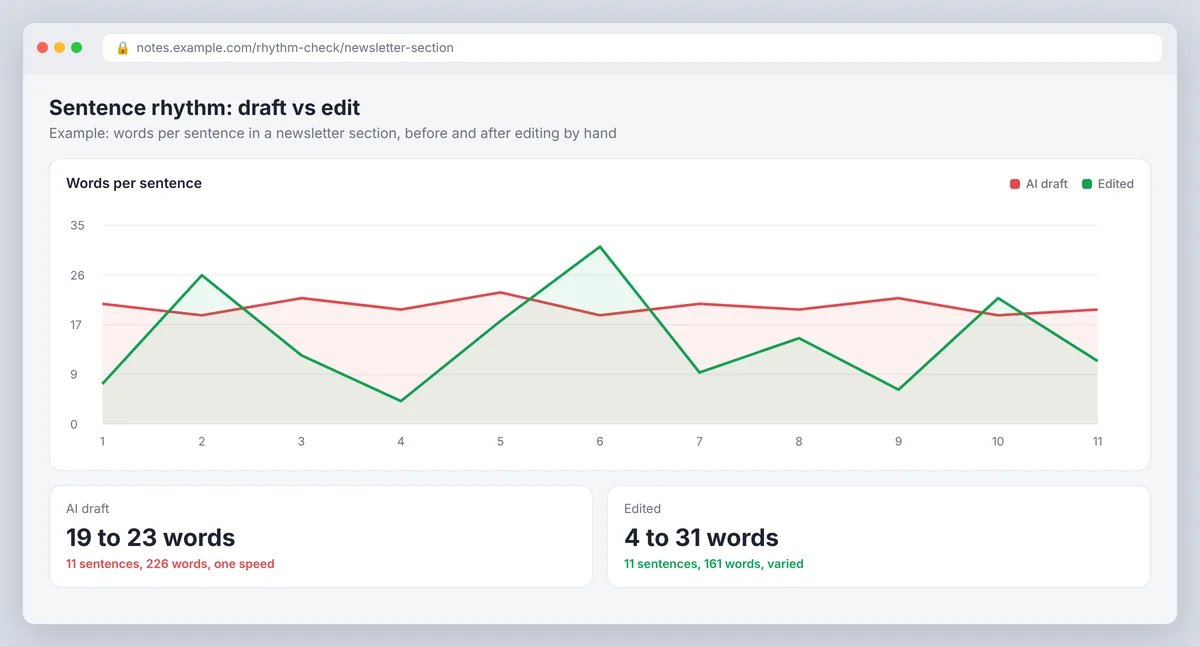
AI-generated writing tends to run at one speed: 18 to 25 words a sentence, one subordinate clause each, a repetitive sentence pattern that is the clearest tell there is. Break a long sentence into a short one and a medium one. Join two choppy ones. Put a four-word sentence after a thirty-word one. Rearrange words manually rather than with a tool, because a tool shuffles clauses while you reshape meaning. Read the paragraph aloud; if it sounds like a metronome, it reads like a machine.
3. Make it context-rich and personal where appropriate
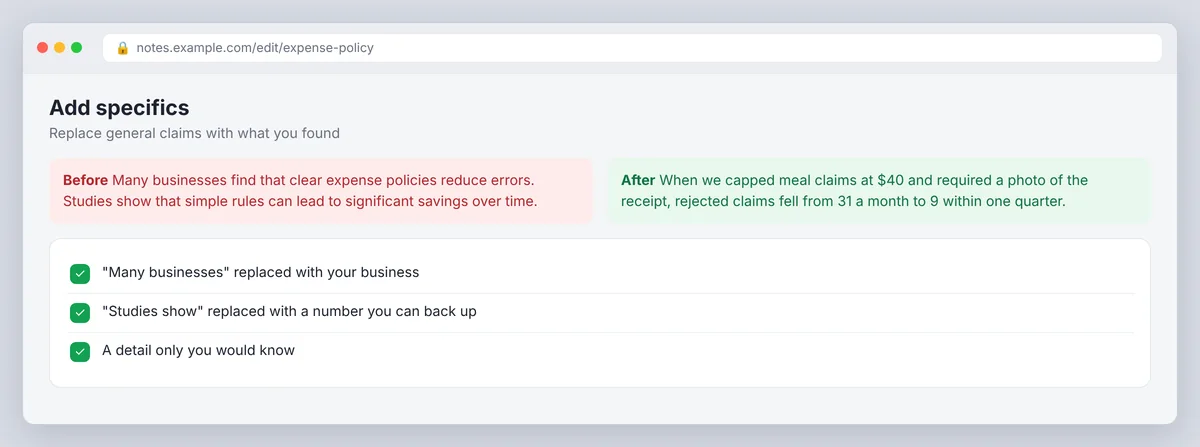
The commonest failure in AI content is not adding a personal or analytical touch. Replace "many businesses find" with what your business found. Replace "studies show" with the study, and cite your sources. Add the number, the name, the date, the thing that went wrong, the decision you made. Personal insights, specificity and real-world detail are the personal touches a model cannot supply (its limited real-world nuance is the whole problem) and what a reader actually wants. Originality lives here, not in the wording. This is the change that matters most and the one no tool does for you. Authenticity comes from the specifics, and so does accuracy.
4. Cut the stock phrases and overused words
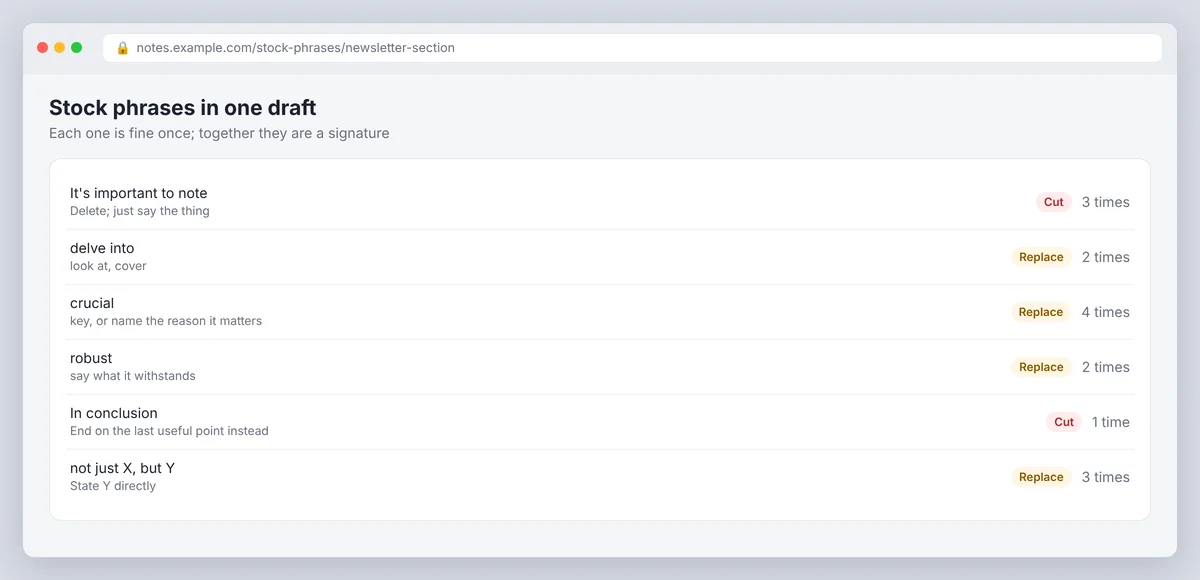
"It's important to note", "delve", "crucial", "robust", "landscape", "in conclusion", "not just X but Y". Each is fine once; together they are a signature. Replace them with plain, even informal words, use contractions where the register allows, and drop the expressions a person would never say aloud. Common phrases are common because chatbots learned them from millions of pages; your text should sound like one page. Repetition of the same keywords in every paragraph belongs on the same list.
5. Commit to opinions
Ask a chatbot whether something is worth doing and it hedges: "it depends on your needs". Ask a person and they tell you. Where the draft hedges, decide. Where it balances two views with equal weight, say which you hold and why. A point of view is a human fingerprint, and a few inconsistencies of tone, a conversational aside here, a blunt verdict there, are more human still.
6. Avoid robotic, templated sections
The five-paragraph structure, the summary at the end of every section, the conclusion that restates the introduction, the FAQ that repeats the body: these are what "formulaic" and "robotic" mean, and a robotic structure reads as AI writing even when every sentence is fine. Cut the restating. Let a section end when it has made its point. Use lists and tables where they help a reader, not because the template had them. Clarity on the topic beats completeness of the template.
7. Read it aloud, then run a check
Your ear catches flat rhythm, repetitive words and robotic sentences nobody would say. An editor like Grammarly or the Hemingway Editor can point out long sentences and filler, but your ear is the better judge. Fix those, then paste the result into a detector as a check, the way you would run a plagiarism or spell checker. A high score on a passage you revised means the passage still carries the patterns; a high score on a passage you wrote yourself means a false positive, and the response is your drafts, not more changes.
Paraphrasing and humanising tools for AI content: what they can and cannot do
A humanizer automates steps 2, 4 and part of 6: it reworks an AI draft toward varied sentence structure, plain vocabulary and natural phrasing while keeping the content. That is a real saving on a long draft. It does not do steps 1, 3 or 5, because it does not know your point, your facts or your opinion. A paraphrasing tool such as QuillBot does less still: it restates sentences one by one, which changes words without changing the pattern.
How much a humanizer changes depends on the text and the setting. A light pass that swaps words but keeps the sentence shapes often leaves a detector score close to where it was, especially on generic text with nothing specific in it to restructure. A stronger setting that rebuilds sentences usually does more. Formal and technical writing tends to stay in a "mixed" range whatever you do, because precise, impersonal prose looks like AI to a detector. Two lessons: pick the setting for the text, and expect to add the specifics yourself afterwards; good results come from the combination.
You can see this for yourself with a fair test. Take a few samples of your own AI-assisted text of about 200 words each, write down every number, name and qualifier in them, and score each one in a single detector. Humanize them, score the results in the same detector, then check every fact on your list and read each version next to the original for meaning. SerpPal's AI humanizer shows the AI score before and after, and a Review N changed facts badge if a number, name or link is missing or written differently, so most of that comparison is on one screen. Our guide to whether AI humanizers work covers what the research says, including a study of 14 detection tools that found none of them accurate or reliable, especially on edited text.
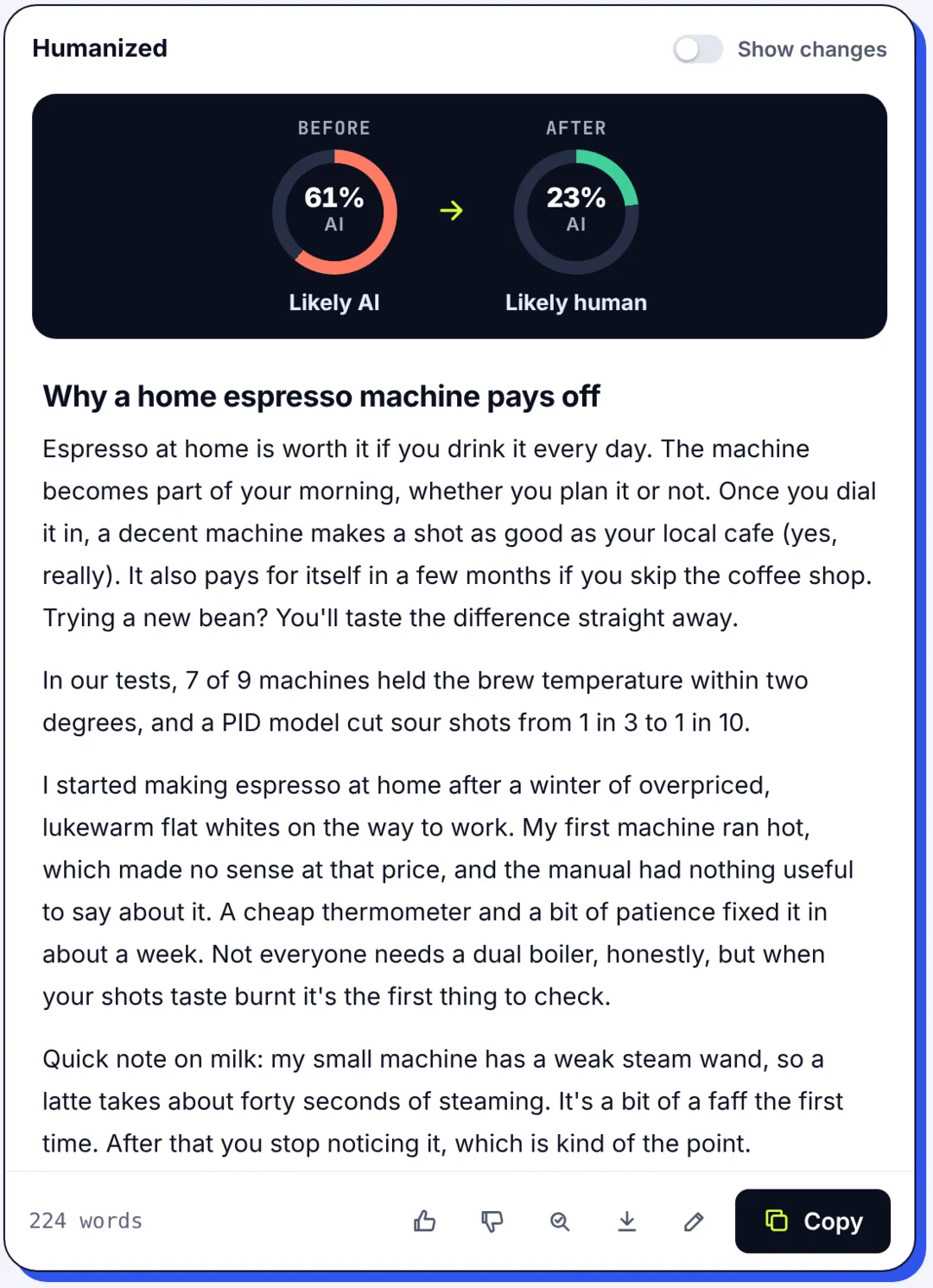
Where a humanizer is the wrong tool: on text you wrote yourself (it will change your meaning and give you nothing to defend), on anything a policy forbids you to generate, and as a substitute for checking facts. Humanizing a draft you are permitted to use, then revising it with your own material, is a legitimate workflow. Running a generated essay through a tool to hide it is not, and it usually fails anyway. If you are stuck with an assignment, get legitimate support: a tutor, a writing centre, an extension, a conversation with the person who set it.
Why evasion tricks backfire
Synonym replacement makes text read like a thesaurus, still predictable and still generic, and often still scores as AI. Deliberate mistakes and odd punctuation read as exactly what they are. Hidden Unicode characters are detectable and, once found, indefensible, and relying on them turns a writing question into a disciplinary one. "Undetectable" services cannot promise a result on tools they do not control, and the text they return is frequently worse than the draft that went in. None of these survives the only test that matters, which is whether you can explain every sentence to the person asking.
Interpreting AI scores: what the percentages mean
A score of 60 percent does not mean 60 percent of the words were written by AI. It means the tool is 60 percent confident the text resembles its picture of AI output, under that tool's threshold, on that day. The same text scores differently on different detectors and after small changes, which tells you how much to trust any single statistic.
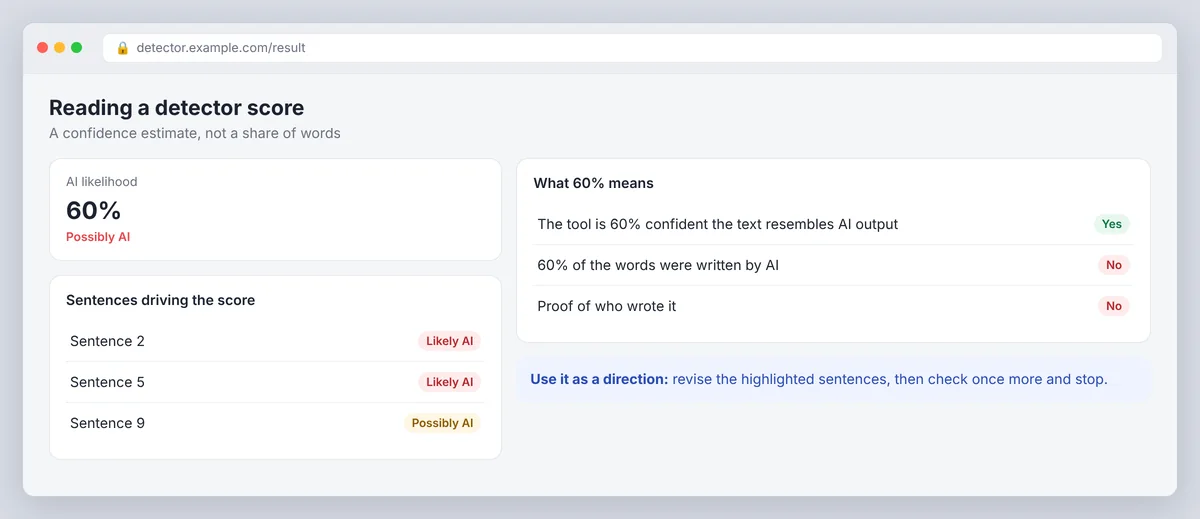
For your own checks, use the score as a direction. SerpPal's AI detector is free without an account and highlights the sentences driving the result, which turns a percentage into a to-do list: those sentences are where the uniform pacing and stock wording are. Fix them for a reader, recheck once, and stop. Chasing zero produces worse writing, and there is no "30 percent rule" anywhere except in forum threads.
Using AI without misrepresenting authorship: school, work, publishing, clients
Schools usually distinguish brainstorming and feedback (often allowed) from generated text submitted as your own (usually not), and many require disclosure. Employers care about confidentiality as much as authorship: pasting client data into a public chatbot may be the bigger breach. Publishers increasingly require a statement of AI use. Client contracts can forbid specific tools. Read the actual policy, keep a note of what you used AI for, and disclose where disclosure is asked for. A disclosed, well-revised AI-assisted draft is a normal piece of professional writing, and for SEO content it is also what Google's guidance on helpful content rewards: experience and expertise a reader can see. An undisclosed one that reads as human is a risk you carry alone.
Conclusion: how to avoid AI detection in writing, honestly
The tools are useful at the edges. A humanizer fixes pacing, a detector shows you where to look by analyzing the sentences, a chatbot gives you a first draft in seconds. The middle, the facts, the opinions, the specifics, the voice, is yours, and it is the part that makes writing read as human because it is. Do that part properly and the detection question mostly answers itself. Authentic writing, with your facts and your voice, is the approach that holds up, because what is left is writing you can explain line by line.
FAQs about avoiding AI detection as a writer
Can I completely avoid AI detection if AI writes my essay?
No. Editing can make AI-assisted text read and score as human, but nothing guarantees a result across detectors, and if the assignment forbids AI-written work, a low score does not make it allowed. Use AI only where the rules permit, do the thinking and the specifics yourself, and be ready to explain every paragraph.
What are the best prompts to avoid AI detection?
Instructions that produce better first drafts rather than disguised ones: give the chatbot your audience and your facts explicitly, plus an example of your writing style, and ask for varied sentences, no stock openers and no hedging. The draft will still need the seven steps above. Asking for "undetectable" text produces stilted output that still gets flagged.
Does ChatGPT writing always get detected?
Unedited, usually yes; detectors are built on exactly that. Revised with real specifics, a point of view and varied sentences, often not, because the patterns are gone. The variable is the revision, not the model; detectors detect AI patterns, and revision removes them.
What is the 30 percent rule in AI detection?
There is no such rule. Detector percentages are confidence estimates that differ by tool, threshold and text length, and no institution defines acceptable AI use as a percentage. Ask what the score means for the tool in question and what the relevant policy actually says.
Is it okay to use an AI humanizer?
On a draft you are allowed to use with AI, yes: it handles pacing and wording and shows what changed, and you add the facts and opinions afterwards. On text you wrote yourself, no, because it changes your meaning for no gain. On text a policy forbids you to generate, no, because the problem is the policy, not the score.