On this page
- What a prompt to humanize AI text can and cannot do
- The general-purpose AI prompt to humanize AI text (copy and paste)
- Six ChatGPT prompts for the ways AI outputs sound robotic
- Example 1: a full humanization pass, before and after
- Where ChatGPT prompts fall short and an AI humanizer helps
- A step-by-step editing workflow for AI-generated text
- Conclusion
- Frequently asked questions
A prompt to humanize AI text works when it names the problem: "vary the sentence length, cut the stock phrases, keep every fact and flag anything unclear" gets a usable revision, while "make this sound more human" gets the same text with contractions. Below is a general-purpose prompt you can paste into ChatGPT, Claude or Gemini, six targeted ChatGPT prompts (they work in any AI model) for the telltale markers of AI-generated content (repetitive rhythm, overly formal phrasing, stock transitions, fence-sitting), a before-and-after, and an honest account of where prompting stops working and a dedicated humanizer or your own editing has to take over.
Key takeaways
- Good humanizing prompts specify audience, purpose, voice, the exact pattern to fix, and what must not change.
- One problem per prompt. A rhythm pass, then a tone pass, then a phrasing pass beats one "fix everything" request, and ChatGPT prompts that ask for everything at once produce the least change.
- Prompts cannot add what the model does not know: your facts, your opinion, your experience. Supply those or the text stays generic.
- A model revising its own output tends to keep its own habits. For stubborn AI-generated text, an AI humanizer built for the job often does better, and a good one shows what changed.
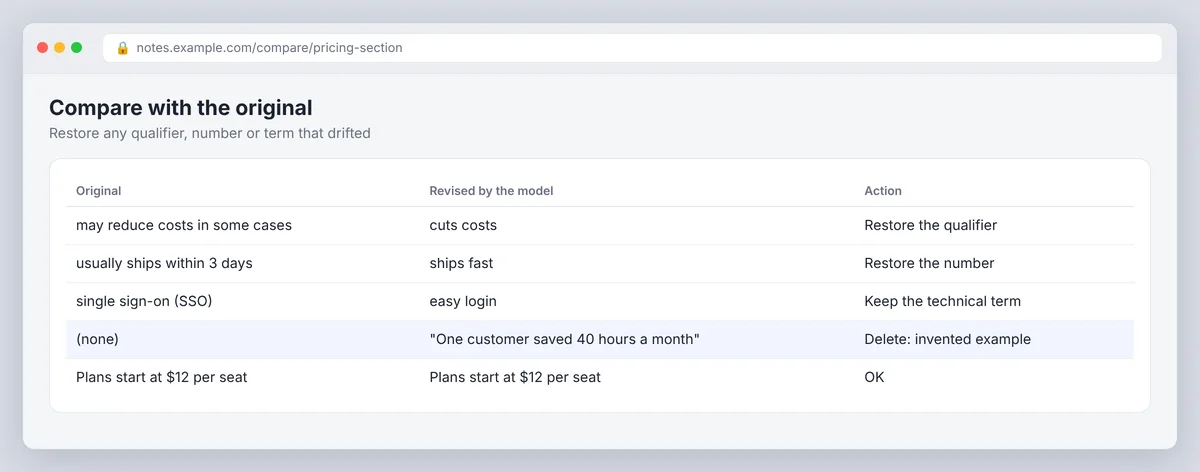
- Always compare the revision with the original. Prompts drop qualifiers and invent examples when you let them.
What a prompt to humanize AI text can and cannot do
Humanizing, or humanization if you prefer the longer word, means turning AI-generated text into human-sounding writing a person would plausibly have produced: varied rhythm, natural phrasing, plain word choices, a point of view, specific detail, and the facts intact. A prompt can handle the first two well, the third partly, and the last two only if you supply the material. It cannot know your audience, your experience or your opinion unless you type them into the prompt, which is why the general prompt below has so many brackets.
Two cautions before the prompts. First, a prompt is not a way to disguise work you are not allowed to submit; if a policy forbids AI-written text, no wording fixes that. Second, an AI model follows instructions loosely. "Keep every fact unchanged" lowers the error rate; it does not make it zero, so the comparison step at the end is not optional.
The general-purpose AI prompt to humanize AI text (copy and paste)
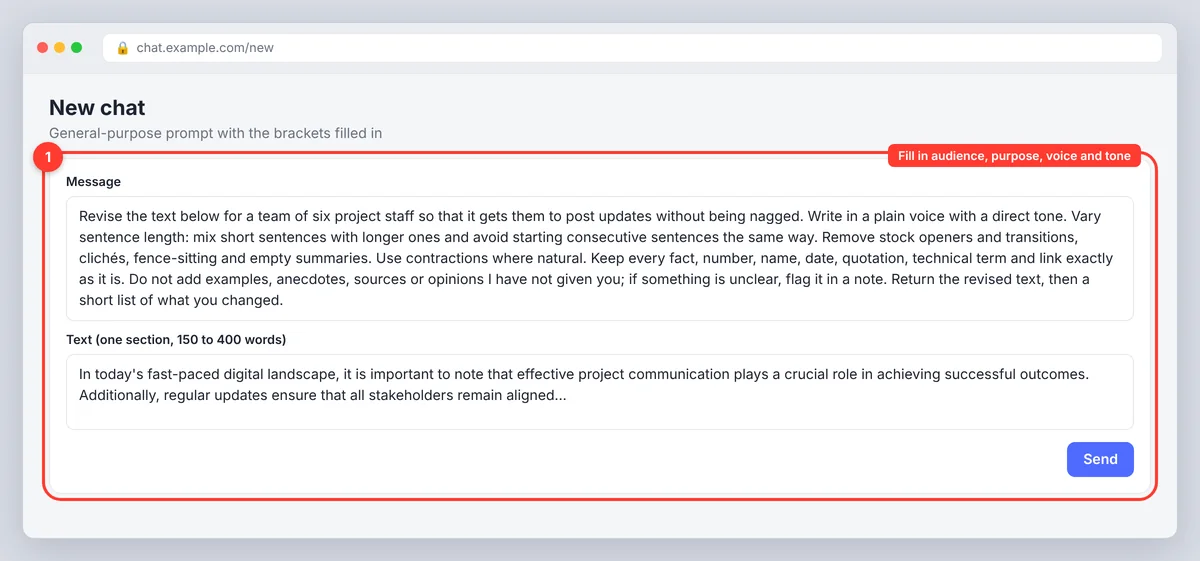
Paste this into any AI model, ChatGPT included, and fill in the brackets. It works on blog posts, emails, social media captions and reports alike:
Revise the text below for [audience] so that it [purpose]. Write in a [voice: plain, warm, authoritative, dry] voice with a [tone: conversational, professional, formal] tone. Vary sentence length: mix short sentences with longer ones and avoid starting consecutive sentences the same way. Remove stock openers and transitions ("in today's world", "it's important to note", "furthermore", "in conclusion"), clichés, fence-sitting and empty summaries. Use contractions where natural. Prefer concrete verbs and plain words over jargon. Keep every fact, number, name, date, quotation, technical term and link exactly as it is. Do not add examples, anecdotes, sources or opinions I have not given you; if something is unclear or unsupported, flag it in a note instead of guessing. Return the revised text, then a short list of what you changed. Text: [paste 150 to 400 words]
Work in sections of 200 words to a few hundred. A whole 2,000-word blog post in one prompt gets a shallower pass, and you cannot check the changes properly.
Six ChatGPT prompts for the ways AI outputs sound robotic
Each of these targets one pattern in AI writing, and the same wording works as Claude or Gemini prompts. Use them to steer the model rather than to let its defaults decide; the defaults are the problem. Run them one at a time, in roughly this order, and compare after each. They follow the same advice as OpenAI's prompt engineering guide and Google's Gemini prompting strategies: be specific, give context, and say what the output should look like.
1. The sentence rhythm prompt
Rewrite this passage so the sentences vary in length and structure. Put at least one sentence under eight words next to one over twenty-five. Do not start two consecutive sentences with the same word or structure. Change nothing else: keep the meaning, facts and order of points.
AI writing runs at one speed, around 18 to 25 words a sentence with one subordinate clause each, and that repetition is the first thing readers and AI detection tools notice. This prompt breaks the monotony, makes the text sound human-like at once, and is the single highest-return instruction you can give; a punchy short sentence next to a long one does more than any vocabulary change.
2. The stock phrase and jargon prompt
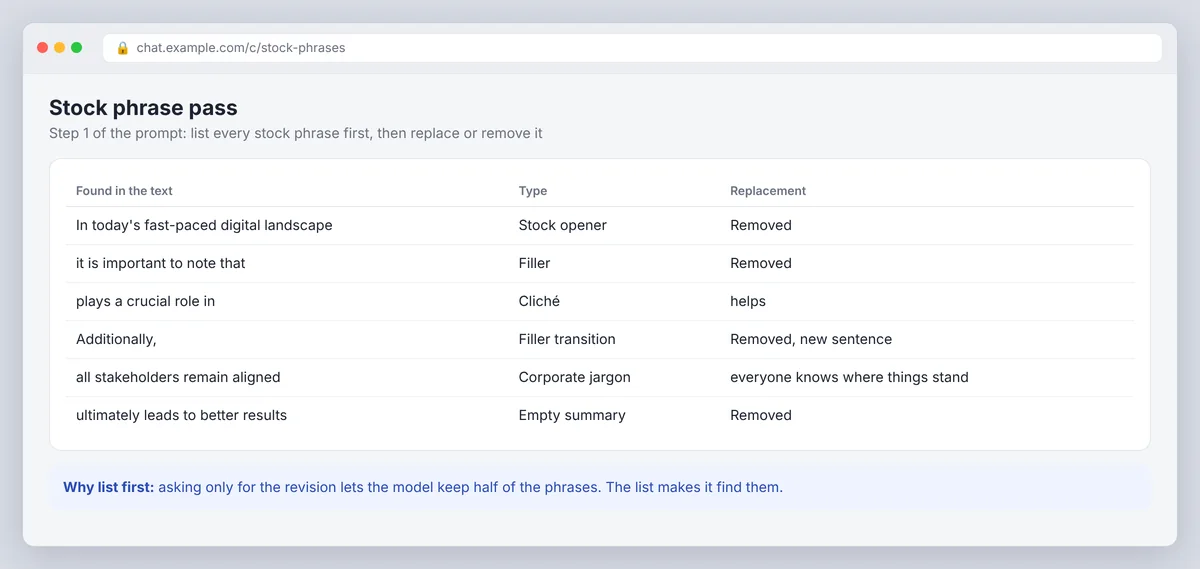
List every stock phrase, cliché, filler transition and piece of corporate jargon in this text. Then rewrite it with each one replaced by plain language or removed. Keep technical terms my readers need; explain them in a few words if necessary. Keep all facts unchanged.
Asking for the list first makes the model genuinely find them; asking only for the revision lets it keep half. The same goes for formatting quirks: ask it to list the bullet points and bold labels it added for no reason, then remove them.
3. The conversational tone prompt: write like you talk
Rewrite this so it reads as if a knowledgeable person were explaining it to a colleague over coffee. Use contractions, direct address ("you"), and short questions where they fit. Do not add slang, jokes or fake enthusiasm, and do not make it less precise. Keep every fact and number.
The guard rails matter. Without them, "conversational" produces exclamation marks and "Let's dive in!", which is a different flavour of AI content, overly familiar instead of overly formal. Clarity matters more than charm: one metaphor is fine, a metaphor per paragraph is another AI habit.
4. The opinion injection prompt: add real perspective
Here is my view on this topic: [your opinion, in one or two sentences, with the reason]. Revise the text so it takes that position clearly instead of sitting on the fence, and remove phrases like "it depends" or "there are many factors" where my view answers the question. Do not invent other opinions or attribute views to anyone.
This is the only prompt that cannot work without you. Give it the opinion and it will carry it through; leave the bracket empty and it will invent a bland one. This is also where you inject a persona if the piece is written in someone's name: say who is speaking and what they care about.
5. The real-world context prompt: balance expertise with a personal touch
Here are three specific details from my own experience with this topic: [detail 1], [detail 2], [detail 3]. Work them into the text where they strengthen a general claim, replacing vague statements ("many businesses find") with the specific. Do not add any detail I have not supplied.
Supply the number, the name, the thing that went wrong, the scenarios you have actually seen. Specific, factual, checkable detail is what reads as human-written, and the model has none of yours; this is the step marketers skip and then wonder why their AI-assisted blog content sounds like everyone else's.
6. The writing style prompt: match your voice
Here are two paragraphs I wrote myself: [paste]. Study the sentence length, vocabulary, punctuation habits and level of formality. Then revise the text below to match that style as closely as possible without copying any sentences. Keep the meaning and facts unchanged. [paste text]
A sample beats any description of your voice, and it keeps consistency across a long piece. Two paragraphs is enough; five is better. If you have a brand voice document with word choices and preferences, paste the relevant part too.
Example 1: a full humanization pass, before and after
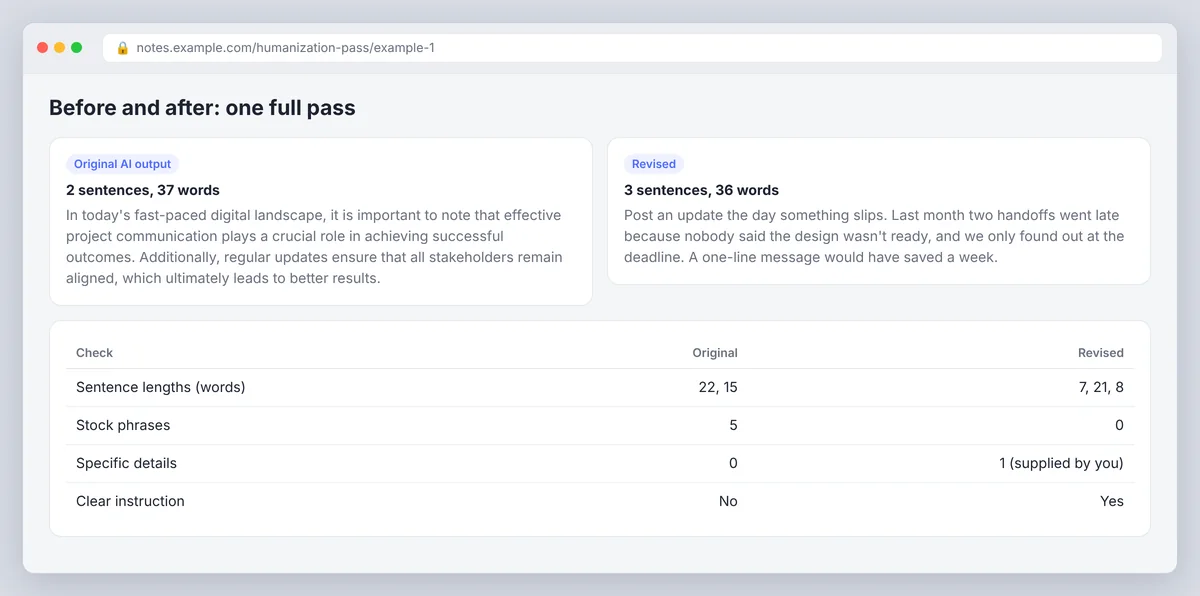
Original AI output: "In today's fast-paced digital landscape, it is important to note that effective project communication plays a crucial role in achieving successful outcomes. Additionally, regular updates ensure that all stakeholders remain aligned, which ultimately leads to better results."
Prompt used: the general template with audience "a project manager writing to a team of six", purpose "get them to post updates without being nagged", voice "plain", tone "direct", plus one supplied detail: "last month two handoffs slipped because nobody said the design was late".
Revised: "Post an update the day something slips. Last month two handoffs went late because nobody said the design wasn't ready, and we only found out at the deadline. A one-line message would have saved a week."
The second version has three sentence lengths, no stock phrases, a specific incident and an instruction. Every word of improvement that matters came from the supplied detail; the prompt only arranged it.
Example 2: a one-line tweak
Sometimes a single sentence is the problem. Ask ChatGPT: "Make this sentence shorter and more direct without changing its meaning: 'It is worth noting that there are several factors that can impact the overall accuracy of the results.'" A typical answer: "Several things affect how accurate the results are." Same facts, half the words, no throat-clearing. For a caption or a subject line, that is the whole job.
Where ChatGPT prompts fall short and an AI humanizer helps
Prompting is cheap and worth doing first; the ROI on ten minutes of crafting a good prompt is high. It stops working in four predictable places.
- The model keeps its own habits. Asked to humanize its own output, ChatGPT reintroduces the same transitions and rhythm two sentences later, because those patterns are what it considers good writing. The second and third passes change less than the first.
- It drops qualifiers and invents detail. "May reduce costs in some cases" becomes "reduces costs". A request for an example produces a plausible fabricated one. Preserving meaning and factual accuracy is your job; the comparison step catches drift only if you do it.
- It cannot verify anything. A prompt revises; it does not check. Facts that were wrong in the draft are still wrong, now in better prose.
- It cannot supply what you did not give it. No opinion, no experience, no specifics. Prompts 4 and 5 only work with your input, and that input is most of the value; the model can generate wording all day, but it cannot generate your experience.
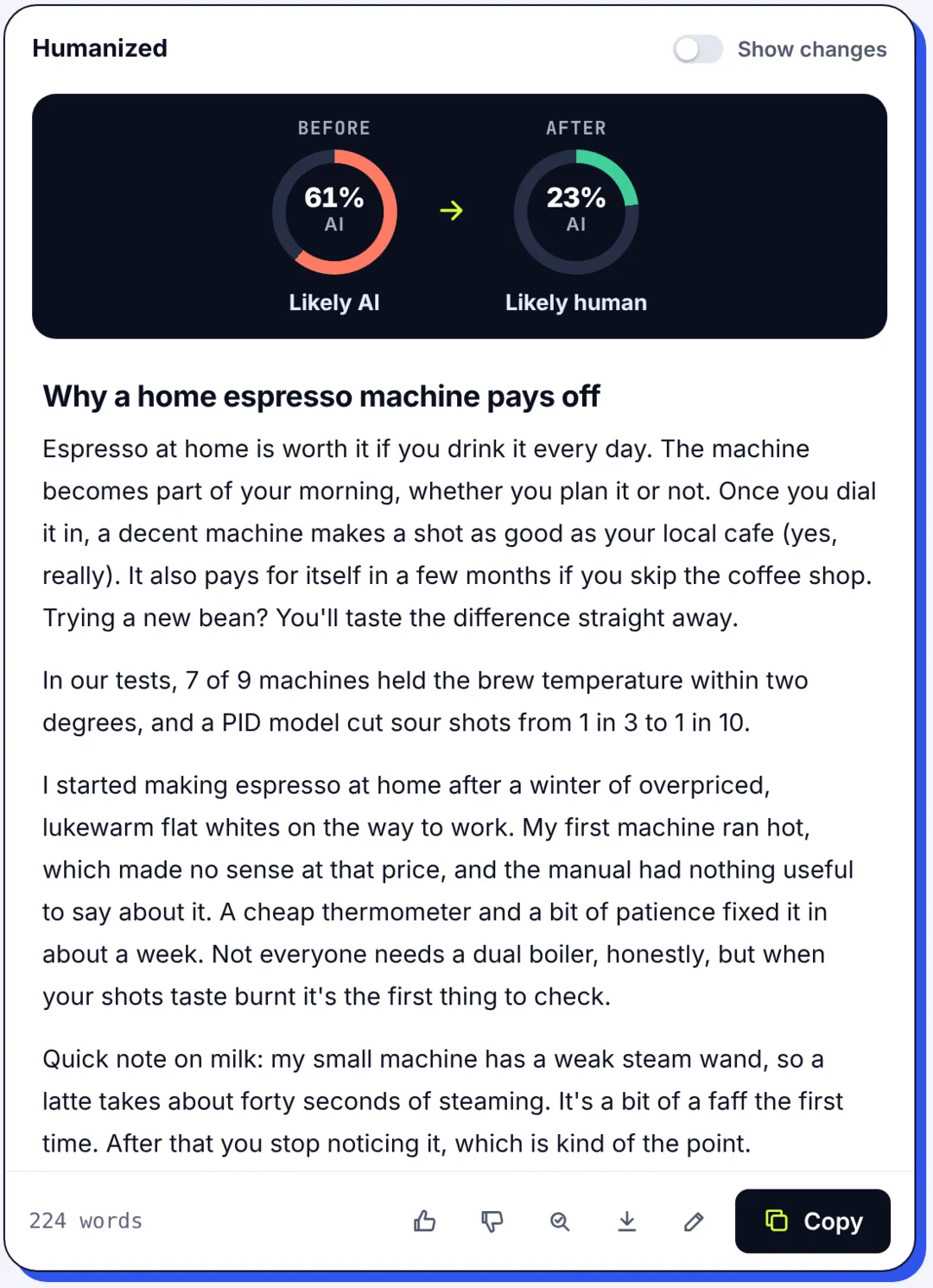
A dedicated AI humanizer handles the first problem differently: it is built to transform AI-generated text toward the patterns of human writing rather than toward a model's idea of polish, and the good ones protect facts explicitly. AI tools of this kind are not magic, but they do not have the self-editing blind spot. SerpPal's AI humanizer lets you pick a style (Natural, Strong, Academic, Simple, Casual or Professional), shows the AI score before and after, and shows a Review N changed facts badge if a number, name or link is missing or written differently. As with prompts, results depend on the text: light rewording that keeps the sentence shapes tends to move a detector score less than restructuring, and formal or technical text is the hardest to move. Our guide to whether AI humanizers work explains how to test one fairly on your own drafts. It still cannot do prompts 4 and 5. Nothing can.
A step-by-step editing workflow for AI-generated text
- Fix the structure yourself. Cut repeated paragraphs and the summary at the end of each section. No prompt does this well.
- Run the rhythm and stock-phrase prompts, or a humanizer pass, on one section at a time, and refine the wording by hand where the output is still stiff.
- Add your material with the opinion and real-context prompts, or by typing it in directly, which is usually faster. This is where the piece starts to connect with readers, because it finally delivers insights only you could offer. Incorporate them as plain statements, not as "in my experience" preambles.
Preserving meaning and factual accuracy
- Compare with the original. Side by side. Restore any qualifier, number or term that drifted; a humanized paragraph that maintains the facts but loses the "usually" is now wrong.
- Check facts against sources, not against the model.
Check with AI detectors, then stop
- Run a detector once as a sanity check, not as a target. SerpPal's AI detector is free without an account and highlights the sentences that still read as generated, which tells you which prompt to run again.
- Read it aloud and stop. More passes flatten the text; past a point, more rewriting makes the piece less engaging, not more.
Our guide to humanizing AI text covers the editing side of this in more depth; this post is the prompting side.
Conclusion
The best prompt to humanize AI text is specific: one problem, a clear audience and voice, and a firm rule to keep every fact. Run the targeted prompts one at a time, add your own opinion and details, then compare the result with the original. When prompts stop helping, try SerpPal's AI humanizer on the rhythm and phrasing, and do the last pass yourself. The human parts, your experience and your view, are what make content resonate with readers and hold up in search rankings.
Frequently asked questions
What is the best prompt to humanize AI text?
One that names the audience, the purpose, the voice and tone, the specific pattern to fix (sentence rhythm, stock phrases, hedging, jargon), and what must stay unchanged (facts, numbers, names, terms, links), and that asks the model to flag uncertainty rather than invent. The general template above does all of that; the targeted prompts do one job each and are easier to check.
Can ChatGPT humanize its own text?
Partly. Ask ChatGPT to vary the rhythm and cut named stock phrases and it will, but it tends to reintroduce its own habits and it cannot add specifics or opinions you have not supplied. For a stiff draft, one targeted pass helps; for a stubborn one, a dedicated humanizer or your own editing does better.
How many passes does it take to humanize AI text?
Usually two or three targeted passes: rhythm, then phrases and tone, then your own additions. Beyond that, each pass changes less and risks flattening the text or drifting from the facts. If a passage is still robotic after three passes, the problem is missing content, not wording.
Do humanizing prompts make text undetectable?
No. They reduce the markers AI detectors respond to, and well-edited, natural text with real specifics often scores as human-written, but nothing guarantees a result across AI detection tools, whatever the topic. Use a detector to check your editing, not as the goal, and never use prompts to disguise work a policy forbids.
What should I always add myself?
Your opinion, your experience, specific numbers and names, and any claim's source. Those are the parts a model cannot produce and the parts that make writing read as human. Prompts 4 and 5 are only containers for them.