On this page
- What it means to humanize AI text
- Six things that make a draft read as AI
- Humanizing AI text step by step: the workflow
- Before and after: a short example
- Does humanizing actually work? A quick test and how it works
- AI humanizer tool versus manual editing
- AI detectors and what they can prove
- Prompts for more natural first drafts
- FAQ: humanizing AI-generated content
To humanize AI text, you change how it reads without changing what it says: vary the sentence structure and rhythm, swap the stock phrases and overused vocabulary for plain words, add the specific details only a person would know, and then check that every fact, name and number survived. Done by hand it takes about as long as writing; done with an AI humanizer and a short editing pass it takes minutes, as long as you compare the result with the original and keep the original meaning intact.
This guide covers what humanizing actually means, the six patterns that make AI content read as AI, a step-by-step workflow, a before-and-after example, what AI tools do well and badly, and what AI detection can and cannot prove at the end. It applies to articles, marketing copy, emails and academic writing alike.
Key takeaways
- Humanizing is editing for rhythm, voice, clarity, specificity and accuracy. It is not disguising who wrote the text.
- The patterns to fix: uniform sentences, stock openers and transitions, overused words, vague claims, neat summaries, no lived detail.
- Preserving meaning is the whole job. Compare every humanized section with the original and restore anything that drifted.
- A humanizer tool handles rhythm and phrasing in seconds, ensuring the surface reads human-like; the facts, examples and opinions still have to come from you.
- Detectors estimate probability. Use one to check your work, never as the target.
What it means to humanize AI text
AI-generated text from ChatGPT, Claude, Gemini or any other AI text generator is usually correct, fluent and oddly lifeless. Humanizing AI text means turning that output into human-like content a reader experiences as written by a person: it has a point of view, it speeds up and slows down, it uses the words people use, and it contains things that could only be known by someone who did the work.
That is a different goal from making the text undetectable. Detectors respond to the patterns AI text tends to have, so good humanization usually lowers a detector score as a side effect. But chasing the score produces mangled text, and the honest reason to humanize content is that readers, search engines and editors all prefer prose with a human in it: reader engagement, SEO rankings and trust all follow from it. The AI-generated content that fails is the content nobody edited. It is also not the same as starting over: a from-scratch redo replaces the text, humanization keeps the content and changes the delivery.
Six things that make a draft read as AI
Before fixing anything, learn to see it. Almost every piece of AI-generated text has the same six habits, and once you can spot them the editing is mechanical.
- One speed. Every sentence is 18 to 25 words with one subordinate clause and the same syntax. No short ones, no long ones, no variation; a predictable, robotic rhythm.
- Stock openers and transitions. "In today's fast-paced world", "It's important to note", "Furthermore", "In conclusion".
- Overused vocabulary. "Delve", "crucial", "robust", "landscape", "foster", "navigate". Fine individually, a tell in bulk.
- Vague claims with hedges. "Studies show", "many experts agree", "can often help", with no study, expert or number.
- Neat summaries. Each paragraph ends by restating itself; the last paragraph restates the first.
- No lived detail. Nothing that could be checked, nothing that happened to anyone in particular.
The first three are surface habits a tool can fix. The last three need a person. Our guide to the signs of AI writing goes through each with examples, and the same list is what makes AI content easy to spot on Reddit threads and in blog articles alike.
Humanizing AI text step by step: the workflow
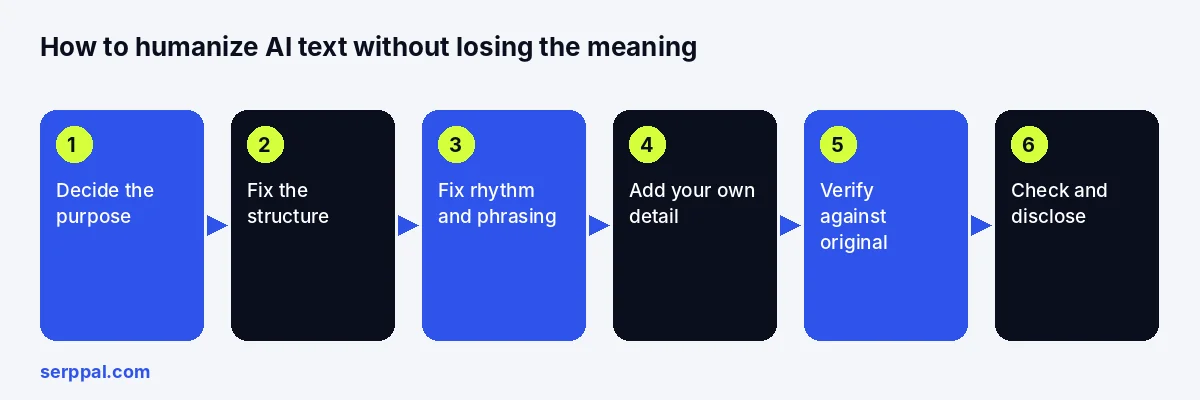
This is the workflow that preserves meaning. The order matters: structure first, then phrasing, then your own material, then verification. It is the same whether you are humanizing marketing copy, a student essay or a technical explainer, and whether you refine the text by hand or with automated help.
Step 1: Decide what the text is for
Write one line: who reads this, and what should they know or do afterwards. A support email, a product page and an essay need different tones, and "humanize" without a target audience produces generic conversational text, which is just a different flavour of generic. Tailored beats casual: a conversational style suits a blog, not a policy document.
Step 2: Fix the structure before the sentences
Read the text once for shape, or pull a quick outline from it. Cut paragraphs that repeat earlier ones, move the answer to the top, delete the mini-summaries at the end of each section, and remove the concluding paragraph that restates the introduction. AI output is usually longer than it needs to be, and most of the excess is repetition. A well-structured piece is half humanized already.
Step 3: Fix rhythm, phrasing and vocabulary
Now go sentence by sentence. Break one long sentence into a short one and a medium one. Join two choppy ones. Replace every stock phrase with nothing, or with the plain version. Swap the overused words and jargon for the ones you would say out loud, and adjust the tone to the reader you named in step 1. Prefer active constructions and concrete verbs. Read it aloud; the ear catches the flat stretches the eye slides over.
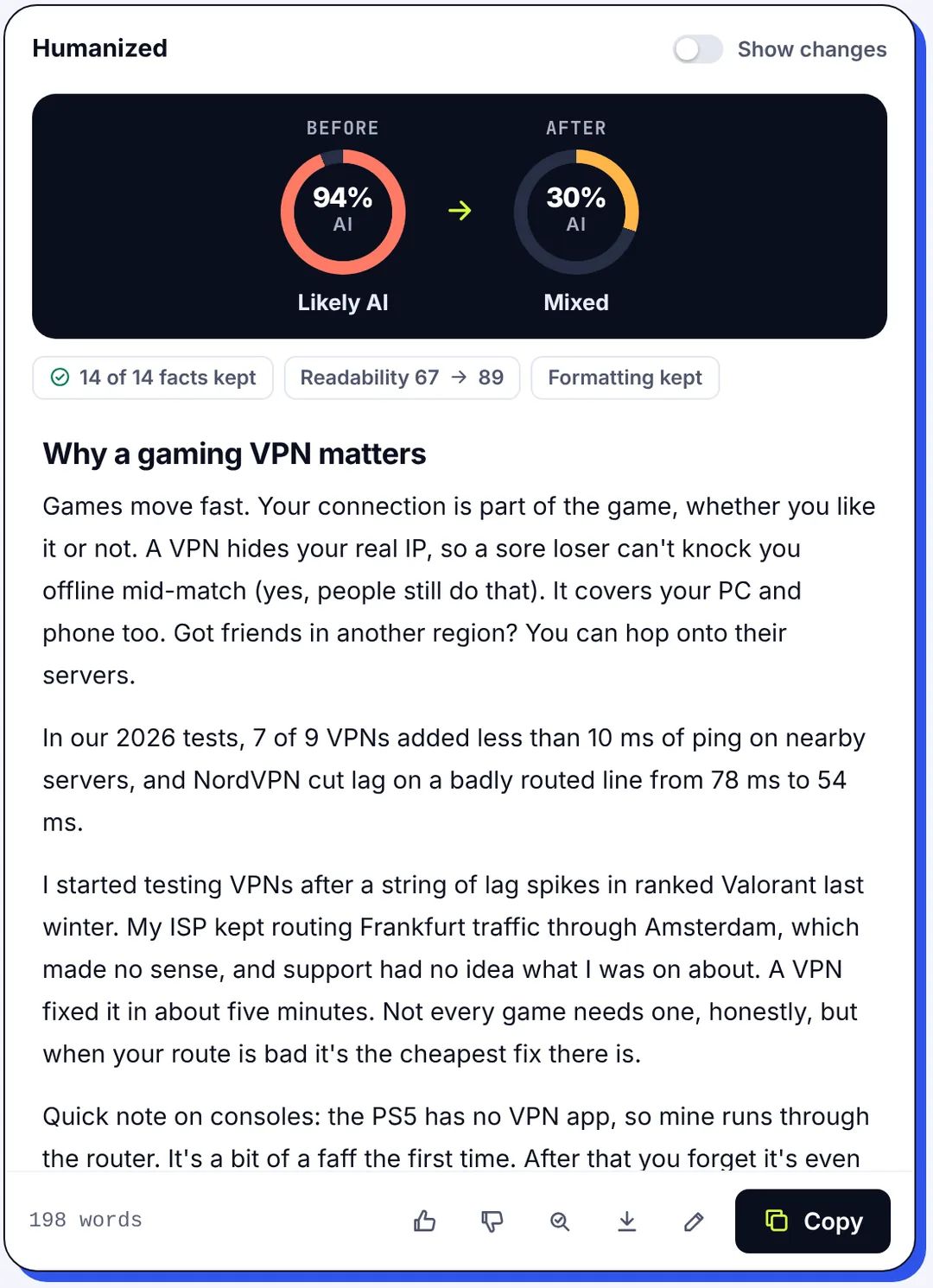
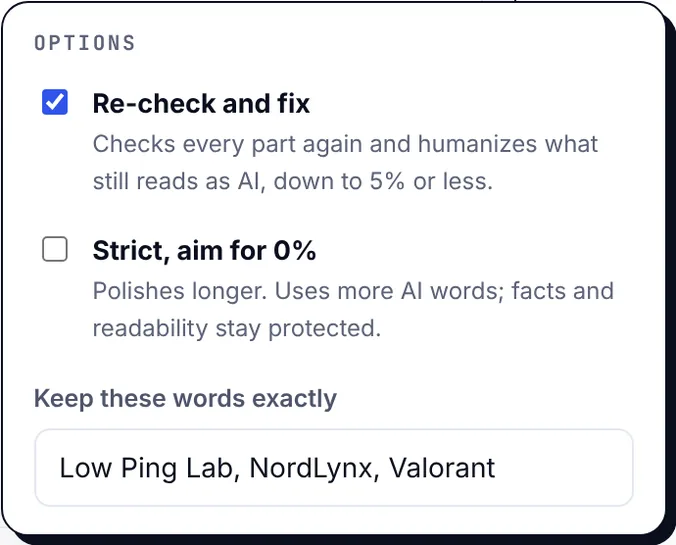
This is the step an AI humanizer automates, and where a humanizer helps most. SerpPal's humanizer takes the text and transforms it toward natural sentence structure and vocabulary in one of several styles (Natural, Strong, Academic, Simple, Casual, Professional), and shows the AI score before and after. Facts, names, numbers, links and formatting are kept, and a badge tells you how many were preserved so you do not have to count. Readability is reported before and after too, so the polished version is easier to read, not just different.
Step 4: Add authentic voice and original insight
Insert one specific example per section: a number from your own data, a thing that went wrong, a quote from a customer, a decision you made and why. Replace "many businesses find" with what your business found. State an opinion where the text hedged. Personal anecdotes are optional (the "just add personal stories" method only partially works, because a story bolted onto generic advice is still generic advice); concrete, checkable detail is not. This step is what makes humanized content relatable and engaging, what makes it resonate with readers, and no tool can do it for you.
Step 5: Preserve the meaning: verify every fact against the original
Put the original and the humanized version side by side. Check names, dates, figures, quotations, product details and links. Look for qualifiers that changed ("usually" becoming "always"), claims that appeared from nowhere, and nuance that vanished. Then check the facts themselves against a source, because the AI text may have been wrong before you started; factual accuracy is your responsibility, not the generator's. For anything medical, legal or financial, have a qualified person read it. A plagiarism check is worth running on anything long, since AI tools sometimes reproduce their sources closely.
Step 6: Check, polish and disclose
Run the result through an AI detector as a sanity check, not as a target. Fix grammar, consistent terminology and accessibility basics such as headings and alt text for visuals. If the text is for a class or an employer, follow the AI policy: some require disclosure of AI-assisted work, some restrict use. Then publish, and keep a copy of the original for the next round of revisions.
Before and after: a short example
AI-generated version: "In today's digital landscape, effective time management is crucial for professionals seeking to boost productivity. By leveraging proven strategies and prioritizing tasks, individuals can not only accomplish more but also reduce stress. It's important to note that consistency is key."
Humanized and edited: "I stopped losing my evenings when I started writing the next day's three tasks on a sticky note before leaving the office. Two usually get done. The third is where the stress used to live, and now it just moves to tomorrow's note."
The second version is shorter, has three sentence lengths, contains a specific practice and a result, and commits to a claim. A humanizer tool would get you most of the way on rhythm and vocabulary; the sticky note has to be yours. The same transformation works on a 2,000-word article; it just takes more passes.
Does humanizing actually work? A quick test and how it works
We used an AI text generator to generate three ordinary passages of about 220 words each (a newsletter section, an expense policy containing four figures, and a technical explainer with seven facts), humanized each with SerpPal, and checked every version with the AI detector.
| Text | Original AI score | Natural style | Strong style with Strict | Facts kept |
|---|---|---|---|---|
| Newsletter section | 100% | 100% | 17% | n/a |
| Expense policy | 99% | 46% | 9% | 4 of 4 |
| Technical explainer | 94% | 70% | 48% | 7 of 7 |
Three things stand out. The gentle default did little for the generic newsletter text, because there was almost no content to restructure. The stronger setting worked on all three. And every figure survived, with readability slightly higher in each case. The lesson: pick the style for the text, expect to run a stubborn section twice, and verify with a detector rather than assuming. Humanizing AI-generated copy accurately is a process, not a button, and the humanization gets better each time you refine the result with context the AI model never had. More detail is in do AI humanizers work.
AI humanizer tool versus manual editing
Manual editing wins when the text is short, specialised, confidential, or written in a voice you must preserve exactly. The "rewrite every other paragraph by hand" method works well and takes forever. A tool wins when you have many pieces, little time, or output so uniform that reworking every sentence by hand would take longer than generating it fresh. Most marketers, students and content creators land on a hybrid: tool for step 3, hands for everything else. The tool can transform the surface of AI content in seconds; the clarity of the argument is yours to supply.
What a free AI humanizer gives you
Free tiers differ. Some are a monthly word allowance on a free plan (SerpPal's is 500 humanizer words a month, no card), some are a partial preview, some are a trial. Before pasting anything, check the word cap, whether you get the full output, and the privacy policy; never paste client work or unpublished research into a tool whose data handling you have not read. The guide to free AI humanizers goes through the differences.
What makes the best AI humanizer
Judge any humanizer tool on four things, in this order: whether the meaning and facts survive (the tool ensures this only if it shows you), whether the output reads naturally and human-sounding to a person, whether you can protect specific terms and keep formatting, and only then the detector score. A tool that scores 0 percent AI and reads like a thesaurus has failed. Multilingual support, a template for recurring jobs and PDF or document upload matter for some teams; a fast result in seconds is nice but not the point. No tool ensures a result is right for your audience; that is still an editing preference you set.
AI detectors and what they can prove
A detector's algorithms analyze a text and estimate how closely it matches patterns typical of AI output. It is a probability. Detectors disagree with each other, flag some human text written by people, and miss some edited AI text. SerpPal's own documentation states that at its "Likely AI" line the checker flags about 91 percent of AI-written texts and about 7 percent of human-written ones, which is useful and clearly not proof.
So use a detector the way you would use a spell checker: to catch what you missed, after the work is done. Do not keep humanizing to chase a number; that produces worse text and does not resolve the underlying uncertainty. SerpPal's AI detector is free without an account and highlights the sentences that read as machine-generated, which tells you where to edit rather than just how much.
Prompts for more natural first drafts
The cheapest humanizing happens before the text exists. Tell the generator who the readers are, what they already know, what tone, outline and length you want, which facts it may use, and that it should flag anything uncertain rather than invent it. Ask for short sentences mixed with long ones, no stock openers, high-quality sources only, and one concrete example per section. The output will still need the workflow above, but it will start closer to human, and the AI writing will need fewer touches. If you draft inside SerpPal, the brand kit gives the AI writer that context automatically; see humanize in the editor for running the pass on a draft in place.
FAQ: humanizing AI-generated content
How do you humanize AI text without losing the meaning?
Edit structure first, then phrasing, then add your own detail, and compare every section with the original before publishing. Use a humanizer that reports which facts it kept, and verify names, numbers and qualifiers yourself. Meaning is lost at the phrasing stage when nobody checks; the comparison is the safeguard.
Can humanized text still be flagged by AI detectors?
Yes. Detectors are probabilistic, generic sections often stay high, and some honest human writing is flagged too. Treat a detector as a check on your editing, not as a guarantee, and judge the text on how it reads and whether it is accurate.
Is there a free AI humanizer?
Yes. SerpPal's free plan includes 500 humanizer words a month with no card, and the AI detector is free without any account. Other tools offer free previews or trials. Check what the free tier actually returns and how it handles your text before relying on it.
Is it okay to humanize AI text for school or work?
It depends on the policy. Many schools allow AI assistance with disclosure and forbid submitting generated work as your own; employers vary. Humanizing your own draft to read better is editing. Humanizing a generated essay to hide its origin is the thing the policies are about.
What is the difference between humanizing and paraphrasing?
Paraphrasing restates a section in different words, usually sentence by sentence, to avoid duplication or simplify a source. Humanizing restructures a whole AI-generated text toward natural rhythm, vocabulary and voice while keeping the content. A paraphraser changes words; a humanizer changes how the text sounds.