On this page
- What a content brief is, and how it differs from a creative brief
- What to include in a content brief
- Free content brief template (copy and paste)
- How to create a content brief step by step
- Content brief examples
- Why content briefs fail
- Content briefs in a content marketing workflow
- Frequently asked questions
A content brief template is a one-page, customizable form that tells a writer who the target audience is, what the piece has to achieve, which keyword and questions it must cover, how it should be structured, and when it is due. The template below is free to copy; the rest of this guide explains how to fill each field so the brief produces a draft you can publish instead of one you have to rewrite.
Most bad content is not badly written. It was badly briefed. The writer did not know the audience, guessed at the angle, and covered the topic the way the top three search results did because nobody told them what would make this piece different. A good brief fixes that in thirty minutes of work before anyone writes a word.
Key takeaways
- A content brief covers one piece of content; a creative brief or campaign brief covers the whole campaign. Keep them separate.
- The fields that matter most: audience, objective, the main keyword and what the searcher wants, the questions to answer, the outline, sources, the next step for the reader and the deadline.
- For SEO content, the research (what ranks, what it covers, what it misses) is the brief. Everything else is logistics.
- Effective briefs help writers and content managers get aligned before content creation starts, which means faster production times and fewer revisions.
- Briefs fail when they are vague ("write an engaging post") or when they dictate every sentence. Aim for decisions, not instructions.
- Copy the template, delete what your team does not need, and keep one owner per brief.
What a content brief is, and how it differs from a creative brief
A content brief is a short working document that gives everyone involved in a piece of content (writer, editor, designer, subject-matter expert) the same picture of what is being made and why. It is the handoff between content strategy and content production, the point where strategic goals become a specific assignment.
A creative brief or campaign brief sits one level up. It covers positioning, messaging, channels, budget and campaign objectives for a whole initiative. A content brief takes one deliverable from that plan, a blog post, a landing page, an e-book chapter, a LinkedIn series, and specifies it. If your creative brief is trying to describe individual articles, it is too long; if your content brief is explaining the marketing strategy, it is too long too. The creative brief defines the content needs; the content brief defines how one piece of content meets them.
You need a brief whenever the person writing is not the person who decided the piece should exist: a freelance writer, an in-house colleague, a content creator on another team, or an AI writing tool. The same requester-writer gap is where most wasted drafts come from.
Why are content brief templates so important?
A template turns a brief from a favour into a habit. It makes sure the necessary information is there every time, it makes briefs comparable across writers, and it gives content operations a consistent, reusable format that anyone can fill in. Teams that brief from a template report smoother handoffs and faster production times for one reason: the writer understands the assignment before the first draft, not after it.
What to include in a content brief
The key components are the same for a blog post, a product page or a newsletter. Only the emphasis changes.
| Field | What goes in it | Why the writer needs it |
|---|---|---|
| Objective | What the reader should know or do afterwards, and the business goal it serves | Decides the angle and the depth |
| Target audience | Who they are, what they already know, where they are in the buyer journey | Decides vocabulary, assumptions and tone |
| Keyword and search intent | The main query, related terms, and what the searcher wants | Decides format and the questions to answer |
| Questions to answer | The specific things the reader will look for, in their words | Becomes the outline |
| Outline | Proposed H2s and H3s with a note per section | Prevents the "cover everything" draft |
| Sources and experts | Documents, data, interviews, competitor pages to beat | Keeps the piece accurate and specific |
| Voice and guidelines | Tone, terms to use and avoid, approved claims | Keeps the piece consistent with everything else |
| Next step and links | The one action you want, plus the internal links to include | Connects the piece to the rest of the site |
| Length, format, deadline, owner | Word count range, content type, milestones, who answers questions | The logistics that stop the project drifting |
Two things are deliberately missing: a keyword density target and a list of phrases to repeat. Neither helps a reader, and both produce text that sounds like a brief. Give the writer the terms the top pages use as a reference, not a quota.
Make your desired goal or action clear
If one field deserves extra clarity, it is the objective. "Raise awareness" is not a goal; "get readers who run a small shop to try the free plan" is. Define the desired action in the brief and the writer can clarify every other decision against it: which examples to use, how much detail the piece needs, what the last paragraph should do.
Free content brief template (copy and paste)
Copy this into Google Docs, Notion or wherever your team works. Delete fields you never fill in; a template nobody completes is worse than no template.
Project
- Working title:
- Content type and format (blog post, guide, landing page, email, social series):
- Owner (answers questions, collects feedback):
- Writer / editor / expert:
- Draft due / review due / publish date:
Why this exists
- Objective (what the reader should know or do):
- Business goal and content goals it supports:
- Success measure (qualified visits, sign-ups, demo requests, engagement):
Target audience
- Who they are (role, demographic, situation, buyer personas if you use them):
- What they already know:
- Funnel stage (awareness, consideration, decision):
- The problem in their words:
SEO requirements and research
- Main keyword:
- Related keywords and phrases to cover naturally:
- Search intent (learn, compare, buy, do):
- What the top-ranking pages cover, and what they miss:
- Questions to answer (from search results, support tickets, sales calls):
- Suggested URL slug:
- Title tag and meta description (draft):
- Pages to link to from the piece:
- Featured snippet or AI Overview opportunity (yes/no, which question):
Structure
- Key message (the one sentence a reader should remember):
- Outline (H2s and H3s as headers, one line per section on what it must cover):
- Required elements (table, checklist, screenshots, examples, FAQ):
- Target length:
Resources
- Sources, data and documents:
- Subject-matter expert and questions for them:
- Competitor pages to beat, and why they fall short:
- Voice notes, guidelines and words to avoid:
- Approved claims and anything that needs legal or product review:
Finish
- Primary call-to-action:
- Distribution (newsletter, LinkedIn, social media, partner):
- Repurposing (quotes, graphics, short posts):
That is the whole template. Customize it: most briefs run to one page; a researched SEO guide might run to two because the outline and questions take space. If yours is longer, you are writing the article in the brief. Keep it concise and reuse it; a comprehensive brief is one that answers the writer's questions, not one that answers every possible question.
How to create a content brief step by step
The order matters. Start with why, then who, then the research, then the structure. Writers who receive a brief built in that order rarely ask what the point was.
- Write the objective in one sentence. "Help operations leads choose a project management tool and move them to our comparison page." If you cannot write this sentence, the piece is not ready to be briefed.
- Define the target audience. Role, situation, what they already tried, what they are worried about. Pull this from sales calls, support tickets and community threads rather than from a persona slide.
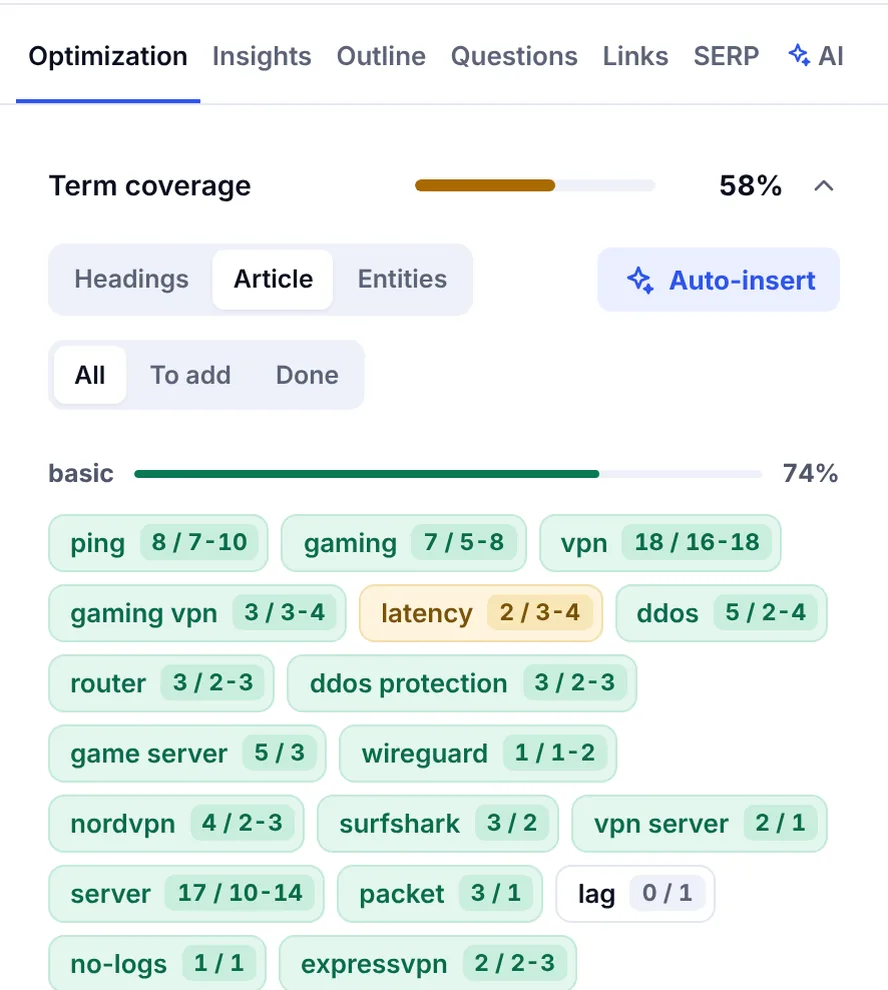
- Research the keyword and the search results. Note what the searcher wants, the format that ranks, the subtopics every top page covers, the questions in the "People also ask" box, and the gaps. This is the step a content optimization tool does fastest: SerpPal's analysis reads the top results for the keyword and builds a topic brief with the intent, content type, topics to cover and common headings, which you can paste straight into the outline field. See outline, questions and SERP for how it works and the features overview for where it sits in the workflow.
- Decide the angle. What will this piece do that the ranking pages do not: a real test, an expert interview, a template, a contrarian view backed by data. Without an angle you are briefing a copy.
- Build the outline from the questions. Each H2 should answer something the reader is looking for. Add a one-line note on what the section must contain, so the writer knows what each of the specific sections is for. Do not write the paragraphs.
- Gather resources. Sources, data, the expert's calendar slot, approved product claims, voice notes. A brief that says "interview Sam" without checking Sam is available is a delay waiting to happen.
- Set the finish. One next step, the pages to link, the distribution plan, the deadlines and the owner, and who you are assigning the draft to.
- Review it with the writer before they start. Fifteen minutes on a call catches the misunderstandings that would otherwise cost a full draft.
Tools and resources for creating content briefs
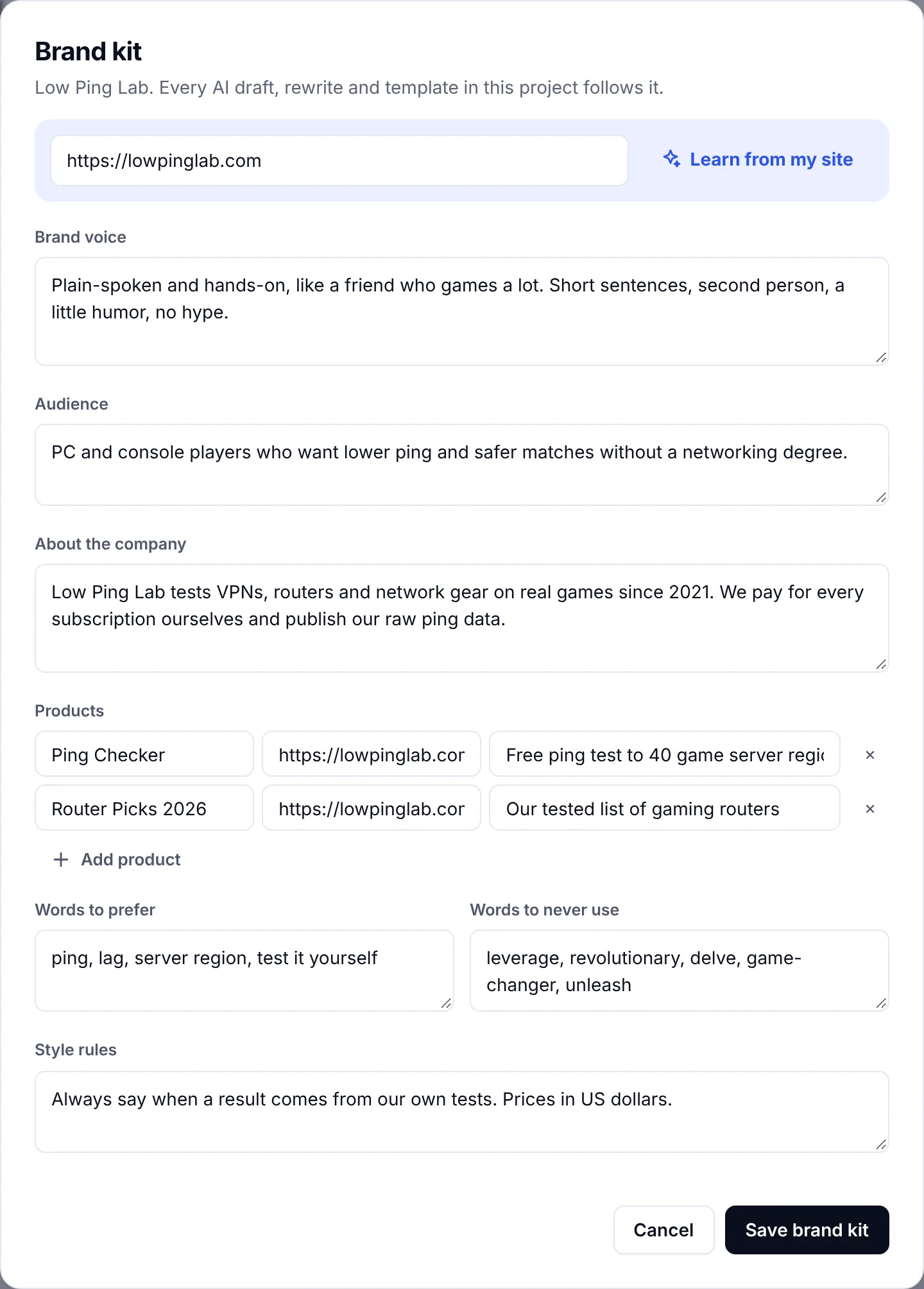
A brief needs three tools: a document everyone can edit (Google Docs or Notion are the usual choices), a search analysis that shows what the top pages cover, and a place to keep the things that never change. Tone, terminology, banned words, product names and audience descriptions do not vary from piece to piece, so they should not be retyped in every brief. Keep them in one shared document (SerpPal calls this a brand kit and applies it to AI drafts automatically) and have the brief link to it. The brief then only records exceptions: "more technical than usual, this is for engineers". This is what gives a team consistency across dozens of pieces without a style guide nobody reads.
Content brief examples
Three short examples show how the same fields shift with the format. Each is a summary of a filled template, not the template itself.
SEO blog post brief example
Objective: help small-business owners decide whether they need a bookkeeper or software, and send the ready ones to the pricing page. Audience: owners with under ten staff who currently do the books themselves, decision stage. Target keyword: "bookkeeper vs accounting software", commercial intent, comparison format ranks. Angle: a cost table built from real plan prices and typical bookkeeper rates, which none of the top five pages include, the kind of insight the reader cannot get elsewhere. Outline: when software is enough, when a bookkeeper is, the cost comparison table, the hybrid option, a decision checklist, FAQ. Length: 1,800 to 2,200 words. CTA: pricing page. Links: the invoicing guide and the tax deadlines post.
B2B SaaS landing page brief example
Objective: explain the onboarding automation feature and get qualified customer-success leaders to request a demo. Audience: CS leads at 50-to-500-person SaaS companies, consideration stage, already using a help desk. Keyword: "customer onboarding automation", mixed intent. Sources: product documentation, two approved customer quotes, the product manager for a 20-minute call. Constraints: only the three approved outcome claims; no competitor names. Structure: problem, how it works in three steps with screenshots, the two quotes, integrations, demo request. Length: 700 to 900 words.
Social media series brief example
Objective: drive marketing leaders to a new research report. Channel: LinkedIn, four posts over two weeks plus one quote graphic. Audience: marketing managers and directors. Deliverables: four posts and one graphic. Key message: one surprising finding per post, each linking to the report. Voice: plain, first person, no hashtags beyond two. Inputs: the report, five pre-approved statistics, the designer for the graphic. CTA: report download. Social media managers adapt wording per post; the brief fixes the message, not the copy.
Why content briefs fail
The same handful of problems account for most briefs that produce a draft nobody wants.
- The vague objective. "Write a thought-leadership piece on AI" gives the writer nothing to decide with. Objectives name a reader and an outcome; a well-written one lets the writer know what done looks like.
- The script. A brief that specifies every sentence is a draft with extra steps, and it removes the writer's judgment, which is the thing you are paying for.
- The keyword list with no purpose. Twenty phrases to "include" and no note on what the searcher wants produces stuffed, aimless text.
- Unresolved disagreements. If product, sales and marketing disagree about the audience or the claims, the brief should record the decision, not forward the argument to the writer.
- Missing resources. The expert who was never booked, the data that was never exported, the screenshots nobody owns. The brief should list materials that exist, not materials that would be nice.
- No owner. Three stakeholders giving feedback in three threads is how a two-day revision becomes two weeks.
Each of these is cheaper to fix in the brief than in the draft, which is the entire argument for writing one.
Content briefs in a content marketing workflow
A brief is one stage of a repeatable content marketing process: plan the topic, brief it, draft it, optimize it against the search results, review it, publish it, measure its visibility and traffic. Each stage progresses from the one before, and the brief is what keeps the later stages honest. Keep the brief attached to the draft through that whole chain so an editor can check the piece against what was asked rather than against taste, and so the person updating the post a year later knows what it was for.
If you draft with an AI writer, the brief matters more, not less. A model given a one-line prompt writes the average article on the topic. A model given the audience, the angle, the questions and the sources writes something an editor can work with, and the brief is what lets an editor check that the draft meets the request rather than their taste. Our guide to writing SEO content that ranks picks up where the brief leaves off.
Frequently asked questions
What should a content brief include?
The objective and the business goal it serves, the target audience and their stage, the main keyword with its search intent and the questions to answer, an outline with H2s and H3s, sources and expert input, brand voice guidelines, the call-to-action and the pages to link, the length, format, deadline and owner. For SEO content, add the suggested URL, title tag and meta description, the seo requirements that are easy to forget.
How long should a content brief be?
One page for most pieces, two for a researched long-form guide. If it is longer, it is either repeating background the writer already has or writing the article in advance. The outline and the questions are the parts that deserve space; everything else should be a line each.
What is the difference between a content brief and a creative brief?
A creative brief (or campaign brief) describes a whole campaign: positioning, messaging, channels, budget, objectives. A content brief describes one piece of content within it. Teams that merge the two end up with briefs that are too vague for writers and too detailed for stakeholders.
Who should write the content brief?
Usually the content strategist, content manager or editor who owns the topic plan, with input from SEO, product, sales or subject-matter experts where their knowledge changes the piece. One person owns it and answers the writer's questions; everyone else contributes specific inputs rather than editing the document.
Can a content brief template be used with AI writing tools?
Yes, and it should be. Paste the audience, objective, angle, questions and outline into the prompt or the tool's brief fields, and the draft will follow your structure instead of the average structure on the web. It is the simplest way to streamline and simplify AI-assisted content creation without losing control of what gets made. The research step is where a tool that analyzes the search results saves the most time; the angle and the sources still have to come from you.