On this page
- What "free" actually includes
- How an AI humanizer works
- How to humanize AI text with a free humanizer
- AI detectors and realistic expectations
- Privacy and safe use: what happens to the text you paste
- Students, schoolwork and trusted use
- Humanizer versus paraphrasing tool
- Keep your meaning, stay error-free
- Frequently asked questions about free AI humanizers
A free AI humanizer reworks AI-generated text from ChatGPT, Claude, Gemini or any other AI model so it reads the way a person would have written it, and "free" almost always means a monthly word allowance (free words), a short preview, or a trial rather than unlimited use. The useful question is not which tool is free but what the free tier lets you do: how many words, whether you need an account, whether you see the whole result, and what happens to the text you paste.
This guide covers what free access really includes, how an AI text humanizer works, how to humanize AI text without losing the facts, what AI detection tools still catch, and the privacy and academic rules worth knowing before you paste text anywhere.
Key takeaways
- Free humanizers come in three kinds: a free plan with a monthly word cap, a partial preview that hides the full result, and a time-limited trial. Read which one you are getting.
- A humanizer changes sentence structure, rhythm and word choice to make AI content sound human-like; it does not check facts. Compare the output with the original before you use it.
- Humanized text can still be caught by AI detection. No tool can guarantee an undetectable result, and anyone promising a 99% rate to bypass AI detectors is selling, not measuring.
- Never paste confidential, unpublished or personal text into a free tool whose data policy you have not read.
- For schoolwork, follow the course policy. A humanizer does not make generated work your own.
What "free" actually includes
Nearly every AI humanizer advertises a free option to humanize AI text. They are not the same thing, and the difference decides whether the tool is usable for your AI-generated draft.
| Free model | What you get | What to check |
|---|---|---|
| Free plan with monthly words | A fixed number of humanizer words a month, usually after a signup without a card | The monthly cap, whether unused words carry over, per-request limits |
| Free preview | The first paragraph or a blurred version of the result; the full text is paid | Whether you can copy the whole output |
| Free trial | Full features for a few days or a one-time allowance | What happens to saved texts when it ends |
| Free with ads or daily cap | A few hundred words a day, often without an account | Daily reset time, whether long texts are cut off silently |
SerpPal's AI humanizer is the first kind: the free plan includes 500 words of humanizing a month, needs no card at signup, and delivers the complete result with the AI score before and after. The AI detector alongside it needs no sign-up at all: up to 1,000 words per check, five checks an hour, so you can test any humanizer's output, including other tools', without an account.
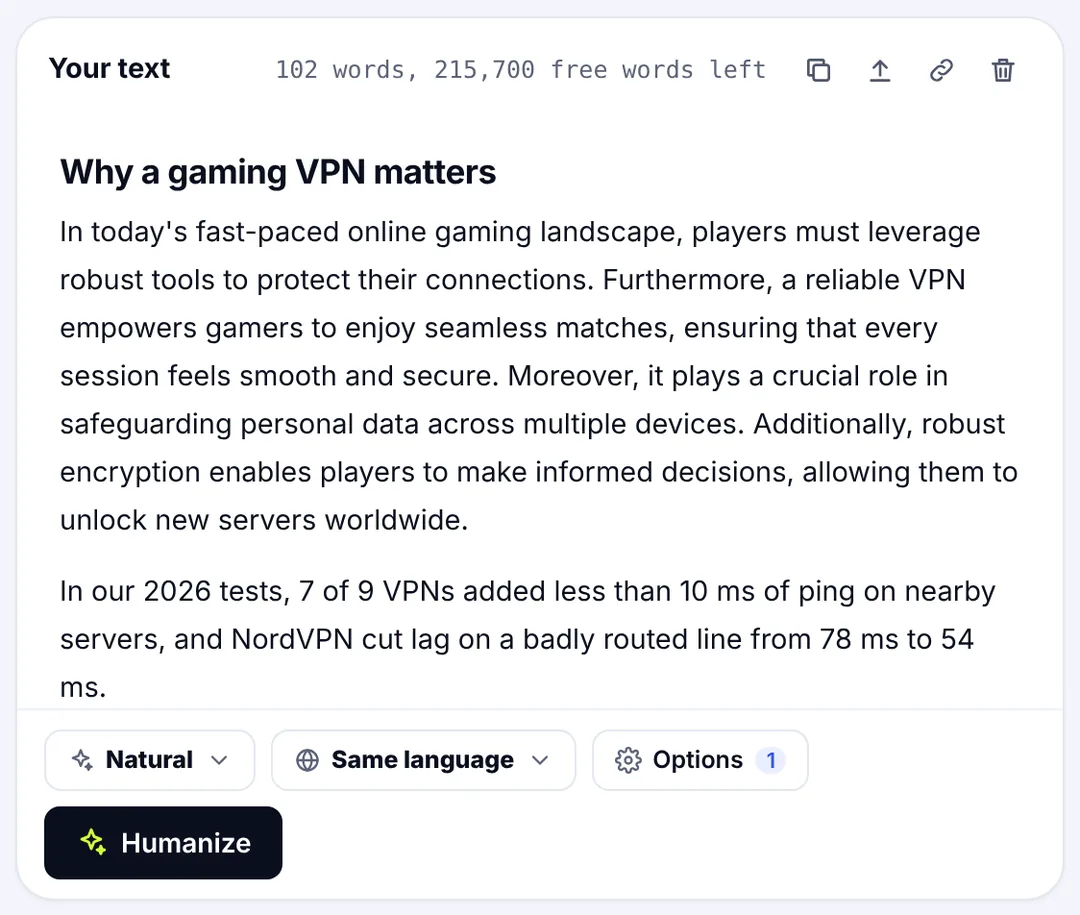
Two habits save frustration. Paste a short section of AI-generated text first to see whether the free tier returns the full output after processing. And check whether the counter shows words before processing; tools that reveal the cap only after you paste a 3,000-word draft are telling you something about how they treat users.
How an AI humanizer works
An AI humanizer is a language model prompted and tuned to transform text toward the patterns human writing tends to have: varied sentence length, a mix of plain and specific vocabulary, fewer stock transitions, more concrete phrasing and a natural flow. AI-generated text tends toward the opposite: evenly long sentences, predictable phrases, the same robotic connective tissue paragraph after paragraph. A detector scores those patterns; humanization reduces them. It is the difference between a human text converter that swaps words and a tool that makes AI-generated text sound like a person, with a tone that fits the reader.
Good humanization changes the wording while preserving the content. That second part is where free tools diverge. A cheap pass swaps synonyms and shuffles clauses, which lowers detector scores a little and often damages meaning. A careful one restructures sentences while keeping names, numbers, dates, links and the terms you need intact, then reports what it kept. Most AI tools in this category offer several writing styles (Natural, Casual, Professional, Academic) and several languages; SerpPal's humanizer keeps the language of your text and works out the AI scores in that language too. The style sets the tone; the pass keeps the facts intact. SerpPal's result screen shows the before-and-after AI score, a facts badge (how many numbers, names and links survived) and the readability before and after, so you can see what the pass did instead of guessing.
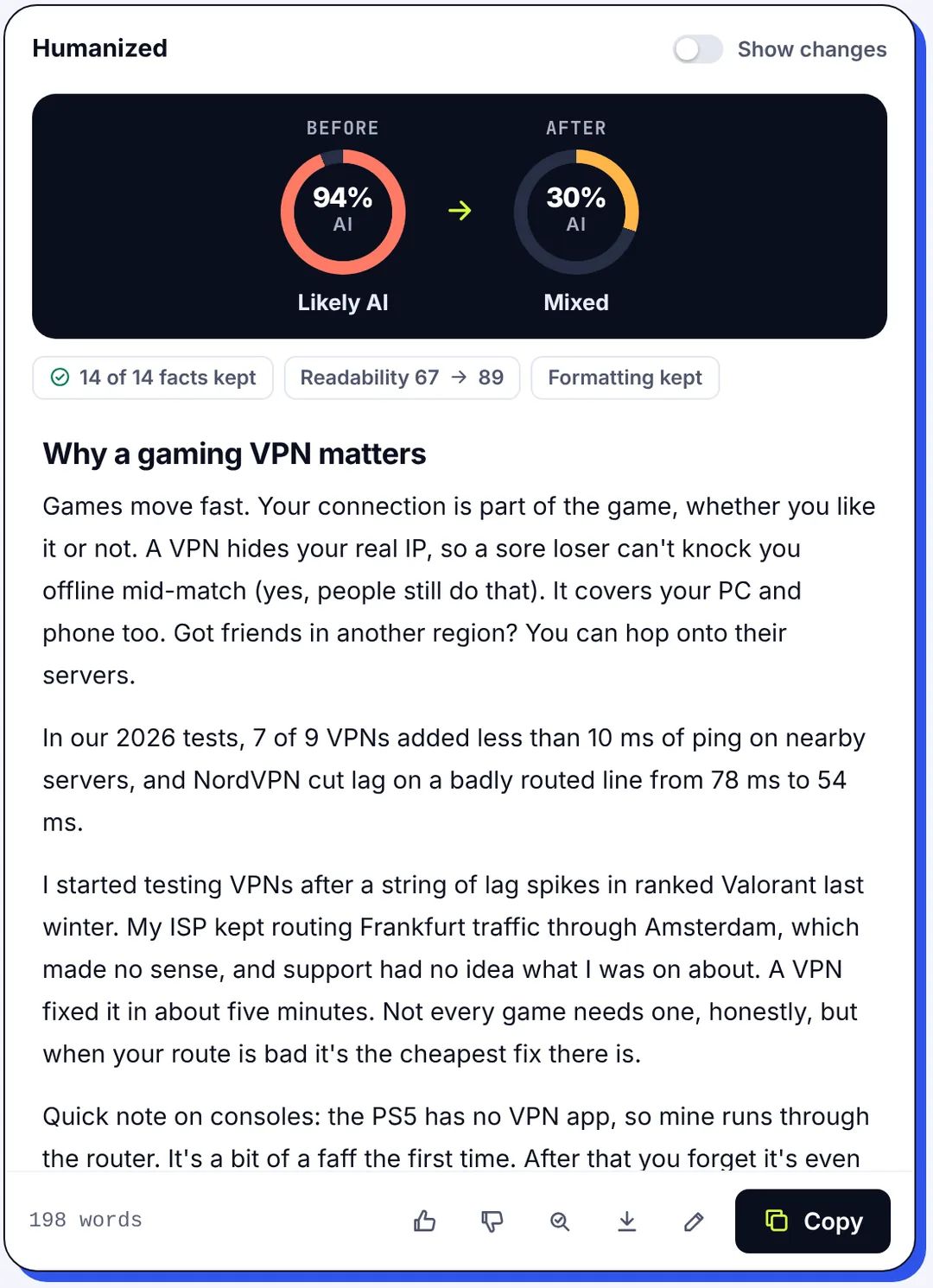
What the same AI content looks like after humanizing
We asked an AI writing assistant to generate three ordinary drafts of about 220 words each (a newsletter email section, an expense policy with four figures in it, and a technical explainer with seven facts), ran them through SerpPal's humanizer, then checked each version with the AI detector.
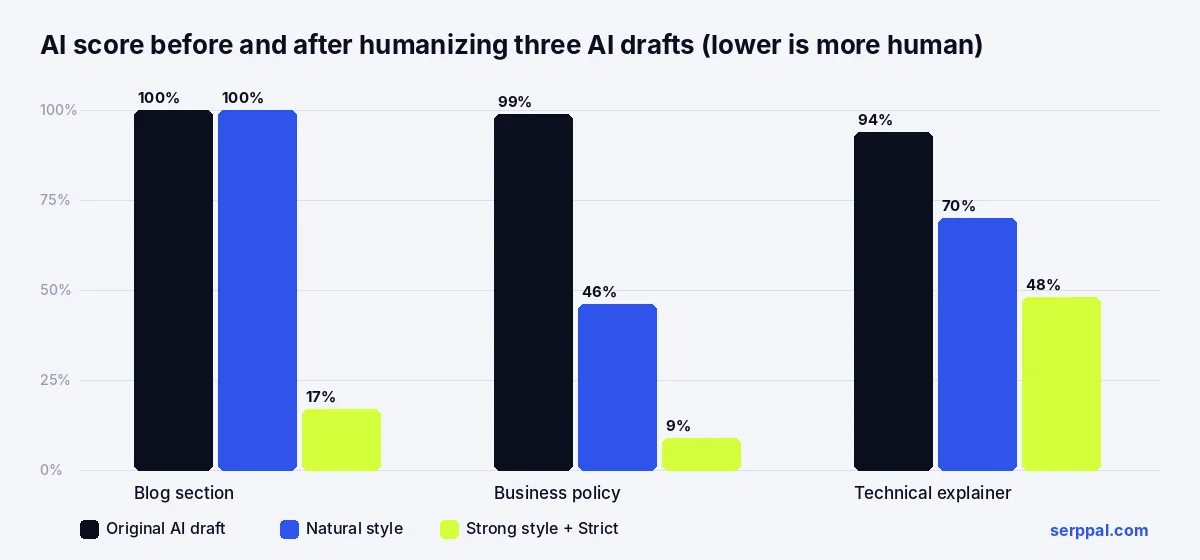
The Natural style, meant for everyday text, brought two of the three down substantially and left the generic newsletter passage untouched at 100. Strong with Strict on, the setting for stubborn text, brought them to 17, 9 and 48. All four facts and all seven facts were kept in the two fact-heavy drafts, and readability went up slightly in each case. The lesson for any free humanizer tool: the default setting is often not enough, one pass of humanization is rarely the last, and you need a detector to know what happened to the AI-generated text. Our guide to whether AI humanizers work goes deeper into those numbers.
How to humanize AI text with a free humanizer
The workflow to humanize AI text is the same whichever tool you use, and most of the quality comes from steps 1 and 4, not from the tool. It also saves time on manual editing: processing takes seconds, and you start from readable text instead of a robotic draft you would otherwise redo by hand.
- Start from a draft you understand. If you cannot explain a paragraph, you cannot check the humanized version. Fix the content first.
- Paste one section, not the whole document. It fits inside a free cap, and a 300-word result is checkable in two minutes.
- Choose a style that matches the reader. Natural or Casual for blog posts, LinkedIn and Instagram captions and email, Professional for client work, Academic for essays. Pick stronger settings only for text that stays high after a first pass.
- Compare the output with the original, sentence by sentence. Look for dropped qualifiers ("usually" becoming "always"), changed numbers, missing links, renamed products and key phrases that vanished. Preserving meaning is the whole point.
- Check with an AI detection tool. Then decide whether the score matters for your purpose. For a blog post, readability matters more; for anything submitted for review, the policy matters more than the score.
- Refine in your own voice. Replace generic transitions with your actual reasoning and add the detail a tool cannot know. That step is what makes the text authentic and polished rather than merely human-sounding text, and it is where you refine the tone for the audience.
If you work in an editor rather than a standalone tool, the same pass can run on the article in place; see humanize in the editor.
Keyword protection and text cleanup
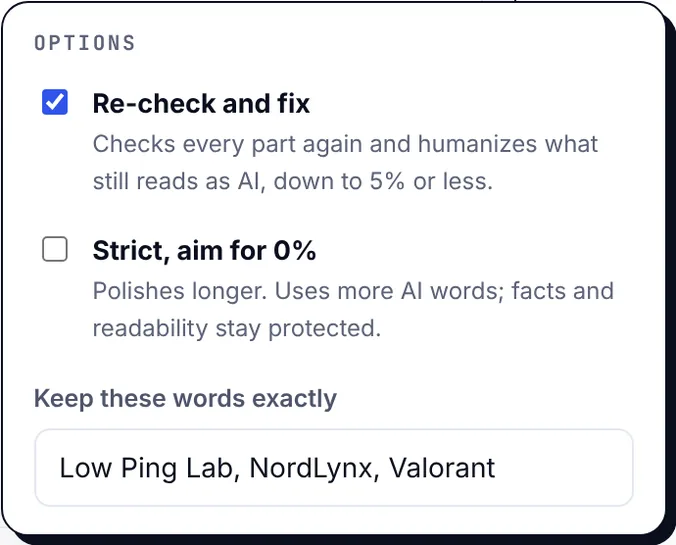
Humanizers remove repetitive phrasing, and your target SEO keyword looks like repetition. Before you humanize AI text written for SEO or marketing, list the terms, product names and headings that must survive. Tools with a "keep these words" option let you protect them; otherwise, search the output for each one afterwards and restore what was lost. Clean up the formatting too: check that lists, bold text and headings came through in the formats you need. Headings and links deserve a separate glance: a pass that turns "## Pricing" into "## What it costs" is harmless, one that drops a link is not.
AI detectors and realistic expectations
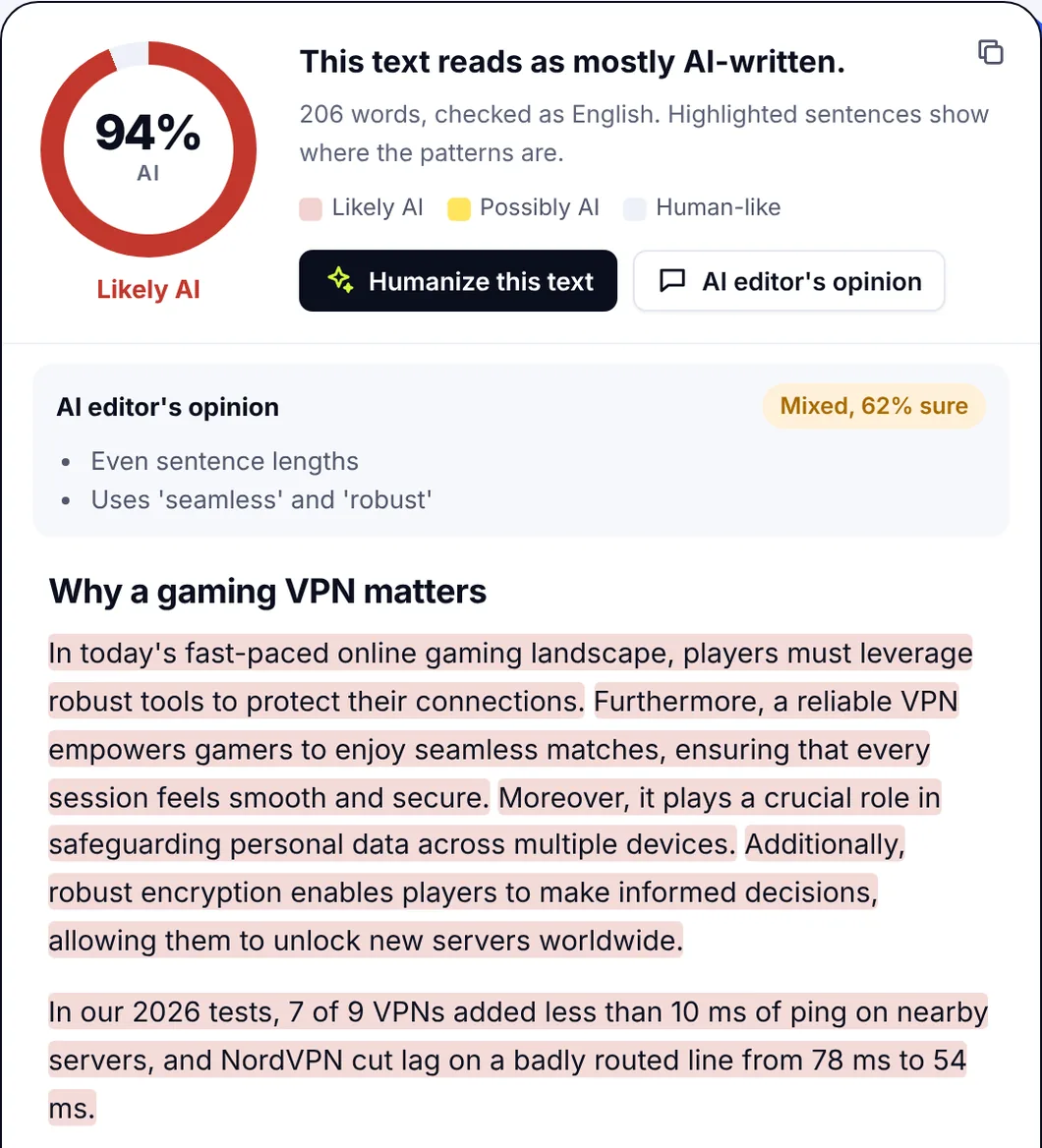
AI detection estimates how closely a text matches patterns typical of model output. It is a probability, not proof, and detection tools disagree with each other. Humanized content can still be flagged, especially generic AI-generated passages where there is little content to restructure, and authentic human text is sometimes marked as AI-written too. Detectors for plagiarism are a separate thing again: they compare against published text, not against patterns. Read how AI detectors work for what the scores can and cannot tell you.
That has two consequences for choosing a free humanizer. First, ignore claims that a tool will pass AI detection every time; they are untestable marketing, and the detectors update. Second, judge the tool on readability, clarity and preserved meaning, with the detector score as a secondary check. A text that reads well, says what you meant and scores 20% is a success. A text that scores 0% and reads like a thesaurus is not.
Privacy and safe use: what happens to the text you paste
A free tool has to pay for itself somehow. Some use pasted text to train models, some keep it for a period, some keep it indefinitely, and the policy page is the only way to know. Before pasting, look for three things: whether submitted text is stored, for how long, and whether it is used to improve the service. If the page does not answer those questions, assume the worst and keep client work, personal data, unpublished research and anything under an NDA out of it. A private browser window changes nothing about what the server keeps.
Also check where the processing happens. Tools that run detection in your browser keep the text local; humanization always runs on a server, because a language model has to run somewhere. The same goes for documents you upload rather than paste, and for anything you email to a service.
Students, schoolwork and trusted use
Students are the largest audience for free humanizers, and the honest advice is simple: follow the course policy, and disclose AI assistance when it is required. Many institutions treat humanizing a generated essay as a form of contract cheating; others allow AI for drafting with disclosure. A humanizer does not turn generated work into your own research, does not add citations, and does not protect you if an instructor asks you to explain a paragraph you did not write.
Where it is permitted, the good uses are the same as for professionals and marketers: making your own stiff draft read naturally, smoothing a translation, or fixing a section that an AI writing assistant such as ChatGPT, Claude or Gemini helped you generate. The result should be human-like because you refined it, not only because a tool did. Academic writing also has its own register, so pick an academic style rather than a casual one, and keep the technical vocabulary your subject requires.
Humanizer versus paraphrasing tool
The two are often confused because both change the wording.
A paraphrasing tool rewrites a passage with different words, usually sentence by sentence, and is for avoiding duplicated wording or simplifying a source; the rewritten version keeps the sentence order.
A humanizer restructures a whole text toward natural rhythm and tone, and is for AI-generated content specifically. A grammar checker fixes errors in what is there; a plagiarism checker compares against published text. For restating a quoted passage, use a paraphraser; for an AI draft that sounds like an AI draft, use a humanizer; for anything that matters, use your own editing after either.
Keep your meaning, stay error-free
Whichever tool you pick, the finish is the same: read the humanized text once for meaning against the original, once for errors, and once aloud for flow and readable rhythm. If it passes all three, it is ready for publishing, whether that is a blog, an email or a LinkedIn post. If it fails the first, the tool is not for you, however good its detector numbers look.
Frequently asked questions about free AI humanizers
Is there a genuinely free AI humanizer with no card?
Yes. Several tools, SerpPal included, offer a free plan that needs a signup with an email address but no card, with a monthly word allowance (500 words on SerpPal). The things to confirm are the monthly cap, whether you get the complete output rather than a preview, and whether the allowance resets.
Can AI detectors still flag humanized text?
Yes. Humanizing lowers the patterns AI detectors look for; it does not remove them with certainty, and generic passages with little real content often stay high. Check the output with a detector, and treat the score as one signal rather than a verdict.
Will a humanizer change my meaning or remove my key terms?
It can. Humanizing AI-generated text may alter qualifiers, numbers, terminology and keyword placement, however carefully a tool tries to transform the wording while preserving the content. Compare the result with the original, use a keep-these-words option where the tool has one, and restore anything essential that disappeared.
Why do some free humanizers only show part of the result?
Because the preview is the marketing. The tool shows the first sentences to prove it works and charges for the rest. It is a legitimate model, but it is not a free humanizer, and you should know that before pasting a long draft.
Is it okay to use a free AI humanizer for schoolwork?
Only where your institution's policy allows AI assistance, and with the disclosure it requires. Where it is allowed, use it to improve your own draft, not to disguise a generated essay, and be ready to explain every paragraph you submit.