On this page
An AI code detector is a tool that estimates whether source code was written by a person or generated by an AI coding assistant such as ChatGPT, Claude, Gemini or GitHub Copilot. It scans the code for statistical patterns that AI models tend to produce and returns a likelihood score, not a yes-or-no verdict.
These tools can flag code worth a closer look, but AI code detection is much less reliable than most people expect. This guide explains the detection methods, the signs reviewers look for, the limitations, and better ways to verify who wrote a piece of code.
Key takeaways
- AI code detectors analyze predictability, coding style and code patterns to estimate how likely code is AI-generated.
- Code is harder to judge than essays: snippets are short, syntax is strict, and clean human code often looks "machine-like".
- Formatters, linters and team style rules make human-written code more uniform, which raises false positives.
- Small edits to AI-generated code can lower a detector's score, so a low score proves little either way.
- Commit history, code review, tests and asking the author to explain the code are stronger evidence of authenticity than any checker.
What is an AI code detector?
An AI code detector (also called an AI coding detector) is a tool that can analyze a code snippet, a file or a whole codebase and estimate whether it came from a large language model (LLM). AI-generated code now comes from many places: chat tools like ChatGPT and Claude where you type a prompt, code completion inside IDEs like VS Code and Cursor, and agents that write whole features.
People use AI code detection for different reasons:
- Educators and universities check programming assignments and submissions for academic integrity.
- Hiring teams review take-home coding tests.
- Companies track how much AI-written code enters their codebase for security, licensing and review workflows.
- Open-source maintainers screen pull requests that may have been generated without testing.
Most general AI detectors, including our free AI detector, are built for prose such as essays and articles. They can analyze AI-generated content in code comments, commit messages and documentation, but detecting code itself needs a tool trained on code.
How AI code detectors work: detection methods
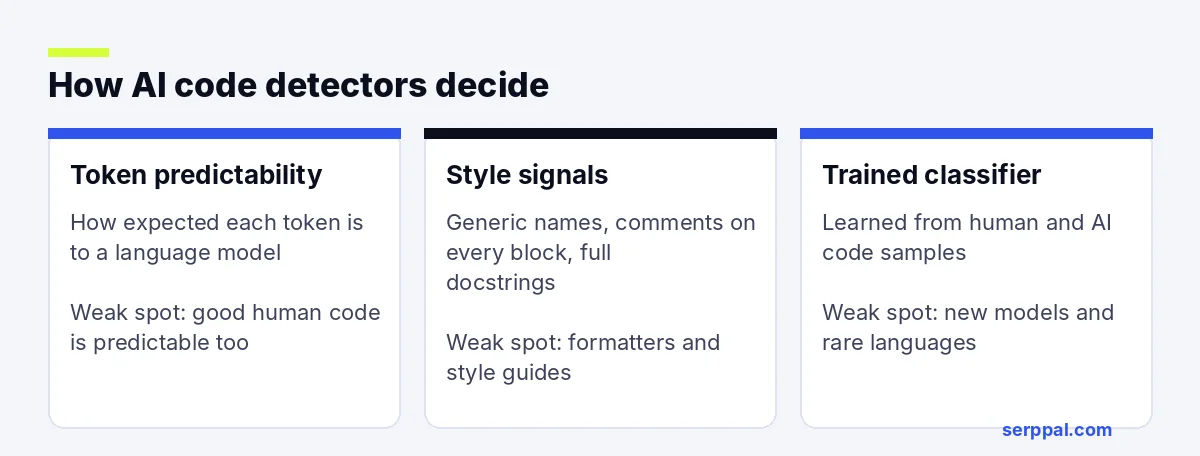
A detector can't see how code was written; it only sees the final text. Most tools combine three detection methods.
1. Perplexity and token predictability
Language models pick the most likely next token. A detector runs the code through a model and measures perplexity, meaning how surprising each token is. Code where almost every token is the obvious choice scores as more likely AI-generated. Analyzing perplexity is fast, which is why most tools start there. This is the same idea behind text detection, explained in our guide on how AI detectors work.
2. Coding style and code patterns
Stylistic analysis looks at code structure and telltale habits of AI output. Reviewers and detection algorithms both watch for these indicators:
- Descriptive but generic names like
result,dataorprocess_items. - An explanation above nearly every block, often stating the obvious.
- Full docstrings on tiny helper functions and unusually tidy formatting.
- Defensive checks and error handling the task didn't ask for.
- No leftover debug lines, commented-out code blocks or small inconsistencies.
3. Classifiers trained on datasets
Some tools train a classifier on large collections of human and AI code in languages such as Python, JavaScript, Java, C++, PHP, SQL and HTML. It learns which features separate code generated by AI models from code written by developers. It works best on the languages and models it was trained on, and less well on new models.
Accuracy and limitations of AI code detection
No tool is 100% accurate, and claims of high accuracy usually come from tests on unedited code. Detecting AI in code is harder than in essays, for several reasons:
- Code is predictable by design. There are only so many good ways to write a binary search or parse a CSV file. A skilled developer writes the same "obvious" code an AI would.
- Snippets are short. A 20-line function gives a detector very little to analyze.
- Tools standardize style. Auto-formatters, linters and shared conventions remove the quirks that might show a human hand.
- Edits change the score. Renaming variables, trimming explanations or restructuring a few lines can push AI code under the threshold.
- AI-assisted work is mixed. Many developers accept a suggestion, edit it, and write the next part themselves. One score can't describe that.
The result is both false positives (code written by people flagged as AI, especially clean beginner code that follows a tutorial) and false negatives (lightly edited AI code that passes). Treat any score as a reason for more scrutiny, never as proof.
AI detection vs plagiarism detection
Traditional plagiarism tools for code, such as the long-standing MOSS system used in computer science courses, measure similarity between submissions or against known sources. AI detection is different: AI output is usually original, so it won't match anything. That's why a code plagiarism checker can show 0% similarity on code a chatbot wrote in seconds. Combining both gives educators a fuller picture of code originality, but neither can verify authorship on its own.
| Factor | Essays | Code |
|---|---|---|
| Typical length | Hundreds to thousands of words | Often a short snippet or function |
| Room for personal style | Large | Small, limited by syntax and conventions |
| Effect of formatting tools | Little | Large: formatters standardize style |
| Other evidence available | Drafts, version history | Commit history, tests, code review |
| Detector reliability | Moderate, with known false positives | Lower |
How to choose an AI coding detector
If you still want a tool, a short comparative analysis before you buy saves trouble. Check:
- Languages: does it support the programming languages your assignments or projects use?
- Integration: can you upload files, connect a repository, use an API, or add a plugin to your LMS? A dashboard that tracks results across submissions helps educators most.
- Explanations: highlighting which lines raised the score is more useful than a bare percentage.
- Privacy: where does the code go after you upload it? Student work and proprietary code need clear data terms.
- Honest accuracy claims: look for published testing on edited code, not only on fresh AI output.
Better ways to detect AI-generated code
Because detection tools are weak, teams that care about authorship use process evidence. These best practices hold up better than any single scan:
- Commit history. Real development leaves a trail of small commits, fixes and reverts. One giant commit with a finished solution is worth asking about.
- Explain-the-code conversations. Ask the author to walk through a function, change a requirement live, or fix a bug they didn't expect. People who wrote the code handle this easily.
- Tests and edge cases. AI code often passes the happy path but misses edge cases and can hide security vulnerabilities, so tests catch problems a detector never will. Mutation testing goes further: it makes small deliberate changes to the code to check whether the tests notice, which catches what line coverage missed, including weak tests that an AI tool might generate.
- Clear AI policies and transparency. Many courses and companies now allow AI tools with disclosure, which protects both sides and supports academic honesty. A policy that says what's allowed prevents most disputes.
- Proctored or live work. For exams and interviews, live coding settles the question directly.
For written parts of a project, such as reports, README files and essays about the code, a text detector is more useful. Our guide to the AI detectors teachers use covers how schools check written work.
What about AI code humanizers?
Some tools claim to make AI-generated code undetectable by renaming variables, stripping comments and reshuffling structure. Two cautions. First, if your course or employer requires you to write the code yourself, disguising AI code is still a breach of that rule. Second, automated changes can introduce errors, so you'd have to review and test everything again.
If you're allowed to use AI, the honest path is better: disclose it, understand every line, test it, and make the code your own through real changes. SerpPal's humanizer is built for prose, not source code, so we don't recommend it for code.
Is using AI-generated code a problem?
Not by itself. AI coding assistants are a normal part of programming now, and sophisticated tools like GitHub Copilot sit right inside the editor. The risks are practical: code you don't understand, subtle bugs and vulnerabilities, licensing questions about suggested snippets, and breaking a class or job rule that requires original work. Review AI suggestions like code from a new colleague: read it, test it, and only merge what you can explain.
Conclusion
In summary, an AI code detector can help you identify code to review and prioritize assignments to check, but it can't prove who wrote it. Use the score as one signal, then rely on commit history, tests and a short conversation with the author. Clear rules about AI tools do more for academic integrity and code quality than any detector.
Frequently asked questions
Can AI-generated code be detected?
Sometimes. Tools detect AI-generated code best when it's unedited; AI code with typical comments and naming is often flagged, but edited or short code is hard to classify. No AI code detector is accurate enough to be the only evidence.
Can teachers tell if you used AI to write code?
Often, but not mainly through detectors. Teachers notice code that doesn't match a student's level, features that weren't taught, and students who can't explain their own solution. Commit history and short code interviews are common checks.
Do AI text detectors work on code?
Not well. Text detectors are trained on prose, so code confuses them. Use them for comments, documentation and reports, and use code-specific tools or process evidence for the code itself.
Which programming languages can AI code detectors check?
Most focus on popular languages such as Python, JavaScript, Java, C, C++ and PHP. Accuracy is usually lower for less common languages and for code produced by the newest AI models.